So this works mostly*
Tested so far is: lemonade-sdk, vkcube, vaapi video encoding.
This works better on the "unstable" distros. Currently using debian forky with this and it's the best out of the ubuntu/debian combinations I tried. Still has compatibility issues here and there, but seems to be more an issue of everything else catching up.
17-03-2026:
Updated the patchfile: brought over the mem-fixed patches which should improve performance significantly. For the lemonade-sdk I'm getting around 50% utilization(and tps) which considering all the sync calls is actually pretty decent.
30-03-2026: (Patch for 10.2.1-1)
Updated the patch file and instructions for compiling pve-qemu.
Also cleaned up the instructions, and added some missing steps.
Screen Sharing Notes:
Sunshine's new vulkan_encode path does work for native_context. It takes a bit of setup I might explain in more detail if people want to know. The main problem you will run into is that the DRM plane modifiers are missing, and the driver expects them which will give you a very messed up image. Adding AMD_DEBUG=nodcc,notiling into your /etc/environment will fix this but it comes with a performance hit I'm sure.
Virglrenderer:
This needs to be built as well. I recommend doing it first as it does impact the pve-qemu build later.
I had weird issues with proxmox favoring the apt version so here are my steps
sudo apt build-dep virglrenderersudo apt-get source virglrenderer- cd into the folder it extracted
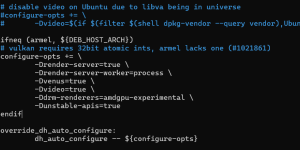
- open debian/rules and add
-Ddrm-renderers=amdgpu-experimental, -Dunstable-apis=true , -Dvideo=true , and -Dvenus=true to the configure-opts variable. (not sure if you need the last 3 tbh but it works so I'm not touching it)
- go back to the root folder and run
dpkg-buildpackage -us -uc -b
- Now run
sudo dpkg -i *.deb
 PVE-QEMU:
Steps to get it working:
git clone https://github.com/proxmox/pve-qemu- Place patch file in
pve-qemu/debian/patches/extra and remove .txt
- add
extra/extra/0031-VDRM_10.2.1.patch to the end of pve-qemu/debian/patches/series
- Comment out
extra/0009-virtio-gpu-virgl-Add-virtio-gpu-virgl-hostmem-region.patch
- Comment out
extra/0010-virtio-gpu-Ensure-BHs-are-invoked-only-from-main-loo.patch
- These last two patches are included in the "master" patch and will conflict with it.
- Pull Qemu dependencies
cd qemu; meson subprojects download; cd ..
- Go back to the root of pve-qemu and build with
make deb
- Just install the new pve-qemu with
sudo dpkg -i ./*.deb
Mesa (guest):
Mesa also isn't configured to support this so we will manually build off the apt source similar to virglrenderer.
sudo apt build-dep mesasudo apt-get source mesa- cd into the folder
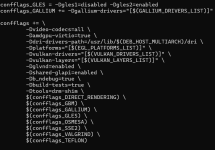
- Open debian/rules and near the end you have a giant block of "confflags". Add
-Dvideo-codecs=all and -Damdgpu-virtio=true to it, I'll include a picture below of how it should look roughly.
- go back to the root of mesa and run
dpkg-buildpackage -us -uc -b
- Now run
sudo dpkg -i *.deb on the folder with the deb packages
- If it complains about missing packages just run
apt --fix-broken install it should grab any it missed originally.
If
dpkg -i ./*.debisn't working I used
apt reinstall ./*.deb instead to ensure it was replacing the packages correctly but I don't think it's necessary.
QEMU Config:
You can somewhat just follow the normal instructions
here.
I use this though
args: -device virtio-gpu-gl,blob=on,drm_native_context=on,hostmem=8G -display egl-headless,rendernode=/dev/dri/renderD128 -object memory-backend-memfd,id=mem1,size=16G -machine memory-backend=mem1
Make sure that the size=x command matches the ram of the VM. The hostmem is just the "bar"/"aperture" size between the host/guest. Keep it between 256MB and 8GB I think it can have issues outside of that.
Misc Notes:
You will also need to be running kernel 6.14+ on the guest.
Also apt will attempt to update these packages at some point, so keep that in mind. Running something like
apt mark hold "packagenamehere" is a temporary solution without breaking the whole proxmox dependency chain.
Good luck lol



