virglrenderer for 3d support

Hi,

AFAIK one must add multiple new options for venus to work, according to the docs:

`virtio-gpu-gl,hostmem=8G,blob=true,venus=true`
(the 8G are just as an example)

but i tried here on a test machine (with an radeon RX560 on the host and i always got `error_out_of_host_memory` when running vulkaninfo on the guest.
Since the docs are not very expansive, I'm not sure if there is something missing (vulkan drivers are installed on host and guest, kernels should be new enough, qemu and mesa as well...)
 
How did you do it? I still get:
Code:
kvm: -device virtio-gpu-gl,hostmem=8G,blob=true,venus=true: old virglrenderer, blob resources unsupported
So i am not even able to start the VM. Can you show me your QEMU version so i know it's not a QEMU problem?
 
Last edited:
Ah that explains it. I'm still on 8 until 9 is final (and venus fixed). Maybe you can also test DRM native context as well? (Should be "-device virtio-vga-gl,blob=true,context_init=true,hostmem=4G")
 
that property (context_init) does not exist here, i'll have to look if there is some compile flag that has to be activated...
 
It is October 5 2025 and Proxmox 9.x is released. Has Proxmox been able to test DRM Native Context successfully and will full, documentable support be made available in a 9.x patch upgrade?

DRM Native Context will be a game changer for Proxmox Workstation.

If Virtio-gpu Venus is relatively straight forward to implement right now is this another option that can be made available for users?
Cheers.
 
Last edited:
I've managed to get Vulkan running in PVE 9:
  • the package virgl-server needs to be additionally installed. See also this Debian bug.
  • /usr/libexec/virgl_render_server needs to be symlinked to /builds/virgl/virglrenderer/install/libexec/virgl_render_server as this is the default path libvirglrenderer.so expects it at (see strings /usr/lib/x86_64-linux-gnu/libvirglrenderer.so.1 | grep -i render_server). The RENDER_SERVER_EXEC_PATH is an environment variable, but I haven't found a way to set them via qm.conf on the quick (which would be soo much less ugly than that symlink).
  • The VMs qm.conf needs to be adapted as follows:
    • args: -device virtio-vga-gl,hostmem=8G,venus=on,blob=on -display egl-headless,gl=on (you might want to use less than 8G here, mine is for LLM experiments with llama.cpp)
    • vga: none
While my host is a bit messy, I think this should be enough to get Vulkan running in the VM (of course you'll need up to date Mesa and lib(e)gl and so on). My VM is Ubuntu 25.04 btw.
 
Last edited:
I've managed to get Vulkan running in PVE 9:
  • the package virgl-server needs to be additionally installed. See also this Debian bug.
  • /usr/libexec/virgl_render_server needs to be symlinked to /builds/virgl/virglrenderer/install/libexec/virgl_render_server as this is the default path libvirglrenderer.so expects it at (see strings /usr/lib/x86_64-linux-gnu/libvirglrenderer.so.1 | grep -i render_server). The RENDER_SERVER_EXEC_PATH is an environment variable, but I haven't found a way to set them via qm.conf on the quick (which would be soo much less ugly than that symlink).
  • The VMs qm.conf needs to be adapted as follows:
    • args: -device virtio-vga-gl,hostmem=8G,venus=on,blob=on -display egl-headless,gl=on (you might want to use less than 8G here, mine is for LLM experiments with llama.cpp)
    • vga: none
While my host is a bit messy, I think this should be enough to get Vulkan running in the VM (of course you'll need up to date Mesa and lib(e)gl and so on). My VM is Ubuntu 25.04 btw.
Gave this a try on PVE 9.0.10 with latest enterprise updates. when i run `strings /usr/lib/x86_64-linux-gnu/libvirglrenderer.so.1 | grep -i render_server` it shows the correct path of `/usr/libexec/virgl_render_server` so no symlink needed anymore.

In the VM (Arch Linux, up to date) with vulkan-virtio package installed, everything seems to work! vulkaninfo shows the GPU, vkcube works, etc. So all you need to do to get this working is install packages - vulkan driver on host proxmox, virgl-server, etc, and then the vulkan driver in a up-to-date VM, and it "just works"!
 
Does anyone here know of a way to debug this, on either the host or the guest?

I have changed my qm.conf file to use virtio-vga-gl with Venus, and the VM does boot and I can access the guest remotely however when attempting to determine what graphics driver is in use, it is still returning llvmpipe (so still using CPU renderer)

EDIT: issue appears to be caused because i'm using gnome-remote-desktop, which doesn't appear to pick up the GPU. Very weird.
 
Last edited:
Does anyone here know of a way to debug this, on either the host or the guest?

I have changed my qm.conf file to use virtio-vga-gl with Venus, and the VM does boot and I can access the guest remotely however when attempting to determine what graphics driver is in use, it is still returning llvmpipe (so still using CPU renderer)

EDIT: issue appears to be caused because i'm using gnome-remote-desktop, which doesn't appear to pick up the GPU. Very weird.
Actually I had the same issue on PopOS inside proxmox, dont ask me why i decided this linux, I should of just went with debian server lol.....
But you should verify the permissions and make sure your current user has access to these groups. Thats what did it for me.

Code:
sudo adduser $USER render
sudo adduser $USER video  # Add this too, just in case

Here is my config with 64G fo ram for the gpu.
By the way lemonade-server and AI work just as well as if it wasnt behind a host.
Its only missing one feature.

Code:
ggml_vulkan: 0 = Virtio-GPU Venus (AMD Radeon Graphics (RADV GFX1151)) (venus) | uma: 1 | fp16: 1 | bf16: 0 | warp size: 64 | shared memory: 65536 | int dot: 1 | matrix cores: none

Code:
args: -device virtio-vga-gl,blob=true,hostmem=64G,venus=true -display egl-headless,gl=on -object memory-backend-memfd,id=mem1,size=64G -machine memory-backend=mem1
balloon: 8192
boot: order=scsi0;ide2;net0
cores: 4
cpu: x86-64-v2-AES
hugepages: 0
ide2: local:iso/pop-os_22.04.iso,media=cdrom,size=2624M
keephugepages: 0
machine: q35
memory: 65536
meta: creation-qemu=10.1.2,ctime=1763248587
net0: virtio=BC:24:11:C5:BB:20,bridge=vmbr1
numa: 0
ostype: l26
scsi0: local-lvm:vm-100-disk-1,iothread=1,size=384G
scsihw: virtio-scsi-single
smbios1: uuid=3dd09f26-b080-4b20-9abe-b0158816b3d0
sockets: 1
vga: none
vmgenid: 4a506f2c-f08d-4667-baa1-95709a0aee25
 
Code:
Nov 26 05:08:53 pve QEMU[1433652]: EGL is not supported on this platform
Nov 26 05:08:53 pve QEMU[1433652]: failed to initialize vrend winsyskvm: virgl could not be initialized: -1

what does this mean? i used the line -device virtio-vga-gl,hostmem=8G,venus=on,blob=on -display egl-headless,gl=on
also do i need to start virgl_test_server manually?
 
Code:
Nov 26 05:08:53 pve QEMU[1433652]: EGL is not supported on this platform
Nov 26 05:08:53 pve QEMU[1433652]: failed to initialize vrend winsyskvm: virgl could not be initialized: -1

what does this mean? i used the line -device virtio-vga-gl,hostmem=8G,venus=on,blob=on -display egl-headless,gl=on
also do i need to start virgl_test_server manually?
Are you trying to run a windows guest? Please provide the entire config.
 
Code:
agent: 1
args: -device virtio-vga-gl,blob=true,hostmem=16G,venus=true -display egl-headless,gl=on -object memory-backend-memfd,id=mem1,size=16G -machine memory-backend=mem1
bios: ovmf
boot: order=scsi0;net0
cores: 16
cpu: host
efidisk0: zpool-nfs:110/vm-110-disk-0.qcow2,efitype=4m,pre-enrolled-keys=1,size=528K
memory: 16384
meta: creation-qemu=8.1.5,ctime=1718311224
name: archlinux
net0: virtio=BC:24:11:13:F9:49,bridge=vmbr0,firewall=1
numa: 0
ostype: l26
scsi0: zpool-nfs:110/vm-110-disk-1.qcow2,discard=on,iothread=1,size=256G
scsihw: virtio-scsi-single
smbios1: uuid=5a595ab9-72a4-46e1-a395-06135be6c769
sockets: 1
vga: none

no, guest is arch-(linux)
 
Went down the native context rabbithole and here's what I've figured out so far for anyone else wondering about that. All of this is "as far as I can tell" I'm a developer but not for qemu so take it with a grain of salt.

Native context support isn't implemented in QEMU 10.2, but the repo for the current development version based on 10.2 is here. Once proxmox updates pve-qemu to 10.2 it should (fingers crossed) be somewhat easy to patch over the native context changes.
Mailing list can be found here, with instructions for getting it working. (kernel 6.14+, and recent virglrenderer)

Tried patching the changes onto the current pve-qemu (10.1) and while it patches cleanly (excluding the docs), the device only makes it part way through it's initialization. I'm guessing it relies on other changes in 10.2 but I honestly didn't look into it much further so I cant say how difficult getting it working on 10.1 would be.

I only tried bringing over commits (78017b8d - ea091327), so heads up if you wanted to pick up where I left off.

Hopefully that saves folks in the same boat some time if they stumble across this.
 
One question, how do i connect to the "VirGL Venus" display? Since vga is set "none" i get no display in Proxmox.
 
Native context has been merged into the QEMU main branch!
Can see it here. Though looks to be targeting QEMU11.0... So probably not gonna be in proxmox officially until ~Sept unless they backport it.
 
  • Like
Reactions: jtru and DocMAX
So this works mostly*
I tested it initially and it worked, posted this and tested again and it was broken... Then tested again today and it's fully fine. So honestly I have no idea, it kinda works.

Tested so far is: lemonade-sdk, vkcube, vaapi video encoding.

17-03-2026:
Updated the patchfile: brought over the mem-fixed patches which should improve performance significantly. For the lemonade-sdk I'm getting around 50% utilization(and tps) which considering all the sync calls is actually pretty decent.


Attached is the patch file for getting native context kinda working on pve-qemu.
PVE-QEMU:
Steps to get it working:
  1. git clone https://github.com/proxmox/pve-qemu
  2. Place patch files in `pve-qemu/debian/patches/extra` and remove .txt
  3. add `extra/0014-Native-ContextV2.patch` to the end of `pve-qemu/debian/patches/series`
  4. Go back to the root of pve-qemu and build with make deb
  5. Just install the new pve-qemu with sudo dpkg -i ./pve-qemu-kvm_10.1.2-7_amd64.deb
Virglrenderer:
This needs to be built as well
I had weird issues with proxmox favoring the apt version so here are my steps

  1. sudo apt build-dep virglrenderer
  2. sudo apt-get source virglrenderer
  3. cd into the folder it extracted
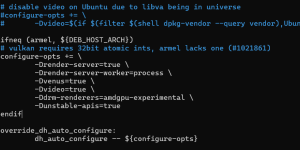
  4. open debian/rules and add -Ddrm-renderers=amdgpu-experimental, -Dunstable-apis=true , -Dvideo=true , and -Dvenus=trueto the configure-opts variable. (not sure if you need the last 3 tbh but it works so I'm not touching it)
  5. go back to the root folder and run dpkg-buildpackage -us -uc -b
  6. Now run sudo dpkg -i *.deb
1773448196169.png
Mesa (guest):
Mesa also isn't configured to support this so we will manually build off the apt source similar to virglrenderer.
  1. sudo apt build-dep mesa
  2. sudo apt-get source mesa
  3. cd into the folder
  4. Open debian/rules and near the end you have a giant block of "confflags". Add -Dvideo-codecs=all and -Damdgpu-virtio=true to it, I'll include a picture below of how it should look roughly.
  5. go back to the root of mesa and run dpkg-buildpackage -us -uc -b
  6. Now run sudo dpkg -i *.deb on the folder with the deb packages
  7. If it complains about missing packages just run apt --fix-broken install it should grab any it missed originally.
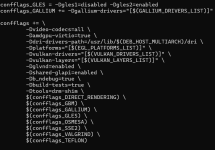
1773448113189.png
If dpkg -i ./*.debisn't working I used apt reinstall ./*.deb instead to ensure it was replacing the packages correctly but I don't think it's necessary.

QEMU Config:
You can somewhat just follow the normal instructions here.
I use this though args: -device virtio-gpu-gl,blob=on,drm_native_context=on,hostmem=8G -display egl-headless,rendernode=/dev/dri/renderD128 -object memory-backend-memfd,id=mem1,size=16G -machine memory-backend=mem1

Make sure that the size=x command matches the ram of the VM. The hostmem is just the "bar"/"aperture" size between the host/guest. Keep it between 256MB and 8GB I think it can have issues outside of that.

Misc Notes:
You will also need to be running kernel 6.14+ on the guest.

Also apt will attempt to update these packages at some point, so keep that in mind. Running something like apt mark hold "packagenamehere" is a temporary solution without breaking the whole proxmox dependency chain.

Good luck lol

 

Attachments

Last edited:
  • Like
Reactions: mgabriel