

var/lib/vz/images/100/ null

aleilia

New Member
Jun 18, 2023
6
0
1
Hi i m new of proxmox and sorry if i ask this question.I have an image .vdmk,I use this guide to import the image but after mount the usb and after create an vm 100 go to the folder var/lib/vz/images/100/ the dirextory is empty.
the point is this
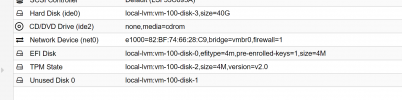

1687061590887.png

why cant find the image?

tks a lot
 
Hi,
the local-lvm storage is an LVM-thin storage, so you can't interact with it like a normal file system. You can use the command pvesm list local-lvm or directly lvs to list the images.
 
tks but i have to do import of file .vdmk and the gui of proxmox i must convert the file in the directory how can i do ?
 
To import a disk to local-lvm, you can use e.g. qm set <VMID> --scsi0 local-lvm:0,import-from=/path/to/your/image.vmdk (replacing VMID and scsi0 as needed of course).
 
Greetings. I think I'm following the same guide for migrations for as the op and I have a similar question. My conversion fails because none of my VMIDs are found under /images though I've already created the target VM for the conversion. Where are the images, and under what circumstances are they not found under /images? Thank you

qemu-img convert -f vmdk /mnt/usb/hostname.domain.local/hostname.domain.local.vmdk -O qcow2 /var/lib/vz/images/103/hostname.domain.local.qcow2
 
According to the admin interface, my VM disks are on local-zfs. I do see block device /dev/zd16 (symlinked from /dev/zvol/rpool/data/vm-103-disk-0), but I'm not sure how to apply the conversion to it. Should this work?

qm set 103 --ide0 local-zfs:0,import-from=/mnt/usb/hostname.domain.local/hostname.domain.local.vmdk
 
Last edited:
Greetings. I think I'm following the same guide for migrations for as the op and I have a similar question. My conversion fails because none of my VMIDs are found under /images though I've already created the target VM for the conversion. Where are the images, and under what circumstances are they not found under /images? Thank you
https://forum.proxmox.com/threads/c...on-zfs-qemu-img-wont-work.143342/#post-643939

qemu-img convert -f vmdk /mnt/usb/hostname.domain.local/hostname.domain.local.vmdk -O qcow2 /var/lib/vz/images/103/hostname.domain.local.qcow2
Did you get an error when you ran this? If/when it completes, you will need to rename the resulting file to match expected naming nomenclature:
vm-[id]-disk-[index-number].qcow2
I'm not sure how to apply the conversion to it. Should this work?

qm set 103 --ide0 local-zfs:0,import-from=/mnt/usb/hostname.domain.local/hostname.domain.local.vmdk
It should, did you try it?


Blockbridge : Ultra low latency all-NVME shared storage for Proxmox - https://www.blockbridge.com/proxmox