Upgrade from 3.4-6 to 4.0 failed

hpcraith

Renowned Member
Mar 8, 2013
85
0
71
Stuttgart Germany
www.hlrs.de
Introducing a new server running with 4.1-1 we have to upgrade our 3 servers running 3.4-6.
Following exactly the wiki "Upgrade from 3.x to 4.0" (cut and paste) the upgrade failed and
the server hangs in shell.
All VMs on that server have been moved to the new server. So we decided to install a fresh
Proxmox 4 from the CD. This also failed and rebooted. During the normal install procedure we could only
see one device (sda) and not the second (sdb) where the 3.4 was installed. Next we tried
the debug install. At the "#' we could not enter anything. The system hung.
I copied some information from the sister server which is identical.
==============================
Server
IBM x3850M2

lspci

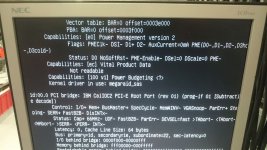
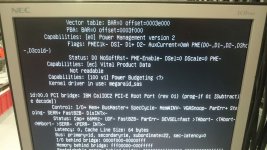
04:00.0 SCSI storage controller: LSI Logic / Symbios Logic SAS1078 PCI-Express Fusion-MPT SAS (rev 03)
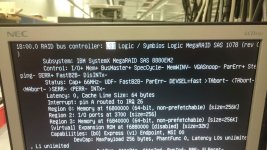
18:00.0 RAID bus controller: LSI Logic / Symbios Logic MegaRAID SAS 1078 (rev 04)

fdisk -l

Disk /dev/sda: 1168.0 GB, 1167996223488 bytes
255 heads, 63 sectors/track, 142000 cylinders, total 2281242624 sectors
Units = sectors of 1 * 512 = 512 bytes
Sector size (logical/physical): 512 bytes / 512 bytes
I/O size (minimum/optimal): 512 bytes / 512 bytes
Disk identifier: 0x00000000

Disk /dev/sda doesn't contain a valid partition table

Disk /dev/sdb: 146.0 GB, 145999527936 bytes
255 heads, 63 sectors/track, 17750 cylinders, total 285155328 sectors
Units = sectors of 1 * 512 = 512 bytes
Sector size (logical/physical): 512 bytes / 512 bytes
I/O size (minimum/optimal): 512 bytes / 512 bytes
Disk identifier: 0x000aeeb7

Device Boot Start End Blocks Id System
/dev/sdb1 * 2048 1048575 523264 83 Linux
/dev/sdb2 1048576 285155327 142053376 8e Linux LVM

======================

Is it possible that a modul for the raids is missing or what could be the reason?
The IBM servers are very reliable and have 128 GByte of memory.

Dieter
 
Correction to my last postings.
I said that a 4.0 CD installation worked. This is only partially true. As I am not at the computing center at the moment, I
checked with my colleague working for me.
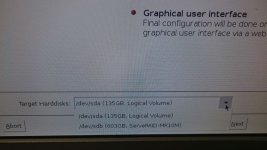
The 4.0 CD install only sees as target disk sdb: which is the big raid and installs to it. But it does not see
the disk sda: which is the small raid. I asked my colleague to try a 3.x CD install.
The result: 3.x CD install sees both harddisks (see attached JPG). This proves that something is missing on the
4.0 CD. I wonder why the proxmox people do not answer this thread. I have community support for 3 servers and ordered it for the 4 th one.
 

Attachments

  • ProxmoxV3.jpg
    ProxmoxV3.jpg
    122.4 KB · Views: 4
I am not sure what the screenshots are supposed to show (especially the first ones, are those from the working 3.x installation? are those part of error messages the 4.1 installer shows?), but if you don't describe the issue more clearly (other than "does not work", it will be hard to get to the bottom of this..
  • is your 3.x installation up to date? which kernel version are you using there?
  • what does lspci -v , lsmod and system log show from the working 3.x server (regarding those two raid devices)
  • are the raid firmware versions and configurations identical on both machines?
  • does the debian jessie installer recognize the raid volumes? if yes, you can try to install via the debian installer (https://pve.proxmox.com/wiki/Install_Proxmox_VE_on_Debian_Jessie) and find out whether the issue is just in the proxmox installer, or in the proxmox kernel. providing the same output like for the 3.x machine might point in the right direction
ps. if you have a community subscription (or four), you can add it to your forum account. we try to answer fast in any case ;)
 
Es sind zwei identische IBM Server. Ich beschränke mich jetzt mal auf die Neuinstallation mit CD. Da müßte es ja auf jeden
Fall funktionieren. Die Treiberinfo von Proxmox 3.x habe ich mal dazugefügt. Wie gesagt eine 3.x CD Installation funktioniert
ohne Probleme.

Neuinstallation mit der 4.1 CD ebenfalls nicht. Es wurde nicht alle angeschlossenen Platten, die an RAID Controllern hängen nicht erkannt.
a) kleines RAID "04:00.0 SCSI storage controller: LSI Logic / Symbios Logic SAS1078 PCI-Express Fusion-MPT SAS (rev 03)" nicht erkannt.
Treiber unter Proxmox 3.x
04:00.0 0100: 1000:0062 (rev 03)
Subsystem: 1014:0366
Kernel driver in use: mptsas

b) großes RAID "18:00.0 RAID bus controller: LSI Logic / Symbios Logic MegaRAID SAS 1078 (rev 04)" erkannt.
Treiber unter Proxmox 3.x
18:00.0 0104: 1000:0060 (rev 04)
Subsystem: 1014:0379
Kernel driver in use: megaraid_sas

Es wurde nur ein Installationsmedium (b) angezeigt
Bei Installation auf das b) ist die Installation hängen geblieben. Im Debug Mode kam noch der # Prompt, aber es konnte nichts mehr
eingegeben werden.

Den debian jessi installer werde ich morgen probieren, wenn ich wieder am Rechenzentrum bin.
 
Der jessie installer erkennt das LSI Logic / Symbios Logic SAS1078 PCI-Express Fusion-MPT SAS (rev 03) Raid auch nicht.
Wir haben auch die jessie installer firmware version versucht. Die geladenen Module sind mptsas und megaraid_sas und auch
sonst sieht alles gleich aus wie unter 3.x.
Letzte Hoffnung ist ein
LSI 1078 SAS controller BIOS and firmware update v2.66 (Linux) - IBM System x3850 M2 and x3950 M2
von 2011-04-22 wobei ich nicht weiß, ob dieses schon drauf ist, da ich die Server geerbt habe.


Gruß
Dieter
 
just FYI, we had another user reporting problems with the 4.4 kernel when using the mpt2sas kernel module - those problems where solved by upgrading the controller's firmware: https://bugzilla.proxmox.com/show_bug.cgi?id=974

We did a lot of research, upgraded the LSI controller bios to the latest version, but nothing solved the problem. Today with the help of
a very experienced colleague we solved the problem adding three parameters to the grub boot menu of the CD installer:

linux /boot/vmlinuz-4.4.6-1-pve root=/dev/mapper/pve-root ro mptbase.mpt_msi_enable_sas=0 iommu=soft amd_iommu=on

Now two question popped up:
1. How can the installer be changed to set up the same boot menu for the running server, if the system is installed on the
Raid not recognized without these parameters set?
2. If /etc/default/grub is extended to:
GRUB_CMDLINE_LINUX_DEFAULT="mptbase.mpt_msi_enable_sas=0 iommu=soft amd_iommu=on"
does this action survive all Proxmox updates?

Hoping that this also helps other members.

Dieter
 
We did a lot of research, upgraded the LSI controller bios to the latest version, but nothing solved the problem. Today with the help of
a very experienced colleague we solved the problem adding three parameters to the grub boot menu of the CD installer:

linux /boot/vmlinuz-4.4.6-1-pve root=/dev/mapper/pve-root ro mptbase.mpt_msi_enable_sas=0 iommu=soft amd_iommu=on

Now two question popped up:
1. How can the installer be changed to set up the same boot menu for the running server, if the system is installed on the
Raid not recognized without these parameters set?
2. If /etc/default/grub is extended to:
GRUB_CMDLINE_LINUX_DEFAULT="mptbase.mpt_msi_enable_sas=0 iommu=soft amd_iommu=on"
does this action survive all Proxmox updates?

Hoping that this also helps other members.

Dieter

yes, the /etc/default/grub file is touched once in the installer in case of root on ZFS, but apart from that it is left alone. you should run "update-grub" whenever you change it yourself to make sure that the changes are reflected in the grub configuration file in /boot .