[SOLVED] trying to access a bare-metal backup

Dragao

New Member
Mar 28, 2025
21
3
3
Hi all,

I have succesfully backup-ed a widnows system (yes I know aplha software)
Now I want to see if I can do a FLR using the proxmox-backup-client

I am trying to do this on the pbs itself but I only get Error: permission check failed.

Althou the error seem quite clear I am 100% sure name/password are correct (using root account)

So I may be missing something..

And althou I do understand why proxmox does not have a windows client (people should really stop using Windows) We still have some windows machine which we need to backup.

Any insights are welcome!
 
how did you backup the windows system? using a live-cd and raw/image backup of its disk? how are you attempting to restore it? please provide more details, else nobody will understand what you are trying to do and why it fails ;)
 
Ha, my bad.. I was under the impression the Alpha software used in this case was common knowledge :)

I make backups using proxmoxbackupclient_go (link)
Backups created with this tool are visible in Proxmox Backup server.

Unlike FLR for VM/CT I cannot browse these backups on the PVE (the backups are only visible when I logon the PBS)
As these backups are based on proxmox-backup-client my thought is I could also do a FLR using the proxmox-backup-client. But thusfar I am unsuccessfull

I am trying to access the backup from cli from PBS but I get an errors like "Error: authentication failed - ticket with bad timestamp: invalid digit found in string"

(using the command like: proxmox-backup-client list --repository root@pam@127.0.0.1:<your-datastore-name>)

So again I know I am using unsupported software. But my question is past that point I am trying to access the backup using proxmox-client-backup from the pbs. I would like this to be successfull. :)

What I would like the most is to be able to do a FLR / browse the image. Copy the file I need do a manual restore to the Windows Machine.
Access may be in the form of a mount or something like that
 
Last edited:
Ha, my bad.. I was under the impression the Alpha software used in this case was common knowledge :)

I make backups using proxmoxbackupclient_go (link)
Backups created with this tool are visible in Proxmox Backup server.
that was indeed an important missing piece of information :) I am not sure what kind of backup archives that creates! file level access requires some level of structure inside the backup archive:
- for host/ct/file-based backups, we have our own archive format (pxar) which is - so far - not capable of storing all the Windows metadata
- for vm/block-based backups, we rely on a special VM that detects certain common file system setups, mounts them and makes them accessible

the second option is in theory agnostic of how the backup data was obtained, so should work for a block-based backup of arbitrary disk images.

Unlike FLR for VM/CT I cannot browse these backups on the PVE (the backups are only visible when I logon the PBS)

that is expected, because PVE will only display backups of type VM/CT and only if they follow our naming scheme. but other than driving the PBS file restore, PVE doesn't do anything special either, so that is not an issue per-se.

As these backups are based on proxmox-backup-client my thought is I could also do a FLR using the proxmox-backup-client. But thusfar I am unsuccessfull

I am trying to access the backup from cli from PBS but I get an errors like "Error: authentication failed - ticket with bad timestamp: invalid digit found in string"
that sounds like an orthogonal issue. the interesting commands are

"proxmox-backup-client mount .." (mounts a file-based backup)
"proxmox-backup-client map .." (maps a block-based backup as block device)

or, if you want a more unified and structured approach

"proxmox-file-restore" (this spawns the VM for block-based backups which requires qemu and some other packages installed, or directly restores from the file-based backup)

a simple "proxmox-backup-client list --repository user@realm@host:datastore" should print all backups accessible (possibly after prompting you to confirm the TLS certificate fingerprint and asking for a password. if it doesn't we first need to fix that, before attempting to browse/restore anything!
 
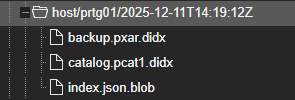
1765805678870.png

This is the backup (from the pbs)
So it is more like file based backup.

as far for metadata. At this point that is of no interest :) as long as I have the data. :)
 
a pxar backup (unless it is encrypted) should be browseable from the PBS UI directly.. if it isn't, then likely that client is doing something wrong..
 
a pxar backup (unless it is encrypted) should be browseable from the PBS UI directly.. if it isn't, then likely that client is doing something wrong..
is that from the gui? or cli?

either way I have no clue how to do that

I have tried using the cli (proxmox-backup-client)
as far as I can see I have no utilitys to do this via the gui
 
on the UI there should be a little folder icon in the actions column for the pxar.didx entry, if you click that a file browser should open.