@warlocksyno @curruscanis Have either of you notice any irregularity viewing the disks in the UI (pve>disks in the menu)? I get communication failures but not all hosts are effected. i.e. Connection refused (595), Connection timed out (596)


TrueNAS Storage Plugin
- Thread starter warlocksyno
- Start date
You are using an out of date browser. It may not display this or other websites correctly.
You should upgrade or use an alternative browser.
You should upgrade or use an alternative browser.
@warlocksyno @curruscanis Have either of you notice any irregularity viewing the disks in the UI (pve>disks in the menu)? I get communication failures but not all hosts are effected. i.e. Connection refused (595), Connection timed out (596)
Can you check to see if your pvestatd service in Proxmox is crashing? It's probably that. I have a branch being tested by @curruscanis at the moment to see if it fixes a similar issue.
I had not checked that status and I moved all of my VMs to an NFS share on the same box... (I had a hardware issue to resolve, used = unstableCan you check to see if your pvestatd service in Proxmox is crashing? It's probably that. I have a branch being tested by @curruscanis at the moment to see if it fixes a similar issue.
 ) no issues since... now that I have repaired all the HDWare issues. I will go back to testing. ATM, I am using the 1.1.7 version and will move up ASAP.
Can you check to see if your pvestatd service in Proxmox is crashing? It's probably that. I have a branch being tested by @curruscanis at the moment to see if it fixes a similar issue.
d8P
d888888P
?88' 88bd88b?88 d8P d8888b 88bd88b d888b8b .d888b,
88P 88P' `d88 88 d8b_,dP 88P' ?8bd8P' ?88 ?8b,
88b d88 ?8( d88 88b d88 88P88b ,88b `?8b
`?8b d88' `?88P'?8b`?888P'd88' 88b`?88P'`88b`?888P'
d8b d8,
88P `8P
d88
?88,.d88b,888 ?88 d8P d888b8b 88b 88bd88b
`?88' ?88?88 d88 88 d8P' ?88 88P 88P' ?8b
88b d8P 88b ?8( d88 88b ,88b d88 d88 88P
888888P' 88b`?88P'?8b`?88P'`88bd88' d88' 88b
88P' )88
d88 ,88P For Proxmox VE
?8P `?8888P
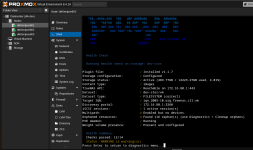
TrueNAS Plugin v1.2.4 - Installed
---------------------------------
p.s. will this ever support "snapshots" ?
Last edited:
d8P
d888888P
?88' 88bd88b?88 d8P d8888b 88bd88b d888b8b .d888b,
88P 88P' `d88 88 d8b_,dP 88P' ?8bd8P' ?88 ?8b,
88b d88 ?8( d88 88b d88 88P88b ,88b `?8b
`?8b d88' `?88P'?8b`?888P'd88' 88b`?88P'`88b`?888P'
d8b d8,
88P `8P
d88
?88,.d88b,888 ?88 d8P d888b8b 88b 88bd88b
`?88' ?88?88 d88 88 d8P' ?88 88P 88P' ?8b
88b d8P 88b ?8( d88 88b ,88b d88 d88 88P
888888P' 88b`?88P'?8b`?88P'`88bd88' d88' 88b
88P' )88
d88 ,88P For Proxmox VE
?8P `?8888P
TrueNAS Plugin v1.2.4 - Installed
---------------------------------
p.s. will this ever support "snapshots" ?
The plugin does support snapshots? To what are you refering too?
Feature Comparison
| Feature |
|---|
| Snapshots |
| VM State Snapshots (vmstate) |
| Clones |
| Thin Provisioning |
| Block-Level Performance |
| Shared Storage |
| Automatic Volume Management |
| Automatic Resize |
| Pre-flight Checks |
| Multi-path I/O |
| ZFS Compression |
| Container Storage |
| Backup Storage |
| ISO Storage |
| Raw Image Format |
[th]
TrueNAS Plugin
[/th][th]Standard iSCSI
[/th][th]NFS
[/th][td] [/td][td]
 [/td][td][/td]
[td][/td][td][/td][td][/td]
[td][/td][td][/td][td][/td]
[td][/td][td][/td][td][/td]
[td][/td][td][/td][td] [/td]
[/td]
[td][/td][td][/td][td][/td]
[td][/td][td][/td][td][/td]
[td][/td][td][/td][td][/td]
[td][/td][td][/td][td][/td]
[td][/td][td][/td][td][/td]
[td][/td][td][/td][td][/td]
[td][/td][td][/td][td][/td]
[td][/td][td][/td][td][/td]
[td][/td][td][/td][td][/td]
[td][/td][td][/td][td][/td]
Native Support | Via Additional Layer | Not SupportedMy bad, I was using "RAW" formatted disks ....The plugin does support snapshots? To what are you refering too?
Feature Comparison
Feature Snapshots VM State Snapshots (vmstate) Clones Thin Provisioning Block-Level Performance Shared Storage Automatic Volume Management Automatic Resize Pre-flight Checks Multi-path I/O ZFS Compression Container Storage Backup Storage ISO Storage Raw Image Format
[th]
TrueNAS Plugin
[/th][th]
Standard iSCSI
[/th][th]
NFS
[/th]
[td]
[/td][td]
[/td][td]
[/td]
[td]
[/td][td]
[/td][td]
[/td]
[td]
[/td][td]
[/td][td]
[/td]
[td]
[/td][td]
[/td][td]
[/td]
[td]
[/td][td]
[/td][td]
[/td]
[td]
[/td][td]
[/td][td]
[/td]
[td]
[/td][td]
[/td][td]
[/td]
[td]
[/td][td]
[/td][td]
[/td]
[td]
[/td][td]
[/td][td]
[/td]
[td]
[/td][td]
[/td][td]
[/td]
[td]
[/td][td]
[/td][td]
[/td]
[td]
[/td][td]
[/td][td]
[/td]
[td]
[/td][td]
[/td][td]
[/td]
[td]
[/td][td]
[/td][td]
[/td]
[td]
[/td][td]
[/td][td]
[/td]
Legend:
@warlocksyno In some cases, I can't migrate to the iscsi storage unless i use the raw format . The target format choice is greyed, i 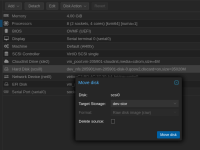
This might be just a UI, issue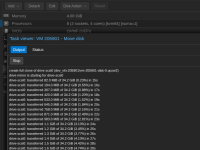
This might be just a UI, issue
Last edited:
@warlocksyno In some cases, I can't migrate to the iscsi storage unless i use the raw format . The target format choice is greyed, i
This might be just a UI, issue
Hmm, it should ALWAYS be RAW. Since NVMe/TCP and iSCSI are exclusively block storage, the format should be RAW.
IMHO and I could be wrong, we should be able to change the format when leaving the plugin supplied storage and going to, i.e. a local zfs storage, to support qcow2 \snapshots.Hmm, it should ALWAYS be RAW. Since NVMe/TCP and iSCSI are exclusively block storage, the format should be RAW.

I also changed my zvol_block size to 128k in my most recent testing as my sysetms will be for VM workloads... from previous posts since I was reading through the documentation on the plugin and it recomends that.
truenasplugin: truenas-iscsi
api_host 10.10.5.10
api_key 3-vVeJEyC29sGwNEjpCfVnRBjHOKei8F3TekksP6bbr1NlStP4OHQ48UVmXl2laDiI
dataset tank/proxmox-iscsi
target_iqn iqn.2005-10.org.freenas.ctlroxmox-iscsi-1
api_insecure 1
shared 1
discovery_portal 10.10.5.10:3260
zvol_blocksize 128k
tn_sparse 1
use_multipath 1
portals 10.10.6.10:3260
content images
I'm following this thread with interest. Amazing work on this project.
I'm a bit curious about the documentation's reccomendation for 128k volblocksize. It's my understanding that KVM virtual machines running on ZFS can get better I/O with 64k.
Has anyone done any A/B testing on that?
EDIT:
IMHO and I could be wrong, we should be able to change the format when leaving the plugin supplied storage and going to, i.e. a local zfs storage, to support qcow2 \snapshots.
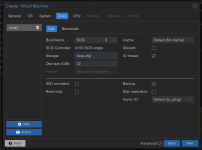
My local ZFS storage locks me to RAW files. This has been the expected behavior since at least PVE 8, I think.
EDIT: The Proxmox documentation indicates that any storage target that presents itself as a block device only uses raw disk images.
Last edited:

@warlocksyno just an update, I've been on branch "fix/websocket-fork-segfault" with 50+ vms using the storage.. this is my companies entire DEV environment. these are applications VMs with heavy DB queries (DBs in another cluster) My Devs haven't even noticed....
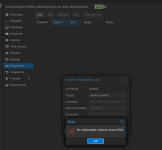
@warlocksyno is there an expectation that we should be able to use the Proxmox VM replication?
There are two possible reasons for this failure.
1) the LUN name isn't recognize
2) the system doesn't think it has a destination volume
The error "no replicatable volumes found" in Proxmox typically occurs when attempting to set up VM replication and the system cannot identify suitable storage volumes for replication. One common cause is a mismatch between the virtual machine (VM) ID and the associated disk ID in the storage configuration.
For example, if a VM has the ID 103 but its disk is labeled as vm-102-disk-0, this inconsistency prevents replication from being properly configured.
To resolve this issue, ensure that the disk ID matches the VM ID. This can be done by renaming the ZFS volume using the command zfs rename when the VM is shut down.
After renaming the volume (e.g., from vm-102-disk-0 to vm-103-disk-0), update the VM configuration either via the command qm set 103 --scsi0 local-zfs:vm-103-disk-0 or by manually editing the configuration file at /etc/pve/qemu-server/103.conf.
I was hoping that in the future I could deploy a second TrueNAS and target it for replication.
There are two possible reasons for this failure.
1) the LUN name isn't recognize
2) the system doesn't think it has a destination volume
The error "no replicatable volumes found" in Proxmox typically occurs when attempting to set up VM replication and the system cannot identify suitable storage volumes for replication. One common cause is a mismatch between the virtual machine (VM) ID and the associated disk ID in the storage configuration.
For example, if a VM has the ID 103 but its disk is labeled as vm-102-disk-0, this inconsistency prevents replication from being properly configured.
To resolve this issue, ensure that the disk ID matches the VM ID. This can be done by renaming the ZFS volume using the command zfs rename when the VM is shut down.
After renaming the volume (e.g., from vm-102-disk-0 to vm-103-disk-0), update the VM configuration either via the command qm set 103 --scsi0 local-zfs:vm-103-disk-0 or by manually editing the configuration file at /etc/pve/qemu-server/103.conf.
I was hoping that in the future I could deploy a second TrueNAS and target it for replication.
Attachments
Last edited:
@warlocksyno is there an expectation that we should be able to use the Proxmox VM replication?
I was hoping that in the future I could deploy a second TrueNAS and target it for replication.
Interesting... Can you give me a run down of what you are trying to achieve in this setup and with what machines/nodes? I'll see if I can get a similar setup going and get a fix started.
II'm a bit curious about the documentation's reccomendation for 128k volblocksize. It's my understanding that KVM virtual machines running on ZFS can get better I/O with 64k.
It depends on the workload and how your TrueNAS pool is setup surprisingly. I'll be talking with TrueNAS/iXSystems to see what their recommendation on this is, since AFAIK, it's heavily depended on your disk layout + workload.
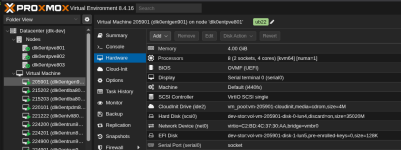
This is my current ENV. I have one dedicated TrueNAS host exporting both ISCSI and NFS. This is a common VM configuration.Interesting... Can you give me a run down of what you are trying to achieve in this setup and with what machines/nodes? I'll see if I can get a similar setup going and get a fix started.
I could be wrong but, if the storage is "Shared" and I have another storage considered "Shared" I should be able to use the Proxmox "Replication" to create a standby "Disk" for HA \ DR. At the very least a copy I can manually reconfigure the VM to use on the second "Shared" storage.
Attachments
Last edited:
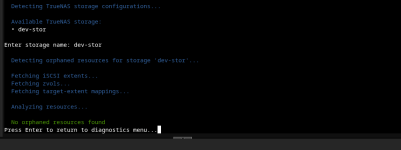
I moved my repo to alpha and updated.... it still shows "orphans" but won't clean them...This is my current ENV. I have one dedicated TrueNAS host exporting both ISCSI and NFS. This is a common VM configuration.
I could be wrong but, if the storage is "Shared" and I have another storage considered "Shared" I should be able to use the Proxmox "Replication" to create a standby "Disk" for HA. At the very least a copy I can manually reconfigure the VM to use on the second "Shared" storage.
Attachments
standby "Disk" for HA \ DR. At the very least a copy I can manually reconfigure the VM to use on the second "Shared" storage.
Within the cluster itself? If so, I don't think you need the replication feature. Replication is for if you have non-shared storage between the nodes. Such as local storage, like a ZFS pool on each host. You can then use the replication feature to have the nodes replication the data to the other nodes so they all have a 1:1 copy of the data. The VM config is always synced between all cluster members though, so that is already covered by default.
If all 3 nodes are setup to use the plugin correctly, with HA turned on, if the HA manager decides the VM needs to be on a different node for any reason, that node should automatically connect the LUNs as needed.
If you are wanting to duplicate the data onto another storage, I'm not aware of Proxmox being able to do that natively unless you setup the other storage as a backup destination, which then you could do a live-restore from.
But maybe I'm misunderstanding the intent?
As for multipathing, you will have to the portal on TrueNAS shared out to more than one of the network interfaces and since TrueNAS does not allow two or more interfaces to share the same subnet, you would also have to have the same subnets setup on the Proxmox.
For instance:
Code:
┌─────────────┐
│  TrueNAS    │
│             │
│ eth0: 10.15.14.172/23 ────────┐
│ eth1: 10.30.30.2/24 ───────┐  │
└─────────────┘              │  │
                             │  │
                  ┌──────────┘  │
                  │  ┌──────────┘
                  │  │
               ┌──▼──▼────────┐
               │  Switch(es)  │
               └──┬──┬────────┘
                  │  │
                  │  └──────────┐
                  └──────────┐  │
                             │  │
┌─────────────┐              │  │
│  Proxmox    │              │  │
│             │              │  │
│ eth2: 10.15.14.89/23 ◄─────┘  │
│ eth3: 10.30.30.3/24 ◄─────────┘
└─────────────┘
From:
https://github.com/WarlockSyno/True...a/wiki/Advanced-Features.md#multipath-io-mpio
Last edited:
I am looking for a configuration to "pre-stage" vm disks as a DR for a primary storage failure. I understand the Proxmox limitation, TY for confirming.Within the cluster itself? If so, I don't think you need the replication feature. Replication is for if you have non-shared storage between the nodes. Such as local storage, like a ZFS pool on each host. You can then use the replication feature to have the nodes replication the data to the other nodes so they all have a 1:1 copy of the data. The VM config is always synced between all cluster members though, so that is already covered by default.
If all 3 nodes are setup to use the plugin correctly, with HA turned on, if the HA manager decides the VM needs to be on a different node for any reason, that node should automatically connect the LUNs as needed.
If you are wanting to duplicate the data onto another storage, I'm not aware of Proxmox being able to do that natively unless you setup the other storage as a backup destination, which then you could do a live-restore from.
But maybe I'm misunderstanding the intent?
As for multipathing, you will have to the portal on TrueNAS shared out to more than one of the network interfaces and since TrueNAS does not allow two or more interfaces to share the same subnet, you would also have to have the same subnets setup on the Proxmox.
For instance:
Code:┌─────────────┐ │ TrueNAS │ │ │ │ eth0: 10.15.14.172/23 ────────┐ │ eth1: 10.30.30.2/24 ───────┐ │ └─────────────┘ │ │ │ │ ┌──────────┘ │ │ ┌──────────┘ │ │ ┌──▼──▼────────┐ │ Switch(es) │ └──┬──┬────────┘ │ │ │ └──────────┐ └──────────┐ │ │ │ ┌─────────────┐ │ │ │ Proxmox │ │ │ │ │ │ │ │ eth2: 10.15.14.89/23 ◄─────┘ │ │ eth3: 10.30.30.3/24 ◄─────────┘ └─────────────┘
From:
https://github.com/WarlockSyno/True...a/wiki/Advanced-Features.md#multipath-io-mpio
It looks like I'm going to have to look at using the Truenas replication tool for this.. or maybe just get the boss for "pony up" for the 100tb Truenas Enterprise HA device!
TY , I have my Truenas and my Proxmox using two distinct and isolated (no routing) networks 172.16.80.* vlan 11 and 172.16.81.* vlan21
Do I need to reference the VLANs in the storage.cfg ?
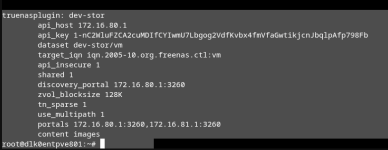
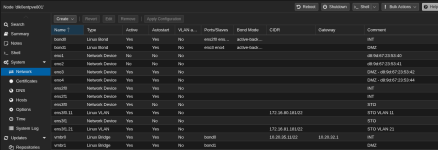
# network interface settings; autogenerated
# Please do NOT modify this file directly, unless you know what
# you're doing.
#
# If you want to manage parts of the network configuration manually,
# please utilize the 'source' or 'source-directory' directives to do
# so.
# PVE will preserve these directives, but will NOT read its network
# configuration from sourced files, so do not attempt to move any of
# the PVE managed interfaces into external files!
auto lo
iface lo inet loopback
iface eno1 inet manual
#d8:9d:67:23:53:40
iface eno2 inet manual
#d8:9d:67:23:53:41
auto eno3
iface eno3 inet manual
#DMZ - d8:9d:67:23:53:42
auto eno4
iface eno4 inet manual
#DMZ - d8:9d:67:23:53:44
auto ens2f0
iface ens2f0 inet manual
#INT
auto ens2f1
iface ens2f1 inet manual
#INT
iface ens3f0 inet manual
mtu 9216
#STO
iface ens3f1 inet manual
#STO
auto ens3f0.11
iface ens3f0.11 inet static
address 172.16.80.181/22
mtu 9216
#STO VLAN 11
auto ens3f1.21
iface ens3f1.21 inet static
address 172.16.81.181/22
#STO VLAN 21
auto bond0
iface bond0 inet manual
bond-slaves ens2f0 ens2f1
bond-miimon 100
bond-mode active-backup
bond-primary ens2f0
#INT
auto bond1
iface bond1 inet manual
bond-slaves eno3 eno4
bond-miimon 100
bond-mode active-backup
bond-primary eno4
#DMZ
auto vmbr0
iface vmbr0 inet static
address 10.20.35.11/22
gateway 10.20.32.1
bridge-ports bond0
bridge-stp off
bridge-fd 0
#INT
auto vmbr1
iface vmbr1 inet manual
bridge-ports bond1
bridge-stp off
bridge-fd 0
#DMZ
source /etc/network/interfaces.d/*
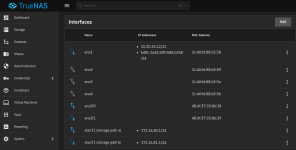
truenas_admin@dlk0entsto801[~]$ ping 172.16.80.181
PING 172.16.80.181 (172.16.80.181) 56(84) bytes of data.
64 bytes from 172.16.80.181: icmp_seq=1 ttl=64 time=0.181 ms
64 bytes from 172.16.80.181: icmp_seq=2 ttl=64 time=0.159 ms
64 bytes from 172.16.80.181: icmp_seq=3 ttl=64 time=0.172 ms
^C
--- 172.16.80.181 ping statistics ---
3 packets transmitted, 3 received, 0% packet loss, time 2037ms
rtt min/avg/max/mdev = 0.159/0.170/0.181/0.009 ms
truenas_admin@dlk0entsto801[~]$ ping 172.16.81.181
PING 172.16.81.181 (172.16.81.181) 56(84) bytes of data.
64 bytes from 172.16.81.181: icmp_seq=1 ttl=64 time=0.299 ms
64 bytes from 172.16.81.181: icmp_seq=2 ttl=64 time=0.166 ms
64 bytes from 172.16.81.181: icmp_seq=3 ttl=64 time=0.169 ms
^C
--- 172.16.81.181 ping statistics ---
3 packets transmitted, 3 received, 0% packet loss, time 2039ms
rtt min/avg/max/mdev = 0.166/0.211/0.299/0.062 ms
 yet I still get :
Also, I can't seem to clear the orphans.
Last edited:
Here is the dmesg log showing the IO-ERROR I encountered. It's happening on a second server so not NIC failure
Attachments
Last edited:
Here is the dmesg log showing the IO-ERROR I encountered. It's happening on a second server so not NIC failure
I think I see a few issues.
1. You have the MTU on ens3f0.11 set to 9216, usually 9216 is what you set the MTU on the switch as, so header information can fit ontop of a 9000 MTU packet. Is it supposed to be like that? An MTU mismatch between hosts will give you issues.
You can try pinging different interfaces and hosts with the MTU set manually as well. For an MTU of 9000 it's usually safe to ping with a packet size of 8972
Example:
Bash:
# Send 100 pings with high packet size
ping -c 100 -s 8972 10.15.14.172
2. Make sure you have the multipath service configured:
https://pve.proxmox.com/wiki/ISCSI_Multipath
Bash:
systemctl enable multipathd
systemctl start multipathd
systemctl status multipathd
Basically make sure the iscsid.conf is configured and restart the multipath-tools.service
3. Make sure the Proxmox nodes can see and login to the portals. The plugin is supposed to do this automaticaly, but maybe there's an issue.
Bash:
iscsiadm -m discovery -t sendtargets -p 172.16.80.1:3260
iscsiadm -m discovery -t sendtargets -p 172.16.81.1:3260
4. Make sure your portals are setup on TrueNAS, if either of the commands above fail, that might be the issue.
Under Shares > iSCSI > Portals make sure your portal ID has both interfaces as listening.
If they are, attempt to login manually:
iscsiadm -m node -T YOURTRUENASBASEIQN:YOURTARGET --loginex:
iscsiadm -m node -T iqn.2005-10.org.freenas.ctl:proxmox --login---
If that all still isn't working, you can enable debug mode by editing your storage.cfg and add "debug 2" to the config.
ex:
INI:
    use_multipath 1
    portals 10.20.30.20:3260,10.20.31.20:3260
    debug 2
    force_delete_on_inuse 1
    content images
This will dump a LOT of info into the journalctl logs. If you let it run for about 10 mins with debug 2 on and then run the diagnostics bundler in the diagnostics menu on the alpha branches install.sh - That would give me a pretty good idea of what's going on. You can PM me the bundle, as there's some sensitive information in there, but I try to have the installer redact that information.
Let me know what you find out