

Troubleshooting - LXC TTY Terminal Login Prompt Shows Gibberish

Wolveraptor

New Member
Nov 29, 2025
4
1
3
Hello Proxmox Community,

I have encountered a weird issue that has been present for a while. The issue does not affect the usability of the LXC it is a mere annoyance. It happened when I upgraded from Fedora 42 within an LXC to Fedora 43 within an LXC. Since this has not hindered/impacted the LXC I did retain a backup prior to the upgrade form Fedora 42 to Fedora 43. The upgrade form Fedora 42 to Fedora 43 within the LXC was performed 1-2 months ago. Again, this isn't impacting production, just a minor annoyance to see the gibberish in the login field.

My Google-fu has not yielded fruit in coming to a solution.

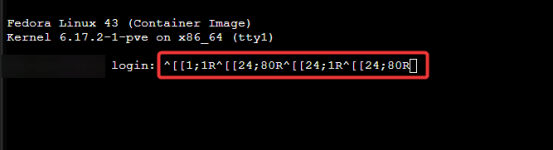
The below screenshot shows the login prompt when using TTY that the login prompt is filled with gibberish.
1766521319022.png

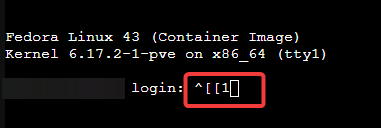
When the gibberish occurs when using TTY, I can backspace up to, see below screenshot, enter my username and login. There is still some gibberish present.
1766521813677.png

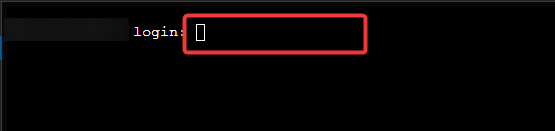
This same gibberish does not occur prepopulated when changing the TTY setting from tty to /dev/console.
1766521432868.png

Any insight/ideas/help is appreciated if there is additional information required, I am happy to provide it. This was not happening prior to the upgrade from Fedora 42 to Fedora 43.

My PVE version is: pve-manager/9.1.1/42db4a6cf33dac83 (running kernel: 6.17.2-1-pve)
 
Sorry, no answer but seeing the same thing on my Proxmox installation. Saw it on Proxmox 8 and now on 9.1.4 as well. I have a feeling that 42-->43 is not working properly and staying on 42 for the time being (I had some other issues and reverted back to 42). Distro Upgrades worked till 42.

Like you, I can't find anything else on the net re/this topic.
 
No need to apologize, I am glad I am not alone.

I haven't been able to find a fix or workaround and like you, I have reverted back to Fedora 42. I ran Ubuntu LXCs prior to this and their distro-upgrades were fine albeit they were point releases though. I have since switched everything to Fedora 42. It's not the end of the world but was annoying enough to switch back.

Seems like such a weird/niche issue. Maybe when Fedora 43 is officially available via the templates within Proxmox this will not be an issue. That's curious that you noticed it being fine in Proxmox 8 and 9.1.4 provided you didn't upgrade past 42. Maybe something was fundamentally changed in 43 that is enough to cause the weird output.

It's something I have to try and look into on the back burner but for now, I redid everything on Fedora 42 and that is good enough for me.
 
  • Like
Reactions: Kingneutron
This is just a hunch, but looks like Fedora 43 LXC TTY is not translating ANSI Escape codes properly.

Do a search on " linux ansi escape codes 24;80R "

Proper workaround by changing it to /dev/console in the web gui should suffice (and also enables you to see boot messages); I've never really had to use multiple VTs in LXC anyway like you might on a real bare-metal box.

And there are other weird things going on with LXC native console like not adhering to $LINES and $COLUMNS in bare terminal (without GNU screen / tmux) when doing apt upgrade. That gets you some ASCII screen corruption, with the thing thinking it's limited to like 80x25 when it's not.

The other workaround is just to ssh into the LXC, or use ' pct enter vmid ' over ssh or from the PVE Console.
 
  • Like
Reactions: Wolveraptor
As @Kingneutron said - the reason is that Fedora is outputting ASCII/shell escape sequences that is not compatible with your terminal type. That is not a fault with LXC/Proxmox, but can also appear over SSH, Telnet or Serial Port. This could be caused by those characters in /etc/motd, /etc/issue etc.

One thing to also check or set is the locale settings for your OS and terminal (export TERM=C). You can also change the underlying terminal that gets launched when you open a shell, I forgot how exactly, but it’s typically getty or something similar.
 
This is just a hunch, but looks like Fedora 43 LXC TTY is not translating ANSI Escape codes properly.

Do a search on " linux ansi escape codes 24;80R "

Proper workaround by changing it to /dev/console in the web gui should suffice (and also enables you to see boot messages); I've never really had to use multiple VTs in LXC anyway like you might on a real bare-metal box.

And there are other weird things going on with LXC native console like not adhering to $LINES and $COLUMNS in bare terminal (without GNU screen / tmux) when doing apt upgrade. That gets you some ASCII screen corruption, with the thing thinking it's limited to like 80x25 when it's not.

The other workaround is just to ssh into the LXC, or use ' pct enter vmid ' over ssh or from the PVE Console.
I apologize for the tardy response, thank you for the additional information, @Kingneutron !

I did look at those escape codes and was not able to find any permanent resolution yet. I had a Fedora forum article at one point that referenced resetting the, I think, $PS1 value and possibly adding that to .bashrc or the profile initialization.

I can confirm using /dev/console is a workaround for the issue.

This has been on my personal plate to take a deeper dive into to see if I can find anything out about performing the upgrade without the need for a workaround afterwards. I still have much to learn and I thank you for input!
As @Kingneutron said - the reason is that Fedora is outputting ASCII/shell escape sequences that is not compatible with your terminal type. That is not a fault with LXC/Proxmox, but can also appear over SSH, Telnet or Serial Port. This could be caused by those characters in /etc/motd, /etc/issue etc.

One thing to also check or set is the locale settings for your OS and terminal (export TERM=C). You can also change the underlying terminal that gets launched when you open a shell, I forgot how exactly, but it’s typically getty or something similar.

Thank you. @guruevi , for your information as well. I have not tested adding TERM=C. I did have the following set in /etc/locale: LANG=en_US.UTF-8, LANGUAGE=en_US.UTF-8, and LC_TIME=en_US.UTF-8. I appreciate your reply and taking time to educating me! I still have a lot to learn.

I understand you say this is not a direct problem with LXC/Proxmox but why does this happen when upgrading the Fedora LXC within Proxmox? There is not tone in text and I am not finger pointing or trying to be argumentative, just curious.

Is it more so that the gibberish output can also happen on bare-metal devices, within SSH sessions, or serial connections in other deployment scenarios, as you mentioned? In other words, the cause isn't necessarily a fault with the LXC or Proxmox but could be a setting that gets changed/altered or a file that gets changed altered as a result of an upgrade/dist-upgrade/misconfigured file but it does not mean Proxmox is broken/the culprit or that the Fedora LXC is broken/the culprit?
 
I threw a couple of additional items at it while comparing service files from a working Fedora 42 LXC that this issue does not happen on and comparing them to a Fedora 42 LXC that was upgraded to Fedora 43.
  • The getty@.service file on Fedora 42 contains ExecStart=-/sbin/agetty -o '-- \\u' --noreset --noclear - ${TERM} but on Fedora 43 contains ExecStart=-/sbin/agetty --noreset --noclear --issue-file=/etc/issue:/etc/issue.d:/run/issue.d:/usr/lib/issue.d - ${TERM}.
    • Adding an override with sudo systemctl edit getty@ to match the line from Fedora 42 did not change the ANSI escape code behavior.
  • The console-getty.service file on Fedora 42 contains /sbin/agetty -o '-- \\u' --noreset --noclear --keep-baud 115200,57600,38400,9600 - ${TERM} but on Fedora 43 contains ExecStart=-/sbin/agetty --noreset --noclear --issue-file=/etc/issue:/etc/issue.d:/run/issue.d:/usr/lib/issue.d --keep-baud 115200,57600,38400,9600 - ${TERM}.
    • Adding an override with sudo systemctl edit console-getty.service to match the line from Fedora 42 did not change the ANSI escape code behavior.
  • The container-getty@.service file on Fedora 42 contains ExecStart=-/sbin/agetty -o '-- \\u' --noreset --noclear - ${TERM} but on Fedora 43 contains ExecStart=-/sbin/agetty --noreset --noclear --issue-file=/etc/issue:/etc/issue.d:/run/issue.d:/usr/lib/issue.d - ${TERM}.
    • Adding an override with sudo systemctl edit container-getty.service to match the line from Fedora 42 did not change the ANSI escape code behavior.
  • I noted that if the LXC is powered off, then powered on, the ^[[1;1R^[[24;80R^[[24;1R^[[24;80R text does not pre-populate the login field.
  • I noted that if the LXC is rebooted this the ^[[1;1R^[[24;80R^[[24;1R^[[24;80R text pre-populates the login field.
  • I noted that if the LXC is rebooted but I consistently switch between Summary and Console during the reboot, the ^[[1;1R^[[24;80R^[[24;1R^[[24;80Rtext does not pre-populate the login field.
    • This is the most interesting behavior I have noticed since troubleshooting this from the last message I sent.
    • This makes me wonder if Proxmox is changing how the TTY is loading or how it is communicating with the LXC via TTY and constantly switching between Summary and Console during the reboot is enough to prevent the cursor position request from coming through.
 
I just wanted to add that I'm seeing this same behavior with my Archlinux containers.

Indeed the only working fix at the moment is switching to /dev/console

Edited: I just noticed that affected containers (fedora, arch) have the login prompt displayed at the bottom, while non affected (debian based, alpine) ones have it properly displayed at the top.

Edited 2:
I think this has to do with recent version of util-linux, downgrading to version 2.39.3 also fixes the issue.
The problem starts with version 2.40.3 and newer

Could it be this commit https://github.com/util-linux/util-linux/commit/7b90601fc1925c7be155e7e9317ef412ae4e7edb
 
Last edited: