

Hello Proxmox Community,
I have encountered a weird issue that has been present for a while. The issue does not affect the usability of the LXC it is a mere annoyance. It happened when I upgraded from Fedora 42 within an LXC to Fedora 43 within an LXC. Since this has not hindered/impacted the LXC I did retain a backup prior to the upgrade form Fedora 42 to Fedora 43. The upgrade form Fedora 42 to Fedora 43 within the LXC was performed 1-2 months ago. Again, this isn't impacting production, just a minor annoyance to see the gibberish in the login field.
My Google-fu has not yielded fruit in coming to a solution.
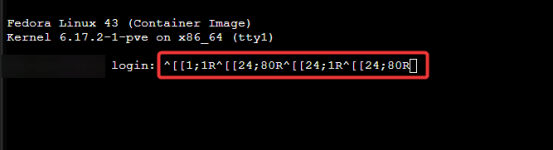
The below screenshot shows the login prompt when using TTY that the login prompt is filled with gibberish.
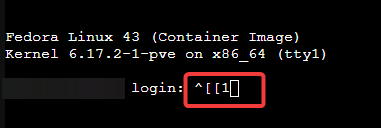
When the gibberish occurs when using TTY, I can backspace up to, see below screenshot, enter my username and login. There is still some gibberish present.
This same gibberish does not occur prepopulated when changing the TTY setting from tty to /dev/console.

Any insight/ideas/help is appreciated if there is additional information required, I am happy to provide it. This was not happening prior to the upgrade from Fedora 42 to Fedora 43.
My PVE version is: pve-manager/9.1.1/42db4a6cf33dac83 (running kernel: 6.17.2-1-pve)
I have encountered a weird issue that has been present for a while. The issue does not affect the usability of the LXC it is a mere annoyance. It happened when I upgraded from Fedora 42 within an LXC to Fedora 43 within an LXC. Since this has not hindered/impacted the LXC I did retain a backup prior to the upgrade form Fedora 42 to Fedora 43. The upgrade form Fedora 42 to Fedora 43 within the LXC was performed 1-2 months ago. Again, this isn't impacting production, just a minor annoyance to see the gibberish in the login field.
My Google-fu has not yielded fruit in coming to a solution.
The below screenshot shows the login prompt when using TTY that the login prompt is filled with gibberish.
When the gibberish occurs when using TTY, I can backspace up to, see below screenshot, enter my username and login. There is still some gibberish present.
This same gibberish does not occur prepopulated when changing the TTY setting from tty to /dev/console.
Any insight/ideas/help is appreciated if there is additional information required, I am happy to provide it. This was not happening prior to the upgrade from Fedora 42 to Fedora 43.
My PVE version is: pve-manager/9.1.1/42db4a6cf33dac83 (running kernel: 6.17.2-1-pve)
