

There is a problem when adding a virtual machine to a VLAN.
The situation is as follows:
VLAN 10 is configured on Mikrotik. A DHCP server is also configured for this network.
When adding a VLAN tag to the virtual machine interface, the virtual machine does not receive an address via DHCP. If you make the settings static and enter the address yourself, there is no connection to the default gateway.
At the same time, if I assign another tag to the virtual machine (for example, 555), identical in settings to tag 10, then the virtual machine will receive an address via DHCP and will have a connection.
On Proxmox itself, the eno1np0 interface is configured, to which the vmbr0 bridge is attached. VLAN aware is enabled on vmbr0 and bridge-vids 2-4094 are permitted.
The firewall is disabled on the datacenter and virtual machine.
Based on the tcpdump output, DHCP address requests are sent to MikroTik, and the response comes back to the eno1np0 interface, but does not go to the vmbr0 and tap118i0 interfaces (118 is the ID of my virtual machine).
Below is the output of the tcpdump command for different interfaces.
tcpdump -eni eno1np0 'vlan 10 and (port 67 or port 68)'
tcpdump: verbose output suppressed, use -v[v]... for full protocol decode
listening on eno1np0, link-type EN10MB (Ethernet), snapshot length 262144 bytes
15:01:30.801625 bc:24:11:83:7d:3f > ff:ff:ff:ff:ff:ff, ethertype 802.1Q (0x8100), length 343: vlan 10, p 0, ethertype IPv4 (0x0800), 0.0.0.0.68 > 255.255.255.255.67: BOOTP/DHCP, Request from bc:24:11:83:7d:3f, length 297
15:01:30.806312 48:8f:5a:e4:da:e8 > ff:ff:ff:ff:ff:ff, ethertype 802.1Q (0x8100), length 346: vlan 10, p 0, ethertype IPv4 (0x0800), 192.168.10.1.67 > 255.255.255.255.68: BOOTP/DHCP, Reply, length 300
15:01:32.801657 bc:24:11:83:7d:3f > ff:ff:ff:ff:ff:ff, ethertype 802.1Q (0x8100), length 343: vlan 10, p 0, ethertype IPv4 (0x0800), 0.0.0.0.68 > 255.255.255.255.67: BOOTP/DHCP, Request from bc:24:11:83:7d:3f, length 297
15:01:33.385065 48:8f:5a:e4:da:e8 > bc:24:11:83:7d:3f, ethertype 802.1Q (0x8100), length 346: vlan 10, p 0, ethertype IPv4 (0x0800), 192.168.10.1.67 > 192.168.10.17.68: BOOTP/DHCP, Reply, length 300
15:01:35.039445 bc:24:11:83:7d:3f > ff:ff:ff:ff:ff:ff, ethertype 802.1Q (0x8100), length 343: vlan 10, p 0, ethertype IPv4 (0x0800), 0.0.0.0.68 > 255.255.255.255.67: BOOTP/DHCP, Request from bc:24:11:83:7d:3f, length 297
15:01:35.042574 48:8f:5a:e4:da:e8 > bc:24:11:83:7d:3f, ethertype 802.1Q (0x8100), length 346: vlan 10, p 0, ethertype IPv4 (0x0800), 192.168.10.1.67 > 192.168.10.17.68: BOOTP/DHCP, Reply, length 300
15:01:39.965960 bc:24:11:83:7d:3f > ff:ff:ff:ff:ff:ff, ethertype 802.1Q (0x8100), length 343: vlan 10, p 0, ethertype IPv4 (0x0800), 0.0.0.0.68 > 255.255.255.255.67: BOOTP/DHCP, Request from bc:24:11:83:7d:3f, length 297
15:01:39.969384 48:8f:5a:e4:da:e8 > bc:24:11:83:7d:3f, ethertype 802.1Q (0x8100), length 346: vlan 10, p 0, ethertype IPv4 (0x0800), 192.168.10.1.67 > 192.168.10.17.68: BOOTP/DHCP, Reply, length 300
tcpdump -eni vmbr0 port 67 or port 68
tcpdump: verbose output suppressed, use -v[v]... for full protocol decode
listening on vmbr0, link-type EN10MB (Ethernet), snapshot length 262144 bytes
15:01:30.801636 bc:24:11:83:7d:3f > ff:ff:ff:ff:ff:ff, ethertype 802.1Q (0x8100), length 343: vlan 10, p 0, ethertype IPv4 (0x0800), 0.0.0.0.68 > 255.255.255.255.67: BOOTP/DHCP, Request from bc:24:11:83:7d:3f, length 297
15:01:32.801664 bc:24:11:83:7d:3f > ff:ff:ff:ff:ff:ff, ethertype 802.1Q (0x8100), length 343: vlan 10, p 0, ethertype IPv4 (0x0800), 0.0.0.0.68 > 255.255.255.255.67: BOOTP/DHCP, Request from bc:24:11:83:7d:3f, length 297
15:01:35.039453 bc:24:11:83:7d:3f > ff:ff:ff:ff:ff:ff, ethertype 802.1Q (0x8100), length 343: vlan 10, p 0, ethertype IPv4 (0x0800), 0.0.0.0.68 > 255.255.255.255.67: BOOTP/DHCP, Request from bc:24:11:83:7d:3f, length 297
15:01:39.965967 bc:24:11:83:7d:3f > ff:ff:ff:ff:ff:ff, ethertype 802.1Q (0x8100), length 343: vlan 10, p 0, ethertype IPv4 (0x0800), 0.0.0.0.68 > 255.255.255.255.67: BOOTP/DHCP, Request from bc:24:11:83:7d:3f, length 297
15:01:48.732715 bc:24:11:83:7d:3f > ff:ff:ff:ff:ff:ff, ethertype 802.1Q (0x8100), length 343: vlan 10, p 0, ethertype IPv4 (0x0800), 0.0.0.0.68 > 255.255.255.255.67: BOOTP/DHCP, Request from bc:24:11:83:7d:3f, length 297
15:02:05.558621 bc:24:11:83:7d:3f > ff:ff:ff:ff:ff:ff, ethertype 802.1Q (0x8100), length 343: vlan 10, p 0, ethertype IPv4 (0x0800), 0.0.0.0.68 > 255.255.255.255.67: BOOTP/DHCP, Request from bc:24:11:83:7d:3f, length 297
15:02:16.828551 bc:24:11:83:7d:3f > ff:ff:ff:ff:ff:ff, ethertype 802.1Q (0x8100), length 343: vlan 10, p 0, ethertype IPv4 (0x0800), 0.0.0.0.68 > 255.255.255.255.67: BOOTP/DHCP, Request from bc:24:11:83:7d:3f, length 297
15:02:18.828535 bc:24:11:83:7d:3f > ff:ff:ff:ff:ff:ff, ethertype 802.1Q (0x8100), length 343: vlan 10, p 0, ethertype IPv4 (0x0800), 0.0.0.0.68 > 255.255.255.255.67: BOOTP/DHCP, Request from bc:24:11:83:7d:3f, length 297
15:02:21.370864 bc:24:11:83:7d:3f > ff:ff:ff:ff:ff:ff, ethertype 802.1Q (0x8100), length 343: vlan 10, p 0, ethertype IPv4 (0x0800), 0.0.0.0.68 > 255.255.255.255.67: BOOTP/DHCP, Request from bc:24:11:83:7d:3f, length 297
tcpdump -eni tap118i0 'port 67 or port 68'
tcpdump: verbose output suppressed, use -v[v]... for full protocol decode
listening on tap118i0, link-type EN10MB (Ethernet), snapshot length 262144 bytes
11:15:15.854742 bc:24:11:83:7d:3f > ff:ff:ff:ff:ff:ff, ethertype IPv4 (0x0800), length 339: 0.0.0.0.68 > 255.255.255.255.67: BOOTP/DHCP, Request from bc:24:11:83:7d:3f, length 297
11:15:17.854720 bc:24:11:83:7d:3f > ff:ff:ff:ff:ff:ff, ethertype IPv4 (0x0800), length 339: 0.0.0.0.68 > 255.255.255.255.67: BOOTP/DHCP, Request from bc:24:11:83:7d:3f, length 297
11:15:20.468537 bc:24:11:83:7d:3f > ff:ff:ff:ff:ff:ff, ethertype IPv4 (0x0800), length 339: 0.0.0.0.68 > 255.255.255.255.67: BOOTP/DHCP, Request from bc:24:11:83:7d:3f, length 297
11:15:25.232607 bc:24:11:83:7d:3f > ff:ff:ff:ff:ff:ff, ethertype IPv4 (0x0800), length 339: 0.0.0.0.68 > 255.255.255.255.67: BOOTP/DHCP, Request from bc:24:11:83:7d:3f, length 297
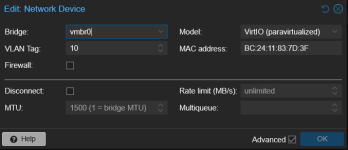
This is setup of my network device on virtual machine:
The situation is as follows:
VLAN 10 is configured on Mikrotik. A DHCP server is also configured for this network.
When adding a VLAN tag to the virtual machine interface, the virtual machine does not receive an address via DHCP. If you make the settings static and enter the address yourself, there is no connection to the default gateway.
At the same time, if I assign another tag to the virtual machine (for example, 555), identical in settings to tag 10, then the virtual machine will receive an address via DHCP and will have a connection.
On Proxmox itself, the eno1np0 interface is configured, to which the vmbr0 bridge is attached. VLAN aware is enabled on vmbr0 and bridge-vids 2-4094 are permitted.
The firewall is disabled on the datacenter and virtual machine.
Based on the tcpdump output, DHCP address requests are sent to MikroTik, and the response comes back to the eno1np0 interface, but does not go to the vmbr0 and tap118i0 interfaces (118 is the ID of my virtual machine).
Below is the output of the tcpdump command for different interfaces.
tcpdump -eni eno1np0 'vlan 10 and (port 67 or port 68)'
tcpdump: verbose output suppressed, use -v[v]... for full protocol decode
listening on eno1np0, link-type EN10MB (Ethernet), snapshot length 262144 bytes
15:01:30.801625 bc:24:11:83:7d:3f > ff:ff:ff:ff:ff:ff, ethertype 802.1Q (0x8100), length 343: vlan 10, p 0, ethertype IPv4 (0x0800), 0.0.0.0.68 > 255.255.255.255.67: BOOTP/DHCP, Request from bc:24:11:83:7d:3f, length 297
15:01:30.806312 48:8f:5a:e4:da:e8 > ff:ff:ff:ff:ff:ff, ethertype 802.1Q (0x8100), length 346: vlan 10, p 0, ethertype IPv4 (0x0800), 192.168.10.1.67 > 255.255.255.255.68: BOOTP/DHCP, Reply, length 300
15:01:32.801657 bc:24:11:83:7d:3f > ff:ff:ff:ff:ff:ff, ethertype 802.1Q (0x8100), length 343: vlan 10, p 0, ethertype IPv4 (0x0800), 0.0.0.0.68 > 255.255.255.255.67: BOOTP/DHCP, Request from bc:24:11:83:7d:3f, length 297
15:01:33.385065 48:8f:5a:e4:da:e8 > bc:24:11:83:7d:3f, ethertype 802.1Q (0x8100), length 346: vlan 10, p 0, ethertype IPv4 (0x0800), 192.168.10.1.67 > 192.168.10.17.68: BOOTP/DHCP, Reply, length 300
15:01:35.039445 bc:24:11:83:7d:3f > ff:ff:ff:ff:ff:ff, ethertype 802.1Q (0x8100), length 343: vlan 10, p 0, ethertype IPv4 (0x0800), 0.0.0.0.68 > 255.255.255.255.67: BOOTP/DHCP, Request from bc:24:11:83:7d:3f, length 297
15:01:35.042574 48:8f:5a:e4:da:e8 > bc:24:11:83:7d:3f, ethertype 802.1Q (0x8100), length 346: vlan 10, p 0, ethertype IPv4 (0x0800), 192.168.10.1.67 > 192.168.10.17.68: BOOTP/DHCP, Reply, length 300
15:01:39.965960 bc:24:11:83:7d:3f > ff:ff:ff:ff:ff:ff, ethertype 802.1Q (0x8100), length 343: vlan 10, p 0, ethertype IPv4 (0x0800), 0.0.0.0.68 > 255.255.255.255.67: BOOTP/DHCP, Request from bc:24:11:83:7d:3f, length 297
15:01:39.969384 48:8f:5a:e4:da:e8 > bc:24:11:83:7d:3f, ethertype 802.1Q (0x8100), length 346: vlan 10, p 0, ethertype IPv4 (0x0800), 192.168.10.1.67 > 192.168.10.17.68: BOOTP/DHCP, Reply, length 300
tcpdump -eni vmbr0 port 67 or port 68
tcpdump: verbose output suppressed, use -v[v]... for full protocol decode
listening on vmbr0, link-type EN10MB (Ethernet), snapshot length 262144 bytes
15:01:30.801636 bc:24:11:83:7d:3f > ff:ff:ff:ff:ff:ff, ethertype 802.1Q (0x8100), length 343: vlan 10, p 0, ethertype IPv4 (0x0800), 0.0.0.0.68 > 255.255.255.255.67: BOOTP/DHCP, Request from bc:24:11:83:7d:3f, length 297
15:01:32.801664 bc:24:11:83:7d:3f > ff:ff:ff:ff:ff:ff, ethertype 802.1Q (0x8100), length 343: vlan 10, p 0, ethertype IPv4 (0x0800), 0.0.0.0.68 > 255.255.255.255.67: BOOTP/DHCP, Request from bc:24:11:83:7d:3f, length 297
15:01:35.039453 bc:24:11:83:7d:3f > ff:ff:ff:ff:ff:ff, ethertype 802.1Q (0x8100), length 343: vlan 10, p 0, ethertype IPv4 (0x0800), 0.0.0.0.68 > 255.255.255.255.67: BOOTP/DHCP, Request from bc:24:11:83:7d:3f, length 297
15:01:39.965967 bc:24:11:83:7d:3f > ff:ff:ff:ff:ff:ff, ethertype 802.1Q (0x8100), length 343: vlan 10, p 0, ethertype IPv4 (0x0800), 0.0.0.0.68 > 255.255.255.255.67: BOOTP/DHCP, Request from bc:24:11:83:7d:3f, length 297
15:01:48.732715 bc:24:11:83:7d:3f > ff:ff:ff:ff:ff:ff, ethertype 802.1Q (0x8100), length 343: vlan 10, p 0, ethertype IPv4 (0x0800), 0.0.0.0.68 > 255.255.255.255.67: BOOTP/DHCP, Request from bc:24:11:83:7d:3f, length 297
15:02:05.558621 bc:24:11:83:7d:3f > ff:ff:ff:ff:ff:ff, ethertype 802.1Q (0x8100), length 343: vlan 10, p 0, ethertype IPv4 (0x0800), 0.0.0.0.68 > 255.255.255.255.67: BOOTP/DHCP, Request from bc:24:11:83:7d:3f, length 297
15:02:16.828551 bc:24:11:83:7d:3f > ff:ff:ff:ff:ff:ff, ethertype 802.1Q (0x8100), length 343: vlan 10, p 0, ethertype IPv4 (0x0800), 0.0.0.0.68 > 255.255.255.255.67: BOOTP/DHCP, Request from bc:24:11:83:7d:3f, length 297
15:02:18.828535 bc:24:11:83:7d:3f > ff:ff:ff:ff:ff:ff, ethertype 802.1Q (0x8100), length 343: vlan 10, p 0, ethertype IPv4 (0x0800), 0.0.0.0.68 > 255.255.255.255.67: BOOTP/DHCP, Request from bc:24:11:83:7d:3f, length 297
15:02:21.370864 bc:24:11:83:7d:3f > ff:ff:ff:ff:ff:ff, ethertype 802.1Q (0x8100), length 343: vlan 10, p 0, ethertype IPv4 (0x0800), 0.0.0.0.68 > 255.255.255.255.67: BOOTP/DHCP, Request from bc:24:11:83:7d:3f, length 297
tcpdump -eni tap118i0 'port 67 or port 68'
tcpdump: verbose output suppressed, use -v[v]... for full protocol decode
listening on tap118i0, link-type EN10MB (Ethernet), snapshot length 262144 bytes
11:15:15.854742 bc:24:11:83:7d:3f > ff:ff:ff:ff:ff:ff, ethertype IPv4 (0x0800), length 339: 0.0.0.0.68 > 255.255.255.255.67: BOOTP/DHCP, Request from bc:24:11:83:7d:3f, length 297
11:15:17.854720 bc:24:11:83:7d:3f > ff:ff:ff:ff:ff:ff, ethertype IPv4 (0x0800), length 339: 0.0.0.0.68 > 255.255.255.255.67: BOOTP/DHCP, Request from bc:24:11:83:7d:3f, length 297
11:15:20.468537 bc:24:11:83:7d:3f > ff:ff:ff:ff:ff:ff, ethertype IPv4 (0x0800), length 339: 0.0.0.0.68 > 255.255.255.255.67: BOOTP/DHCP, Request from bc:24:11:83:7d:3f, length 297
11:15:25.232607 bc:24:11:83:7d:3f > ff:ff:ff:ff:ff:ff, ethertype IPv4 (0x0800), length 339: 0.0.0.0.68 > 255.255.255.255.67: BOOTP/DHCP, Request from bc:24:11:83:7d:3f, length 297
This is setup of my network device on virtual machine:
