

Tape Backup: understanding media sets

marte

Active Member
Jun 28, 2019
19
1
43
48
I think I have a misunderstanding concerning media sets when using a tape library.

I have configured a media pool with a allocation policy "monthly" and a retention policy "2 weeks".

My understanding was, when removing the tape the backups are on from the library, a new tape gets selected with starts a new media set (thus, with a full backup), as the ols one can't be continued.

first backup works as expected (full backup):

Code:
Duration: 2h 14min 49s

Used Tapes:
KH3912L6

the second also (changes):

Code:
Duration: 6min 54s

Used Tapes:
KH3912L6

But, after removing the tape, I expected another full backup, but got:

Code:
Duration: 4min 20s

Used Tapes:
KH3913L6

So, only changes were written (at least thats what I think looking at the duration and how it gets displayed):
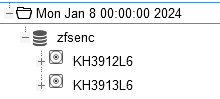
1705928510937.png

Why was no new media set started? In the documentation is written

Additionally, the following events may allocate a new media set:
  • Required tape is offline (and you use a tape library).

Okay, it MAY start a new media set. Why it doesn't in my case?
 
Hi

just fyi, i did not forget this thread :) honestly i'm not sure why it did not allocate a new media-set, but could you post your allocation/retention policy of that pool, then i can look into the source and see what might be going on there
(also maybe the docs are inaccurate or theres some info there missing)

EDIT: oops, i overlooked you already posted the policies... i'll look as soon as i have some time
 
Last edited:
Hi

just fyi, i did not forget this thread :) honestly i'm not sure why it did not allocate a new media-set, but could you post your allocation/retention policy of that pool, then i can look into the source and see what might be going on there
(also maybe the docs are inaccurate or theres some info there missing)

EDIT: oops, i overlooked you already posted the policies... i'll look as soon as i have some time
thank you!

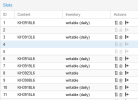
I had already labeled some tapes for this pool, so that I can be sure which tapes can be used:
1706171826447.png
Is this maybe a problem?

Thank you & best regards
 
ok looking at the code, there are a few reasons when a new media set is created:

* if it's forced (via 'new backup' in the gui for example)
* because of the policy ( always or the time matches)
* an error with the media set happened ( e.g. missing tapes in the inventory, owner error etc. )
* the pool encryption key changed
* or if the last writable media is "vaulted" ( so marked as being in a vault)
(also maybe some reason that i missed)

though i'm questioning the last part a bit, as it does not make complete sense to me that only in the case of vaulted tapes a new media set is created.
i have to confer with my colleague though, maybe there is a deeper reason for this that i'm currently not seeing
 
@dcsapak I am reopening this old thread because I have the same problem as the OP. Apparently either this still has not been fixed/documented, or I don't understand how it works.

I have a standalone tape drive, and I perform small backup jobs, all writing to the same media set, which has allocation policy "continue" and retention policy "keep".

This causes the first backup (of each job) on the first tape to be a full backup, and the following ones to be incremental.

After a certain time of my liking, I would like to start with a new tape and make a full backup again, i.e. one that does not depend on the other tapes for eventual restoring, for safety. But I have not been able to obtain that.

(a) I have tried editing the backup job and setting "export media set", but this has no clear result, because all I get is a message saying something like "standalone drive - ejecting tape instead of exporting media set" (I haven't copypasted the exact words, but this is the gist of it).

(b) Following the thread above, I have also tried marking all tapes as "full" and "vaulted" (via the GUI). But then, if I label a new tape and launch the backup jobs, I evidently get only incremental backups (I say so because the space they occupy on the tape is very small). So apparently it's still the same media set.

So, what is the way to start from scratch, so to say? (In pbs terminology, I think this is: "I have a standalone tape drive, how can I start a new media set"?).

Thanks.
 
(b) Following the thread above, I have also tried marking all tapes as "full" and "vaulted" (via the GUI). But then, if I label a new tape and launch the backup jobs, I evidently get only incremental backups (I say so because the space they occupy on the tape is very small). So apparently it's still the same media set.
i can't reproduce this here:

i have a standalone drive:
* started a backup via a job with a media pool policies 'keep' (retention) and 'continue' (allocation)
* marked the last 'writable' medium as vaulted (so no member of the media-set is writable or on-site)
* started the backup job again, it started a new media set

if this does not work for you, please share the relevant task logs, there it should mention if the media-set was continued or if it allocated a new media-set
 
i can't reproduce this here:

i have a standalone drive:
* started a backup via a job with a media pool policies 'keep' (retention) and 'continue' (allocation)
* marked the last 'writable' medium as vaulted (so no member of the media-set is writable or on-site)
* started the backup job again, it started a new media set

if this does not work for you, please share the relevant task logs, there it should mention if the media-set was continued or if it allocated a new media-set

This is the log:

Code:
2026-02-13T16:48:19+01:00: Starting tape backup job 'giov:vmp0:ibm_lto6:tbj-giov'
2026-02-13T16:48:19+01:00: update media online status
2026-02-13T16:48:19+01:00: media set uuid: [...]
2026-02-13T16:48:20+01:00: found 1 groups (out of 1 total)
2026-02-13T16:48:21+01:00: skip snapshot host/orange/2020-12-07T17:25:16Z
2026-02-13T16:48:21+01:00: skip snapshot host/orange/2020-12-08T15:56:06Z
2026-02-13T16:48:21+01:00: skip snapshot host/orange/2021-01-05T11:20:45Z
2026-02-13T16:48:21+01:00: skip snapshot host/orange/2021-02-25T15:48:18Z
2026-02-13T16:48:21+01:00: skip snapshot host/orange/2021-03-21T15:37:07Z
2026-02-13T16:48:21+01:00: skip snapshot host/orange/2021-09-07T15:41:19Z
2026-02-13T16:48:21+01:00: skip snapshot host/orange/2021-09-21T15:47:19Z
2026-02-13T16:48:21+01:00: skip snapshot host/orange/2022-01-22T16:55:27Z
2026-02-13T16:48:21+01:00: skip snapshot host/orange/2022-07-27T17:11:13Z
2026-02-13T16:48:21+01:00: skip snapshot host/orange/2023-07-19T10:56:42Z
2026-02-13T16:48:21+01:00: skip snapshot host/orange/2024-03-24T15:02:55Z
2026-02-13T16:48:21+01:00: skip snapshot host/orange/2024-04-13T19:47:17Z
2026-02-13T16:48:21+01:00: skip snapshot host/orange/2024-04-21T16:13:37Z
2026-02-13T16:48:21+01:00: skip snapshot host/orange/2024-04-27T15:15:45Z
2026-02-13T16:48:21+01:00: skip snapshot host/orange/2024-05-12T17:51:28Z
2026-02-13T16:48:21+01:00: skip snapshot host/orange/2024-07-23T08:31:49Z
2026-02-13T16:48:21+01:00: skip snapshot host/orange/2024-10-29T12:31:41Z
2026-02-13T16:48:21+01:00: skip snapshot host/orange/2025-07-26T20:05:22Z
2026-02-13T16:48:21+01:00: backup snapshot "host/orange/2026-02-12T19:01:14Z"
2026-02-13T16:48:21+01:00: allocated new writable media 'GDT002'
2026-02-13T16:48:21+01:00: Checking for media 'GDT002' in drive 'ibm_lto6'
2026-02-13T16:48:21+01:00: found media label GDT002 [...]
2026-02-13T16:48:21+01:00: writing new media set label
2026-02-13T16:48:30+01:00: moving to end of media
2026-02-13T16:48:32+01:00: arrived at end of media
2026-02-13T16:48:32+01:00: write catalog for previous media: [...]
2026-02-13T16:49:38+01:00: wrote 780 chunks (3045.33 MB at 46.38 MB/s)
2026-02-13T16:49:38+01:00: end backup giov:"host/orange/2026-02-12T19:01:14Z"
2026-02-13T16:49:38+01:00: percentage done: 100.00% (19/19 snapshots)
2026-02-13T16:49:40+01:00: append media catalog
2026-02-13T16:49:40+01:00: TASK OK

I am not sure which of the lines above states that a new media set was started (maybe "writing new media set label"?).

But anyway, the data written to tape amount to less than 3 GB (3045.33 MB it says), and this number matches with the column "bytes used" in the PBS "inventory" page, which reports "2.87 GB".

However, in reality, the filesystem to be backupped amounts to 665 GB of data (this I get with "zfs list", but also in the "content" tab of the PBS datastore page).

So it's pretty evident that what was written to the tape is an incremental backup, not a full one. It should have been hundred times larger.

Maybe I am misunderstanding the whole process. I first ran this command on the data server:

PHP:
proxmox-backup-client backup giov.pxar:/rpool/giov --repository 10.0.1.7:giov

("giov" is the name of the zfs filesystem to be backupped and also of the datastore; 10.0.1.7 is the backup server).

which updated the PBS datastore "giov" so that the backup was current. Then I launched the above tape backup job with the intent of having the whole thing also stored to tape on a new media set. But that did not happen :-(
 
mhmm indeed it did not allocate a new media-set, this would look like this (what it did in my tests)

Code:
2026-02-18T10:39:19+01:00: Starting tape backup job '...'
2026-02-18T10:39:19+01:00: update media online status
2026-02-18T10:39:19+01:00: starting new media set - reason: writable media offsite in vault 'test'
2026-02-18T10:39:19+01:00: media set uuid: ...

can you provide more details on your setup, especially the media status list before and after the respective backup jobs
you can get that with

Code:
proxmox-tape media list

EDIT: also the allocation/retention policy of the media pool and the config of the backup job would be interesting
 
The setup: it's a PVE 9.1.5 server who launches the backup; it The PBS machine has been recently upgraded to 4.1.2.

As reported above, the command that launched this particular backup was:

Code:
proxmox-backup-client backup giov.pxar:/rpool/giov --repository 10.0.1.7:giov

"rpool/giov" is a ZFS filesystem.

the referenced datastore is:
Code:
root@violet:~# proxmox-backup-manager datastore show giov
┌───────────────────┬─────────────────┐
│ Name              │ Value           │
╞═══════════════════╪═════════════════╡
│ name              │ giov            │
├───────────────────┼─────────────────┤
│ path              │ /backup/giov    │
├───────────────────┼─────────────────┤
│ comment           │                 │
├───────────────────┼─────────────────┤
│ gc-schedule       │ monthly         │
├───────────────────┼─────────────────┤
│ notification-mode │ legacy-sendmail │

following is the media list. To recap, I have:
1) set full & vaulted GDT001
2) added the new tape GDT002
3) launched the backup (see previous message).

Note that the media set is indeed the same.

(tape GDT002 is not physically in the drive while I am writing this).

Code:
root@violet:~# proxmox-tape media list
┌────────────┬──────┬──────────────────────────┬────────┬──────────┬────────────────┬─────────┬──────────┬───────── ──────┐
│ label-text │ pool │ media-set-name           │ seq-nr │ status   │ location       │ catalog │ uuid     │ media-set-uuid │
╞════════════╪══════╪══════════════════════════╪════════╪══════════╪════════════════╪═════════╪══════════╪════════════════╡
│ GDT000     │ vmp0 │ Sun May  9 15:29:30 2021 │      0 │ full     │ vault-archivio │      ok │ b8905... │ f132...053a0   │
├────────────┼──────┼──────────────────────────┼────────┼──────────┼────────────────┼─────────┼──────────┼────────────────┤
│ GDT001     │ vmp0 │ Sun May  9 15:29:30 2021 │      1 │ full     │ vault-archivio │      ok │ febfc... │ f132...053a0   │
├────────────┼──────┼──────────────────────────┼────────┼──────────┼────────────────┼─────────┼──────────┼────────────────┤
│ GDT002     │ vmp0 │ Sun May  9 15:29:30 2021 │      2 │ writable │ offline        │      ok │ 01ff4... │ f132...053a0   │
└────────────┴──────┴──────────────────────────┴────────┴──────────┴────────────────┴─────────┴──────────┴────────────────┘

the media pool:

Code:
root@violet:~# proxmox-tape pool list
┌──────┬────────────┬───────────┬──────────┬─────────┐
│ name │ allocation │ retention │ template │ encrypt │
╞══════╪════════════╪═══════════╪══════════╪═════════╡
│ vmp0 │ continue   │ keep      │          │ yes     │
└──────┴────────────┴───────────┴──────────┴─────────┘

the backup jobs:


Code:
root@violet:~# proxmox-tape backup-job list
┌──────────────────┬──────────────┬──────┬──────────┬──────────┬──────────┬──────────────────┬─────────┐
│ id               │ store        │ pool │ drive    │ schedule │ next-run │ next-media-label │ comment │
╞══════════════════╪══════════════╪══════╪══════════╪══════════╪══════════╪══════════════════╪═════════╡
│ tbj-giov         │ giov         │ vmp0 │ ibm_lto6 │          │          │ GDT002           │         │
├──────────────────┼──────────────┼──────┼──────────┼──────────┼──────────┼──────────────────┼─────────┤
│ tbj-giov-arc     │ giov-arc     │ vmp0 │ ibm_lto6 │          │          │ GDT002           │         │
├──────────────────┼──────────────┼──────┼──────────┼──────────┼──────────┼──────────────────┼─────────┤
│ tbj-marigian     │ marigian     │ vmp0 │ ibm_lto6 │          │          │ GDT002           │         │
├──────────────────┼──────────────┼──────┼──────────┼──────────┼──────────┼──────────────────┼─────────┤
│ tbj-marigian-arc │ marigian-arc │ vmp0 │ ibm_lto6 │          │          │ GDT002           │         │
├──────────────────┼──────────────┼──────┼──────────┼──────────┼──────────┼──────────────────┼─────────┤
│ tbj-orange       │ orange       │ vmp0 │ ibm_lto6 │          │          │ GDT002           │         │
├──────────────────┼──────────────┼──────┼──────────┼──────────┼──────────┼──────────────────┼─────────┤
│ tbj-orange-vm    │ orange-vm    │ vmp0 │ ibm_lto6 │          │          │ GDT002           │         │
├──────────────────┼──────────────┼──────┼──────────┼──────────┼──────────┼──────────────────┼─────────┤
│ tbj-sync         │ sync         │ vmp0 │ ibm_lto6 │          │          │ GDT002           │         │
└──────────────────┴──────────────┴──────┴──────────┴──────────┴──────────┴──────────────────┴─────────┘

in detail, this is the job I launched above:

Code:
root@violet:~# proxmox-tape backup-job show tbj-giov
┌───────────────────┬─────────────────┐
│ Name              │ Value           │
╞═══════════════════╪═════════════════╡
│ id                │ tbj-giov        │
├───────────────────┼─────────────────┤
│ drive             │ ibm_lto6        │
├───────────────────┼─────────────────┤
│ pool              │ vmp0            │
├───────────────────┼─────────────────┤
│ store             │ giov            │
├───────────────────┼─────────────────┤
│ notification-mode │ legacy-sendmail │
└───────────────────┴─────────────────┘