Hi all,
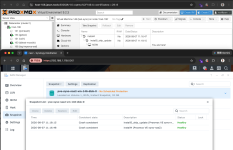
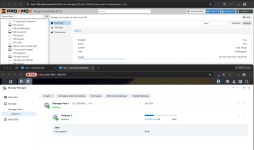
I have been working on a Synology SAN Manager storage plugin for Proxmox VE and would like to share it here for testing and feedback.
Project: jt-pve-storage-synology
The main reason I built it is that plain iSCSI works with Synology, but the management model is not ideal.
A typical setup is to create a LUN/target in Synology SAN Manager, present that LUN to PVE, and then use LVM on top of it for VM disks.
That works, but it also means:
In short, PVE can use Synology iSCSI, but it does not actually manage Synology SAN Manager.
The plugin uses a different model:
One PVE disk = one Synology thin LUN.
Creating a disk from the normal PVE Web UI or CLI creates the corresponding thin LUN in Synology SAN Manager. The plugin also handles target creation/mapping, iSCSI login and multipath setup.
Disk deletion, resize, snapshots, rollback and clones are mapped back to SAN Manager as well.
Current functionality
Testing so far
I have tested it with:
During one multipath failure test, I disconnected one path while repeatedly reading from the LUN. 60 reads completed with 0 failures.
In a PVE node failure test, another node took over the LUN in about 3.6 seconds.
Synology API
One complication is that Synology does not publish a complete SAN Manager API specification.
For the protocol details, I cross-referenced:
Where those sources differed, I used the behavior observed on real hardware as the reference.
The plugin itself is an independent Perl implementation. The other projects were only used to identify protocol details such as API names, methods, parameters and error codes.
LUN limits
Because every PVE disk is represented by a Synology LUN, the Synology LUN limit effectively becomes the maximum number of PVE disks that can be provisioned on that NAS.
These limits vary significantly between Synology models.
The plugin queries the NAS directly for its actual LUN, target and snapshot limits, as well as current usage, instead of relying on a hard-coded model table.
It also warns before the available LUN count becomes too low.
Current limitations
Synology HA has not yet been verified on physical hardware.
Synology UC dual-controller systems have also not been validated and are not currently treated as supported.
For storage operations, the plugin is intentionally conservative: if safe behavior cannot be verified, it rejects the operation rather than guessing.
Links
Documentation:
https://jasoncheng7115.github.io/jt-pve-storage-synology/
Source:
https://github.com/jasoncheng7115/jt-pve-storage-synology
I would especially appreciate test reports from users running different Synology models, DSM versions, multipath setups, or larger PVE clusters.
Feedback, bug reports and test results are welcome.
I have been working on a Synology SAN Manager storage plugin for Proxmox VE and would like to share it here for testing and feedback.
Project: jt-pve-storage-synology
The main reason I built it is that plain iSCSI works with Synology, but the management model is not ideal.
A typical setup is to create a LUN/target in Synology SAN Manager, present that LUN to PVE, and then use LVM on top of it for VM disks.
That works, but it also means:
- LUNs and targets still need to be created and managed separately in DSM
- VM disks are not mapped 1:1 to Synology LUNs
- Creating, deleting or resizing a VM disk in PVE does not manage the Synology LUN lifecycle
- Snapshots and clones cannot directly use Synology's native LUN snapshot functionality
- Multipath must be configured and maintained separately on every PVE node
- Troubleshooting can involve PVE, LVM, iSCSI and DSM at the same time
In short, PVE can use Synology iSCSI, but it does not actually manage Synology SAN Manager.
The plugin uses a different model:
One PVE disk = one Synology thin LUN.
Creating a disk from the normal PVE Web UI or CLI creates the corresponding thin LUN in Synology SAN Manager. The plugin also handles target creation/mapping, iSCSI login and multipath setup.
Disk deletion, resize, snapshots, rollback and clones are mapped back to SAN Manager as well.
Current functionality
- VM and LXC disk provisioning
- Disk delete and resize
- Snapshot and rollback
- Full clone and linked clone
- Templates
- Live and offline migration
- Storage migration
- Backup and restore
- Shared storage
- CHAP
- Multipath
Testing so far
I have tested it with:
- A 5-node Proxmox VE cluster
- VM and LXC workloads
- Live and offline migration
- Snapshot and rollback
- vzdump backup and restore
- Multipath path failure
- PVE node failure and takeover by another node
- Complete Synology NAS outage
- DSM upgrades across versions
- Multiple Synology NAS models and DSM versions
During one multipath failure test, I disconnected one path while repeatedly reading from the LUN. 60 reads completed with 0 failures.
In a PVE node failure test, another node took over the LUN in about 3.6 seconds.
Synology API
One complication is that Synology does not publish a complete SAN Manager API specification.
For the protocol details, I cross-referenced:
- Synology's official CSI Driver
- OpenStack Cinder's Synology Driver
- API responses and behavior observed on actual Synology NAS systems
Where those sources differed, I used the behavior observed on real hardware as the reference.
The plugin itself is an independent Perl implementation. The other projects were only used to identify protocol details such as API names, methods, parameters and error codes.
LUN limits
Because every PVE disk is represented by a Synology LUN, the Synology LUN limit effectively becomes the maximum number of PVE disks that can be provisioned on that NAS.
These limits vary significantly between Synology models.
The plugin queries the NAS directly for its actual LUN, target and snapshot limits, as well as current usage, instead of relying on a hard-coded model table.
It also warns before the available LUN count becomes too low.
Current limitations
Synology HA has not yet been verified on physical hardware.
Synology UC dual-controller systems have also not been validated and are not currently treated as supported.
For storage operations, the plugin is intentionally conservative: if safe behavior cannot be verified, it rejects the operation rather than guessing.
Links
Documentation:
https://jasoncheng7115.github.io/jt-pve-storage-synology/
Source:
https://github.com/jasoncheng7115/jt-pve-storage-synology
I would especially appreciate test reports from users running different Synology models, DSM versions, multipath setups, or larger PVE clusters.
Feedback, bug reports and test results are welcome.