

Synology SAN Manager storage plugin for Proxmox VE (iSCSI, snapshots, multipath)

Jason_Cheng

Active Member
May 19, 2020
11
5
43
43
Taiwan
blog.jason.tools
Hi all,

I have been working on a Synology SAN Manager storage plugin for Proxmox VE and would like to share it here for testing and feedback.

Project: jt-pve-storage-synology

The main reason I built it is that plain iSCSI works with Synology, but the management model is not ideal.

A typical setup is to create a LUN/target in Synology SAN Manager, present that LUN to PVE, and then use LVM on top of it for VM disks.

That works, but it also means:
  • LUNs and targets still need to be created and managed separately in DSM
  • VM disks are not mapped 1:1 to Synology LUNs
  • Creating, deleting or resizing a VM disk in PVE does not manage the Synology LUN lifecycle
  • Snapshots and clones cannot directly use Synology's native LUN snapshot functionality
  • Multipath must be configured and maintained separately on every PVE node
  • Troubleshooting can involve PVE, LVM, iSCSI and DSM at the same time

In short, PVE can use Synology iSCSI, but it does not actually manage Synology SAN Manager.


The plugin uses a different model:

One PVE disk = one Synology thin LUN.

Creating a disk from the normal PVE Web UI or CLI creates the corresponding thin LUN in Synology SAN Manager. The plugin also handles target creation/mapping, iSCSI login and multipath setup.

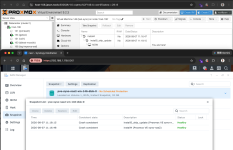
Disk deletion, resize, snapshots, rollback and clones are mapped back to SAN Manager as well.


Current functionality
  • VM and LXC disk provisioning
  • Disk delete and resize
  • Snapshot and rollback
  • Full clone and linked clone
  • Templates
  • Live and offline migration
  • Storage migration
  • Backup and restore
  • Shared storage
  • CHAP
  • Multipath


Testing so far

I have tested it with:
  • A 5-node Proxmox VE cluster
  • VM and LXC workloads
  • Live and offline migration
  • Snapshot and rollback
  • vzdump backup and restore
  • Multipath path failure
  • PVE node failure and takeover by another node
  • Complete Synology NAS outage
  • DSM upgrades across versions
  • Multiple Synology NAS models and DSM versions

During one multipath failure test, I disconnected one path while repeatedly reading from the LUN. 60 reads completed with 0 failures.

In a PVE node failure test, another node took over the LUN in about 3.6 seconds.


Synology API

One complication is that Synology does not publish a complete SAN Manager API specification.

For the protocol details, I cross-referenced:
  • Synology's official CSI Driver
  • OpenStack Cinder's Synology Driver
  • API responses and behavior observed on actual Synology NAS systems

Where those sources differed, I used the behavior observed on real hardware as the reference.

The plugin itself is an independent Perl implementation. The other projects were only used to identify protocol details such as API names, methods, parameters and error codes.


LUN limits

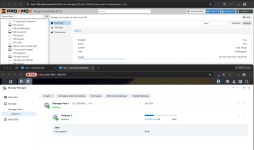
Because every PVE disk is represented by a Synology LUN, the Synology LUN limit effectively becomes the maximum number of PVE disks that can be provisioned on that NAS.

These limits vary significantly between Synology models.

The plugin queries the NAS directly for its actual LUN, target and snapshot limits, as well as current usage, instead of relying on a hard-coded model table.

It also warns before the available LUN count becomes too low.


Current limitations

Synology HA has not yet been verified on physical hardware.

Synology UC dual-controller systems have also not been validated and are not currently treated as supported.

For storage operations, the plugin is intentionally conservative: if safe behavior cannot be verified, it rejects the operation rather than guessing.


Links

Documentation:
https://jasoncheng7115.github.io/jt-pve-storage-synology/

Source:
https://github.com/jasoncheng7115/jt-pve-storage-synology

I would especially appreciate test reports from users running different Synology models, DSM versions, multipath setups, or larger PVE clusters.

Feedback, bug reports and test results are welcome.
 

Attachments

  • snapshot_en.png
    snapshot_en.png
    234.7 KB · Views: 8
  • size_en.png
    size_en.png
    217.9 KB · Views: 8
  • Like
Reactions: BD-Nets and UdoB
Hi all,

I have been working on a Synology SAN Manager storage plugin for Proxmox VE and would like to share it here for testing and feedback.

Project: jt-pve-storage-synology

The main reason I built it is that plain iSCSI works with Synology, but the management model is not ideal.

A typical setup is to create a LUN/target in Synology SAN Manager, present that LUN to PVE, and then use LVM on top of it for VM disks.

That works, but it also means:
  • LUNs and targets still need to be created and managed separately in DSM
  • VM disks are not mapped 1:1 to Synology LUNs
  • Creating, deleting or resizing a VM disk in PVE does not manage the Synology LUN lifecycle
  • Snapshots and clones cannot directly use Synology's native LUN snapshot functionality
  • Multipath must be configured and maintained separately on every PVE node
  • Troubleshooting can involve PVE, LVM, iSCSI and DSM at the same time

In short, PVE can use Synology iSCSI, but it does not actually manage Synology SAN Manager.


The plugin uses a different model:

One PVE disk = one Synology thin LUN.

Creating a disk from the normal PVE Web UI or CLI creates the corresponding thin LUN in Synology SAN Manager. The plugin also handles target creation/mapping, iSCSI login and multipath setup.

Disk deletion, resize, snapshots, rollback and clones are mapped back to SAN Manager as well.


Current functionality
  • VM and LXC disk provisioning
  • Disk delete and resize
  • Snapshot and rollback
  • Full clone and linked clone
  • Templates
  • Live and offline migration
  • Storage migration
  • Backup and restore
  • Shared storage
  • CHAP
  • Multipath


Testing so far

I have tested it with:
  • A 5-node Proxmox VE cluster
  • VM and LXC workloads
  • Live and offline migration
  • Snapshot and rollback
  • vzdump backup and restore
  • Multipath path failure
  • PVE node failure and takeover by another node
  • Complete Synology NAS outage
  • DSM upgrades across versions
  • Multiple Synology NAS models and DSM versions

During one multipath failure test, I disconnected one path while repeatedly reading from the LUN. 60 reads completed with 0 failures.

In a PVE node failure test, another node took over the LUN in about 3.6 seconds.


Synology API

One complication is that Synology does not publish a complete SAN Manager API specification.

For the protocol details, I cross-referenced:
  • Synology's official CSI Driver
  • OpenStack Cinder's Synology Driver
  • API responses and behavior observed on actual Synology NAS systems

Where those sources differed, I used the behavior observed on real hardware as the reference.

The plugin itself is an independent Perl implementation. The other projects were only used to identify protocol details such as API names, methods, parameters and error codes.


LUN limits

Because every PVE disk is represented by a Synology LUN, the Synology LUN limit effectively becomes the maximum number of PVE disks that can be provisioned on that NAS.

These limits vary significantly between Synology models.

The plugin queries the NAS directly for its actual LUN, target and snapshot limits, as well as current usage, instead of relying on a hard-coded model table.

It also warns before the available LUN count becomes too low.


Current limitations

Synology HA has not yet been verified on physical hardware.

Synology UC dual-controller systems have also not been validated and are not currently treated as supported.

For storage operations, the plugin is intentionally conservative: if safe behavior cannot be verified, it rejects the operation rather than guessing.


Links

Documentation:
https://jasoncheng7115.github.io/jt-pve-storage-synology/

Source:
https://github.com/jasoncheng7115/jt-pve-storage-synology

I would especially appreciate test reports from users running different Synology models, DSM versions, multipath setups, or larger PVE clusters.

Feedback, bug reports and test results are welcome.
This looks like a useful approach, especially the one-to-one mapping between a PVE virtual disk and a Synology thin LUN. That seems to simplify the storage lifecycle compared with having PVE, LVM, iSCSI, and DSM each managing a separate part of the workflow.

The testing around multipath failure and PVE node failure is particularly interesting. The fact that you tested repeated reads during a path failure and also tested takeover after a node failure gives a much better indication of how the plugin behaves under real-world conditions than basic provisioning tests alone.

I also like the conservative approach to unsupported operations. With storage infrastructure, refusing an operation when the behavior cannot be verified is generally safer than attempting something that could put VM data at risk.

One area I'd be interested in seeing more test results for is larger clusters with many disks and snapshots, particularly how the Synology LUN limits affect storage provisioning as the number of VMs grows. It would also be useful to know how the plugin behaves when a snapshot, clone, resize, or migration operation is interrupted halfway through.

Overall, this seems like a promising project for people running Proxmox with Synology shared storage. The documentation and real-hardware testing should make it much easier for others to reproduce the setup and report useful results.
 
  • Like
Reactions: BD-Nets and UdoB
Any blockers tu be expected when using it with Fiberchannel?
Especially QLogic QLE2672/2692-based cards which are supported by Synology.
Most parts of the workflow (Multipath, LUN, LVM) should be the same.
 
Any blockers tu be expected when using it with Fiberchannel?
Especially QLogic QLE2672/2692-based cards which are supported by Synology.
Most parts of the workflow (Multipath, LUN, LVM) should be the same.
Oh, this project currently supports iSCSI, but FC SAN is not supported yet. I'll need access to actual hardware before I can implement and test that part. However, most of the logic that needs to be handled is indeed the same.
 
This looks like a useful approach, especially the one-to-one mapping between a PVE virtual disk and a Synology thin LUN. That seems to simplify the storage lifecycle compared with having PVE, LVM, iSCSI, and DSM each managing a separate part of the workflow.

The testing around multipath failure and PVE node failure is particularly interesting. The fact that you tested repeated reads during a path failure and also tested takeover after a node failure gives a much better indication of how the plugin behaves under real-world conditions than basic provisioning tests alone.

I also like the conservative approach to unsupported operations. With storage infrastructure, refusing an operation when the behavior cannot be verified is generally safer than attempting something that could put VM data at risk.

One area I'd be interested in seeing more test results for is larger clusters with many disks and snapshots, particularly how the Synology LUN limits affect storage provisioning as the number of VMs grows. It would also be useful to know how the plugin behaves when a snapshot, clone, resize, or migration operation is interrupted halfway through.

Overall, this seems like a promising project for people running Proxmox with Synology shared storage. The documentation and real-hardware testing should make it much easier for others to reproduce the setup and report useful results.


On LUN limits as the cluster grows : one VM disk is one LUN, so this is the number to plan around. The plugin reads the per-model ceilings from the NAS itself (SYNO.Core.System info type=define) rather than from a datasheet, because they differ by model: a DS918+ reports 256 LUNs and 128 targets, and some J and Value models report 4. It refuses before DSM does, and the count includes every LUN on that NAS — your own, and any Virtual Machine Manager disks, all draw on the same ceiling — and it warns once while sixteen remain. A VM with a system disk and a data disk uses two, so 256 is roughly 128 such VMs. There is a sourced per-model table in docs/LIMITS.md.

Two more ceilings bite, in this order: snapshots per LUN (the NAS reports 256 in one field and 128 in another, so the plugin guards the smaller, and that quota is shared with any snapshot schedule you set in SAN Manager); and targets, which are irrelevant in the default shared target mode — and that is exactly why per-volume is not the default, since 128 targets would cap the storage below the LUN ceiling.

On interrupted operations : I had not tested that, so I did. Each operation was killed with SIGKILL part-way through, with the target confirmed against its own ps line before the signal was sent, and then both the VM configuration and the storage server were audited after the work had settled:

  • Snapshot (killed at 0.3 s, 0.8 s and 1.3 s): either nothing on either side, or the snapshot present on both — in the configuration and on the storage server with its taken_by marker. Never one without the other. Re-using the same name afterwards is refused as a duplicate.
  • Resize (0.3 s, 0.8 s, 1.3 s and 2.0 s): either nothing, or both sides at the new size. Never out of step.
  • Full clone (3 s): leaves <newid>.conf carrying lock: clone, and no volume on the storage server. qm destroy refuses with VM is locked (clone); qm unlock <newid> followed by qm destroy <newid> clears it completely.
  • Offline migration (1.0 s): the configuration stays on the source node, the guest starts and runs there, and the target node has nothing.

Afterwards, on all three nodes, the only multipath map and tracking entry belonged to the guest that was still running, pve-syno-reap --all reported nothing left behind on each of them, and the storage server was back to 0 LUNs and 0 snapshots. This is now group H of the pre-release checklist.
 
Any blockers tu be expected when using it with Fiberchannel?
Especially QLogic QLE2672/2692-based cards which are supported by Synology.
Most parts of the workflow (Multipath, LUN, LVM) should be the same.
AFAIK or as other plugins do it, you don't have LVM and multipath part. The iSCSI volume can be directly attached to QEMU, so no middleware needed. For the FC-part, a lot needs to be changed in the backend for this to work. I tried it years ago with storagecli similar to the ZFS-over-iSCSI plugin, but it was a lot of work and no one to pay so my homelab FC-SAN POC was not more than a POC.
 
AFAIK or as other plugins do it, you don't have LVM and multipath part. The iSCSI volume can be directly attached to QEMU, so no middleware needed. For the FC-part, a lot needs to be changed in the backend for this to work. I tried it years ago with storagecli similar to the ZFS-over-iSCSI plugin, but it was a lot of work and no one to pay so my homelab FC-SAN POC was not more than a POC.
Actually, I have already implemented FC support in another storage plugin:
https://github.com/jasoncheng7115/jt-pve-storage-dellemc


It's currently being used by a customer, and the functionality is working correctly. We're still monitoring it as it continues to be deployed into production.


Based on my experience, the FC backend does require more work than iSCSI, but it's definitely achievable.