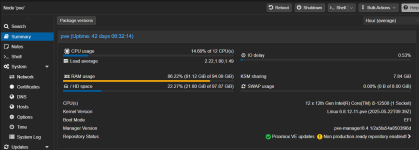
I'm doing backups from fast (NVMe) drives to slow (ATA; 5400 RPM 130 MB/s write). Presumably, as a result of this, swap space fills up when I run backups, and it's mostly VM memory that gets swapped out. I have 8 GB of swap configured and it fills up completely. RAM usage of the server never comes under pressure.
The machine has 96 GB RAM. 84 of it is allocated (not over allocated; this is the sum of all RAM assignments of all running VMs), KSM sharing shows 8 GB. There should be plenty of RAM available. I'm not using the Proxmox backup server. I'm running Proxmox 8.4.1. I appreciate there's a more recent version. I'm not in a position right now to upgrade Proxmox. If this however is a known issue I will upgrade to the latest version and retest all of this.
I've already configured sysctl like this:
This didn't help either. I configured
I'm running at default
Right now my issue has been solved (or at least mitigated), but obviously I don't like the solution. I'm open to suggestions. I don't want to move backup storage to a fast disk, but I'm happy to try stuff, create custom built binaries and provide a patch if this could be helpful. Other suggestions are very welcome of course also.
The machine has 96 GB RAM. 84 of it is allocated (not over allocated; this is the sum of all RAM assignments of all running VMs), KSM sharing shows 8 GB. There should be plenty of RAM available. I'm not using the Proxmox backup server. I'm running Proxmox 8.4.1. I appreciate there's a more recent version. I'm not in a position right now to upgrade Proxmox. If this however is a known issue I will upgrade to the latest version and retest all of this.
I've already configured sysctl like this:
Code:
vm.dirty_bytes = 268435456
vm.dirty_background_bytes = 134217728
This didn't help either. I configured
vm.swappiness to 0, 1 and 10. None of it helped. The only thing that did help is running zstd through nocache using this wrapper:
Code:
root@pve:~# cat /usr/bin/zstd
#!/bin/bash
exec nocache /usr/bin/zstd.real "$@"
I'm running at default
vm.swappiness (60) now and swap isn't used anymore. I do see the buff/cache number from free growing as a machine is being backed up, but it goes down to a reasonable level again when a machine finishes backing up.Right now my issue has been solved (or at least mitigated), but obviously I don't like the solution. I'm open to suggestions. I don't want to move backup storage to a fast disk, but I'm happy to try stuff, create custom built binaries and provide a patch if this could be helpful. Other suggestions are very welcome of course also.