

Successful Dual NVIDIA H200 NVL Passthrough + Full NVLink (NV18) on Proxmox VE 8.4 (HPE DL385 Gen11)

sam.lee

New Member
Nov 20, 2025
1
1
1
Hi all,
Just wanted to share a success case that may be useful for the Proxmox team and the community.

Hardware:
• HPE DL385 Gen11
• 2× NVIDIA H200 NVL (NVLink4, 18 links per GPU)

Proxmox Version:
• Proxmox VE 8.4
• ZFS root
• Standard VFIO passthrough (q35 + OVMF)

Guest OS:
• Ubuntu 22.04
• Ubuntu 24.04
• NVIDIA driver 580.95.05
• CUDA 13.0

Result:
Both GPUs passed through successfully.
nvidia-smi nvlink --status shows all 18× NVLink lanes active per GPU (26.562 GB/s each), meaning full NVLink (NV18) is functional inside a VM.

Measured aggregate NVLink bandwidth ≈ 478 GB/s per GPU, matching bare-metal H200 NVL performance.

NUMA affinity and P2P memory access also working correctly.

Why I’m sharing:
This setup is not documented anywhere, and Proxmox does not officially claim NVLink support in VMs — so this result may help others working with HPC GPUs or modern NVIDIA architectures.

Happy to provide sanitized logs or additional validation info if useful for future documentation.
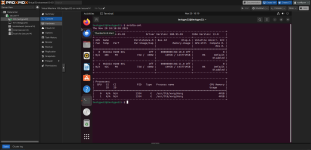
Screenshot 2025-11-20 at 11.19.12 AM.png
 
  • Like
Reactions: padi
Hi! Could you share an explanation of how to run this scheme? Do you think it will work for the HGX H200? We managed to join a couple of GPUs, but failed to join NV Switch, so nvidia fabric cannot be started.
|UPD
We added all 8 cards and 4 switches to one VM, then the factory starts and torch.is_available starts working. It doesn't work in other variations.
 
Last edited:
hey @sam.lee @krendilok thanks for sharing :)

I'm trying something similar on latest Proxmox v8.4 with 8xH200SXM (with 4 NVSwitches) on Dell PowerEdge XE9680 but I cannot get it work ...

so far:
Code:
> nano /etc/default/grub
GRUB_CMDLINE_LINUX_DEFAULT="quiet intel_iommu=on iommu=pt"
> update-grub

> nano /etc/modules
vfio
vfio_iommu_type1
vfio_pci

# blacklist gpu drivers
> nano /etc/modprobe.d/blacklist.conf
blacklist nouveau
blacklist nvidia*

> nano /etc/modprobe.d/vfio.conf
options vfio-pci ids=gpu_id,nvswitch_id disable_vga=1

>update-initramfs -u -k all
>reboot

after this, for lspci -nnk | grep -i nvidia -A3 you should get smtg like:
Code:
19:00.0 3D controller [0302]: NVIDIA Corporation GH100 [H200 SXM 141GB] [10de:2335] (rev a1)
    Subsystem: NVIDIA Corporation GH100 [H200 SXM 141GB] [10de:18be]
    Kernel driver in use: vfio-pci     <<< --- check this
    Kernel modules: nvidiafb, nouveau
83:00.0 Bridge [0680]: NVIDIA Corporation GH100 [H100 NVSwitch] [10de:22a3] (rev a1)
    Subsystem: NVIDIA Corporation GH100 [H100 NVSwitch] [10de:1796]
    Kernel driver in use: vfio-pci     <<< --- and this
where gpu_id is 10de:2335 and nvswitch_id is 10de:22a3
and each gpu and nvswitch is in a different iommu group

I create a q35 vm and OVFM/UEFI bios with Ubuntu24.04 ( works with SeaBIOS also but proxmox docs recommend to best compatibility )

bind all 8 gpu's and 4 nvswitches or 4 gpu's and 2 nvswitches or only one gpu without nvswitch
by default, the Raw Device section will not list the NVSwitch, look for NVSwitch pci address (with above lspci) and add it to /etc/pve/qemu-server/vm_id.conf

reserve enough MMIO BAR address space with qm set vm_id -args '-fw_cfg name=opt/ovmf/X-PciMmio64Mb,string=262144'
if after boot you get smtg like:
Code:
> dmesg | grep -i nvidia
This PCI I/O region assigned to your NVIDIA device is invalid
probably you need to adjust the above value, more info's in this great tutorial :)

and inside vm:
Code:
> curl -fsSL https://developer.download.nvidia.com/compute/cuda/repos/ubuntu2404/x86_64/3bf863cc.pub | sudo gpg --dearmor -o /usr/share/keyrings/nvidia-cuda.gpg
> echo "deb [signed-by=/usr/share/keyrings/nvidia-cuda.gpg] https://developer.download.nvidia.com/compute/cuda/repos/ubuntu2404/x86_64/ /" | sudo tee /etc/apt/sources.list.d/nvidia-cuda.list
> apt update
> apt install nvidia-driver nvidia-fabricmanager

check driver is binded with lspci -nnk | grep -i nvidia -A3
check with ./deviceQuery from cuda-samples

if the vm is unreachable after boot
check if the net interface name is the same for ip addr and networkctl - readjust if needed

@cheiss I saw your post from [here](https://forum.proxmox.com/threads/dell-xe9680-with-h200-sxm-using-proxmox-ve-with-vgpu-passthough.165158/), any hints? :)


update
so ... :)

I update the above question with the steps I take and now everything seems to be working
Need to test on 9.1 also and get some load test metrics

Thanks,

Adrian
 
Last edited: