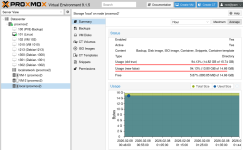
Since I start using Proxmox at home I always found strange the way I need to know the free available space on the disk as on almost all of the places of the UI the units are 1024 for KiB... etc, except when you select a Storage where you can see 1000 for KB (without the i)
finally I found the place where to fix it on the file and see the right numbers (and units)
the original person who wrote it, when and where on the github is
https://github.com/proxmox/pve-manager/commits/master/www/manager6/storage/StatusView.js
ui: storage status: use SI units for usage for consitency with RRD chart
ThomasLamprecht on May 7, 2021
and on the Proxmox server
/usr/share/pve-manager/js/pvemanagerlib.js
that line is around the line 66678
return Proxmox.Utils.render_size_usage(val, max, true);
It should be like that
return Proxmox.Utils.render_size_usage(val, max, false);
it's the only place on the file where you can search for "val, max," to found the right place
----------------------------------------
WARNING: Do not attempt this modification if you do not know what you are doing, and especially not in a production environment; it could cause the user interface to stop working.
btw that is extra, just for fun, just to see the differences for anyone, or if anyone want to change how they want to see it in a different way, made a backup of the file.
that is just if people want to see it and other combinations, and now I just change "usage" with "usage2" and add "free" so is more easy to know how many GiB I have of free disk space on the disk more easy...
if anyone want to see the difference between both representations at the same time, that is how to write it. (I add it a few more things, but it's like like you can see on the picture) and that is on my proxmox server
{
itemId: 'usage',
title: gettext('Usage (old true)'),
valueField: 'used',
maxField: 'total',
renderer: (val, max) => {
if (max === undefined) {
return val;
}
return Proxmox.Utils.render_size_usage(val, max, true);
},
},
{
itemId: 'usage2',
title: gettext('Usage (new false)'),
valueField: 'used',
maxField: 'total',
renderer: (val, max) => {
if (max === undefined) {
return val;
}
return Proxmox.Utils.render_size_usage(val, max, false);
},
},
{
itemId: 'free',
title: gettext('Free'),
valueField: 'used',
maxField: 'total',
printBar: false,
renderer: (val, max) => {
if (max === undefined) {
return val;
}
return Proxmox.Utils.render_size_usage(max-val, max, false);
},
},
finally I found the place where to fix it on the file and see the right numbers (and units)
the original person who wrote it, when and where on the github is
https://github.com/proxmox/pve-manager/commits/master/www/manager6/storage/StatusView.js
ui: storage status: use SI units for usage for consitency with RRD chart
ThomasLamprecht on May 7, 2021
and on the Proxmox server
/usr/share/pve-manager/js/pvemanagerlib.js
that line is around the line 66678
return Proxmox.Utils.render_size_usage(val, max, true);
It should be like that
return Proxmox.Utils.render_size_usage(val, max, false);
it's the only place on the file where you can search for "val, max," to found the right place
----------------------------------------
WARNING: Do not attempt this modification if you do not know what you are doing, and especially not in a production environment; it could cause the user interface to stop working.
btw that is extra, just for fun, just to see the differences for anyone, or if anyone want to change how they want to see it in a different way, made a backup of the file.
that is just if people want to see it and other combinations, and now I just change "usage" with "usage2" and add "free" so is more easy to know how many GiB I have of free disk space on the disk more easy...
if anyone want to see the difference between both representations at the same time, that is how to write it. (I add it a few more things, but it's like like you can see on the picture) and that is on my proxmox server
{
itemId: 'usage',
title: gettext('Usage (old true)'),
valueField: 'used',
maxField: 'total',
renderer: (val, max) => {
if (max === undefined) {
return val;
}
return Proxmox.Utils.render_size_usage(val, max, true);
},
},
{
itemId: 'usage2',
title: gettext('Usage (new false)'),
valueField: 'used',
maxField: 'total',
renderer: (val, max) => {
if (max === undefined) {
return val;
}
return Proxmox.Utils.render_size_usage(val, max, false);
},
},
{
itemId: 'free',
title: gettext('Free'),
valueField: 'used',
maxField: 'total',
printBar: false,
renderer: (val, max) => {
if (max === undefined) {
return val;
}
return Proxmox.Utils.render_size_usage(max-val, max, false);
},
},