Slow ceph operation

kacper.adrianowicz

New Member
Sep 12, 2025
11
1
3
Hi

I have 3 node cluster with 2 x Kioxia 1,92TB SAS Enterprise SSD. Disk operation on VM's are very slow. Network config is as follow:

Each node have:
1 x 1Gb NIC for Ceph public network (the same network as proxmox itself)
1 x 10Gb NIC for Ceph cluster network

I'm no expert in ceph and couldn't figure out what is the issue. I read that problem might be that i have 1Gb NIC for public ceph network that is also used by proxmox.

Is this assumption correct? Should I have seperate 10Gb NIC for ceph public network? Does it have to be separate from ceph cluster network or can it be the same NIC?

Below Ceph config

Code:
[global]
    auth_client_required = cephx
    auth_cluster_required = cephx
    auth_service_required = cephx
    cluster_network = 10.99.99.10/27
    fsid = 6eb06b21-c9f2-4527-8675-5dc65872dde9
    mon_allow_pool_delete = true
    mon_host = 10.0.5.10 10.0.5.11 10.0.5.12
    ms_bind_ipv4 = true
    ms_bind_ipv6 = false
    osd_pool_default_min_size = 2
    osd_pool_default_size = 3
    public_network = 10.0.5.10/27

[client]
    keyring = /etc/pve/priv/$cluster.$name.keyring

[client.crash]
    keyring = /etc/pve/ceph/$cluster.$name.keyring

[mon.g-srv-01]
    public_addr = 10.0.5.10

[mon.g-srv-02]
    public_addr = 10.0.5.11

[mon.g-srv-03]
    public_addr = 10.0.5.12
 
Ceph Public is the network used to read/write from/to your Ceph OSDs from each PVE host, so your are limited to 1GB/s. Ceph Cluster network is used for OSD replication traffic only. Move Ceph Public to your 10GB nic and there should be an improvement. You can share the same nic for both Ceph Public and Ceph Cluster.
 
  • Like
Reactions: Heracleos and aaron
1 x 1Gb NIC for Ceph public network (the same network as proxmox itself)
Move that to a fast network too! Otherwise your guests will be limited by that 1 Gbit. see https://docs.ceph.com/en/latest/rados/configuration/network-config-ref/ for which ceph network is used for what.
Checkout our 2023 Ceph benchmark whitepaper (in the sticky threads). A 10 Gbit network will quickly become the bottleneck if you use fast datacenter NVMEs.

Moving a Ceph network can be done on the fly, but especially for the Ceph Public network, the procedure is a little bit more involved.
How you can change the Ceph network config for a running cluster is explained here: https://lore.proxmox.com/all/20260102165754.650450-1-a.lauterer@proxmox.com/

It is the patch for our documentation. Once a new version of the admin guide is created, it will be there in a more readable form. But that patch should still be readable enough :)
 
Last edited:
Moving a Ceph network can be done on the fly, but especially for the Ceph Public network, the procedure is a little bit more involved.
Nice to see this reaching the official documentation!

Maybe OP did setup a vlan for Ceph Public network with different IP network from that of other cluster services and can just move the vlan to a different physical nic/bond. Did you @kacper.adrianowicz ? If you didn't, you could do it now ;)
 
  • Like
Reactions: Johannes S
Hello everyone!

I moved pulic network to the same 10Gbit network as cluster network. I found great post on forum with step-by-step guide on how to safely do it:


And results are as follow:

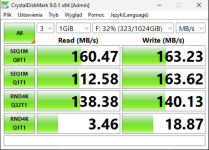
My main VM CrystalDiskMark results were:
1770182483714.png

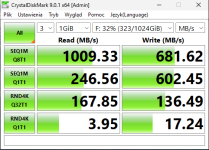
After moving into 10Gbit public network:
1770182510088.png

So it looks a lot better. Hoever it is still not perfect. I started backup of the VM and VM performance tanked. A lot. So much that during backup SQL connection to this server was very, very slow, and it disconnected quite a few times...


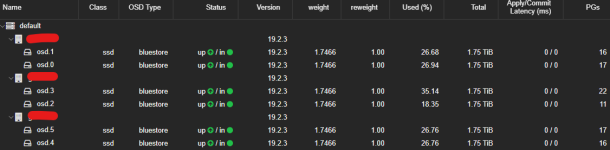
I have no warings on Ceph, OSD's looks fine:
1770182797792.png

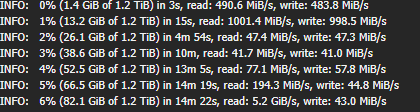
But whole VM is sloooow (during backup). Speed of the backup is also very, very slow
1770182914724.png

And latancy on disks in VM sometimes go up to over few thousands [ms]


What else can I do to improve stability and performance?
 
Did you create different VLANs for public and cluster network? Set MTU on NIC and Switch to 9000?
One or Two switches for Ceph? MLAG? Guest VM network also on the Ceph Switch(es)?
 
  • Like
Reactions: GeraldS
So much that during backup SQL connection to this server was very, very slow, and it disconnected quite a few times...
That could have other reasons that don't relate directly to Ceph. How do you make backups and what is your backup target?
 
Hello everyone!

I moved pulic network to the same 10Gbit network as cluster network. I found great post on forum with step-by-step guide on how to safely do it:


And results are as follow:

My main VM CrystalDiskMark results were:
View attachment 95476

After moving into 10Gbit public network:
View attachment 95477

So it looks a lot better. Hoever it is still not perfect. I started backup of the VM and VM performance tanked. A lot. So much that during backup SQL connection to this server was very, very slow, and it disconnected quite a few times...


I have no warings on Ceph, OSD's looks fine:
View attachment 95478

But whole VM is sloooow (during backup). Speed of the backup is also very, very slow
View attachment 95479

And latancy on disks in VM sometimes go up to over few thousands [ms]


What else can I do to improve stability and performance?
if you backup storage is slow (or if you are limited with network bandwidth), it can slow down vm write during the backup, if a block is not yet saved. (it's not related to ceph, this is the same for any kind of storage) You can try to enable fleecing option in the backup scheduling advanced option, and choose your ceph storage (or another fast storage), to work like a write buffer between your vms and the backup server during the backup.
 
  • Like
Reactions: _gabriel
@devaux
public and cluster network right now are using the same 10Gb NIC and the same VLAN
MTU on NIC and Switch are default 1500 right now
All connected to one switch, without MLAG, and yes albo VMs are connected to the same aggregation switch

@aaron
I tried manual backup, and it goes to NAS that is connected to the same switch with 10Gb NIC

@spirit
I don't think that is the case, 10Gb is enough. I changed it, and we'll see tommorow how it went
 
I tried manual backup, and it goes to NAS that is connected to the same switch with 10Gb NIC
Well, then the question is how fast that NAS can write the backup data. As @spirit mentioned, a slow backup target can have an impact on the running VM. The fleecing option in the backup job options can help if you place that on a fast storage in the cluster. For example, the Ceph RBD storage.
 
@aaron - i placed it on ceph-storage

What configuration should I check / change on ceph-pool, VM config, etc. to make sure that I'm using proper settings?

I read about KRBD on ceph-pool, write-cache on VM, disable RAM balooning and all other settings
 
What configuration should I check / change on ceph-pool, VM config, etc. to make sure that I'm using proper settings?
The fleecing option is part of the backup job config: DC → Backups. In the Advanced settings of the backup jobs
 
@devaux
public and cluster network right now are using the same 10Gb NIC and the same VLAN
MTU on NIC and Switch are default 1500 right now
All connected to one switch, without MLAG, and yes albo VMs are connected to the same aggregation switch

I see room for improvement ;)
- MTU 9000
- Different VLANs for Public, Cluster and VM-Guest-Network.
- Ceph things on a dedicated Switch. For redundancy and speed with additional MLAG setup. Also HW offloading on the Switch could help.

I think with the first two steps you could get some extra speed and don't need any additional hardware.
 
  • Like
Reactions: Johannes S