Severe system freeze with NFS on Proxmox 9 running kernel 6.14.8-2-pve when mounting NFS shares

Same issue here:
we had a perfectly working setup in PVE8 + OVS.
With PVE9 (fully updated) the load on the VM explode suddenly, the share are unaccessible and we have to reboot the VM).
The setup is as this:
- A bare metal NFS server (debian 13 fully updated)
- Several bare metal servers (rocky 9.7) NFS clients that encounter no problem.
- A VM mouting the same shares with NFS 4.2 (rocky 9.7 fully updated, we try several kernel with no luck. As of now we are on 6.17)

We are quite desesperate.
Please ask if more info needed.
 
Last edited:
same issue for me. tried everything in this post and others as well. going to completely kill this instance and start fresh on PVE8.
NFS shares unusable on PVE9 for me.
 
Do you backup this VM using the "Snapshot" mode (to a PBS server, for info) ? We deactivated the backup and the VM is up since 3 days which is a new record.
Maybe it has something to do with the freeze order send to the guest agent ?
 
Sorry for getting your hopes up :(
The load skyrocketted to 300 and the NFS shares are unavailable. This only occurs on this VM, not on bare-metal server.
I wish we could downgrade to PVE8 :(
 
I experienced this today. I upgraded this server to 9 a few days ago. NFS server is Truenas. NFS share set up as a disk and only used for proxmox run backups. Server became unresponsive to ping around 1:30 am. Didn't have time to manually check it but noticed it came back up around 7am. Later when i was on the machine trying to look at the logs I see that around 1:30 there are a lot of network unreachable errors regarding the NFS server. Then what looks like a reboot attempt but network doesn't come back up immediately. There is no gap in logs between 1:30 and 7am so the server was not entirely crashed. My analysis was incomplete because the server went away again while I was logged in.

I wanted to chime in because I don't think anybody noticed the network may come back up by itself after a long time. Might be a clue. I was hoping to switch to CIFS but people have been having issues with that too. That's a bummer.

EDIT: I have disabled the NFS share on the Truenas side, disabled the nfs storage on the proxmox server side and removed the mount. This particular server should not do any NFS calls right now. However I noticed that it just went down again. I am a little puzzled by this but I won't have access until it either comes up by itself or I take a walk to the server room next week. (As far as I can tell this was an unrelated kernel panic. Something to do with cpu power states. Prox 9 has been brutal on this old box)
 
Last edited:
Same issue here:
we had a perfectly working setup in PVE8 + OVS.
With PVE9 (fully updated) the load on the VM explode suddenly, the share are unaccessible and we have to reboot the VM).
The setup is as this:
- A bare metal NFS server (debian 13 fully updated)
- Several bare metal servers (rocky 9.7) NFS clients that encounter no problem.
- A VM mouting the same shares with NFS 4.2 (rocky 9.7 fully updated, we try several kernel with no luck. As of now we are on 6.17)

We are quite desesperate.
Please ask if more info needed.

This thread prompted me to do some testing before upgrading the production box.

On a test server, installed pve 8.2 (what i'm running on the prod box), then restored various pve and other config files (think full recovery). Once at a satisfactory state, updated to pve 8.4, then to pve 9.1.

Once on 9.1, installed TN scale 25.10 (also tested with 25.04) as a vm. For the data disk, allocated 100GB as a virtual disk. Created a dataset and nfs export.

Mounted the export on the proxmox host then did a simple ``cat /dev/random > /mnt/pve/nfs_export_dataset/file`` . Just dump a ton of random data to a file on the nfs export.

To monitor activity, I had zpool iostat 1 running on truenas and iftop on the proxmox host. It was obvious when things stalled out.

I repeated the same test with same failures using 6.12 kernel and 6.8.

**HERE's** where things get bizarre. Also mounted was a nfs export from the production box (TN running as a vm there too). I was able to successfully transfer gigabytes of data with no issues.

It was going over a 2.5gb network. The disk used on the test proxmox is a spinner, so top write speed of ~180 MB/s. Transfers to the production box were well over 250MB/s with no crashes/lock ups.

Next iteration will be to install proxmox 9.1 from scratch, update fully, reinstall TN and retest as above. If successful then retest with pve 8.4 updated to 9.1.
 
Has anyone tried a direct PCI pass of the storage ssd thru to the nas vm yet? That's my project for today. I have this issue
 
Can you clarify what exactly you mean?

Are you passing a sata or nvme device?

How were you passing it through before?
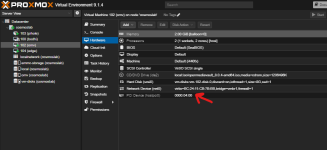
certainly. here is how it is now addded, and working stabily. what a relief.

prior to this I was using a proxmox pass through command to map it to that VM. I also tried adding a thick volume for the data drive. long story short, whenever proxmox had any control of the data disk things crashed severely just like other people in this thread are getting

1768496156532.png
 
No. Instead of a raw device use a mapping as described in the link. intel_iommu and amd_iommu are not needed as they are enabled by default on recent kernels.
 
Last edited:
No. Instead of a raw device use a mapping as described in the link. intel_iommu and amd_iommu are not even needed as they are enabled by default on recent kernels.
Oh I got you. There is a layer of indirection in proxmomx in resource mapping in datacenter. I see that. Thank you for the advice and ill also clear those options out of my grub.
 
certainly. here is how it is now addded, and working stabily. what a relief.

prior to this I was using a proxmox pass through command to map it to that VM. I also tried adding a thick volume for the data drive. long story short, whenever proxmox had any control of the data disk things crashed severely just like other people in this thread are getting

View attachment 94954

Thanks for replying. So it appears you're passing through a nvme drive?

Did you use this to pass through the disk before - https://pve.proxmox.com/wiki/Passthrough_Physical_Disk_to_Virtual_Machine_(VM) ?

What's interesting, in my testing (post #46), I'm not even passing through a whole disk, rather a virtual disk from the same physical disk proxmox was installed onto (local-lvm). In my production box, actual sata controllers are passed through, allowing access to all available sata ports on the board.

However, you might be on to something with your comment about proxmox having any kind of control of the disk causing issues.

I can't pass through the sata controller as that's what proxmox is booting from. I do have a hba I can install, attach another disk to it and retest.

If it doesn't crash that would indeed confirm your theory about proxmox causing issues when handling storage and nfs.

I still want to retest with a fresh install, and with prox 8.2. Same scenario, create virtual data disk for truenas, configure export, then write to that export from the host, loading it up as much as possible.
 
Thanks for replying. So it appears you're passing through a nvme drive?

Did you use this to pass through the disk before - https://pve.proxmox.com/wiki/Passthrough_Physical_Disk_to_Virtual_Machine_(VM) ?

What's interesting, in my testing (post #46), I'm not even passing through a whole disk, rather a virtual disk from the same physical disk proxmox was installed onto (local-lvm). In my production box, actual sata controllers are passed through, allowing access to all available sata ports on the board.

However, you might be on to something with your comment about proxmox having any kind of control of the disk causing issues.

I can't pass through the sata controller as that's what proxmox is booting from. I do have a hba I can install, attach another disk to it and retest.

If it doesn't crash that would indeed confirm your theory about proxmox causing issues when handling storage and nfs.

I still want to retest with a fresh install, and with prox 8.2. Same scenario, create virtual data disk for truenas, configure export, then write to that export from the host, loading it up as much as possible.
Im not going to read that doc, but i did use some proxmox command to pass it thru intially. As I said, that didnt work.
 
Following @cosmos255 suggestion above, I retested 9.1 w/kern 6.17 with disk directly attached to TN using sas hba in pass through.

To clarify, truenas resides as a vm under proxmox.

Additional virtual disk (stored on local-lvm created during proxmox install) defined in TN as the zfs vdev.

NFS share configured and exported.

Above nfs share mounted Proxmox host.

To generate load, simple "cat /dev/random > filename.ext" executed in the mounted folder.

Writes stall after writing few hundred MB to few GB - varies, but always stalls in under 30s. To recover have to unmount with the "-l" (lazy) parameter in proxmox host.

Performing the same test on a disk connected directly to TN using the HBA (or likely sata controller if pass through was possible), no issues. Tested by writing up to 100GB with no issues. To further increase load, disabled zfs SYNC option and limited writes to ~5GB to keep within memory cache. Still no issues.

Conclusion: Inconclusive. Some in this thread have reported their nfs server is an entirely different box. Effectively proxmox is functioning as a nfs client only and nothing else, no nas vm's or disks involved.

That said, I think if a nas is being run as a vm, the safest way to access attached disks is by passing the sata or hba directly to the guest. Passing the disks or even using virtual disks __should__ work (albeit slowly) without crashing, but appears to not be the case.

Post #24, https://forum.proxmox.com/threads/s...e-when-mounting-nfs-shares.169571/post-813200, by @wuwu indicates just this kind of configuration but still has issues. Perhaps this was fixed with kernel 6.17? He never updated his post any other results.

What a mess.
 
  • Like
Reactions: cosmos255
Tested same scenario on a z690/12700k platform. No lockups or crashes with nfs. The only consistent thing about all this is the inconsistency. Previous platform was a b550/3700x. This really does seem to be a case of ymmv type situation.
 
Tested same scenario on a z690/12700k platform. No lockups or crashes with nfs. The only consistent thing about all this is the inconsistency. Previous platform was a b550/3700x. This really does seem to be a case of ymmv type situation.
Yes, your mileage may always vary. However, it seems that what you are saying is that the pass-through resolved your issue. It also resolved mine. So we are two out of two success stories so far. At least that is how I read your posts.