I'm a little disappointed that no one from the team or the developers has commented on the problem yet.


Severe system freeze with NFS on Proxmox 9 running kernel 6.14.8-2-pve when mounting NFS shares
- Thread starter Krailler
- Start date
-
- Tags
- kernel 6.14 n100 pve 9.0.0~11
You are using an out of date browser. It may not display this or other websites correctly.
You should upgrade or use an alternative browser.
You should upgrade or use an alternative browser.

Usually, that means there's nothing concrete to say yet.I'm a little disappointed that no one from the team or the developers has commented on the problem yet.
This is a real issue, but it's also been noticeably difficult to pin down the causes on it. Something's going on in 6.14 with NFS, but not for everyone, and it doesn't seem easily repeatable in a way that would make testing easier.
Not to mention NFS setups themselves tend to get heavily tweaked, so incoming reports all have different underlying configurations.
Hey all, just seen this thread as a reply to a post I made a few days ago and seems related (although im using CIFS / Synology) some of it does sound the same
under normal usage it presents itself as random disconnections. (sonarr processing stalls or playback of media just stops)
Id replicated my setup from a pi4 (docker with jellyfin/sonarr/nextcloud but using a nice silent minipc with better cpu/ram and I prefer proxmox's ability for backup/restore and have tested restoring the container to a different device & get exactly the same symtoms.
(I first noticed just watching shows/films, some days its fine, some days random freezes) at first i just restarted the nas/proxmox but as it carried on ive been looking more into it, & it just appears that any large network transfers (e.g proxmox network backup, sonarr handling files, tdarr health checks etc) cause the mounts to vanish,
seen some posts mentioning intel nic issues and turning tso/gso/gro off which i tried last night, made zero difference (i can reliably reproduce this issue within 20-30 secs just by manually running a jellyfin media segment scan/keyframe extract task) so is easy to test things to see if anything fixes it, thus far nothing has changed and is broken.
NAS settings smb2/smb3/oplocks on/off etc
Network - tried jumbo frames / different ports / different cables (but i dont suspect network as the pi4 setup works flawless)
Firewall - unsered IDS/DOS protection bypassed
Proxmox network - tried tso/gso/gro off, tried a different USB3 nic - no change
would be nice to get this running reliably, the pi4 setup works flawlessly (but obviously less ram/cpu/slower processing) so proxmox on an i7/16gb/nvme should theoretically wipe the floor with it (and it does, for a short while!) its just so unreliable and unstable with this mounts issue.
for now for my sanity & reliability / usability i'll stick with the Pi4b setup, but if anyone has any solid fix for this, would love to hear what fixed it!
thanks
I've been wrestling with the same exact issue. It also happens the most for me with jellyfin, but I potentially see it with any traffic to my network storage (a Synology NAS).
I've tried SMB and NFS connections, and I've tried bind mounts on LXC containers and directly mounting in VMs. Nothing has corrected this problem yet.
It *used* to work. I can't say when the issue started exactly, but I believe it was after I updated my Proxmox 8 machine recently. I have since done a fresh install of Proxmox 9 on a different machine and get the same behavior.
This thread may be the same problem...
I've tried SMB and NFS connections, and I've tried bind mounts on LXC containers and directly mounting in VMs. Nothing has corrected this problem yet.
It *used* to work. I can't say when the issue started exactly, but I believe it was after I updated my Proxmox 8 machine recently. I have since done a fresh install of Proxmox 9 on a different machine and get the same behavior.
This thread may be the same problem...
under normal usage it presents itself as random disconnections. (sonarr processing stalls or playback of media just stops)
Id replicated my setup from a pi4 (docker with jellyfin/sonarr/nextcloud but using a nice silent minipc with better cpu/ram and I prefer proxmox's ability for backup/restore and have tested restoring the container to a different device & get exactly the same symtoms.
(I first noticed just watching shows/films, some days its fine, some days random freezes) at first i just restarted the nas/proxmox but as it carried on ive been looking more into it, & it just appears that any large network transfers (e.g proxmox network backup, sonarr handling files, tdarr health checks etc) cause the mounts to vanish,
seen some posts mentioning intel nic issues and turning tso/gso/gro off which i tried last night, made zero difference (i can reliably reproduce this issue within 20-30 secs just by manually running a jellyfin media segment scan/keyframe extract task) so is easy to test things to see if anything fixes it, thus far nothing has changed and is broken.
NAS settings smb2/smb3/oplocks on/off etc
Network - tried jumbo frames / different ports / different cables (but i dont suspect network as the pi4 setup works flawless)
Firewall - unsered IDS/DOS protection bypassed
Proxmox network - tried tso/gso/gro off, tried a different USB3 nic - no change
would be nice to get this running reliably, the pi4 setup works flawlessly (but obviously less ram/cpu/slower processing) so proxmox on an i7/16gb/nvme should theoretically wipe the floor with it (and it does, for a short while!) its just so unreliable and unstable with this mounts issue.
for now for my sanity & reliability / usability i'll stick with the Pi4b setup, but if anyone has any solid fix for this, would love to hear what fixed it!
thanks

Hi everyone,
I’m dealing with persistent I/O stalls in a setup where:
Here is my environment:
NFS (on Proxmox host):
nfs: server 192.168.30.104 not responding, still trying
...
nfs: server 192.168.30.104 OK
Typically repeating in long cycles:
[31958.410247] nfs: server 192.168.30.104 not responding, still trying
[32741.776511] nfs: server 192.168.30.104 OK
[33028.495824] nfs: server 192.168.30.104 not responding, still trying
[33749.397840] nfs: server 192.168.30.104 OK
And frequent hung tasks (state D) during flush/close:
INFO: task Tdarr_Server:661925 blocked for more than 122 seconds.
...
nfs_wb_all -> nfs4_file_flush -> filp_flush -> __x64_sys_close
SMB (on Proxmox host):
CIFS: VFS: \\192.168.30.104 has not responded in 45 seconds. Reconnecting...
CIFS: trying to dequeue a deleted mid
What I’ve already tested:
NFS and SMB tuning – various option profiles, Mount separation (each container gets its own NFS/SMB mount), Network & kernel tuning (Flow Control + RSTP disabled)).
Result: despite all above, NFS “not responding” and CIFS “Reconnecting…” persist, especially during concurrent RW (Tdarr) and RO (Plex) workloads.
Occasionally Tdarr processes enter D state due to kernel waits in nfs_wb_all or netfs_write.
To be clear, in my previous version of Proxmox, which was 8, everything worked perfectly without any problems with NFS or SMB mounts in unprivileged LXC containers.
I’m dealing with persistent I/O stalls in a setup where:
- Proxmox VE (host) runs TrueNAS SCALE as a VM
- The Proxmox host mounts NFS/SMB exports from the TrueNAS VM
- These mounts are bind-mounted into unprivileged LXC containers (Plex, Tdarr, TubeArchivist)
Here is my environment:
- Proxmox VE: kernel 6.14.11-4-pve
- TrueNAS SCALE: running as a VM (VirtIO NIC + disks via HBA passthrough)
- TrueNAS VM: 4 vCPUs (tested with 8 vCPUs too), ZFS on raw disks
- Networking: 10 GbE (LACP bond, MTU 1500, RSTP + flow control disabled, VirtIO interface)
- LXC containers (unprivileged):
- 117: Plex – mostly read, rare writes
- 120: Tdarr – transcodes (heavy RW)
- 130: TubeArchivist – RW for metadata and thumbnails
NFS (on Proxmox host):
nfs: server 192.168.30.104 not responding, still trying
...
nfs: server 192.168.30.104 OK
Typically repeating in long cycles:
[31958.410247] nfs: server 192.168.30.104 not responding, still trying
[32741.776511] nfs: server 192.168.30.104 OK
[33028.495824] nfs: server 192.168.30.104 not responding, still trying
[33749.397840] nfs: server 192.168.30.104 OK
And frequent hung tasks (state D) during flush/close:
INFO: task Tdarr_Server:661925 blocked for more than 122 seconds.
...
nfs_wb_all -> nfs4_file_flush -> filp_flush -> __x64_sys_close
SMB (on Proxmox host):
CIFS: VFS: \\192.168.30.104 has not responded in 45 seconds. Reconnecting...
CIFS: trying to dequeue a deleted mid
What I’ve already tested:
NFS and SMB tuning – various option profiles, Mount separation (each container gets its own NFS/SMB mount), Network & kernel tuning (Flow Control + RSTP disabled)).
Result: despite all above, NFS “not responding” and CIFS “Reconnecting…” persist, especially during concurrent RW (Tdarr) and RO (Plex) workloads.
Occasionally Tdarr processes enter D state due to kernel waits in nfs_wb_all or netfs_write.
To be clear, in my previous version of Proxmox, which was 8, everything worked perfectly without any problems with NFS or SMB mounts in unprivileged LXC containers.
I have NFS stalls as well when doing high I/O operations like disk moves. I tried NFS version 3 , also applied different tunning parameters to NFS mount and nothing seem to help stalls and freezes continue to happen.
I'm happy to hear that other are having difficulties too. Since monday I'm debugging the NFS, CIFS (Synology) issue and I simply cannot find the exact source of the I/O stalls on my Promox host. Just putting a little load on the NFS or CIFS shares and my system is completely gone. It must be in the kernel because I simply cannot find any related processes that could lead to this issue. I hope this gets fixed soon because Proxmox is just not unusable for the moment.
Last edited:
Same issue on my side with kernel 6.14.11-4-pve. I recently migrated to new hardware and to pve9 from pve7. I was running NFS server in LXC and other LXCs and proxmox itself were joined to it. It was working fine on pve7. Currently it is not possible to copy (rsync) bigger amount of data, it freezes completely and only reboot helps. I tried to run TrueNAS in VM, but same results, it freezes during transfer within couple of seconds.. Load avarage goes to 40 and IO delay up to 80%.
Last edited:
Are you accessing nfs from a vm, or datacentre storage?Worst of all - is a deadlock. There are no way to kill NFS driver process ("kill 9" or etc). Only reboot is needed...
Is any way to avoid deadlock? soft mounting, timeout, or etc?
Using the datacentre storage nfs, and then passing paths from this share to lxc often hangs mine.
I have been able to get it going by killing the container, and then the node comes back.
To people having problems with CIFS mounts try adding cache=none option to the CIFS mount in /etc/fstab on kernel 6.17.
I've had the same problems as the people above after upgrading to Proxmox 9. I have a CIFS share from a Windows VM mounted on the Proxmox host. Transferring files bigger than a couple of GBs causes the transfer to fail midway and deadlock the system, requiring a reboot. I had to downgrade to kernel 6.8, as even 6.11 seemed to have the same problem.
The problem still seems to exist with PVE 9.1 and kernel 6.17.2-1-pve, but it doesn't deadlock the system and instead just fails. While trying out different settings to diagnose the problem I added cache=none and now the transfer doesn't seem to fail.
I've had the same problems as the people above after upgrading to Proxmox 9. I have a CIFS share from a Windows VM mounted on the Proxmox host. Transferring files bigger than a couple of GBs causes the transfer to fail midway and deadlock the system, requiring a reboot. I had to downgrade to kernel 6.8, as even 6.11 seemed to have the same problem.
The problem still seems to exist with PVE 9.1 and kernel 6.17.2-1-pve, but it doesn't deadlock the system and instead just fails. While trying out different settings to diagnose the problem I added cache=none and now the transfer doesn't seem to fail.
I'm experiencing the same issue on PVE 9.0.11. It's an NTFS NFS mount to a VM. At first, I thought it was due to some bad sectors on the drive that I was reading from, but after reading this thread, I now believe it's because of whatever bug is going on here. I will try to grab logs next time it happens.
Kernel version:
Mount configuration:
FWIW, when I mount the exact same share, exact same drive and run the exact same operation in a vanilla debian VM running in PVE, I do not see the same behavior — everything runs just as it should.
Kernel version:
Code:
prox:~# uname -r
6.14.11-4-pve
Mount configuration:
Code:
mount -t nfs 1**.***.**.***:/mnt/tank/hdd_import /mnt/hdd_import/FWIW, when I mount the exact same share, exact same drive and run the exact same operation in a vanilla debian VM running in PVE, I do not see the same behavior — everything runs just as it should.
Last edited:
Hello community, in case our experience from last week is useful to you.
When migrating a platform from version 6.4 to 9.1.1, we had the same problem with NFS server on the same Proxmox node or in a VM - it would become completely blocked exactly 30 minutes after node startup or during a backup after just a few minutes, and the only thing we could do was restart the node. It even rebooted itself a couple of times because the IO Delay would spike brutally during copy tests. The other four external NFS servers had no problem with version 4.1.
These NFS servers have been working for years on the old platform and we never had any problems. After investigating, we've managed to keep it stable for 2 days now without any freezing or disconnections, with backups working perfectly. To achieve this, on the NFS servers that had the problem, we made the following configuration with v3 (we'll test v4 in a test environment because there was no way to make it work).
We set fixed ports for statd and lockd ports, and allowed only v3:
/etc/nfs.conf
[mountd]
manage-gids=y
[lockd]
port=32803
udp-port=32769
[statd]
port=32765
outgoing-port=32766
[nfsd]
vers3=y
vers4=n
vers4.0=n
vers4.1=n
vers4.2=n
We added to /etc/default/nfs-kernel-server:
RPCNFSDOPTS="--no-nfs-version 4 --nfs-version 3 --threads=32"
RPCMOUNTDOPTS="--manage-gids --port 32767"
After that, we mounted the NFS in Proxmox with the options:
options noatime,vers=3,hard,intr,timeo=600,retrans=5
The problem that occurred after 30 minutes disappeared and backups were performed correctly with excellent speed and without the nodes suffering high IO delay, except for one of them. We realized that when it reached a particular VM, the IO delay would spike again between 50-60% during the copy of that VM. After reviewing the VM, the problem was that it was misconfigured regarding sockets - it had more sockets than the physical node itself. We set it to the same number as the physical node and it dropped from 50% to 0%, and the backup no longer affected the node.
When migrating a platform from version 6.4 to 9.1.1, we had the same problem with NFS server on the same Proxmox node or in a VM - it would become completely blocked exactly 30 minutes after node startup or during a backup after just a few minutes, and the only thing we could do was restart the node. It even rebooted itself a couple of times because the IO Delay would spike brutally during copy tests. The other four external NFS servers had no problem with version 4.1.
These NFS servers have been working for years on the old platform and we never had any problems. After investigating, we've managed to keep it stable for 2 days now without any freezing or disconnections, with backups working perfectly. To achieve this, on the NFS servers that had the problem, we made the following configuration with v3 (we'll test v4 in a test environment because there was no way to make it work).
We set fixed ports for statd and lockd ports, and allowed only v3:
/etc/nfs.conf
[mountd]
manage-gids=y
[lockd]
port=32803
udp-port=32769
[statd]
port=32765
outgoing-port=32766
[nfsd]
vers3=y
vers4=n
vers4.0=n
vers4.1=n
vers4.2=n
We added to /etc/default/nfs-kernel-server:
RPCNFSDOPTS="--no-nfs-version 4 --nfs-version 3 --threads=32"
RPCMOUNTDOPTS="--manage-gids --port 32767"
After that, we mounted the NFS in Proxmox with the options:
options noatime,vers=3,hard,intr,timeo=600,retrans=5
The problem that occurred after 30 minutes disappeared and backups were performed correctly with excellent speed and without the nodes suffering high IO delay, except for one of them. We realized that when it reached a particular VM, the IO delay would spike again between 50-60% during the copy of that VM. After reviewing the VM, the problem was that it was misconfigured regarding sockets - it had more sockets than the physical node itself. We set it to the same number as the physical node and it dropped from 50% to 0%, and the backup no longer affected the node.
Thanks @tlobo for sharing.
I tested it on myself. Unfortunately, there was no improvement.
------------------------------------------------------------------------------------------------
My NFS-Server
Raspberry Pi 3 Model B
1TB USB-C SSD
Raspbian 12
nfs-kernel-server 1:2.6.2-4+deb12u1
------------------------------------------------------------------------------------------------
Proxmox Node
VE 9.0.17
Linux proxmox 6.17.2-1-pve #1 SMP PREEMPT_DYNAMIC PMX 6.17.2-1 (2025-10-21T11:55Z) x86_64 GNU/Linux
------------------------------------------------------------------------------------------------
Then I started the backup on the NFS share, but unfortunately nothing changed. The web interface rarely responds and is sometimes unavailable. Some VMs are unavailable, and so on.
What a shame! I had high hopes.
------------------------------------------------------------------------------------------------
EDIT:
I then updated to the current Proxmox VE 9.1.1 with kernel 6.17.2-2-pve, but unfortunately without success.
I tested it on myself. Unfortunately, there was no improvement.
------------------------------------------------------------------------------------------------
My NFS-Server
Raspberry Pi 3 Model B
1TB USB-C SSD
Raspbian 12
nfs-kernel-server 1:2.6.2-4+deb12u1
vi /etc/nfs.conf
Code:
#
# This is a general configuration for the
# NFS daemons and tools
#
[general]
pipefs-directory=/run/rpc_pipefs
#
[nfsrahead]
# nfs=15000
# nfs4=16000
#
[exports]
# rootdir=/export
#
[exportfs]
# debug=0
#
[gssd]
# verbosity=0
# rpc-verbosity=0
# use-memcache=0
# use-machine-creds=1
# use-gss-proxy=0
# avoid-dns=1
# limit-to-legacy-enctypes=0
# context-timeout=0
# rpc-timeout=5
# keytab-file=/etc/krb5.keytab
# cred-cache-directory=
# preferred-realm=
# set-home=1
# upcall-timeout=30
# cancel-timed-out-upcalls=0
#
[lockd]
port=32803
udp-port=32769
# port=0
# udp-port=0
#
[exportd]
# debug="all|auth|call|general|parse"
# manage-gids=n
# state-directory-path=/var/lib/nfs
# threads=1
# cache-use-ipaddr=n
# ttl=1800
[mountd]
manage-gids=y
# debug="all|auth|call|general|parse"
manage-gids=y
# descriptors=0
# port=0
# threads=1
# reverse-lookup=n
# state-directory-path=/var/lib/nfs
# ha-callout=
# cache-use-ipaddr=n
# ttl=1800
#
[nfsdcld]
# debug=0
# storagedir=/var/lib/nfs/nfsdcld
#
[nfsdcltrack]
# debug=0
# storagedir=/var/lib/nfs/nfsdcltrack
#
[nfsd]
vers3=y
vers4=n
vers4.0=n
vers4.1=n
vers4.2=n
# debug=0
# threads=8
# host=
# port=0
# grace-time=90
# lease-time=90
# udp=n
# tcp=y
# vers3=y
# vers4=y
# vers4.0=y
# vers4.1=y
# vers4.2=y
# rdma=n
# rdma-port=20049

[statd]
port=32765
outgoing-port=32766
# debug=0
# port=0
# outgoing-port=0
# name=
# state-directory-path=/var/lib/nfs/statd
# ha-callout=
# no-notify=0
#
[sm-notify]
# debug=0
# force=0
# retry-time=900
# outgoing-port=
# outgoing-addr=
# lift-grace=y
#
[svcgssd]
# principal=
vi /etc/default/nfs-kernel-server
Code:
# Number of servers to start up
RPCNFSDCOUNT=8

# Runtime priority of server (see nice(1))
RPCNFSDPRIORITY=0

# Options for rpc.mountd.
# If you have a port-based firewall, you might want to set up
# a fixed port here using the --port option. For more information,
# see rpc.mountd(8) or http://wiki.debian.org/SecuringNFS
# To disable NFSv4 on the server, specify '--no-nfs-version 4' here
#RPCMOUNTDOPTS="--manage-gids"
RPCNFSDOPTS="--no-nfs-version 4 --nfs-version 3 --threads=32"
RPCMOUNTDOPTS="--manage-gids --port 32767"

# Do you want to start the svcgssd daemon? It is only required for Kerberos
# exports. Valid alternatives are "yes" and "no"; the default is "no".
NEED_SVCGSSD=""

# Options for rpc.svcgssd.
RPCSVCGSSDOPTS=""reboot------------------------------------------------------------------------------------------------
Proxmox Node
VE 9.0.17
Linux proxmox 6.17.2-1-pve #1 SMP PREEMPT_DYNAMIC PMX 6.17.2-1 (2025-10-21T11:55Z) x86_64 GNU/Linux
vi /etc/pve/storage.cfg
Code:
nfs: backup
        export /mnt/backup/proxmox
        path /mnt/pve/backup
        server 192.168.XXX.XXX
        content backup
        options noatime,vers=3,hard,intr,timeo=600,retrans=5
        prune-backups keep-all=1
umount /mnt/pve/backupsystemctl restart pvedaemonumount /mnt/pve/backuppvesm statuspvesm statuspvesm statusmount------------------------------------------------------------------------------------------------
Then I started the backup on the NFS share, but unfortunately nothing changed. The web interface rarely responds and is sometimes unavailable. Some VMs are unavailable, and so on.
What a shame! I had high hopes.
------------------------------------------------------------------------------------------------
EDIT:
I then updated to the current Proxmox VE 9.1.1 with kernel 6.17.2-2-pve, but unfortunately without success.
Last edited:
You have two:Thanks @tlobo for sharing.
I tested it on myself. Unfortunately, there was no improvement.
------------------------------------------------------------------------------------------------
My NFS-Server
Raspberry Pi 3 Model B
1TB USB-C SSD
Raspbian 12
nfs-kernel-server 1:2.6.2-4+deb12u1
vi /etc/nfs.conf
Code:# # This is a general configuration for the # NFS daemons and tools # [general] pipefs-directory=/run/rpc_pipefs # [nfsrahead] # nfs=15000 # nfs4=16000 # [exports] # rootdir=/export # [exportfs] # debug=0 # [gssd] # verbosity=0 # rpc-verbosity=0 # use-memcache=0 # use-machine-creds=1 # use-gss-proxy=0 # avoid-dns=1 # limit-to-legacy-enctypes=0 # context-timeout=0 # rpc-timeout=5 # keytab-file=/etc/krb5.keytab # cred-cache-directory= # preferred-realm= # set-home=1 # upcall-timeout=30 # cancel-timed-out-upcalls=0 # [lockd] port=32803 udp-port=32769 # port=0 # udp-port=0 # [exportd] # debug="all|auth|call|general|parse" # manage-gids=n # state-directory-path=/var/lib/nfs # threads=1 # cache-use-ipaddr=n # ttl=1800 [mountd] manage-gids=y # debug="all|auth|call|general|parse" manage-gids=y # descriptors=0 # port=0 # threads=1 # reverse-lookup=n # state-directory-path=/var/lib/nfs # ha-callout= # cache-use-ipaddr=n # ttl=1800 # [nfsdcld] # debug=0 # storagedir=/var/lib/nfs/nfsdcld # [nfsdcltrack] # debug=0 # storagedir=/var/lib/nfs/nfsdcltrack # [nfsd] vers3=y vers4=n vers4.0=n vers4.1=n vers4.2=n # debug=0 # threads=8 # host= # port=0 # grace-time=90 # lease-time=90 # udp=n # tcp=y # vers3=y # vers4=y # vers4.0=y # vers4.1=y # vers4.2=y # rdma=n # rdma-port=20049 [statd] port=32765 outgoing-port=32766 # debug=0 # port=0 # outgoing-port=0 # name= # state-directory-path=/var/lib/nfs/statd # ha-callout= # no-notify=0 # [sm-notify] # debug=0 # force=0 # retry-time=900 # outgoing-port= # outgoing-addr= # lift-grace=y # [svcgssd] # principal=
vi /etc/default/nfs-kernel-server
Code:# Number of servers to start up RPCNFSDCOUNT=8 # Runtime priority of server (see nice(1)) RPCNFSDPRIORITY=0 # Options for rpc.mountd. # If you have a port-based firewall, you might want to set up # a fixed port here using the --port option. For more information, # see rpc.mountd(8) or http://wiki.debian.org/SecuringNFS # To disable NFSv4 on the server, specify '--no-nfs-version 4' here #RPCMOUNTDOPTS="--manage-gids" RPCNFSDOPTS="--no-nfs-version 4 --nfs-version 3 --threads=32" RPCMOUNTDOPTS="--manage-gids --port 32767" # Do you want to start the svcgssd daemon? It is only required for Kerberos # exports. Valid alternatives are "yes" and "no"; the default is "no". NEED_SVCGSSD="" # Options for rpc.svcgssd. RPCSVCGSSDOPTS=""
reboot
------------------------------------------------------------------------------------------------
Proxmox Node
VE 9.0.17
Linux proxmox 6.17.2-1-pve #1 SMP PREEMPT_DYNAMIC PMX 6.17.2-1 (2025-10-21T11:55Z) x86_64 GNU/Linux
vi /etc/pve/storage.cfg
Code:nfs: backup export /mnt/backup/proxmox path /mnt/pve/backup server 192.168.XXX.XXX content backup options noatime,vers=3,hard,intr,timeo=600,retrans=5 prune-backups keep-all=1
umount /mnt/pve/backup
systemctl restart pvedaemon
umount /mnt/pve/backup
pvesm status
pvesm status
pvesm status
mount
------------------------------------------------------------------------------------------------
Then I started the backup on the NFS share, but unfortunately nothing changed. The web interface rarely responds and is sometimes unavailable. Some VMs are unavailable, and so on.
What a shame! I had high hopes.
------------------------------------------------------------------------------------------------
EDIT:
I then updated to the current Proxmox VE 9.1.1 with kernel 6.17.2-2-pve, but unfortunately without success.
manage-gids=y
# debug="all|auth|call|general|parse"
manage-gids=y
Since it's a Raspberry Pi, try lowering the backup workers to 4 or 8
You have two:
manage-gids=y
# debug="all|auth|call|general|parse"
manage-gids=y
Since it's a Raspberry Pi, try lowering the backup workers to 4 or 8
workers = threads?
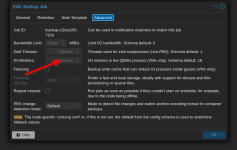
Actually, I haven't had any problems with external NFS servers. The problem was with those mounted on the node itself or within a virtual machine, and this configuration solved the problems; it's still stable.@tlobo Thanks! Unfortunately, that doesn't change anything.
For a Raspberry Pi, I would start with a conservative configuration. In /etc/nfs.conf, I would add the option threads=8 in the [nfsd] section. Then, in /etc/default/nfs-kernel-server, I would also change the threads to 8, leaving it like this:
RPCNFSDOPTS="--no-nfs-version 4 --nfs-version 3 --threads=8"
I would try with small buffers on the mount:
options noatime,vers=3,hard,intr,timeo=600,retrans=5,rsize=8192,wsize=8192
And for backups, I would start by setting the number of workers to 1. Then, if this works, I would gradually increase the number to see how much performance I could get.
Thanks! Unfortunately, that doesn't change anything.Actually, I haven't had any problems with external NFS servers. The problem was with those mounted on the node itself or within a virtual machine, and this configuration solved the problems; it's still stable.
For a Raspberry Pi, I would start with a conservative configuration. In /etc/nfs.conf, I would add the option threads=8 in the [nfsd] section. Then, in /etc/default/nfs-kernel-server, I would also change the threads to 8, leaving it like this:
RPCNFSDOPTS="--no-nfs-version 4 --nfs-version 3 --threads=8"
I would try with small buffers on the mount:
options noatime,vers=3,hard,intr,timeo=600,retrans=5,rsize=8192,wsize=8192
And for backups, I would start by setting the number of workers to 1. Then, if this works, I would gradually increase the number to see how much performance I could get.
But as I said, everything ran smoothly with PVE 8.
Hi!
I have the same problem and it looks like I found a solution.
NFS shares from the Truenas scale virtual machine are mounted to unprivileged LXC via the host.
In /etc/fstab, I added vers=3 and lookupcache=none to the NFS parameters.
One day passed without freeze.
I have the same problem and it looks like I found a solution.
NFS shares from the Truenas scale virtual machine are mounted to unprivileged LXC via the host.
In /etc/fstab, I added vers=3 and lookupcache=none to the NFS parameters.
One day passed without freeze.