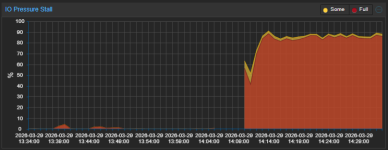
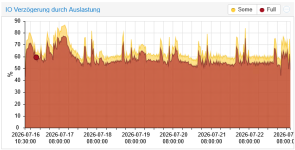
Server-Disk I/O delay 100% during cloning and backup

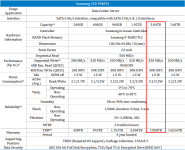
awesome. those drives are definitely worthy. i got confused the same as @uzumo because of the 2TB statement.
so in reality it 3.84TB drives.

those drives should definitely work both in zfs as well as hardware-raid.

unfortunately i only have mirrored ssds here to test.
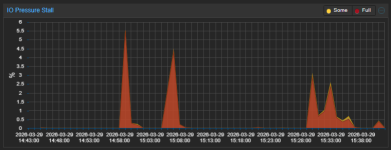
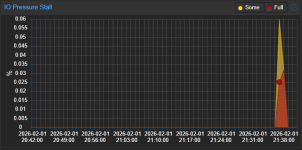
while i cant reproduce your exact setup i tried cloning my biggest windows vm and watched the io pressure on my running vms and the impact was negligible:
1769978546549.png

yes its a spike, but the spike was the whole 0.06%, so basically nothing.
that monitored vm doesnt have any massive io though, so the effect on something running a database might be much bigger.
what exactly is running on that vm? is it something that writes a lot to disk?

so just to repeat. you see the io pressure issue both on hardware raid with lvm and on zfs raidz2, right?
if so we cant really blame the raid controller.
do you have the possibility to check different disk-configurations for their behaviour?
with this i mean things such as 2 disks mirrored zfs, 6 or 8 disk striped mirrors (3/4 vdevs made from 1 mirror each)
reason is that raidz2 (and raid6) isnt the greatest when its about iops.
there is a valid chance that the situation improves if you use raid10/striped mirrors.
you will lose 50% capacity though.

only do that if you can afford the downtime though.

 
What's zpool status -vt and lsblk -Do+FSTYPE,LABEL,MODEL look like?
 
If that was meant for me, I enabled TRIM per the above posts, and ran it yesterday. It's just not enabled by default by Proxmox's installer. Using SATA SSDs as a boot mirror.
 
I’m seeing the exact same behavior here and was wondering if anyone actually managed to solve it properly.

My setup:
  • HP ML350 Gen9
  • P440ar
  • 5x Intel Enterprise SSD (RAID5)
  • local-lvm (LVM-thin, default Proxmox setup)
Symptoms:
  • During migration / cloning / backup:
    • I/O delay / pressure spikes massively
    • other VMs become almost unusable or completely freeze
  • Migration starts fast (~110 MB/s) but drops steadily down to ~20–30 MB/s over time
  • iostat shows the underlying block device still responding reasonably, but the LVM-thin layer queues up heavily
 
I’m seeing the exact same behavior here and was wondering if anyone actually managed to solve it properly.

My setup:
  • HP ML350 Gen9
  • P440ar
  • 5x Intel Enterprise SSD (RAID5)
  • local-lvm (LVM-thin, default Proxmox setup)
Symptoms:
  • During migration / cloning / backup:
    • I/O delay / pressure spikes massively
    • other VMs become almost unusable or completely freeze
  • Migration starts fast (~110 MB/s) but drops steadily down to ~20–30 MB/s over time
  • iostat shows the underlying block device still responding reasonably, but the LVM-thin layer queues up heavily
I still haven't been able to fix the issue on my end
But I'm honestly relieved that I'm not the only one dealing with this!
I was starting to worry it was just me or my setup

Do you have any idea what might be causing this issue?
At first, I thought it might be the hard drives
But then I installed VMware ESXi on the same server and it runs perfectly

So, the way I see it, this has to be a software issue and isn't necessarily hardware-related
Would you agree?
 
  • Like
Reactions: waltar
Hey,
I seem to have the same problem since I've upgraded from Proxmox 8 to 9 - or at least something similar (currently running Kernel 7.0.2-2-pve).
My system freezes when I clone or restore a VM. No problem with backups or while running the system.
Freeze:
- I still can access the web gui, sometimes all VM States are not populated (question mark)
- I can access the server trough SSH, sometime also via webshell but not always.
- Reboot can be initiated via web gui or SSH but will hang somewhere in the process, need to reboot as shown below.

Mostly the clone/restore works until 100% and THEN the systems starts to hang before the log shows TASK OK.

The other VMs start to freeze and I cannot reboot the server - I have to use the following commands via SSH/Shell to reboot the server:
Code:
echo 1 > /proc/sys/kernel/sysrq
echo s > /proc/sysrq-trigger 
sleep 2
echo u > /proc/sysrq-trigger 
sleep 2
echo b > /proc/sysrq-trigger

Could it have to do something with this?
https://bugzilla.proxmox.com/show_bug.cgi?id=7052

Hardware: ProLiant DL360 G7
RAID: HP Smart Array G6 with Spinning discs (one Array for system and VM), ssacli shows all disks OK

Addition:
I had the same or similar problem on another server, this one locked itself up multiple times.
I was able to resolve the self lock up by moving the VM Disks to another RAID on the same server (still spinning discs)

Journal excempts (errors):
Code:
May 13 17:44:47 host kernel: INFO: task iou-wrk-1650:1748 blocked for more than 122 seconds.
May 13 17:44:47 host kernel:       Tainted: P          IO        7.0.2-2-pve #1
May 13 17:44:47 host kernel: "echo 0 > /proc/sys/kernel/hung_task_timeout_secs" disables this message.
May 13 17:44:47 host kernel: task:iou-wrk-1650    state:D stack:0     pid:1748  tgid:1650  ppid:1      task_flags:0x84040d0 flags:0x00080000
May 13 17:44:47 host kernel: Call Trace:
May 13 17:44:47 host kernel:  <TASK>
May 13 17:44:47 host kernel:  __schedule+0x495/0x1760
May 13 17:44:47 host kernel:  ? __blk_flush_plug+0xef/0x150
May 13 17:44:47 host kernel:  schedule+0x27/0xf0
May 13 17:44:47 host kernel:  io_schedule+0x4c/0x80
May 13 17:44:47 host kernel:  folio_wait_bit_common+0x136/0x340
May 13 17:44:47 host kernel:  ? __pfx_wake_page_function+0x10/0x10
May 13 17:44:47 host kernel:  folio_wait_bit+0x18/0x30
May 13 17:44:47 host kernel:  folio_wait_writeback+0x3d/0xb0
May 13 17:44:47 host kernel:  writeback_iter+0xda/0x310
May 13 17:44:47 host kernel:  blkdev_writepages+0x7f/0xd0
May 13 17:44:47 host kernel:  do_writepages+0xc4/0x180
May 13 17:44:47 host kernel:  filemap_writeback+0xd1/0x100
May 13 17:44:47 host kernel:  file_write_and_wait_range+0x60/0xd0
May 13 17:44:47 host kernel:  blkdev_fsync+0x36/0x60
May 13 17:44:47 host kernel:  vfs_fsync_range+0x2d/0xa0
May 13 17:44:47 host kernel:  io_fsync+0x3d/0x60
May 13 17:44:47 host kernel:  __io_issue_sqe+0x43/0x1b0
May 13 17:44:47 host kernel:  io_issue_sqe+0x3e/0x5b0
May 13 17:44:47 host kernel:  io_wq_submit_work+0xdf/0x380
May 13 17:44:47 host kernel:  io_worker_handle_work+0x13d/0x570
May 13 17:44:47 host kernel:  io_wq_worker+0x101/0x3b0
May 13 17:44:47 host kernel:  ? raw_spin_rq_unlock+0x14/0x50
May 13 17:44:47 host kernel:  ? finish_task_switch.isra.0+0x95/0x2f0
May 13 17:44:47 host kernel:  ? __pfx_io_wq_worker+0x10/0x10
May 13 17:44:47 host kernel:  ret_from_fork+0x2dc/0x3a0
May 13 17:44:47 host kernel:  ? __pfx_io_wq_worker+0x10/0x10
May 13 17:44:47 host kernel:  ret_from_fork_asm+0x1a/0x30
May 13 17:44:47 host kernel: RIP: 0033:0x0
May 13 17:44:47 host kernel: RSP: 002b:0000000000000000 EFLAGS: 00000246 ORIG_RAX: 00000000000001aa
May 13 17:44:47 host kernel: RAX: 0000000000000000 RBX: 00005b32e77b52d8 RCX: 00007c13d6ce63ca
May 13 17:44:47 host kernel: RDX: 0000000000000000 RSI: 0000000000000001 RDI: 000000000000001a
May 13 17:44:47 host kernel: RBP: 00005b32e77b53c0 R08: 0000000000000000 R09: 0000000000000008
May 13 17:44:47 host kernel: R10: 0000000000000000 R11: 0000000000000246 R12: 00005b32e77b52d0
May 13 17:44:47 host kernel: R13: 0000000000000000 R14: 0000000000000001 R15: 0000000000000000
May 13 17:44:47 host kernel:  </TASK>


May 13 19:19:16 host kernel: INFO: task worker:1889 blocked for more than 122 seconds.
May 13 19:19:16 host kernel:       Tainted: P          IO        7.0.2-2-pve #1
May 13 19:19:16 host kernel: "echo 0 > /proc/sys/kernel/hung_task_timeout_secs" disables this message.
May 13 19:19:16 host kernel: task:worker          state:D stack:0     pid:1889  tgid:1881  ppid:1854   task_flags:0x400040 flags:0x00080000
May 13 19:19:16 host kernel: Call Trace:
May 13 19:19:16 host kernel:  <TASK>
May 13 19:19:16 host kernel:  __schedule+0x495/0x1760
May 13 19:19:16 host kernel:  ? __submit_bio+0x196/0x250
May 13 19:19:16 host kernel:  ? __pfx_bit_wait_io+0x10/0x10
May 13 19:19:16 host kernel:  schedule+0x27/0xf0
May 13 19:19:16 host kernel:  io_schedule+0x4c/0x80
May 13 19:19:16 host kernel:  bit_wait_io+0x11/0x80
May 13 19:19:16 host kernel:  __wait_on_bit+0x34/0xa0
May 13 19:19:16 host kernel:  out_of_line_wait_on_bit+0x8d/0xc0
May 13 19:19:16 host kernel:  ? __pfx_wake_bit_function+0x10/0x10
May 13 19:19:16 host kernel:  __block_write_begin_int+0x24f/0x560
May 13 19:19:16 host kernel:  iomap_write_begin+0x4cf/0x790
May 13 19:19:16 host kernel:  ? radix_tree_lookup+0xd/0x20
May 13 19:19:16 host kernel:  iomap_file_buffered_write+0x1f8/0x4a0
May 13 19:19:16 host kernel:  blkdev_write_iter+0x192/0x350
May 13 19:19:16 host kernel:  ? rw_verify_area+0x57/0x190
May 13 19:19:16 host kernel:  vfs_write+0x274/0x490
May 13 19:19:16 host kernel:  __x64_sys_pwrite64+0x98/0xd0
May 13 19:19:16 host kernel:  x64_sys_call+0x1d12/0x2390
May 13 19:19:16 host kernel:  do_syscall_64+0x11c/0x14e0
May 13 19:19:16 host kernel:  ? do_syscall_64+0x311/0x14e0
May 13 19:19:16 host kernel:  entry_SYSCALL_64_after_hwframe+0x76/0x7e
May 13 19:19:16 host kernel: RIP: 0033:0x7341e8ea69ee
May 13 19:19:16 host kernel: RSP: 002b:00007341dd7f5f28 EFLAGS: 00000246 ORIG_RAX: 0000000000000012
May 13 19:19:16 host kernel: RAX: ffffffffffffffda RBX: 00007341dd7fa6c0 RCX: 00007341e8ea69ee
May 13 19:19:16 host kernel: RDX: 0000000000200000 RSI: 00007341e4e3a000 RDI: 000000000000000a
May 13 19:19:16 host kernel: RBP: 00007341e4e3a000 R08: 0000000000000000 R09: 0000000000000000
May 13 19:19:16 host kernel: R10: 00000000db1ffe00 R11: 0000000000000246 R12: 0000000000000000
May 13 19:19:16 host kernel: R13: 00005b76c37f41de R14: 00005b76fb84cf58 R15: 00007341dcffa000
May 13 19:19:16 host kernel:  </TASK>
 
Last edited: