[SOLVED] Second public IP for VM

BlinTUZ

Member
Nov 3, 2022
17
1
8
Hello, dear friends.
I have a dedicated server at GTHost with Proxmox 8.4.9 installed. The network settings are shown in the picture^: 1755172266458.png
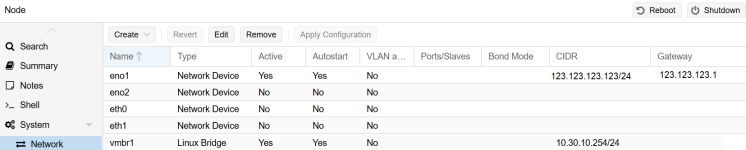
The virtual machines use the local network and access the internet through the IP 123.123.123.123. Proxmox itself is accessible via the public IP 123.123.123.123:8006.

I am planning to set up a new VM for a mail server, and I want it to use the same local network as the other VMs, but go out to the internet through a different public IP. For this purpose, I ordered an additional public IP 123.123.123.222.

Now I’m not sure how to configure it correctly so that the 123.123.123.222 IP is bound to the mail server VM. And I would be happy to get some help from specialist in this side.

Code:
source /etc/network/interfaces.d/*

auto lo
iface lo inet loopback

iface lo inet6 loopback

auto eno1
iface eno1 inet static
        address 123.123.123.123/24
        gateway 123.123.123.1
        up route add -net 123.123.123.0 netmask 255.255.255.0 gw 123.123.123.1 dev eno1
# route 123.123.123.0.24 via 123.123.123.1

iface eth0 inet manual

iface eth1 inet manual

iface eno2 inet manual

auto vmbr1
iface vmbr1 inet static
        address 10.30.10.254/24
        bridge-ports none
        bridge-stp off
        bridge-fd 0
#LAN int
 
Add eno1 to a bridge and configure IP / gateway there (not need to add the route via the up command unless the gateway is outside of the subnet of the IP). Then give the VM a network device on the new bridge using eno1 and configure the IP / gateway inside the VM.
 
  • Like
Reactions: BlinTUZ
Add eno1 to a bridge and configure IP / gateway there (not need to add the route via the up command unless the gateway is outside of the subnet of the IP). Then give the VM a network device on the new bridge using eno1 and configure the IP / gateway inside the VM.
thanks for your reply

resolved by SNAT:
sudo iptables -t nat -I POSTROUTING 1 -s 10.30.10.20 -j SNAT --to-source 123.123.123.222

now vm 10.30.10.20 goes to internet with 123.123.123.222
 
Dear readers,

I'm having similar issues with server.guru for PVE9. I'm having a dedicated server with an additional IP. the "primairy" ip is used for management, the additional IP is for a (linux) VM. The VM should get the dedicated additional public IP for its own (and reachable from internet).

The description from servers.gure are:
https://help.servers.guru/hc/help-center/articles/1758686108-extra-ip-address-configuration

How should I approach.

With the additional IP I got an additional interface, I left it without IP because its not "used" in de host.
1772114625155.png

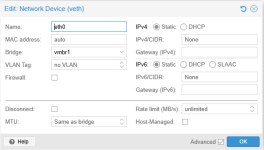
In the VM I created avmbr1 to the 'additional' interface (also no IP etc)
1772114758062.png

I assigned the vmbr1 to the linux VM,
1772114911284.png

In the linux VM I configured the eth0 as followed: In this I set the IP with the additional public IP and the gateway address equal to the the primairy interface gateway (could not find any details). MAC is generated. Netmask is weird as the gateway would set the gateway 'out of scope'.

Code:
config interface 'loopback'
        option ifname 'lo'
        option proto 'static'
        option ipaddr '127.0.0.1'
        option netmask '255.0.0.0'

config interface 'wan'
        option proto 'static'
        option device 'eth0'
        option ipaddr '103.245.xxx.yy'      #additional public IP
        option metric '10'
        option gateway '104.164.xxx.1'     #primairy gateway address
        option netmask '255.255.255.0'    #makes gateway unreachable?
        option onlink '1'
        list dns '8.8.8.8'
        list dns '1.1.1.1'

config globals 'globals'
        option ula_prefix 'fda7:7b42:6d4c::/48'
        option dhcp_default_duid '0004568dadaf5a9a4392b2caa55203a0a450'

#local/host-private lan
config interface 'lan'
        option device 'eth1'
        option proto 'static'
        option ipaddr '192.168.100.1'
        option netmask '255.255.255.0'

I'm able to ping local interface, and able to ping the IP. I cant pint the gateway and cant ping my primairy IP.
And of course:
PING 8.8.8.8 (8.8.8.8): 56 data bytes
ping: sendto: Network unreachable

So, interface is up but "no way out".

Anyone who has a suggestion? I'm fairly new to these kind of datacenter-hosted-environments. Feels like going down a rabbit hole.
 
Last edited: