Hello,
I have a some concern about my installation
I’ve installed 2 servers with Proxmox v2.0 rc1 and now I am trying to create a two-node cluster with high availability (I’ve read the documentation for that).
Each server has its own system partition and they both share a data partition located on the SAN (connected with fibre channel).
On that shared partition I’ve created a shared directory with the Central Web-based Management.
My target is do fencing between the servers.
Is that correct or have you got a better idea?
Any idea is welcome
Thank you
I have a some concern about my installation
I’ve installed 2 servers with Proxmox v2.0 rc1 and now I am trying to create a two-node cluster with high availability (I’ve read the documentation for that).
Each server has its own system partition and they both share a data partition located on the SAN (connected with fibre channel).
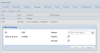
On that shared partition I’ve created a shared directory with the Central Web-based Management.
My target is do fencing between the servers.
Is that correct or have you got a better idea?
Any idea is welcome
Thank you
Last edited: