Hi,
because no one in German forum could help me fix the problem i try my luck here.
Im on Proxmox 8.3
5 Linux Container Runnning
Diskspace:
local = 100GB
local-lvm = 900GB
NFS-Storage =2 TB (Synology for Backups)
My Problem:
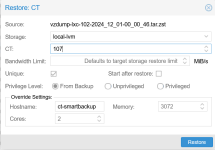
I got an backup from an actual running machine and want to set it up temporarily in a container to extract datas, then it can be delete.
I cant get the Backup running, allways get the Message "no space left on device"
The Backup File has 4GB and extracted around 32 GB.
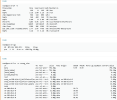
I have 80GB free Space on Root and only 16GB on lvm (were ist the rest ~800GB)
Only 10% of the local-lvm is used out of the containers but the hole disk is occupied from the system.
I think its a problem of deleting Vms and CTs and the spcae is not released after remocing the machines.
Can someone help me find the problem or give me a hint to clean the mess up?
Here some Infos of the PVE:
thx for help
because no one in German forum could help me fix the problem i try my luck here.
Im on Proxmox 8.3
5 Linux Container Runnning
Diskspace:
local = 100GB
local-lvm = 900GB
NFS-Storage =2 TB (Synology for Backups)
My Problem:
I got an backup from an actual running machine and want to set it up temporarily in a container to extract datas, then it can be delete.
I cant get the Backup running, allways get the Message "no space left on device"
The Backup File has 4GB and extracted around 32 GB.
I have 80GB free Space on Root and only 16GB on lvm (were ist the rest ~800GB)
Only 10% of the local-lvm is used out of the containers but the hole disk is occupied from the system.
I think its a problem of deleting Vms and CTs and the spcae is not released after remocing the machines.
Can someone help me find the problem or give me a hint to clean the mess up?
Here some Infos of the PVE:
thx for help