

repairing proxmox VE with fsck

perplexedthinker

New Member
Aug 15, 2022
2
0
1
Hi guys,

So I came back to my trusted proxmox 5.15 VE running on an old Intel NUC which hasn't recovered well from a power outage.
On boot, I get this:

rsz_12022-08-14_204255.jpg

I've booted to a liveCD (tried Ubuntu, and now SystemRescue)

smartctl shows the drive as fine

lsblk output is as expected:
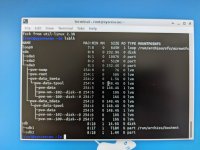
rsz_2022-08-15_142105.jpg

but when I try
Code:
fsck.ext4 -y /dev/sda3

all I get is
Code:
/dev/sda3 is in use
e2fsck: Cannot continue, aborting.

Any thoughts on why I can't fsck or another approach to this?

Cheers!
 
/dev/sda3 is a LVM partition and not a ext4 partition. I guess you would need to fsck the "pve-root" LV. Something like lvchange -ay /dev/pve/root && fsck /dev/pve/root. But first I would boot into clonezilla and backup that whole disk so you can always restore it if something goes wrong when trying to repair it.
 
  • Like
Reactions: paszczakojad
Thanks for that, @Dunuin - that totally worked, and fsck came back clean. Which of course doesn't help with the underlying problem. Do you have any thoughts on what else I can try? I thought it might be the NIC, but I've no problems in liveCD environments.
 
Try to boot a PVE ISO and select rescue mode there. then you can have a look at the services journal (journalctl command).
 
/dev/sda3 is a LVM partition and not a ext4 partition. I guess you would need to fsck the "pve-root" LV. Something like lvchange -ay /dev/pve/root && fsck /dev/pve/root. But first I would boot into clonezilla and backup that whole disk so you can always restore it if something goes wrong when trying to repair it.
Following your advice was not successful:

root@warnow:/# lvchange -ay /dev/pve/root && fsck /dev/pve/root
fsck from util-linux 2.38.1
e2fsck 1.47.0 (5-Feb-2023)
/dev/mapper/pve-root is mounted.
e2fsck: Cannot continue, aborting.

Any hint?