Remote PBS Backup

otmpp

New Member
Jun 9, 2026
8
1
3
Hello,

I have been using PBS to create regular backups of my Proxmox cluster and all is configured well and running well locally.
I'd like to adhere to proper backup protocol and start having backups which are taken offsite.

I've seen through the docs that this is possible using another instance of PBS on that remote computer and just providing it with the IP and everything like you do when local.
However I'm getting a little confused how to actually configure a remote local storage like this.
Do I need to make my PBS accessible through a proxy or does "push" and "pull" work differently?
Or alternatively I can already access my local network through a wireguard connection so would connecting my remote PBS to this be the best?

I would really appreciate any explanation to help me understand this.

Thank you!
 
The sync job on the remote connects to the first PBS. It can be over a VPN.

There's a setting in the sync job advanced properties, as I recall, to sync only the last "n" backups.
 
The sync job on the remote connects to the first PBS. It can be over a VPN.

There's a setting in the sync job advanced properties, as I recall, to sync only the last "n" backups.
Okay that sounds good. Would you say connecting them to each other over a VPN would be the simplest?
My thought is just how would the remote PBS handle losing connecting if the local VPN goes down?
 
If the VPN exists, sure. Another option is port forwarding but you’d of course want to limit that to the remote’s IP.

If the connection drops the job will time out.
 
If the VPN exists, sure. Another option is port forwarding but you’d of course want to limit that to the remote’s IP.

If the connection drops the job will time out.
That sounds good then. I think I'll go the VPN route since that'll just be a case of creating a new client and feels like it would be a bit more secure to create the connection.

Reading through the documentation it seems I would configure my remote backup to be the one which 'pulls' the backup to it.

Is using 'push' from the local to the remote more so to only be done if backing up to an instance which isn't trusted as much or might there be other reasons it makes sense to do it that way?
 
if source PBS have static ip, make a firewall rule, VPN is not required, as PBS flow is already over TLS.
The source does have a static IP but is that TLS still secured since they are self-signed certs?
I'm afraid I don't have much experience configuring firewall rules so if you happen to have a good resource I could trawl through to learn would be appreciated.
I've got experience using traefik and authelia to have secure remote connections on a domain if that helps at all?
 
With a self signed cert the connection is encrypted, the remote has to accept the cert. it could be easier to set up a man in the middle attack but Proxmox requires the cert thumbprint if self signed.
 
Yeah that makes sense that it would still be encrypted... I had a moment. I think if I went that route I would have generated certs anyways since I could put it behind Traefik with my domain which then gives signed Let's Encrypt keys. Unless the connection has to be made through the IP directly?

My WAN IP is static, quite lucky my ISP allow for me to keep it as such.

My only thought of doing it through a port forward/firewall is I'm not too keen on the idea of the webui of PBS being accessible remotely just like that.
Am I realistically being a bit too paranoid there and as long as the password is strong enough it shouldn't really be a concern?
 
Yes sorry, I'd forgotten you'd said that. Just so I can be sure I understand the process as it were.

I would on the local PBS setup a firewall rule so that only the remote PBS IP is accepted as a connection
Then open up port 8007 on the local PBS router
Then on the remote PBS setup a connection using my WAN IP and doing the normal steps as if it were local?

Would that be the general premise going the port forwarded route? Or would it be better to put the local onto the domain I have so it "mixes" in with the regular traffic which I already have exposed while still limiting to the remote's IP?
 
Depending on your router it may also be able to forward the port only for the remote PBS IP. But yes that's the general idea, allow access only from that one IP.

You can also just use the VPN as well, either way works.
 
I mixed up things , this is the Remote PBS need to have the WAN static IP ( Source PBS static ip not mandatory in the pull case )
indeed most routers are able to forward port only for specified WAN public IP.
if router can't do this, then firewall rule will be required on Source PBS.

Then on the remote PBS setup a connection using my WAN IP and doing the normal steps as if it were local?
yes
 
Thanks for your explanation and clarification.

I'll be honest though I think I'll go the VPN route since I've not used firewall rules and like this I can be more confident my data is secure and I don't need to worry about accidentally leaving anything exposed.

To start with at least, I might look into doing it the more 'proper method' shall we say eventually!
 
  • Like
Reactions: Johannes S
Wanted an off-site backup that was all-in-one. (PBS & VPN)
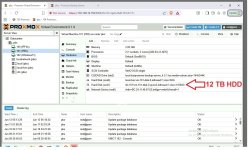
I have built a proxmox backup server (PBS) to take offsite, can work in any location that has wired network. I Put the PBS inside a Proxmox Server where I also installed two other VM's, an IPFire & A Windows or linux. All insitalled an older i7 PC. Also with 2 Nic and a 12TB HDD & s 2TB NVMe drive. Start with loading the proxmox on the 2TB drive. Then the 12TB drive needs to be added, did that as an XFS drive (So it can be passed through to the PBS virtual).

The location to be backed up also has an IPFire (Can be the main hardware IPFire router or a virtual one, it will be the OpenVPN Master). The OpenVPN on the PBS box will be the client. At the main site I setup IPFire as a Net-to-Net Virtual Private Network MASTER, then at the PBS IPFire site I load th client package in as a CLIENT. The master location needs a fixed IP (or you can run DuckDNS to capture the IP address if it's not fixed.)

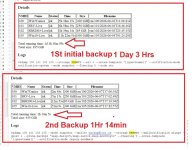
I was surprised how well this works, 1-2 days for the inital backup of just under a Tera Byte. The daily ita around 2 - 2.5 hours backup.
I used a Win11 because I have an AnyDesk account, I can see if it's offline quickly, but there is no need for this to function.
Maybe someone may find this usefull.
WTS PBS.jpg


WTS 2-PBS.jpg

And here is the polished up AI Version

Subject: Guide / Success Story: All-in-One Offsite PBS with Integrated IPFire VPN Appliance
Hi everyone,
I wanted to share a successful deployment of an all-in-one, plug-and-play offsite Proxmox Backup Server (PBS) solution. The goal was to build a self-contained box that could be dropped into any remote location with a wired internet connection and automatically establish a secure tunnel back to the primary site.
It has been running smoothly, and I thought the architecture might be useful to anyone looking for a low-cost, robust offsite backup strategy.

Hardware Specification
  • Host: Older Intel Core i7 Desktop
  • Networking: Dual Gigabit NICs
  • Storage 1: 2TB NVMe SSD (Proxmox VE Host OS + Client VMs)
  • Storage 2: 12TB HDD (Dedicated for PBS datastore)

⚙️ Software Architecture & Storage Layout
Instead of installing PBS bare-metal, I installed Proxmox VE on the 2TB NVMe drive to allow for greater flexibility. Within PVE, I provisioned three virtual machines:
  1. IPFire VM: Acts as the local gateway and handles the VPN client connection.
  2. Proxmox Backup Server (PBS) VM: Handles the actual backup deduplication and storage.
  3. Windows 11 VM: Used purely for remote management and monitoring via AnyDesk (completely optional, but helpful for quick status checks). [1, 2]
Storage Configuration: The 12TB HDD was formatted as XFS on the PVE host. I then passed this directory through to the PBS virtual machine to use as the primary backup datastore.

Network & VPN Topology (Net-to-Net)
To secure the traffic between the primary site and the offsite backup box, I utilized IPFire's OpenVPN Net-to-Net capabilities:
  • Primary Site (Master): Runs an IPFire instance (can be a dedicated hardware appliance or a VM) configured as the OpenVPN Master. Note: This site requires a static public IP, or a Dynamic DNS solution like DuckDNS to track WAN changes.
  • Offsite Box (Client): The virtualized IPFire instance on the backup box is configured as the OpenVPN Client, pre-loaded with the connection package from the Master.
Once plugged into a wired network at the remote site, the client IPFire automatically dials home, establishing a secure Net-to-Net tunnel that bridges the PBS instance directly to the primary cluster.

Performance & Real-World Results
I was incredibly impressed with the efficiency of the PBS deduplication over the VPN tunnel:
  • Initial Backup (~1 TB): Took roughly 36 to 48 hours to complete.
  • Daily Incremental Backups: Typically finish within 2 to 2.5 hours.
This setup has proven to be highly portable, secure, and incredibly reliable. If anyone is looking to replicate a similar "drop-in" offsite backup appliance, I would be happy to answer any questions about the configuration!

