

Random backup failures with QMP 'cont' failed (Permission conflict on node) and QEMU Guest Agent

DolPhinSon

New Member
Jun 13, 2025
8
0
1
Hi all,


I am opening a new thread because I have been occasionally encountering a backup failure recently that happens randomly. I previously commented about a similar symptom in another thread here: https://forum.proxmox.com/threads/pve7-pbs2-backup-timeout-qmp-command-cont-failed-got-timeout.95212/post-858547


I want to emphasize that this issue has never happened before during any backup tasks. It has only started appearing recently. Here is the exact error log I am getting:

```
ERROR: VM 12300 qmp command 'cont' failed - Permission conflict on node '#block3565': permissions 'write' are both required by an unnamed block device (uses node '#block3565' as 'root' child) and unshared by block device 'drive-virtio0' (uses node '#block3565' as 'root' child).

ERROR: Backup of VM 12300 failed - VM 12300 qmp command 'cont' failed - Permission conflict on node '#block146': permissions 'write' are both required by an unnamed block device (uses node '#block146' as 'root' child) and unshared by block device 'drive-virtio0' (uses node '#block146' as 'root' child).
```

My PVE version here:

Bash:
pveversion -v
proxmox-ve: 9.1.0 (running kernel: 6.17.2-1-pve)
pve-manager: 9.1.1 (running version: 9.1.1/42db4a6cf33dac83)
proxmox-kernel-helper: 9.0.4
proxmox-kernel-6.17.2-1-pve-signed: 6.17.2-1
proxmox-kernel-6.17: 6.17.2-1
amd64-microcode: 3.20250311.1
ceph-fuse: 19.2.3-pve2
corosync: 3.1.9-pve2
criu: 4.1.1-1
frr-pythontools: 10.3.1-1+pve4
ifupdown2: 3.3.0-1+pmx11
ksm-control-daemon: 1.5-1
libjs-extjs: 7.0.0-5
libproxmox-acme-perl: 1.7.0
libproxmox-backup-qemu0: 2.0.1
libproxmox-rs-perl: 0.4.1
libpve-access-control: 9.0.4
libpve-apiclient-perl: 3.4.2
libpve-cluster-api-perl: 9.0.7
libpve-cluster-perl: 9.0.7
libpve-common-perl: 9.1.9
libpve-guest-common-perl: 6.0.2
libpve-http-server-perl: 6.0.5
libpve-network-perl: 1.2.3
libpve-rs-perl: 0.11.3
libpve-storage-perl: 9.0.18
libspice-server1: 0.15.2-1+b1
lvm2: 2.03.31-2+pmx1
lxc-pve: 6.0.5-3
lxcfs: 6.0.4-pve1
novnc-pve: 1.6.0-3
proxmox-backup-client: 4.0.20-1
proxmox-backup-file-restore: 4.0.20-1
proxmox-backup-restore-image: 1.0.0
proxmox-firewall: 1.2.1
proxmox-kernel-helper: 9.0.4
proxmox-mail-forward: 1.0.2
proxmox-mini-journalreader: 1.6
proxmox-offline-mirror-helper: 0.7.3
proxmox-widget-toolkit: 5.1.2
pve-cluster: 9.0.7
pve-container: 6.0.18
pve-docs: 9.1.0
pve-edk2-firmware: 4.2025.05-2
pve-esxi-import-tools: 1.0.1
pve-firewall: 6.0.4
pve-firmware: 3.17-2
pve-ha-manager: 5.0.8
pve-i18n: 3.6.2
pve-qemu-kvm: 10.1.2-3
pve-xtermjs: 5.5.0-3
qemu-server: 9.1.6
smartmontools: 7.4-pve1
spiceterm: 3.4.1
swtpm: 0.8.0+pve3
vncterm: 1.9.1
zfsutils-linux: 2.3.4-pve1

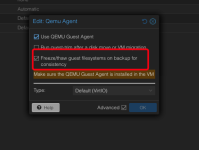
Could this issue be related to the QEMU Guest Agent's freeze/thaw process ("Freeze/thaw guest filesystems on backup for consistency")? I am wondering if a timing or lock issue occurs right when the agent tries to thaw the filesystem after the backup completes, leading to this QMP 'cont' permission conflict.

Has anyone experienced this specific block permission conflict recently, or seen it happen when the QEMU Guest Agent is enabled? Any insights would be greatly appreciated.

Thank you!
 

Attachments

  • image (3).png
    image (3).png
    30.3 KB · Views: 4
Hi @DolPhinSon

thanks for posting on the forum!

Although i am not aware of any known issues on this matter with your version, i'd ask you to update your Proxmox VE node before continuing. The kernel you are running has known security vulnerabilities, see [1]

Apart from that please share the following details on your system, so we can better assess the situation:
  • complete Task Log of the failing backup job
  • Datastore configuration of the PVE host (i.e. /etc/pve/storage.cfg)
  • In case the backup job target is a Proxmox Backup server
    • proxmox-backup-manager version -v
    • Datastore configuration of the PBS
  • What OS is running in the failing VM?
    • in case of Windows, what version of VirtIO is installed
  • Is only the mentioned VM 12300 affected or are other VMs also failing?
Yours sincerely
Jonas

[1] https://forum.proxmox.com/threads/proxmox-virtual-environment-security-advisories.149331/page-2
 
This is full log of VM 12300 and other VMs also failing -102044 - both run Linux OS

Bash:
INFO: starting new backup job: vzdump 102044 --ionice 7 --prune-backups 'keep-last=1' --notes-template '{{guestname}}, {{node}}, {{vmid}}' --mode snapshot --storage NvmeVPSFreeBackup-s2 --compress zstd
INFO: Starting Backup of VM 102044 (qemu)
INFO: Backup started at 2026-06-22 16:04:36
INFO: status = running
INFO: VM Name: dulichviet.com.vn
INFO: include disk 'virtio0' 'vms:vm-102044-disk-0' 100G
INFO: backup mode: snapshot
INFO: ionice priority: 7
INFO: pending configuration changes found (not included into backup)
INFO: creating Proxmox Backup Server archive 'vm/102044/2026-06-22T09:04:36Z'
INFO: skipping guest-agent 'fs-freeze', agent configured but not running?
ERROR: VM 102044 qmp command 'backup' failed - backup_job_create failed: Could not create node: Inactive 'f0440aa397081912ae671cc0bec9414' can't be a file child of active '#block662'
INFO: aborting backup job
INFO: resuming VM again
ERROR: Backup of VM 102044 failed - VM 102044 qmp command 'backup' failed - backup_job_create failed: Could not create node: Inactive 'f0440aa397081912ae671cc0bec9414' can't be a file child of active '#block662'
INFO: Failed at 2026-06-22 16:04:39
INFO: Backup job finished with errors
INFO: notified via target `proxmox-gotify`
INFO: notified via target `backup`

TASK ERROR: job errors


Bash:
Header
Proxmox
Virtual Environment 9.1.1
Search
Virtual Machine 12300 (power-2026-nwqi) on node 'vnpttt-nvme-7003-s102'
Linux
Server View
Logs
()1Password menu is available. Press down arrow to select.
INFO: starting new backup job: vzdump 12300 --storage NvmeVPSFreeBackup-s2 --notes-template '{{guestname}}, {{node}}, {{vmid}}' --ionice 7 --mode snapshot --prune-backups 'keep-last=1' --compress zstd
INFO: Starting Backup of VM 12300 (qemu)
INFO: Backup started at 2026-06-20 20:57:04
INFO: status = running
INFO: VM Name: power-2026-nwqi
INFO: include disk 'virtio0' 'vms:vm-12300-disk-0' 60G
INFO: backup mode: snapshot
INFO: ionice priority: 7
INFO: pending configuration changes found (not included into backup)
INFO: creating Proxmox Backup Server archive 'vm/12300/2026-06-20T13:57:04Z'
INFO: issuing guest-agent 'fs-freeze' command
INFO: issuing guest-agent 'fs-thaw' command
INFO: started backup task 'a74b9451-6ee6-42c1-9b23-b29388dbcaf9'
INFO: resuming VM again
ERROR: VM 12300 qmp command 'cont' failed - Permission conflict on node '#block3565': permissions 'write' are both required by an unnamed block device (uses node '#block3565' as 'root' child) and unshared by block device 'drive-virtio0' (uses node '#block3565' as 'root' child).
INFO: aborting backup job
INFO: resuming VM again
ERROR: Backup of VM 12300 failed - VM 12300 qmp command 'cont' failed - Permission conflict on node '#block146': permissions 'write' are both required by an unnamed block device (uses node '#block146' as 'root' child) and unshared by block device 'drive-virtio0' (uses node '#block146' as 'root' child).
INFO: Failed at 2026-06-20 20:57:05
INFO: Backup job finished with errors
INFO: notified via target `proxmox-gotify`
INFO: notified via target `backup`

TASK ERROR: job errors

Here is datastore configuration


Code:
cat /etc/pve/storage.cfg
dir: local
    path /var/lib/vz
    content images,iso
    shared 1

zfspool: local-zfs
    pool rpool/data
    blocksize 16k
    content images,rootdir
    nodes nvme-s2
    sparse 1


pbs: NvmeVPSFreeBackup-s2
    datastore NvmeVPSFreeBackup-s2
    server pbs-s1
    content backup
    fingerprint
    prune-backups keep-all=1
    username root@pam

zfspool: vms
    pool rpool/vms
    blocksize 16k
    content images,rootdir
    mountpoint /rpool/vms
    sparse 1

Version of PBS
root@pbs-s1:~# proxmox-backup-manager version
proxmox-backup-server 4.2.2-1 running version: 4.0.20
 
Hi @DolPhinSon

thanks for posting on the forum!

Although i am not aware of any known issues on this matter with your version, i'd ask you to update your Proxmox VE node before continuing. The kernel you are running has known security vulnerabilities, see [1]

Apart from that please share the following details on your system, so we can better assess the situation:
  • complete Task Log of the failing backup job
  • Datastore configuration of the PVE host (i.e. /etc/pve/storage.cfg)
  • In case the backup job target is a Proxmox Backup server
    • proxmox-backup-manager version -v
    • Datastore configuration of the PBS
  • What OS is running in the failing VM?
    • in case of Windows, what version of VirtIO is installed
  • Is only the mentioned VM 12300 affected or are other VMs also failing?
Yours sincerely
Jonas

[1] https://forum.proxmox.com/threads/proxmox-virtual-environment-security-advisories.149331/page-2
above
 
Hi @fiona

qm config this vm here:

Bash:
qm config 12300
agent: 1
boot: order=virtio0;ide2
cipassword: **********
ciuser: root
cores: 3
cpu: host
cpulimit: 6
description: Client%3A Nguy%E1%BB%85n
ide2: none,media=cdrom
ipconfig0: ip=1.22.217.9/24,gw=1.22.217.1
kvm: 1
memory: 10240
meta: creation-qemu=7.2.0,ctime=1704959914
name: power-2026-nwqi
nameserver: 8.8.8.8 10.200.22.11
net0: virtio=BC:24:11:27:56:7C,bridge=vmbr0,firewall=1,queues=4,rate=51,tag=209
numa: 1
onboot: 1
ostype: l26
scsihw: lsi
searchdomain: abc.yz
serial0: socket
smbios1: uuid=d6c839f1-7eb9-4fb2-a0c0-5e6789ad6648
sockets: 2
tags: Linux
vga: std
virtio0: vms:vm-12300-disk-0,cache=directsync,discard=on,format=raw,iops_rd=95000,iops_wr=35000,iothread=1,size=60G
vmgenid: 5c600159-56e4-4c1e-8add-ee4574da8145

And the excerpt from the system log/journal from the time around the issue.

Bash:
Jun 20 20:57:04 vnpttt-nvme-7003-s102 vzdump[3123272]: <root@pam> starting task UPID:vnpttt-nvme-7003-s102:002FA852:39B12156:6A369C30:vzdump:12300:root@pam:
Jun 20 20:57:04 vnpttt-nvme-7003-s102 vzdump[3123282]: INFO: starting new backup job: vzdump 12300 --storage NvmeVPSFreeBackup-s2 --notes-template '{{guestname}}, {{node}}, {{vmid}}' --ionice 7 --mode snapshot --prune-backups 'keep-last=1' --compress zstd
Jun 20 20:57:04 vnpttt-nvme-7003-s102 vzdump[3123282]: INFO: Starting Backup of VM 12300 (qemu)
Jun 20 20:57:05 vnpttt-nvme-7003-s102 QEMU[3144421]: Permission conflict on node '#block3565': permissions 'write' are both required by an unnamed block device (uses node '#block3565' as 'root' child) and unshared by block device 'drive-virtio0' (uses node '#block3565' as 'root' child).
Jun 20 20:57:05 vnpttt-nvme-7003-s102 vzdump[3123282]: VM 12300 qmp command failed - VM 12300 qmp command 'cont' failed - Permission conflict on node '#block3565': permissions 'write' are both required by an unnamed block device (uses node '#block3565' as 'root' child) and unshared by block device 'drive-virtio0' (uses node '#block3565' as 'r>
Jun 20 20:57:05 vnpttt-nvme-7003-s102 QEMU[3144421]: Permission conflict on node '#block146': permissions 'write' are both required by an unnamed block device (uses node '#block146' as 'root' child) and unshared by block device 'drive-virtio0' (uses node '#block146' as 'root' child).
Jun 20 20:57:05 vnpttt-nvme-7003-s102 vzdump[3123282]: VM 12300 qmp command failed - VM 12300 qmp command 'cont' failed - Permission conflict on node '#block146': permissions 'write' are both required by an unnamed block device (uses node '#block146' as 'root' child) and unshared by block device 'drive-virtio0' (uses node '#block146' as 'root>
Jun 20 20:57:05 vnpttt-nvme-7003-s102 vzdump[3123282]: ERROR: Backup of VM 12300 failed - VM 12300 qmp command 'cont' failed - Permission conflict on node '#block146': permissions 'write' are both required by an unnamed block device (uses node '#block146' as 'root' child) and unshared by block device 'drive-virtio0' (uses node '#block146' as >
Jun 20 20:57:05 vnpttt-nvme-7003-s102 vzdump[3123282]: INFO: Backup job finished with errors
Jun 20 20:57:05 vnpttt-nvme-7003-s102 perl[3123282]: notified via target `proxmox-gotify`
Jun 20 20:57:05 vnpttt-nvme-7003-s102 perl[3123282]: notified via target `backup`
Jun 20 20:57:05 vnpttt-nvme-7003-s102 vzdump[3123282]: job errors
Jun 20 20:57:05 vnpttt-nvme-7003-s102 vzdump[3123272]: <root@pam> end task UPID:vnpttt-nvme-7003-s102:002FA852:39B12156:6A369C30:vzdump:12300:root@pam: job errors
Jun 20 20:57:06 vnpttt-nvme-7003-s102 sshd-session[2876196]: syslogin_perform_logout: logout() returned an error
Jun 20 20:57:10 vnpttt-nvme-7003-s102 QEMU[3144421]: kvm: ../block/io.c:1976: bdrv_co_write_req_prepare: Assertion `!(bs->open_flags & BDRV_O_INACTIVE)' failed.
Jun 20 20:57:10 vnpttt-nvme-7003-s102 kernel:  zd2064: p1 p14 p15
Jun 20 20:57:11 vnpttt-nvme-7003-s102 kernel: fwbr12300i0: port 2(tap12300i0) entered disabled state
Jun 20 20:57:11 vnpttt-nvme-7003-s102 kernel: tap12300i0 (unregistering): left allmulticast mode
Jun 20 20:57:11 vnpttt-nvme-7003-s102 kernel: fwbr12300i0: port 2(tap12300i0) entered disabled state
Jun 20 20:57:11 vnpttt-nvme-7003-s102 systemd[1]: 12300.scope: Deactivated successfully.
Jun 20 20:57:11 vnpttt-nvme-7003-s102 systemd[1]: 12300.scope: Consumed 10month 4d 5h 23min 33.095s CPU time, 10.4G memory peak.
Jun 20 20:57:12 vnpttt-nvme-7003-s102 qmeventd[3124280]: Starting cleanup for 12300
Jun 20 20:57:12 vnpttt-nvme-7003-s102 kernel: fwbr12300i0: port 1(fwln12300i0) entered disabled state
Jun 20 20:57:12 vnpttt-nvme-7003-s102 kernel: vmbr0v209: port 43(fwpr12300p0) entered disabled state
Jun 20 20:57:12 vnpttt-nvme-7003-s102 kernel: fwln12300i0 (unregistering): left allmulticast mode
Jun 20 20:57:12 vnpttt-nvme-7003-s102 kernel: fwln12300i0 (unregistering): left promiscuous mode
Jun 20 20:57:12 vnpttt-nvme-7003-s102 kernel: fwbr12300i0: port 1(fwln12300i0) entered disabled state
Jun 20 20:57:12 vnpttt-nvme-7003-s102 kernel: fwpr12300p0 (unregistering): left allmulticast mode
Jun 20 20:57:12 vnpttt-nvme-7003-s102 kernel: fwpr12300p0 (unregistering): left promiscuous mode
Jun 20 20:57:12 vnpttt-nvme-7003-s102 kernel: vmbr0v209: port 43(fwpr12300p0) entered disabled state
Jun 20 20:57:12 vnpttt-nvme-7003-s102 qmeventd[3124280]: Finished cleanup for 12300

I don't think this is a version-related issue, because I have a cluster where all nodes run the exact same version and back up to the same PBS. However, this error only occurs with VMs belonging to this specific node (s102).