Hi all,
I am opening a new thread because I have been occasionally encountering a backup failure recently that happens randomly. I previously commented about a similar symptom in another thread here: https://forum.proxmox.com/threads/pve7-pbs2-backup-timeout-qmp-command-cont-failed-got-timeout.95212/post-858547
I want to emphasize that this issue has never happened before during any backup tasks. It has only started appearing recently. Here is the exact error log I am getting:
```
ERROR: VM 12300 qmp command 'cont' failed - Permission conflict on node '#block3565': permissions 'write' are both required by an unnamed block device (uses node '#block3565' as 'root' child) and unshared by block device 'drive-virtio0' (uses node '#block3565' as 'root' child).
ERROR: Backup of VM 12300 failed - VM 12300 qmp command 'cont' failed - Permission conflict on node '#block146': permissions 'write' are both required by an unnamed block device (uses node '#block146' as 'root' child) and unshared by block device 'drive-virtio0' (uses node '#block146' as 'root' child).
```
My PVE version here:
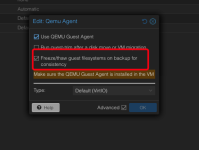
Could this issue be related to the QEMU Guest Agent's freeze/thaw process ("Freeze/thaw guest filesystems on backup for consistency")? I am wondering if a timing or lock issue occurs right when the agent tries to thaw the filesystem after the backup completes, leading to this QMP 'cont' permission conflict.
Has anyone experienced this specific block permission conflict recently, or seen it happen when the QEMU Guest Agent is enabled? Any insights would be greatly appreciated.
Thank you!
I am opening a new thread because I have been occasionally encountering a backup failure recently that happens randomly. I previously commented about a similar symptom in another thread here: https://forum.proxmox.com/threads/pve7-pbs2-backup-timeout-qmp-command-cont-failed-got-timeout.95212/post-858547
I want to emphasize that this issue has never happened before during any backup tasks. It has only started appearing recently. Here is the exact error log I am getting:
```
ERROR: VM 12300 qmp command 'cont' failed - Permission conflict on node '#block3565': permissions 'write' are both required by an unnamed block device (uses node '#block3565' as 'root' child) and unshared by block device 'drive-virtio0' (uses node '#block3565' as 'root' child).
ERROR: Backup of VM 12300 failed - VM 12300 qmp command 'cont' failed - Permission conflict on node '#block146': permissions 'write' are both required by an unnamed block device (uses node '#block146' as 'root' child) and unshared by block device 'drive-virtio0' (uses node '#block146' as 'root' child).
```
My PVE version here:
Bash:
pveversion -v
proxmox-ve: 9.1.0 (running kernel: 6.17.2-1-pve)
pve-manager: 9.1.1 (running version: 9.1.1/42db4a6cf33dac83)
proxmox-kernel-helper: 9.0.4
proxmox-kernel-6.17.2-1-pve-signed: 6.17.2-1
proxmox-kernel-6.17: 6.17.2-1
amd64-microcode: 3.20250311.1
ceph-fuse: 19.2.3-pve2
corosync: 3.1.9-pve2
criu: 4.1.1-1
frr-pythontools: 10.3.1-1+pve4
ifupdown2: 3.3.0-1+pmx11
ksm-control-daemon: 1.5-1
libjs-extjs: 7.0.0-5
libproxmox-acme-perl: 1.7.0
libproxmox-backup-qemu0: 2.0.1
libproxmox-rs-perl: 0.4.1
libpve-access-control: 9.0.4
libpve-apiclient-perl: 3.4.2
libpve-cluster-api-perl: 9.0.7
libpve-cluster-perl: 9.0.7
libpve-common-perl: 9.1.9
libpve-guest-common-perl: 6.0.2
libpve-http-server-perl: 6.0.5
libpve-network-perl: 1.2.3
libpve-rs-perl: 0.11.3
libpve-storage-perl: 9.0.18
libspice-server1: 0.15.2-1+b1
lvm2: 2.03.31-2+pmx1
lxc-pve: 6.0.5-3
lxcfs: 6.0.4-pve1
novnc-pve: 1.6.0-3
proxmox-backup-client: 4.0.20-1
proxmox-backup-file-restore: 4.0.20-1
proxmox-backup-restore-image: 1.0.0
proxmox-firewall: 1.2.1
proxmox-kernel-helper: 9.0.4
proxmox-mail-forward: 1.0.2
proxmox-mini-journalreader: 1.6
proxmox-offline-mirror-helper: 0.7.3
proxmox-widget-toolkit: 5.1.2
pve-cluster: 9.0.7
pve-container: 6.0.18
pve-docs: 9.1.0
pve-edk2-firmware: 4.2025.05-2
pve-esxi-import-tools: 1.0.1
pve-firewall: 6.0.4
pve-firmware: 3.17-2
pve-ha-manager: 5.0.8
pve-i18n: 3.6.2
pve-qemu-kvm: 10.1.2-3
pve-xtermjs: 5.5.0-3
qemu-server: 9.1.6
smartmontools: 7.4-pve1
spiceterm: 3.4.1
swtpm: 0.8.0+pve3
vncterm: 1.9.1
zfsutils-linux: 2.3.4-pve1
Could this issue be related to the QEMU Guest Agent's freeze/thaw process ("Freeze/thaw guest filesystems on backup for consistency")? I am wondering if a timing or lock issue occurs right when the agent tries to thaw the filesystem after the backup completes, leading to this QMP 'cont' permission conflict.
Has anyone experienced this specific block permission conflict recently, or seen it happen when the QEMU Guest Agent is enabled? Any insights would be greatly appreciated.
Thank you!