[SOLVED] qemu-agent 100% CPU usage

Jul 16, 2018
20
1
1
34
Uruguay
www.netuy.net
Hello,

we have 2 servers running Proxmox 5.2
proxmox-ve: 5.2-2 (running kernel: 4.15.17-1-pve)
pve-manager: 5.2-1 (running version: 5.2-1/0fcd7879)
pve-kernel-4.15: 5.2-1
pve-kernel-4.15.17-1-pve: 4.15.17-9
corosync: 2.4.2-pve5
criu: 2.11.1-1~bpo90
glusterfs-client: 3.8.8-1
ksm-control-daemon: 1.2-2
libjs-extjs: 6.0.1-2
libpve-access-control: 5.0-8
libpve-apiclient-perl: 2.0-4
libpve-common-perl: 5.0-31
libpve-guest-common-perl: 2.0-16
libpve-http-server-perl: 2.0-8
libpve-storage-perl: 5.0-23
libqb0: 1.0.1-1
lvm2: 2.02.168-pve6
lxc-pve: 3.0.0-3
lxcfs: 3.0.0-1
novnc-pve: 0.6-4
proxmox-widget-toolkit: 1.0-18
pve-cluster: 5.0-27
pve-container: 2.0-23
pve-docs: 5.2-3
pve-firewall: 3.0-8
pve-firmware: 2.0-4
pve-ha-manager: 2.0-5
pve-i18n: 1.0-5
pve-libspice-server1: 0.12.8-3
pve-qemu-kvm: 2.11.1-5
pve-xtermjs: 1.0-5
qemu-server: 5.0-26
smartmontools: 6.5+svn4324-1
spiceterm: 3.0-5
vncterm: 1.5-3
zfsutils-linux: 0.7.8-pve1~bpo9
.

On one of those servers we have 2 VMs that run CloudLinux 7.6 and have cPanel. I noticed today that the CPU usage was higher than expected, both on the VMs and on the Proxmox Host.

After looking a bit into the VMs it was clear that the usage was caused by the qemu-agent. On both VMs it was on constantly using 100% of CPU. I uninstalled it and after that the load and CPU usage went down, even at the Proxmox host, the screenshots were taken just minutes after uninstalling it.
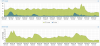

Captura de pantalla de 2019-01-22 10-20-14.png Captura de pantalla de 2019-01-22 10-21-06.png

Is this normal? Did anyone else had this issue?

Thank you very much!

Juan Correa
 
I have this issue from time to time as well, I will uninstall qemu agent next time as all it does is provide a "nice shutdown" which it already does on other linux VMs without the agent installed..
 
Hello everybody!

I ended uninstalling the agent and disabling it on the VM options. So far the CPU usage has been stable and much lower than before, and we haven't faced any issues with the backups.

So, I guess so far this has been a valid solution.

Regards,

Juan Correa
 
@korvin7 May I ask if you remove it from VM's grub config or PVE host's grub config? Cheers.

Eoin
 
remove idle=poll from grub_options fix my problem
Hi, this happened on multiple ubuntu vm's this morning. Had to kill qemu-ga on them to quiet it down. I don' see the "idle=poll" option in /etc/default/grub... would it be located elsewhere or is this solution outdated?
 
Hi, this happened on multiple ubuntu vm's this morning. Had to kill qemu-ga on them to quiet it down. I don' see the "idle=poll" option in /etc/default/grub... would it be located elsewhere or is this solution outdated?
I had this bug on debian in past (in previous debian releases, don't remember exactly). So I think it was a bug in a specific qemu agent version.

what is your ubuntu version ? and agent version ?
 
Hi thanks for your interest. It happened in two different versions of ubuntu:
ubuntu 18.04 with qemu-guest-agent Installed: 1:2.11+dfsg-1ubuntu7.42
ubuntu 22.04 with qemu-guest-agent Installed: 1:6.2+dfsg-2ubuntu6.9
 
I had the same issue last night on ubuntu 22 with agent version 1:6.2+dfsg-2ubuntu6.15
 
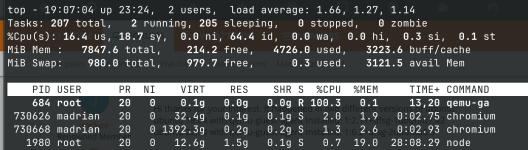
The QEMU guest agent got stuck at 100% CPU, so I had to restart the service:

Code:
Nov 21 18:54:02 debian qemu-ga[694]: info: guest-ping called
Nov 21 18:54:13 debian qemu-ga[694]: info: guest-ping called
Nov 21 18:54:23 debian qemu-ga[694]: info: guest-ping called
Nov 21 18:54:34 debian qemu-ga[694]: info: guest-ping called
-- Boot 9f61da65914a456692bc8924f91bc520 --
Nov 22 19:34:13 debian systemd[1]: Started qemu-guest-agent.service - QEMU Guest Agent.
Nov 22 19:41:56 debian qemu-ga[687]: info: guest-ping called
Nov 22 19:41:56 debian qemu-ga[687]: info: guest-shutdown called, mode: (null)
Nov 22 19:41:56 debian systemd[1]: Stopping qemu-guest-agent.service - QEMU Guest Agent...
Nov 22 19:41:56 debian systemd[1]: qemu-guest-agent.service: Deactivated successfully.
Nov 22 19:41:56 debian systemd[1]: Stopped qemu-guest-agent.service - QEMU Guest Agent.
-- Boot ad77c3ca94ac45908430d2e6b730169e --
Nov 22 19:43:05 debian systemd[1]: Started qemu-guest-agent.service - QEMU Guest Agent.
madrian@debian:~$ df
 
ok, my questions still stand though. without more details noone is going to be able to help you.
pve-version, guest agent version, guest os version?

also is this happening regularily or was that a one time occurence?
 
Hello

I have the same issue for the second time today in a couple of days (more or less a week).
It seems to happen at a time when the backup is to be executed.
I have to double check but I don't think I have an issue with the backup itself which is correctly terminated.

The issue happens with a debian bookworm mostly running docker.
It is hosted on prox pve 8.4.16
I just noticed I had a pending update of the qemu-guest-agent package. Have updated it and will monitor.
Still here here the rest of the info if it can help

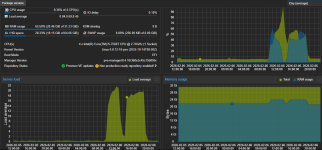
1770414971566.png
(spikes are when it happened)

on the vm itself I had a constant load of the disk at the time of the crash
1770414983864.png

Package version of the host after the apt update


proxmox-ve: 8.4.0 (running kernel: 6.8.12-16-pve)
pve-manager: 8.4.16 (running version: 8.4.16/368e3c45c15b895c)
proxmox-kernel-helper: 8.1.4
proxmox-kernel-6.8: 6.8.12-18
proxmox-kernel-6.8.12-18-pve-signed: 6.8.12-18
proxmox-kernel-6.8.12-17-pve-signed: 6.8.12-17
proxmox-kernel-6.8.12-16-pve-signed: 6.8.12-16
proxmox-kernel-6.8.4-2-pve-signed: 6.8.4-2
pve-cluster: 8.1.2
pve-container: 5.3.3
pve-docs: 8.4.1
pve-edk2-firmware: 4.2025.02-4~bpo12+1
pve-esxi-import-tools: 0.7.4
pve-firewall: 5.1.2
pve-firmware: 3.16-3
pve-ha-manager: 4.0.7
pve-i18n: 3.4.5
pve-qemu-kvm: 9.2.0-7
pve-xtermjs: 5.5.0-2
qemu-server: 8.4.5
 
Last edited:
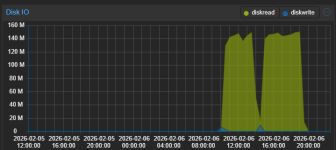
this looks like inadequate storage.
you see pretty high iowait percentage coinciding with the io.
this points towards the storage not beeing able to keep up with the demand.

may i ask what type of storage are you using (shared storage with nfs/iscsi, local storage with sata/nvme ssds, ceph?).
please also give us the disk models you are using here.

backups cause load on the disks in the node. the faster your network and the more capable your PBS is, the more strain a backup can put on your storage.

according to that graph you had that load over almost 12 hours. odd is that the disk read i only around 150 MB/sec, which to me looks like you either have rather slow disks (hdd's maybe?) or rather slow network (somewhere between 1 Gbit and 2.5Gbit), but disks would come to mind first.

we need more info to give bettwe advice, so please provide more details about your storage solution.
 
Thanks for the reply.
I agree that it seems to be storage related but I don't really think so.
Let me know what you think with the following info
- I have a total of 3 identical hosts, same harware, same pve, and more or less same usage. they are all alone, not clustered. Only this one is having the issue.
- It's a sata SSD, kingston 480Gb
- speed seems OK
{22:41:31}root@localhost:[~]:> hdparm -t --direct /dev/sda

/dev/sda:
Timing O_DIRECT disk reads: 1084 MB in 3.00 seconds = 361.15 MB/sec
- I am using network folder on the machine causing the issue, but it has been the case for years on this one.
- I am not using clustering or ceph
- I think the graph doesn't go aove 150mbs because the filter was 'Day average' and not max
- Backup runs every 12 hours and the issue only happens quite randomly
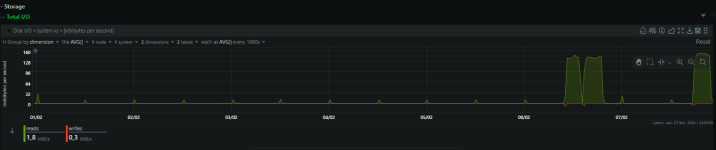
we can see it on the netdata graph on the 7 last day
1770501526325.png
and it usually takes a couple of minutes over a 1Gb eth link
1770501646239.png

Have a nice weekend, and thanks for trying to help me :)
 
just to let you know it happened again today. I couldn't access the machine to kill qemu-ga process, so I had to force reboot it. I took the opportunity to disable qemu to give it a try.
will continue to monitor and let you know