Hi,
I'm new to proxmox and I'm currently testing a setup to move from VMWare to Proxmox.
The proxmox server is an HP Gen11 Microserver
Backup to CIFS share didn't work properly and a Google-search came up with the suggestion to move to NFS.
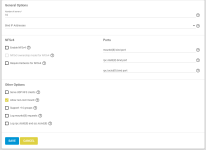
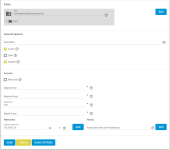
I created an NFS share on a dedicated 'Truenas Core' NAS
It took some iterations, but I could finally mount the NFS Share in proxmox and use it for backups.
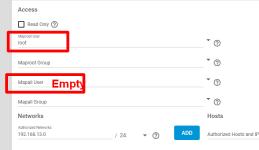
It took a while to find out that the MapAll User needed to be set to 'root'
A backup job starts correctly now, but finishes with warnings:
The backup archive files exist on the NAS and can be opened by proxmox
The backup is small as it is a dummy VM, with no OS,... The result is the same for a real functional VM
The log files exist, but are 0-length
"vi-ing" the log file from the console gives a warning that a ".swp" file exists (as well as an ".swo" file)
creating (touching) the failing files from the console works
Searching the internet and the forum did not provide and solutions or clues...
Did anyone experience a similar issue or does someone have a clue?
Thank you for any suggestions,
Best regards,
Luc
I'm new to proxmox and I'm currently testing a setup to move from VMWare to Proxmox.
The proxmox server is an HP Gen11 Microserver
Backup to CIFS share didn't work properly and a Google-search came up with the suggestion to move to NFS.
I created an NFS share on a dedicated 'Truenas Core' NAS
It took some iterations, but I could finally mount the NFS Share in proxmox and use it for backups.
It took a while to find out that the MapAll User needed to be set to 'root'
A backup job starts correctly now, but finishes with warnings:
Code:
INFO: starting new backup job: vzdump 103 --mode snapshot --compress zstd --notification-mode notification-system --storage NAS_NFS --fleecing 0 --notes-template '{{guestname}}' --node proxmox1 --all 0
INFO: Starting Backup of VM 103 (qemu)
INFO: Backup started at 2026-01-25 14:05:14
INFO: status = stopped
INFO: backup mode: stop
INFO: ionice priority: 7
INFO: VM Name: BackupTest
INFO: include disk 'scsi0' 'local-lvm:vm-103-disk-0' 1G
INFO: creating vzdump archive '/mnt/pve/NAS_NFS/dump/vzdump-qemu-103-2026_01_25-14_05_14.vma.zst'
INFO: starting kvm to execute backup task
INFO: started backup task '11c01b37-112a-4e14-8950-c2e5c9cccc82'
INFO: 100% (1.0 GiB of 1.0 GiB) in 1s, read: 1.0 GiB/s, write: 0 B/s
INFO: backup is sparse: 1.00 GiB (100%) total zero data
INFO: transferred 1.00 GiB in 1 seconds (1.0 GiB/s)
INFO: stopping kvm after backup task
INFO: archive file size: 36KB
INFO: adding notes to backup
WARN: unable to add notes - unable to open file '/mnt/pve/NAS_NFS/dump/vzdump-qemu-103-2026_01_25-14_05_14.vma.zst.notes.tmp.59028' - Operation not permitted
INFO: Finished Backup of VM 103 (00:00:02)
INFO: Backup finished at 2026-01-25 14:05:16
cp: cannot create regular file '/mnt/pve/NAS_NFS/dump/vzdump-qemu-103-2026_01_25-14_05_14.log': Operation not permitted
INFO: Backup job finished successfully
INFO: notified via target `mail-to-root`
TASK WARNINGS: 1
The backup archive files exist on the NAS and can be opened by proxmox
The backup is small as it is a dummy VM, with no OS,... The result is the same for a real functional VM
The log files exist, but are 0-length
"vi-ing" the log file from the console gives a warning that a ".swp" file exists (as well as an ".swo" file)
creating (touching) the failing files from the console works
Searching the internet and the forum did not provide and solutions or clues...
Did anyone experience a similar issue or does someone have a clue?
Thank you for any suggestions,
Best regards,
Luc