


Well, I've never seen this happen before.
I'm on the enterprise repos. I tried to upgrade a PVE 9.2 node to the latest version, including a kernel update from 7.0.24 to 7.0.26, and rebooted.
I immediately went back to the updates page (as I always do), and saw that the same updates were there. Odd.
When it came back up, parts of the web GUI are non-responsive. The Reboot/Shutdown buttons don't even put tasks in the task list when you press them.
Not good.
So, I tried to go back to the web shell.
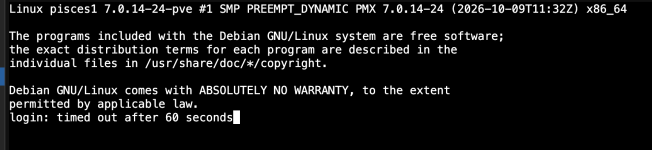
It's supposed to auto-login as root there, and just hung.
I have never seen PVE do this before, but that seemed. Bad.
I got the same result when I SSH in as root. It connects, asks me for my password, and just hangs (of course, there's no output on SSH at all because it doesn't print all that before you log in, obviously).
I happen to have a KVM on this system, and it was frozen.
There was blinking cursor, but I couldn't type anything.
I hit control-C on the KVM to try to back out of whatever it was doing, and then it informed me that the reboot.target task timed out (?!) and kept going.
It sat there waiting on pve-ha-lrm (-crm?) to time out during shutdown, and then miraculously finally rebooted itself.
It hadn't installed any of the updates, but came back up fine. I installed the updates using the KVM and rebooted and everything was normal.
No idea what happened there. But I suppose that was the price of installing updates requiring a reboot on Halloween. Spooky.
Not sure where I'm going with this, but hopefully this might be helpful to anyone else hitting the forum when they're staring at a weirdly frozen Proxmox CLI/malfunctioning web UI after an update.
Whether it's a KVM, a serial console, or a monitor with a keyboard, having a way to directly access your node is critical.
I'm on the enterprise repos. I tried to upgrade a PVE 9.2 node to the latest version, including a kernel update from 7.0.24 to 7.0.26, and rebooted.
I immediately went back to the updates page (as I always do), and saw that the same updates were there. Odd.
When it came back up, parts of the web GUI are non-responsive. The Reboot/Shutdown buttons don't even put tasks in the task list when you press them.
Not good.
So, I tried to go back to the web shell.
It's supposed to auto-login as root there, and just hung.
I have never seen PVE do this before, but that seemed. Bad.
I got the same result when I SSH in as root. It connects, asks me for my password, and just hangs (of course, there's no output on SSH at all because it doesn't print all that before you log in, obviously).
I happen to have a KVM on this system, and it was frozen.
There was blinking cursor, but I couldn't type anything.
I hit control-C on the KVM to try to back out of whatever it was doing, and then it informed me that the reboot.target task timed out (?!) and kept going.
It sat there waiting on pve-ha-lrm (-crm?) to time out during shutdown, and then miraculously finally rebooted itself.
It hadn't installed any of the updates, but came back up fine. I installed the updates using the KVM and rebooted and everything was normal.
No idea what happened there. But I suppose that was the price of installing updates requiring a reboot on Halloween. Spooky.
Not sure where I'm going with this, but hopefully this might be helpful to anyone else hitting the forum when they're staring at a weirdly frozen Proxmox CLI/malfunctioning web UI after an update.
Whether it's a KVM, a serial console, or a monitor with a keyboard, having a way to directly access your node is critical.