

[PVE 9.2] Upgrade to Kernel 7.0.26 Seems Failed Frozen--Web GUI (Mostly) Functional, Guests Ran, but No Access to Shell or Power Operations

Sep 1, 2022
589
220
68
42
Well, I've never seen this happen before.

I'm on the enterprise repos. I tried to upgrade a PVE 9.2 node to the latest version, including a kernel update from 7.0.24 to 7.0.26, and rebooted.
I immediately went back to the updates page (as I always do), and saw that the same updates were there. Odd.

When it came back up, parts of the web GUI are non-responsive. The Reboot/Shutdown buttons don't even put tasks in the task list when you press them.
Not good.

So, I tried to go back to the web shell.
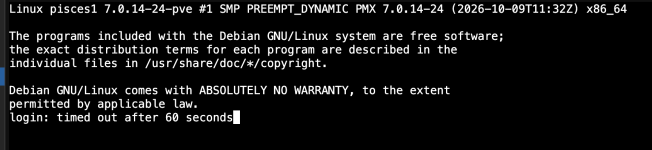
1793473536423.png

It's supposed to auto-login as root there, and just hung.
I have never seen PVE do this before, but that seemed. Bad.
I got the same result when I SSH in as root. It connects, asks me for my password, and just hangs (of course, there's no output on SSH at all because it doesn't print all that before you log in, obviously).

I happen to have a KVM on this system, and it was frozen.
There was blinking cursor, but I couldn't type anything.
I hit control-C on the KVM to try to back out of whatever it was doing, and then it informed me that the reboot.target task timed out (?!) and kept going.

It sat there waiting on pve-ha-lrm (-crm?) to time out during shutdown, and then miraculously finally rebooted itself.
It hadn't installed any of the updates, but came back up fine. I installed the updates using the KVM and rebooted and everything was normal.

No idea what happened there. But I suppose that was the price of installing updates requiring a reboot on Halloween. Spooky.

Not sure where I'm going with this, but hopefully this might be helpful to anyone else hitting the forum when they're staring at a weirdly frozen Proxmox CLI/malfunctioning web UI after an update.

Whether it's a KVM, a serial console, or a monitor with a keyboard, having a way to directly access your node is critical.
 
Hi,
can you share the system/boot logs covering the period of the updates as well as the /var/log/apt/term.log (or the relevant rotation)?
 
Hi,
can you share the system/boot logs covering the period of the updates as well as the /var/log/apt/term.log (or the relevant rotation)?
Hello! Sorry that I didn't see this.

I think it might have happened again when I did today's Debian 13.8 update. Unfortunately, it managed to reboot itself by the time I got to where I could see it on a monitor, so I missed it. Still, it definitely took longer than it should have, like a timer was running out.

How do I look at the system/boot logs?

Here's the latest from apt's run today:

Code:
Log started: 2026-11-21  15:17:04
(Reading database ... 138625 files and directories currently installed.)
Preparing to unpack .../libc6_2.41-12+deb13u5_amd64.deb ...
Unpacking libc6:amd64 (2.41-12+deb13u5) over (2.41-12+deb13u4) ...
Setting up libc6:amd64 (2.41-12+deb13u5) ...
(Reading database ... 138625 files and directories currently installed.)
Preparing to unpack .../base-files_13.8+deb13u8_amd64.deb ...
Unpacking base-files (13.8+deb13u8) over (13.8+deb13u7) ...
Setting up base-files (13.8+deb13u8) ...
Installing new version of config file /etc/debian_version ...
(Reading database ... 138625 files and directories currently installed.)
Preparing to unpack .../libc-bin_2.41-12+deb13u5_amd64.deb ...
Unpacking libc-bin (2.41-12+deb13u5) over (2.41-12+deb13u4) ...
Setting up libc-bin (2.41-12+deb13u5) ...
(Reading database ... 138625 files and directories currently installed.)
Preparing to unpack .../openssl-provider-legacy_3.5.9-1~deb13u1_amd64.deb ...
Unpacking openssl-provider-legacy (3.5.9-1~deb13u1) over (3.5.7-1~deb13u3) ...
Setting up openssl-provider-legacy (3.5.9-1~deb13u1) ...
(Reading database ... 138625 files and directories currently installed.)
Preparing to unpack .../libssl3t64_3.5.9-1~deb13u1_amd64.deb ...
Unpacking libssl3t64:amd64 (3.5.9-1~deb13u1) over (3.5.7-1~deb13u3) ...
Setting up libssl3t64:amd64 (3.5.9-1~deb13u1) ...
(Reading database ... 138625 files and directories currently installed.)
Preparing to unpack .../00-rsync_3.5.0+ds1-0+deb13u2_amd64.deb ...
Unpacking rsync (3.5.0+ds1-0+deb13u2) over (3.5.0+ds1-0+deb13u1) ...
Preparing to unpack .../01-dhcpcd-base_1%3a10.1.0-11+deb13u5_amd64.deb ...
Unpacking dhcpcd-base (1:10.1.0-11+deb13u5) over (1:10.1.0-11+deb13u4) ...
Preparing to unpack .../02-intel-microcode_3.20260925.1~deb13u1_amd64.deb ...
Unpacking intel-microcode (3.20260925.1~deb13u1) over (3.20251111.1~deb13u1) ...
Preparing to unpack .../03-libc-l10n_2.41-12+deb13u5_all.deb ...
Unpacking libc-l10n (2.41-12+deb13u5) over (2.41-12+deb13u4) ...
Preparing to unpack .../04-locales_2.41-12+deb13u5_all.deb ...
Unpacking locales (2.41-12+deb13u5) over (2.41-12+deb13u4) ...
Preparing to unpack .../05-libefivar1t64_38-3.1+deb13u1_amd64.deb ...
Unpacking libefivar1t64:amd64 (38-3.1+deb13u1) over (38-3.1+b1) ...
Preparing to unpack .../06-libefiboot1t64_38-3.1+deb13u1_amd64.deb ...
Unpacking libefiboot1t64:amd64 (38-3.1+deb13u1) over (38-3.1+b1) ...
Preparing to unpack .../07-libfreetype6_2.13.3+dfsg-1+deb13u2_amd64.deb ...
Unpacking libfreetype6:amd64 (2.13.3+dfsg-1+deb13u2) over (2.13.3+dfsg-1+deb13u1) ...
Preparing to unpack .../08-libgpgme11t64_1.24.2-3+deb13u1_amd64.deb ...
Unpacking libgpgme11t64:amd64 (1.24.2-3+deb13u1) over (1.24.2-3) ...
Preparing to unpack .../09-libisns0t64_0.101-1+deb13u1_amd64.deb ...
Unpacking libisns0t64:amd64 (0.101-1+deb13u1) over (0.101-1+b1) ...
Preparing to unpack .../10-libnet-dns-perl_1.57-0+deb13u1_all.deb ...
Unpacking libnet-dns-perl (1.57-0+deb13u1) over (1.56-0+deb13u1) ...
Preparing to unpack .../11-libnghttp2-14_1.64.0-1.1+deb13u2_amd64.deb ...
Unpacking libnghttp2-14:amd64 (1.64.0-1.1+deb13u2) over (1.64.0-1.1+deb13u1) ...
Preparing to unpack .../12-libtemplate-perl_2.27-1+deb13u1_amd64.deb ...
Unpacking libtemplate-perl (2.27-1+deb13u1) over (2.27-1+b8) ...
Preparing to unpack .../13-libwww-perl_6.78-1+deb13u1_all.deb ...
Unpacking libwww-perl (6.78-1+deb13u1) over (6.78-1) ...
Preparing to unpack .../14-openssl_3.5.9-1~deb13u1_amd64.deb ...
Unpacking openssl (3.5.9-1~deb13u1) over (3.5.7-1~deb13u3) ...
Setting up libc-l10n (2.41-12+deb13u5) ...
Setting up libwww-perl (6.78-1+deb13u1) ...
Setting up libisns0t64:amd64 (0.101-1+deb13u1) ...
Setting up intel-microcode (3.20260925.1~deb13u1) ...
intel-microcode: microcode will be updated at next boot
Setting up libefivar1t64:amd64 (38-3.1+deb13u1) ...
Setting up libnghttp2-14:amd64 (1.64.0-1.1+deb13u2) ...
Setting up libnet-dns-perl (1.57-0+deb13u1) ...
Setting up locales (2.41-12+deb13u5) ...
Generating locales (this might take a while)...
  en_US.UTF-8... done
Generation complete.
Setting up libfreetype6:amd64 (2.13.3+dfsg-1+deb13u2) ...
Setting up dhcpcd-base (1:10.1.0-11+deb13u5) ...
Setting up libtemplate-perl (2.27-1+deb13u1) ...
Setting up libefiboot1t64:amd64 (38-3.1+deb13u1) ...
Setting up libgpgme11t64:amd64 (1.24.2-3+deb13u1) ...
Setting up openssl (3.5.9-1~deb13u1) ...
Setting up rsync (3.5.0+ds1-0+deb13u2) ...
rsync.service is a disabled or a static unit not running, not starting it.
Processing triggers for systemd (257.13-1~deb13u1) ...
Processing triggers for man-db (2.13.1-1) ...
Processing triggers for libc-bin (2.41-12+deb13u5) ...
Processing triggers for initramfs-tools (0.148.4) ...
update-initramfs: Generating /boot/initrd.img-7.0.14-30-pve
Running hook script 'zz-proxmox-boot'..
Re-executing '/etc/kernel/postinst.d/zz-proxmox-boot' in new private mount namespace..
Copying and configuring kernels on /dev/disk/by-uuid/5BD1-3AF6
        Copying kernel and creating boot-entry for 7.0.14-26-pve
        Copying kernel and creating boot-entry for 7.0.14-30-pve
Log ended: 2026-11-21  15:17:25