Hi
I run a backup of all my LXCs to my Proxmox Backup Server daily.
I think since updating to 8.3.4 I regularly get the following error:
My main node of my 5 node cluster just went grey in webui:
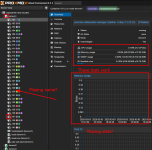
It happened like a week ago once, I didn't really think much, as there was nothing concerning or related in syslog, I just rebooted the whole node and everything was great to go (after manually unlocking container 105)
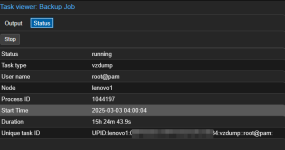
Today that just happened again, seems the backup gets stuck at container 105 again, which then goes offline, all other LXC and services, also things like ssh, webui of proxmox are fully accessible.
Backup Task log:
The Backup tasks seems to get stuck at always the same LXC, though most of the time it works just fine. (Normally the task has like under 20min)

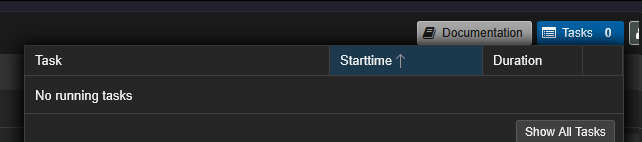
PBS shows no running tasks as of right now:
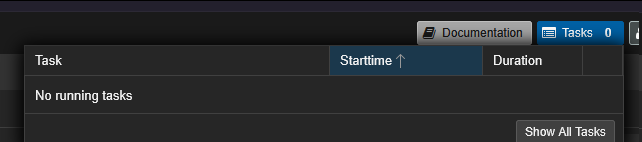
Analyzing the backup from PBS side seems that it went through successfully:
Here the LXC config (Though I've not really modified that in like the last half of a year...):
This kinda leaves me pointless, for the following reasons:
- Why does the backup get interrupted and PVE side, while PBS reports all fine?
- Why does this take my whole node into half working half offline status?
- What can I do to solve this?
Thanks a lot if someone can take a look at this, happy to provide more info if needed !
Love out to all PVE Engineers for making this awesome project
I run a backup of all my LXCs to my Proxmox Backup Server daily.
I think since updating to 8.3.4 I regularly get the following error:
My main node of my 5 node cluster just went grey in webui:
It happened like a week ago once, I didn't really think much, as there was nothing concerning or related in syslog, I just rebooted the whole node and everything was great to go (after manually unlocking container 105)
Today that just happened again, seems the backup gets stuck at container 105 again, which then goes offline, all other LXC and services, also things like ssh, webui of proxmox are fully accessible.
Backup Task log:
Code:
INFO: starting new backup job: vzdump --notification-mode notification-system --mailto {my@mail.com_replaced} --notes-template '{{guestname}}' --mailnotification always --storage pbs-ssd-pool --all 1 --fleecing 0 --quiet 1 --mode snapshot
INFO: skip external VMs: 100, 106, 107, 115, 122, 123, 124, 125, 126, 127, 140, 142, 143, 144
.....
INFO: Starting Backup of VM 104 (lxc)
INFO: Backup started at 2025-03-03 04:01:12
INFO: status = running
INFO: CT Name: adguard
INFO: including mount point rootfs ('/') in backup
INFO: backup mode: snapshot
INFO: ionice priority: 7
INFO: create storage snapshot 'vzdump'
  Logical volume "snap_vm-104-disk-0_vzdump" created.
INFO: creating Proxmox Backup Server archive 'ct/104/2025-03-03T03:01:12Z'
INFO: set max number of entries in memory for file-based backups to 1048576
INFO: run: lxc-usernsexec -m u:0:100000:65536 -m g:0:100000:65536 -- /usr/bin/proxmox-backup-client backup --crypt-mode=none pct.conf:/var/tmp/vzdumptmp1044197_104/etc/vzdump/pct.conf fw.conf:/var/tmp/vzdumptmp1044197_104/etc/vzdump/pct.fw root.pxar:/mnt/vzsnap0 --include-dev /mnt/vzsnap0/./ --skip-lost-and-found --exclude=/tmp/?* --exclude=/var/tmp/?* --exclude=/var/run/?*.pid --backup-type ct --backup-id 104 --backup-time 1740970872 --entries-max 1048576 --repository root@pam@{PBS_IP_REPLACED}:ssd-pool
INFO: Starting backup: ct/104/2025-03-03T03:01:12Z
INFO: Client name: lenovo1
INFO: Starting backup protocol: Mon Mar  3 04:01:12 2025
INFO: Downloading previous manifest (Sun Mar  2 04:00:56 2025)
INFO: Upload config file '/var/tmp/vzdumptmp1044197_104/etc/vzdump/pct.conf' to 'root@pam@{PBS_IP_REPLACED}:8007:ssd-pool' as pct.conf.blob
INFO: Upload config file '/var/tmp/vzdumptmp1044197_104/etc/vzdump/pct.fw' to 'root@pam@{PBS_IP_REPLACED}:8007:ssd-pool' as fw.conf.blob
INFO: Upload directory '/mnt/vzsnap0' to 'root@pam@{PBS_IP_REPLACED}:8007:ssd-pool' as root.pxar.didx
INFO: root.pxar: had to backup 133.671 MiB of 15.479 GiB (compressed 28.399 MiB) in 54.62 s (average 2.447 MiB/s)
INFO: root.pxar: backup was done incrementally, reused 15.349 GiB (99.2%)
INFO: Uploaded backup catalog (639.342 KiB)
INFO: Duration: 59.55s
INFO: End Time: Mon Mar  3 04:02:12 2025
INFO: adding notes to backup
INFO: cleanup temporary 'vzdump' snapshot
  Logical volume "snap_vm-104-disk-0_vzdump" successfully removed.
INFO: Finished Backup of VM 104 (00:01:01)
INFO: Backup finished at 2025-03-03 04:02:13
INFO: Starting Backup of VM 105 (lxc)
INFO: Backup started at 2025-03-03 04:02:14
INFO: status = running
INFO: CT Name: jellyfin
INFO: including mount point rootfs ('/') in backup
INFO: excluding bind mount point mp0 ('/mnt/omv-media') from backup (not a volume)
INFO: backup mode: snapshot
INFO: ionice priority: 7
INFO: create storage snapshot 'vzdump'
The Backup tasks seems to get stuck at always the same LXC, though most of the time it works just fine. (Normally the task has like under 20min)
PBS shows no running tasks as of right now:
Analyzing the backup from PBS side seems that it went through successfully:
Code:
....
....
2025-03-02T04:02:40+01:00: successfully added chunk 13a854552fde87670656c54f5ac3aee5572421867c764b90a4ef7b26360225bc to dynamic index 2 (offset 8467252766, size 2076242)
2025-03-02T04:02:40+01:00: successfully added chunk 0172ff2dcc812976370d6144f465adb8012512c8d02f41d0aaea4d92e8dc4cde to dynamic index 2 (offset 8469329008, size 609803)
2025-03-02T04:02:40+01:00: POST /dynamic_close
2025-03-02T04:02:40+01:00: Upload statistics for 'root.pxar.didx'
2025-03-02T04:02:40+01:00: UUID: ad54992640b648c782b4ceaa3249d2a7
2025-03-02T04:02:40+01:00: Checksum: e7c1ae041a352a893d8f087a5aca441f93baabb9708cbdb5071da053e54ed940
2025-03-02T04:02:40+01:00: Size: 8469938811
2025-03-02T04:02:40+01:00: Chunk count: 1834
2025-03-02T04:02:40+01:00: Upload size: 1553191233 (18%)
2025-03-02T04:02:40+01:00: Duplicates: 1526+0 (83%)
2025-03-02T04:02:40+01:00: Compression: 36%
2025-03-02T04:02:40+01:00: successfully closed dynamic index 2
2025-03-02T04:02:40+01:00: POST /dynamic_chunk
2025-03-02T04:02:40+01:00: upload_chunk done: 440476 bytes, cf6380a06573e41b88e76789b94f58c531a49cf870dbc81b744cd6e493be0bad
2025-03-02T04:02:40+01:00: PUT /dynamic_index
2025-03-02T04:02:40+01:00: dynamic_append 3 chunks
2025-03-02T04:02:40+01:00: successfully added chunk fda9874b44036008d53b560c4c0adce1124eabaefe1986d75889e8528797a5d1 to dynamic index 1 (offset 0, size 724946)
2025-03-02T04:02:40+01:00: successfully added chunk 937590a9eacb7e544e82ecca6fae78249fbfe4a6a7f468e9dd0bf38f3fdbf7cd to dynamic index 1 (offset 724946, size 591158)
2025-03-02T04:02:40+01:00: successfully added chunk cf6380a06573e41b88e76789b94f58c531a49cf870dbc81b744cd6e493be0bad to dynamic index 1 (offset 1316104, size 440476)
2025-03-02T04:02:40+01:00: POST /dynamic_close
2025-03-02T04:02:40+01:00: Upload statistics for 'catalog.pcat1.didx'
2025-03-02T04:02:40+01:00: UUID: f7d2db60531441dba191aecbe5dbd05d
2025-03-02T04:02:40+01:00: Checksum: 96a4c6c312c1ba15fde1e8e3f3de1807ddad1c5ba96129cc4e29a8b82c7bb942
2025-03-02T04:02:40+01:00: Size: 1756580
2025-03-02T04:02:40+01:00: Chunk count: 3
2025-03-02T04:02:40+01:00: Upload size: 1756580 (100%)
2025-03-02T04:02:40+01:00: Compression: 38%
2025-03-02T04:02:40+01:00: successfully closed dynamic index 1
2025-03-02T04:02:40+01:00: POST /blob
2025-03-02T04:02:40+01:00: add blob "/ssd-pool/ct/105/2025-03-02T03:01:58Z/index.json.blob" (421 bytes, comp: 421)
2025-03-02T04:02:40+01:00: POST /finish
2025-03-02T04:02:40+01:00: syncing filesystem
2025-03-02T04:02:42+01:00: successfully finished backup
2025-03-02T04:02:42+01:00: backup finished successfully
2025-03-02T04:02:42+01:00: TASK OK
Here the LXC config (Though I've not really modified that in like the last half of a year...):
Code:
arch: amd64
cores: 3
features: keyctl=1,nesting=1
hostname: jellyfin
lock: snapshot
memory: 5120
mp0: /mnt/omv-media/,mp=/mnt/omv-media,size=0T
nameserver: 10.10.20.1
net0: name=eth0,bridge=vmbr0,firewall=1,gw=10.10.20.1,hwaddr=BC:24:11:EF:D3:67,ip=10.10.20.5/24,tag=20,type=veth
onboot: 1
ostype: ubuntu
rootfs: local-lvm:vm-105-disk-0,size=144G
searchdomain: home
startup: up=10
swap: 512
tags: 10.10.20.5
unprivileged: 1
lxc.cgroup2.devices.allow: c 226:128 rwm
lxc.mount.entry: /dev/dri/renderD128 dev/dri/renderD128 none bind,optional,create=file
lxc.hook.pre-start: sh -c "chown 100000:100104 /dev/dri/renderD128"

[vzdump]
#vzdump backup snapshot
arch: amd64
cores: 3
features: keyctl=1,nesting=1
hostname: jellyfin
memory: 5120
mp0: /mnt/omv-media/,mp=/mnt/omv-media,size=0T
nameserver: 10.10.20.1
net0: name=eth0,bridge=vmbr0,firewall=1,gw=10.10.20.1,hwaddr=BC:24:11:EF:D3:67,ip=10.10.20.5/24,tag=20,type=veth
onboot: 1
ostype: ubuntu
rootfs: local-lvm:vm-105-disk-0,size=144G
searchdomain: home
snapstate: prepare
snaptime: 1740970934
startup: up=10
swap: 512
tags: 10.10.20.5
unprivileged: 1
lxc.cgroup2.devices.allow: c 226:128 rwm
lxc.mount.entry: /dev/dri/renderD128 dev/dri/renderD128 none bind,optional,create=file
lxc.hook.pre-start: sh -c "chown 100000:100104 /dev/dri/renderD128"
This kinda leaves me pointless, for the following reasons:
- Why does the backup get interrupted and PVE side, while PBS reports all fine?
- Why does this take my whole node into half working half offline status?
- What can I do to solve this?
Thanks a lot if someone can take a look at this, happy to provide more info if needed !
Love out to all PVE Engineers for making this awesome project