Hi, I'm new to Proxmox, but I'm disheartened by the issues I'm seeing with desktop virtualization VNC in the browser. The machine I'm using as a client has Fedora 20. I tested with IcedTea-web client 1.4.2 in the latest version of Chrome. I've tried now with guests Fedora 20 (Gnome) and Ubuntu 12.04.4 LTS (Unity) to deploy a virtual desktop in my PVE environment. In both cases, I'm left with a desktop VM that displays horizontally squished menus and text, if accessed using the built-in Java VNC applet. I tried Ubuntu in both 2D and 3D desktop modes via the sign on menu. Has anyone else seen this? Does Oracle Java fix the issue? I'd rather not be forced to hand-wire an alternative VNC solution, as this defeats at least some of the purpose of going with PVE. As I'm sure many of us know, Spice doesn't work well with Ubuntu 12.04 LTS and similar distros -- especially out of the box (sans post-install bits). Therefore, this is not a viable solution. Thanks for your help. -Joshua


PVE 3.2 + IcedTea-web client 1.4.2 + in-browser VNC issue
- Thread starter wrale
- Start date
You are using an out of date browser. It may not display this or other websites correctly.
You should upgrade or use an alternative browser.
You should upgrade or use an alternative browser.

I am utterly surprised to report that I'm seeing the same issue when using the following on the client side:
Windows 7 SP1 x64
Firefox 15.0.1
Java SE 7 update 7
Clearly there is an issue with the applet itself.
I tried to change the virtual display hardware of my guest from default (VGA) to VMware compatible. This resolved the squishing issue, but the resolution Unity defaulted to was enormous and usuable. Spice obviously failed without significant intervention.
Maybe this has something to do with Java 6 vs. Java 7.
Thanks,
Joshua
Windows 7 SP1 x64
Firefox 15.0.1
Java SE 7 update 7
Clearly there is an issue with the applet itself.
I tried to change the virtual display hardware of my guest from default (VGA) to VMware compatible. This resolved the squishing issue, but the resolution Unity defaulted to was enormous and usuable. Spice obviously failed without significant intervention.
Maybe this has something to do with Java 6 vs. Java 7.
Thanks,
Joshua

Your version of firefox is more than 5 years old and has been end of life for at least 3 years!!
Current stable version of firefox is 28.0. Try to upgrade to latest version of firefox and see if that solves the problem.
Current stable version of firefox is 28.0. Try to upgrade to latest version of firefox and see if that solves the problem.
Your version of firefox is more than 5 years old and has been end of life for at least 3 years!!
Current stable version of firefox is 28.0. Try to upgrade to latest version of firefox and see if that solves the problem.
You are incorrect. That version of Firefox is only 1.58 years old, though admittedly it is EOL. Using such an old Firefox and Java was intentioned, as I was demonstrating the wide-spread nature of the problem.
https://en.wikipedia.org/wiki/Firefox_release_history
[TABLE="class: wikitable collapsible"]
[TR]
[TD]15.0.1[/TD]
[TD]Firefox 15.0.1[/TD]
[TD]released September 6, 2012[/TD]
[/TR]
[/TABLE]
I did another test using Firefox 28.0, Java 7 Update 51 on Windows 7. As you can see in the attachment to this post, the issue persists on even a fully update deck. So now I can say it affects old and new client application versions on Windows and at least new application versions on Fedora.
The VNC applet has a bug and/or it is not keeping up with Java 7.
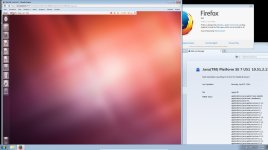
Please advise.
Thanks,
Joshua
Last edited:
pve-3.2
Guests:
Ubuntu, mint, Debian, Redhat, CentOS, Scientific Linux, FreBSD, OpenBSD, Omnios (solaris), Windows 2000, Windows XP, Windows 7.
Guests:
Ubuntu, mint, Debian, Redhat, CentOS, Scientific Linux, FreBSD, OpenBSD, Omnios (solaris), Windows 2000, Windows XP, Windows 7.
pve-3.2
Guests:
Ubuntu, mint, Debian, Redhat, CentOS, Scientific Linux, FreBSD, OpenBSD, Omnios (solaris), Windows 2000, Windows XP, Windows 7.
Thank you.
Would you be willing to post the output of 'dpkg -l|grep qemu' from your hypervisor? I'm theorizing that the issue may be upstream, but I think it's unlikely.
root@proxmox-n1:/var/log# dpkg -l|grep qemu
ii pve-qemu-kvm 1.7-4 amd64 Full virtualization on x86 hardware
ii qemu-server 3.1-15 amd64 Qemu Server Tools
root@proxmox-n1:/var/log#
I'm on PVE 3.2-1/1933730b. I built using the iso.
Last edited:
dpkg -l|grep qemu
ii pve-qemu-kvm 1.7-4 amd64 Full virtualization on x86 hardware
ii qemu-server 3.1-15 amd64 Qemu Server Tools
proxmox-ve-2.6.32: 3.2-121 (running kernel: 2.6.32-27-pve)
pve-manager: 3.2-1 (running version: 3.2-1/1933730b)
ii pve-qemu-kvm 1.7-4 amd64 Full virtualization on x86 hardware
ii qemu-server 3.1-15 amd64 Qemu Server Tools
proxmox-ve-2.6.32: 3.2-121 (running kernel: 2.6.32-27-pve)
pve-manager: 3.2-1 (running version: 3.2-1/1933730b)
