Proxmox won't boot

pongomongo

New Member
Jan 8, 2026
26
1
3
Proxmox has been running without problem on a pc for a few months without problem. The pc has two nvme drives, one for running Proxmox and VMs, the other for data storage. All of a sudden, Proxmox won't boot. When I hook up a monitor to view the boot screen, everything proceeds normally, then the error message below is flashed briefly, then the screen goes black and unresponsive.

Code:
Found logical volume group “pve” using metadata type lvm2

3 logical volume(s) in volume group “pve” now active

/dev/mapper/pve-root: recovering journal

/dev/mapper/pve-root: clean, 94714/6291456 files, 9452054/25165824 blocks


[TIME] Timed out waiting for device dev-disk-by\x2duuid-6d36f059\x2dbdfc\x2d8c44\x2d2b52c8185443.device - /dev/disk/by-uuid/6d36f059-bdfc-4010-8c44-2b52c8185443.

[DEPEND] Dependency failed for mnt-pve-nvme2tb.mount – Mount storage ‘nvme2tb’ under /mnt/pve.


------
It appears that the issue is somehow related to the data storage disk. When I reboot into recovery mode, I check /etc/fstab and see no corresponding problematic mount points

/etc/fstab
Code:
# <file system> <mount point> <type> <options> <dump> <pass>


/dev/pve/root / ext4 errors=remount-ro 0 1

UUID=7D29-0E2F /boot/efi vfat defaults 0 1

/dev/pve/swap none swap sw 0 0

proc /proc proc defaults


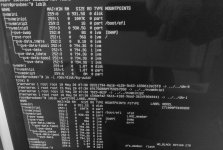
Checking #lsblk: I see the problematic nvme disk listed as nvme1n1, with partitions nvme1n1p1 and nvme1n1p9. There are no mount points associated with these partitions.

Checking #blkid: Each of the nvmen1n1 partitions are shown with the LABEL and types assigned from Proxmox. The UUIDs shown here do not match the uuids shown in the boot error message.

-----
I am stumped on what to do here. Any help would be appreciated!!! I have backups for the VMs and the most critical data stored on the problem disk, but I don't have a backup for Proxmox itself (yet)..
 
Last edited:
Dependency failed for mnt-pve-nvme2tb.mount – Mount storage ‘nvme2tb’ under /mnt/pve
This indicates you added/mounted that disk using a systemd mount file. Hence it does not show up in fstab.

Probably check with:
Code:
ls /etc/systemd/system/mnt-pve-nvme2tb.mount -lh

# It maybe in another dir, so you'll have to check
I've never done it before, but I guess you could adjust that file to show the correct UUID's required. Not sure why they would have changed in the first place.

On the issue of your node not currently booting, I guess this has to do with how you have setup this mnt-pve-nvme2tb.mount in the Proxmox storage backend - which you have not disclosed.

It still remains to be seen if your system is not booting for a different reason & whether that NVME is failing.
 
Thanks for responding. Agreed, I do not know for sure yet what the issue is. Also not sure why UUIDs would have changed here. There is no update, system change, etc that correlates with the manifestation of this issue. One day things work, next day no boot.

Checking nvme disk health:

Code:
# fdisk -l
Disklabel type: gpt
Device: /dev/nvme0n1

# smartctl -H /dev/nvme0n1
SMART overall-health self-assessment test result: PASSED

The disk was setup using the Proxmox GUI (from my memory and notes that should be more detailed):
-node>disks>wipe disk, initialize with gpt.
-datacenter>storage>add zfs.

If there is some CLI method to get more useful information about this, please let me know.

Checking systemd mount file:

Code:
# ls /etc/systemd/system/mnt-pve-nvme2tb.mount -lh
-rw-r--r 1 root root 216 Mar 6 07:40 /etc/systemd/system/mnt-pve-nvme2tb.mount
 
Ok, before I go editing the systemd mount file, can I get some advice on which UUID to use?
"nvme2tb" is the name I assigned the disk in Proxmox.
"flash" is the name I assigned the storage associated with nvme2tb in Proxmox.

Current systemd mount file:

Code:
#nano  /etc/systemd/system/mnt-pve-nvme2tb.mount

[Mount]
Options=defaults
Type=ext4
What=/dev/disk/by-uuid/6d36f059-bdfc-4010-8c44-2b52c8185443
Where=/mnt/nvme2tb


Code:
# fdisk -l

Disk /dev/nvme0n1: 1.82 TiB...
Disk identifier: E5EC3150-0F62-A546-A8A2-E9F058B109E5

Device............Size
/dev/nvme0n1p1....1.8T
/dev/nvme0n1p9......8M

#blkid

/dev/nvme0n1p1: LABEL "flash" UUID='6917568809753267558' UUID_SUB="12944095974692432413" BLOCK_SIZE="4096" TYPE="zfs_member" PARTLABEL="zfs-e97648055e24be6d" PARTUUID="dbf2f0f2-cc6d-e94a-a396-e076068ae86a"
/dev/: PARTUUID="4b7a5a10-01e9-114d-abc0-aeb354b4eb3d"


The time-out error message shows that it is timing out waiting on the /dev/disk/by-uuid/6d36f059-bdfc-4010-8c44-2b52c8185443 This matched the What line in /etc/systemd/system/mnt-pve-nvme2tb.mount

However, this does not match any of the UUIDS associated with the disk as shown using fdisk or blkid

If I edit the systemd file, what I'm not sure about is which UUID is should update it to?

Should I use the disk identifier for the parent disk nvme0n1? (
E5EC3150-0F62-A546-A8A2-E9F058B109E5)

Or should I use the PARTUUID for the partition nvme0n1p9? (4b7a5a10-01e9-114d-abc0-aeb354b4eb3d)
 
There doesn't appear to be a ext4 file system (which is what Directory creates) so stop for now. ZFS is not mounted like this.
Can you share this?
Bash:
ls -l /dev/disk/by-uuid/
lsblk -o+FSTYPE,LABEL,MODEL
 
Last edited:
-datacenter>storage>add zfs.
I don't use ZFS - but AFAIK adding a ZFS storage via Proxmox will not create the above (systemd) .mount file, since it will use the zfs-mount.service instead. Are you sure you chose ZFS & not possibly Directory, since I believe that will create such a file.

Something else has happened here / is happening, that we are not aware of.

Above (OP) you said:
Checking #lsblk: I see the problematic nvme disk listed as nvme1n1, with partitions nvme1n1p1 and nvme1n1p9

However now you suggest:

/dev/nvme0n1p1....1.8T /dev/nvme0n1p9......8M #blkid /dev/nvme0n1p1:

So is it nvme1n1 or nvme0n1?

I suspect you have a ZFS raid/pool comprising both of those drives & another Directory storage was added/defined to that dataset.

You'll need the ZFS gurus to chew through this one, especially with the possibility that one of these drives has failed.
 
nvme1n1 vs nvme0n1 ----it is definitely nvme0n1 as of checking today. The original post was made late at night after staring at the screen for many hours. Sorry for the confusion. Hand transposing out of a recovery mode terminal onto the forum post, I probably made a typo.
 
Last edited:
Yes, it appears that nvme0n1 which is a WD 2tb drive is the one you referred to as "data" above.

Proxmox appears to be installed on the other (1tb, Crucial?) & it would appear that you have a "regular" ext4 installation, so non-zfs. Although it seems to be non-bootable presently!

However the said 2tb drive appears as a zfs_member, so I imagine this is how you created it.

I believe you will first have to check the status of ZFS with the usual commands.

So maybe try:
Code:
zpool status

zfs list

etc.

As I've said above, that .mount created above in systemd, is likely a directory storage created in a dataset (possibly incorrectly).

The ZFS guys will be required here.
 
What stops you from deleting that mount file? PVE units are supposed to mount at /mnt/pve/... so I'm not sure who created that unit.
 
It is quite possible that this was not setup "correctly." It was my first Proxmox box, hence my hesitancy in exactly what was done. Past-me took some notes, but apparently left out some crucial details. Regardless of the correctness of the setup, it worked fine for several months and then something changed suddenly.

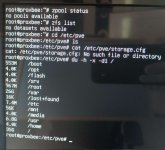
#zpool status
no pools available
#zfs list
no datasets available

Correct, there are two nvme drives, a 1TB Nvme (maybe Crucial?) and a 2TB WD_Black. Proxmox was installed on the 1TB nvme, and the standard Proxmox formatting was left as default. VMs are also installed on the 1 TB. The 2TB WD_Black was added later as a data storage drive.

What is preventing me from deleting the mount file?...I don't know, just trying to be cautious about deleting things without knowing the cause or consequences. I would like to not lose the data, mount points, etc that are on and configured on the data drive if possible.
 
Last edited:
The irony of the situation is that just a few days ago I finished assembling the hardware to work on setting up PBS. Just hadn't quite gotten to it yet.
 
Trying to understand your setup, what does this show:
Code:
cat /etc/pve/storage.cfg

I'm also wondering, if the added 2tb "ever" worked. What is possible, is that the mountpoints being unavailable, you may find that in fact all the backups are stored locally. (This may actually save you here!).

To test this theory, what does this show:
Code:
du -h -x -d1 /

Approximately, what size are all LXCs, VMs? What total backup size do you believe these have?

You said above (OP):
the other for data storage
Could you please define what exactly you mean by "data storage" & ANY usage you did (or believed to be doing) with that drive.
 
One other thing that comes to mind, your lsblk output of nvme1n1p3 (LVM of the 1TB) shows NO vm-vmid-disks in the pve-data-tpool. You claimed all your VMs reside here. So, this maybe concerning, assuming all VMs are supposed to be on that drive. Possibly there is a different explanation - but it is puzzling.
 
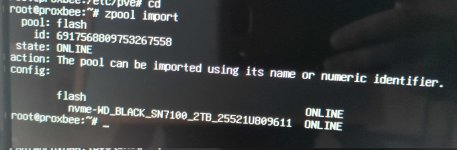
I wonder what zpool import says. Your mount unit is not really ZFS related and I see nothing else it could have mounted. Removing the unit does not delete data.
 
Last edited:
So the basic setup on this Proxmox server was like this:

-2 nvmes
1TB nvme for PVE Host, VMS, isos, templates, local backup
2TB nvme added as datacenter storage to be used for on device data storage
-on my network, I also have an additional, separate smb share added to PVE host storage, used for storing VM and LXC backups

-1 LXC setup as an on-device smb server, with a multiple mount points on the 2TB nvme
-a couple of VMs, each mounted via /etc/fstab/ to mount points from the LXC-smb server

So for the most important VMs and LXCs, I have backups of those stored on a separate drive. Total size 47 GB. I do not think these backups include the data associated with the VMs that is located on the 2TB disk.

The data on the mount points on the 2TB nvme includes: media, files, photos, metadata, databases, logs, etc. I have offline backups of the most critical files, data, etc, but rebuilding the directories and databases would be....let's just say it would be preferred to try to avoid having to do all of that. There would definitely be some lost data if I just wiped the drive and started over. Since the 2TB drive health report doesn't indicate that the drive itself failed, I am optimistic that there is some way to correct this mount timeout issue.
 
Try zpool import flash and then check zfs list and ls /flash. I'd recommend you delete the unit file and reboot. There's also instruction to boot with a failed mount unit. Check what it displays during boot.