Proxmox won't boot, stuck in grub

MarcvsTvllivs

New Member
Jan 20, 2023
3
0
1
Hi everybody!

I rebooted my Proxmox sever and instead of Proxmox, I am greeted by Grub not being able to find my LVM...

Screenshot 2023-01-20 at 7.59.28 PM.png

I read up on others having this issue before, on how to fix grub issues from a liveCD through mounting and chrooting into the incapacitated installation, and on LVMs -- but I am having trouble putting it all together for my setup.

In short, my Proxmox server is on an SSD that has the expected three partitions for Boot, EFI and LVM:
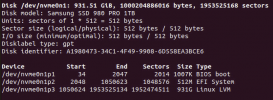
Screenshot 2023-01-20 at 10.54.06 PM.png

Other than a bunch of VM disks (probably should have been given their own space...), the LVM contains the following:

Screenshot 2023-01-20 at 10.53.12 PM.png

Now, what exactly do I mount where? The step by step guides I find usually assume a non-LVM setup, and sda1,2,3 numbering, and I am having trouble transferring that to mine.

Any help would be greatly appreciated!
 
"/dev/pve/root" is the LV with your root filesystem that you can for example mount in "/altroot" on a live CD to then chroot into "/altroot". You will probably also need to bind-mount the "/sys", "/proc" and "/dev" folders.
 
"/dev/pve/root" is the LV with your root filesystem that you can for example mount in "/altroot" on a live CD to then chroot into "/altroot". You will probably also need to bind-mount the "/sys", "/proc" and "/dev" folders.
Right, and the EFI I think as well as grub won't install otherwise. How to I configure the newly-installed grub for the LVM situation though?
 
Depends on how and which PVE version you initially installed.
As far as I understand since PVE 6.2 or 6.3 even the grub bootloader will be stored on the 2nd EFI partition using the proxmox-boot-tool.
If you for example installed PVE on top of a Debian then the grub bootloader would be on the first grub partition.

So you either would need to write a new grub bootloader with the "grub-install" command or by using the proxmox-boot-tool.
See here: https://pve.proxmox.com/wiki/Host_Bootloader
 
Thank you. I am post-6.2 so it is the newer version. I did the grub-install but now all I get is the system booting into grub (rather than grub-rescue before) but still not into Proxmox. I will need to read up more on that, but am grateful for any clues.

EDIT: I can boot just fine using a super grub2 disk from a USB thumb drive, loading LVM drivers, and then selecting the Proxmox installation for the next boot. That's a relief, but I don't know how to make this permanent and independent from the thumb drive.
 
Last edited:
I am in a similar spot. Started a related thread over here because unlike this thread, I am on a brand new install on just one internal drive.
I've now done 1 perfect install on the first box, but now about 7 on the other two (identical) boxes and keep landing in grub.
I've used etcher rufus and ventnoy.
I've used gparted to delete the 3 partitions after a brand new install, and then installed again.
I get the same fall into grub with no errors that I can see.
I also tried to do the 'repair grub' in case that somehow was problematic.
I also used the 'normal' or 'grub2' option and no difference in the outcome.

What am I missing??
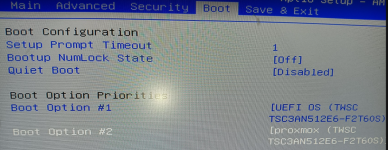
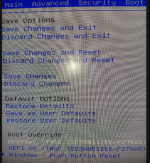
See my bios settings where the proxmox shows up as a boot option (along with the same thing labeled as UEFI), and I've tried to boot each as a priority, same result.
The one weird thing I see is on the second image, at the bottom, there is some sort of boot override which shouldn't be relevant anymore as I fully deleted all the partitions, and therefore there should be no remnant of windows left- but I guess this was not a baremetal box and so it originally came with windows. I guess it's possible my first box also had windows but I didn't even notice because I immediately booted off the proxmox install iso.

So I managed the first box completely flawlessly, and now have been unable to get either of the next 2 boxes to boot, both stop in grub, despite wiping partitions, redoing the iso with multiple tools, changing every related boot option I could find, etc...

Help! :)


1749319043396.png

1749319082412.png
 
Here's a cross ref to my latest update.

I am able to see the proxmox boot drive, load the kernel, but don't see a partition, and booting still fails ....