Proxmox VE 8 to 9 in-place update but kernel still on 6.8

alia80

Member
Sep 21, 2021
6
0
21
56
I did an in-place upgrade from PVE8 to PVE9 but after the update the kernel and zfs are still showing old versions even though they both seem to have updated:

Code:
# pveversion
pve-manager/9.1.4/5ac30304265fbd8e (running kernel: 6.8.12-18-pve)

# uname -a
Linux ghar80 6.8.12-18-pve #1 SMP PREEMPT_DYNAMIC PMX 6.8.12-18 (2025-12-15T18:07Z) x86_64 GNU/Linux

# zfs version
zfs-2.3.4-pve1
zfs-kmod-2.2.9-pve1

 # [ -e  /sys/firmware/efi/efivars/ ] && echo "EFI" || echo "BIOS"
EFI

# cat /sys/module/zfs/version
2.2.9-pve1

I think it has something to do with the efi partition:

Bash:
/boot/efi/loader/entries# ls
memtest.conf
proxmox-5.15.158-2-pve.conf
proxmox-6.8.12-18-pve.conf

# proxmox-boot-tool refresh
Running hook script 'proxmox-auto-removal'..
Running hook script 'zz-proxmox-boot'..
Re-executing '/etc/kernel/postinst.d/zz-proxmox-boot' in new private mount namespace..
No /etc/kernel/cmdline found - falling back to /proc/cmdline
/dev/disk/by-uuid/AED9-4562 contains no grub directory - skipping

Any ideas on how I can resolve this issue?
 
Last edited:
Well, what's in /boot?
And what does pveversion -v tell you, and apt policy proxmox-default-kernel proxmox-kernel-6.17 ?
I guess installing proxmox-kernel-6.17 will bring it to you, but maybe check further why it didn't update itself.
 
Unfortunately this could be one of the problems, as I originally started with PVE6 I have a lot of old version:

# ls /boot
config-5.11.22-1-pve
config-5.11.22-7-pve
config-5.13.19-2-pve
config-5.13.19-6-pve
config-5.15.158-2-pve
config-6.17.4-2-pve
config-6.8.12-18-pve
efi
grub
initrd.img-5.11.22-1-pve
initrd.img-5.11.22-7-pve
initrd.img-5.13.19-2-pve
initrd.img-5.13.19-6-pve
initrd.img-5.15.158-2-pve
initrd.img-6.17.4-2-pve
initrd.img-6.8.12-18-pve
memtest86+ia32.bin
memtest86+ia32.efi
memtest86+x64.bin
memtest86+x64.efi
pve
System.map-5.11.22-1-pve
System.map-5.11.22-7-pve
System.map-5.13.19-2-pve
System.map-5.13.19-6-pve
System.map-5.15.158-2-pve
System.map-6.17.4-2-pve
System.map-6.8.12-18-pve
vmlinuz-5.11.22-1-pve
vmlinuz-5.11.22-7-pve
vmlinuz-5.13.19-2-pve
vmlinuz-5.13.19-6-pve
vmlinuz-5.15.158-2-pve
vmlinuz-6.17.4-2-pve
vmlinuz-6.8.12-18-pve

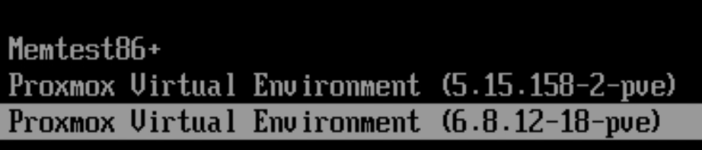
I know that the new kernel did install as it is there but at boot it is only showing the PVE8 version and the PVE7..

# apt policy proxmox-default-kernel proxmox-kernel-6.17
proxmox-default-kernel:
Installed: 2.0.2
Candidate: 2.0.2
Version table:
*** 2.0.2 500
500 http://download.proxmox.com/debian/pve trixie/pve-no-subscription amd64 Packages
100 /var/lib/dpkg/status
2.0.1 500
500 http://download.proxmox.com/debian/pve trixie/pve-no-subscription amd64 Packages
2.0.0 500
500 http://download.proxmox.com/debian/pve trixie/pve-no-subscription amd64 Packages
proxmox-kernel-6.17:
Installed: 6.17.4-2
Candidate: 6.17.4-2
Version table:
*** 6.17.4-2 500
500 http://download.proxmox.com/debian/pve trixie/pve-no-subscription amd64 Packages
100 /var/lib/dpkg/status
6.17.4-1 500
500 http://download.proxmox.com/debian/pve trixie/pve-no-subscription amd64 Packages
6.17.2-2 500
500 http://download.proxmox.com/debian/pve trixie/pve-no-subscription amd64 Packages
6.17.2-1 500
500 http://download.proxmox.com/debian/pve trixie/pve-no-subscription amd64 Packages
6.17.1-1 500
500 http://download.proxmox.com/debian/pve trixie/pve-no-subscription amd64 Packages

Could it be that I need to force it by the changing the default in /etc/default/grub and replace "GRUB_DEFAULT=0" to the actual entry in /boot/grub/grub.cfg which seems to be 'Proxmox VE GNU/Linux, with Linux 6.17.4-2-pve'? Although I want to be careful since I don't want to crash the system and cause data loss
 
Please use code blocks. Try this and reboot
Bash:
proxmox-boot-tool kernel unpin
proxmox-boot-tool refresh
 
Hmm, it's weird, can you run update-grub ? I'm guessing something went wrong when it tried to configure it..
Or maybe something like apt install --reinstall proxmox-kernel-6.17

Or proxmox-boot-tool commands from @Impact, though it's weird that update-grub didn't pick up the latest version.. but maybe it has, and indeed EFI conf doesn't know about it..
 
Last edited:
Hmm, it's weird, can you run update-grub ? I'm guessing something went wrong when it tried to configure it..
Or maybe something like apt install --reinstall proxmox-kernel-6.17

Or proxmox-boot-tool commands from @Impact, though it's weird that update-grub didn't pick up the latest version.. but maybe it has, and indeed EFI conf doesn't know about it.
update-grub didn't help and neither did proxmox-boot-tool refresh but I tried that a while ago
 
Last edited:
Please use code blocks. Try this and reboot
Bash:
proxmox-boot-tool kernel unpin
proxmox-boot-tool refresh
Code:
# proxmox-boot-tool kernel unpin
Removed /etc/kernel/next-boot-pin.
Removed /etc/kernel/proxmox-boot-pin.

# proxmox-boot-tool refresh
Running hook script 'proxmox-auto-removal'..
Running hook script 'zz-proxmox-boot'..
Re-executing '/etc/kernel/postinst.d/zz-proxmox-boot' in new private mount namespace..
No /etc/kernel/cmdline found - falling back to /proc/cmdline
/dev/disk/by-uuid/AED9-4562 contains no grub directory - skipping

# proxmox-boot-tool kernel list
Manually selected kernels:
None.

Automatically selected kernels:
6.17.4-2-pve
6.8.12-18-pve

Should this match the selection on bootup? see attached image from last bootup:

1769392557787.png
 
Last edited:
update-grub didn't help and neither did proxmox-boot-tool refresh but I tried that a while ago
Bash:
# update-grub
Generating grub configuration file ...
W: This system is booted via proxmox-boot-tool:
W: Executing 'update-grub' directly does not update the correct configs!
W: Running: 'proxmox-boot-tool refresh'

No /etc/kernel/cmdline found - falling back to /proc/cmdline
/dev/disk/by-uuid/AED9-4562 contains no grub directory - skipping
Found linux image: /boot/vmlinuz-6.17.4-2-pve
Found initrd image: /boot/initrd.img-6.17.4-2-pve
Found linux image: /boot/vmlinuz-6.8.12-18-pve
Found initrd image: /boot/initrd.img-6.8.12-18-pve
Found linux image: /boot/vmlinuz-5.15.158-2-pve
Found initrd image: /boot/initrd.img-5.15.158-2-pve
Found linux image: /boot/vmlinuz-5.13.19-6-pve
Found initrd image: /boot/initrd.img-5.13.19-6-pve
Found linux image: /boot/vmlinuz-5.13.19-2-pve
Found initrd image: /boot/initrd.img-5.13.19-2-pve
Found linux image: /boot/vmlinuz-5.11.22-7-pve
Found initrd image: /boot/initrd.img-5.11.22-7-pve
Found linux image: /boot/vmlinuz-5.11.22-1-pve
Found initrd image: /boot/initrd.img-5.11.22-1-pve
Found memtest86+ 64bit EFI image: /boot/memtest86+x64.efi
Found memtest86+ 32bit EFI image: /boot/memtest86+ia32.efi
Found memtest86+ 64bit image: /boot/memtest86+x64.bin
Found memtest86+ 32bit image: /boot/memtest86+ia32.bin
Adding boot menu entry for UEFI Firmware Settings ...
done
 
Tried the following so far:

Code:
proxmox-boot-tool kernel unpin
proxmox-boot-tool refresh

and also:

Code:
apt install --reinstall proxmox-kernel-6.17
reboot

made no difference.