

Proxmox VE 8 HDD LVM Thin and Template Cloud-init

zulf

New Member
May 28, 2024
5
0
1
Hello,

on new Proxmox (on Hetzner) 8.3.5, i setup LVM-Thin storage like this :

Bash:
wipefs -a /dev/sda4 /dev/sdb
pvcreate /dev/sda4 /dev/sdb
vgcreate data_hdd /dev/sda4 /dev/sdb
lvcreate -T -l +100%FREE --poolmetadatasize 16G -Zn data_hdd

And add to LVM-Thin storage datacenter.

I add vm template with cloud-init disk (on local storage):

Code:
qm create 907 --name debian12-cloudinit --description "Debian 12 cloud-init template" --template 1 --ostype l26 --machine q35 --cpu host --scsihw virtio-scsi-single --scsi0 local:0,iothread=1,discard
=on,backup=off,format=qcow2,import-from=/root/debian-12-generic-amd64.qcow2 --tablet 0 --boot order=scsi0 --scsi1 local:cloudinit --ciupgrade 0 --net0 virtio,bridge=vmbr10

When I clone (full) template (with disk on local storage in qcow2 format) and start the vm, the startup stuck :
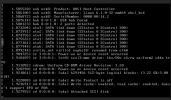
1742483095139.png

Problem seems to be related to LVM-Thin and raw format but I'm not sure about that.

Has anyone reproduce same errors ?
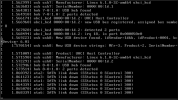
 
Same stuck VM with debian cloud init in raw format

1742487827868.png

And same stuck VM after delete all storage and re-mount LVM-thin with this command :

Code:
wipefs -a /dev/sda4 /dev/sdb
pvcreate /dev/sda4 /dev/sdb
vgcreate data_hdd /dev/sda4 /dev/sdb
lvcreate -T -l +100%FREE --poolmetadatasize 16G -Zn data_hdd
 
With clone on local storage, VM start.
When move on lvm-thin storage, VM don't start.

Is anyone have same issue ?
 
Another issue with Debian Generic Cloud image on lvm-thin storage (no issue in local storage)

Code:
qm create 907 --name debian12-cloudinit --description "Debian 12 cloud-init template" --template 1 --ostype l26 --machine q35 --cpu host --scsihw virtio-scsi-single --scsi1 data_hdd_d3:0,iothread=1,d
iscard=on,backup=off,format=raw,import-from=/root/debian-12-genericcloud-amd64.raw --tablet 0 --boot order=scsi1 --scsi0 data_hdd_d3:cloudinit,format=raw --ciupgrade 0 --net0 virtio,bridge=vmbr10 --agent=1,fstri
m_cloned_disks=1 --vga serial0 --serial0 socket

In clone VM boot with no disk found.

Code:
Begin: Running /scripts/local-block ... done.
done.
Gave up waiting for root file system device.  Common problems:
 - Boot args (cat /proc/cmdline)
   - Check rootdelay= (did the system wait long enough?)
 - Missing modules (cat /proc/modules; ls /dev)
ALERT!  PARTUUID=8888ce3c-8799-46ee-8e4b-a68b2e8b009e does not exist.  Dropping to a shell!
(initramfs) (initramfs) (initramfs)

Anyone faced all issue ?
I can't find any information on these errors in the forum.
 
The problem appears to be more global, possibly related to the specifics of Thin LVM provisioning, or it could be a recent bug since it's unlikely that no one has reported this issue before.

After migrating to LVM thin provisioning, I've completely lost the ability to create working VMs. All attempts result in the VM booting into initramfs.

Working scenarios:
  • When restoring VMs from PBS (Proxmox Backup Server)
Non-working scenarios:
  • Local VM cloning operations

I'm currently using a temporary workaround:

Code:
lvcreate -V 20G -T vg_pve/data -n vm-${VM_ID}-disk-0

qemu-img convert -f qcow2 -O raw ${TEMPLATE_IMAGE}.img /dev/vg_pve/vm-${VM_ID}-disk-0

And then:
Code:
qm set ${VM_ID} --scsihw virtio-scsi-pci --scsi0 ${STORE_POOL}:vm-${VM_ID}-disk-0,discard=on,cache=writeback,ssd=1
 
I dont know if its bug or not - but I probably found the issue.
Reproduce:
Create template like in this tutorial: https://pve.proxmox.com/wiki/Cloud-Init_Support
On first try - do it on e.g ZFS or ext4 drive - should be ok
On second try do it on LVM-thin - you'll probably fail in some conditions.

If you create LVM-thin on nvme with 4k block size you will get troubles, because many of those images with cloud init are prepared for 512 block size. And that is probably causing the problems.

Also - when you create good and working VM / template - and then move it to LVM-thin 4k - it will broke. Moving back to ZFS for example wouldn't help. Maybe there's some workaround for this that i dont know yet, but i'm very unhappy with this kind of issues soon after migrating my nvmes from ext4 to LVM...

In addition - when you'll make backup - and you'll make it into LVM-thin backup pool (for example default local storage) - say good bye :)
BUT: If you have working VM/template that you backup on PBS for example, or any other drive different than LVM-thin - and then you restore it to LVM-thin 4k - it should work.
BUT! When you already have working VM on LVM-thin doing restore from PBS, and you'll make copy of it to LVM-thin - broke again.


I think it has something to do with some boot records, and it's 'place' that varies between 512 and 4k setup.

So be careful guys - 10 hours of battle with this made me go crazy ;)
 
Last edited: