Proxmox Update Meldungen / Warning

Peter_SP

Member
May 27, 2024
16
1
8
Hallo Leute,

ich habe heute wie ca. alle 2 Wochen Updates durchführen wollen und erhielt heute folgende Meldungen. Wie kann ich das beheben, bin Anfänger :) ?

Code:
Starting system upgrade: apt-get dist-upgrade
Reading package lists... Done
Building dependency tree... Done
Reading state information... Done
Calculating upgrade... Done
The following packages were automatically installed and are no longer required:
  libclass-methodmaker-perl libdpkg-perl libfile-fcntllock-perl
  libpve-network-api-perl proxmox-enterprise-support-keyring proxmox-firewall
  pve-nvidia-vgpu-helper pve-yew-mobile-gui pve-yew-mobile-i18n python3-pefile
  python3-virt-firmware virtiofsd
Use 'apt autoremove' to remove them.
The following packages will be REMOVED:
  libpve-notify-perl proxmox-ve pve-container pve-ha-manager pve-manager qemu-server
The following packages have been kept back:
  libpve-network-api-perl libpve-network-perl libpve-rs-perl pve-cluster
  pve-firewall
The following packages will be upgraded:
  libproxmox-rs-perl libpve-cluster-api-perl libpve-cluster-perl
3 upgraded, 0 newly installed, 6 to remove and 5 not upgraded.
Need to get 0 B/87.4 kB of archives.
After this operation, 7375 kB disk space will be freed.
Do you want to continue? [Y/n] y
W: (pve-apt-hook) !! WARNING !!
W: (pve-apt-hook) You are attempting to remove the meta-package 'proxmox-ve'!
W: (pve-apt-hook)
W: (pve-apt-hook) If you really want to permanently remove 'proxmox-ve' from your system, run the following command
W: (pve-apt-hook)       touch '/please-remove-proxmox-ve'
W: (pve-apt-hook) run apt purge proxmox-ve to remove the meta-package
W: (pve-apt-hook) and repeat your apt invocation.
W: (pve-apt-hook)
W: (pve-apt-hook) If you are unsure why 'proxmox-ve' would be removed, please verify
W: (pve-apt-hook)       - your APT repository settings
W: (pve-apt-hook)       - that you are using 'apt full-upgrade' to upgrade your system
E: Sub-process /usr/share/proxmox-ve/pve-apt-hook returned an error code (1)
E: Failure running script /usr/share/proxmox-ve/pve-apt-hook

System not fully up to date (found 10 new packages)

starting shell
root@proxmox:/#

Package versions:

Code:
proxmox-ve: 9.2.0 (running kernel: 7.0.14-26-pve)
pve-manager: 9.2.24 (running version: 9.2.24/66bc407c6d90a67a)
proxmox-kernel-helper: 9.2.1
proxmox-kernel-7.0: 7.0.14-28
proxmox-kernel-7.0.14-28-pve-signed: 7.0.14-28
proxmox-kernel-7.0.14-26-pve-signed: 7.0.14-26
proxmox-kernel-6.8.12-20-pve-signed: 6.8.12-20
proxmox-kernel-6.8: 6.8.12-20
proxmox-kernel-6.5.13-6-pve-signed: 6.5.13-6
proxmox-kernel-6.5: 6.5.13-6
proxmox-kernel-6.5.13-5-pve: 6.5.13-5
proxmox-kernel-6.5.11-4-pve-signed: 6.5.11-4
ceph-fuse: 19.2.7-pve1
corosync: 3.2.0-pve1
criu: 4.1.1-1
frr-pythontools: 10.6.1-1+pve3
ifupdown2: 3.3.0-1+pmx13
intel-microcode: 3.20260227.1
ksm-control-daemon: 1.5-1
libjs-extjs: 7.0.0-9
libproxmox-acme-perl: 1.7.2
libproxmox-backup-qemu0: 2.0.4
libproxmox-rs-perl: 0.4.1
libpve-access-control: 9.2.0
libpve-apiclient-perl: 3.4.3
libpve-cluster-api-perl: 9.1.7
libpve-cluster-perl: 9.1.7
libpve-common-perl: 9.2.8
libpve-guest-common-perl: 6.0.6
libpve-http-server-perl: 6.0.7
libpve-network-perl: 1.6.7
libpve-notify-perl: 9.1.7
libpve-rs-perl: 0.15.3
libpve-storage-perl: 9.1.14
libspice-server1: 0.15.2-1+b1
lvm2: 2.03.31-2+pmx1
lxc-pve: 7.0.0-2
lxcfs: 7.0.0-pve1
novnc-pve: 1.7.0-2
proxmox-backup-client: 4.2.10-1
proxmox-backup-file-restore: 4.2.10-1
proxmox-backup-restore-image: 1.1.0
proxmox-enterprise-support-keyring: 1.1
proxmox-firewall: 1.2.4
proxmox-kernel-helper: 9.2.1
proxmox-mail-forward: 1.1.0
proxmox-mini-journalreader: 1.7
proxmox-offline-mirror-helper: 0.8.0
proxmox-widget-toolkit: 5.2.12
pve-cluster: 9.1.6
pve-container: 6.1.18
pve-docs: 9.2.13
pve-edk2-firmware: 4.2026.08-1
pve-esxi-import-tools: 1.0.1
pve-firewall: 6.0.6
pve-firmware: 3.18-9
pve-ha-manager: 5.2.5
pve-i18n: 3.11.0
pve-qemu-kvm: 11.1.3-1
pve-xtermjs: 6.0.0-3
qemu-server: 9.2.14
smartmontools: 7.5-pve2
spiceterm: 3.4.2
swtpm: 0.10.2+pve1
vncterm: 1.9.2
zfsutils-linux: 2.4.4-pve1
 
Last edited:
Führe touch '/please-remove-proxmox-ve' auf gar keinen Fall aus, auch nicht mit autoremove. Der Hook hat hier geholfen, sonst wären pve-manager, qemu-server usw. weg. Wenn apt plötzlich proxmox-ve entfernen will und pve-cluster zurückhält, liegt das fast immer an den Paketquellen. Entweder sind die Repos gemischt (enterprise und no-subscription gleichzeitig, oder Debian und PVE-Repo passen nicht) oder der Mirror war beim Sync und hatte nur einen Teil der Pakete. Zeig mal die Ausgabe von:
Code:
pveversion -v | head -n 5
grep -r . /etc/apt/sources.list /etc/apt/sources.list.d/
apt update
Wenn die Repos sauber sind, ein paar Stunden warten und apt update && apt full-upgrade nochmal probieren. Das klärt sich dann meistens von selbst.
 
  • Like
Reactions: Peter_SP
Führe touch '/please-remove-proxmox-ve' auf gar keinen Fall aus, auch nicht mit autoremove. Der Hook hat hier geholfen, sonst wären pve-manager, qemu-server usw. weg. Wenn apt plötzlich proxmox-ve entfernen will und pve-cluster zurückhält, liegt das fast immer an den Paketquellen. Entweder sind die Repos gemischt (enterprise und no-subscription gleichzeitig, oder Debian und PVE-Repo passen nicht) oder der Mirror war beim Sync und hatte nur einen Teil der Pakete. Zeig mal die Ausgabe von:
Code:
pveversion -v | head -n 5
grep -r . /etc/apt/sources.list /etc/apt/sources.list.d/
apt update
Wenn die Repos sauber sind, ein paar Stunden warten und apt update && apt full-upgrade nochmal probieren. Das klärt sich dann meistens von selbst.
Habe das selbe Problem und warte jetzt mal bis am Abend:
pveversion -v | head -n 5
grep -r . /etc/apt/sources.list /etc/apt/sources.list.d/
apt update
proxmox-ve: 9.2.0 (running kernel: 7.0.14-28-pve)
pve-manager: 9.2.24 (running version: 9.2.24/66bc407c6d90a67a)
proxmox-kernel-helper: 9.2.1
proxmox-kernel-7.0: 7.0.14-28
proxmox-kernel-7.0.14-28-pve-signed: 7.0.14-28
grep: /etc/apt/sources.list: No such file or directory
/etc/apt/sources.list.d/ceph.sources:Types: deb
/etc/apt/sources.list.d/ceph.sources:URIs: http://download.proxmox.com/debian/ceph-squid
/etc/apt/sources.list.d/ceph.sources:Suites: trixie
/etc/apt/sources.list.d/ceph.sources:Components: no-subscription
/etc/apt/sources.list.d/ceph.sources:Signed-By: /usr/share/keyrings/proxmox-archive-keyring.gpg
/etc/apt/sources.list.d/pve-enterprise.list:# deb https://enterprise.proxmox.com/debian/pve bookworm pve-enterprise
/etc/apt/sources.list.d/pve-enterprise.sources:#Types: deb
/etc/apt/sources.list.d/pve-enterprise.sources:#URIs: https://enterprise.proxmox.com/debian/pve
/etc/apt/sources.list.d/pve-enterprise.sources:#Suites: trixie
/etc/apt/sources.list.d/pve-enterprise.sources:#Components: pve-enterprise
/etc/apt/sources.list.d/pve-enterprise.sources:#Signed-By: /usr/share/keyrings/proxmox-archive-keyring.gpg
/etc/apt/sources.list.d/proxmox.sources:Types: deb
/etc/apt/sources.list.d/proxmox.sources:URIs: http://download.proxmox.com/debian/pve
/etc/apt/sources.list.d/proxmox.sources:Suites: trixie
/etc/apt/sources.list.d/proxmox.sources:Components: pve-no-subscription
/etc/apt/sources.list.d/proxmox.sources:Signed-By: /usr/share/keyrings/proxmox-archive-keyring.gpg
Hit:1 http://download.proxmox.com/debian/ceph-squid trixie InRelease
Hit:2 http://download.proxmox.com/debian/pve trixie InRelease
10 packages can be upgraded. Run 'apt list --upgradable' to see them.
root@pve:/# apt full-upgrade
The following packages were automatically installed and are no longer required:
libclass-methodmaker-perl libfile-fcntllock-perl pve-nvidia-vgpu-helper pve-yew-mobile-i18n python3-virt-firmware
libdpkg-perl proxmox-enterprise-support-keyring pve-yew-mobile-gui python3-pefile virtiofsd
Use 'apt autoremove' to remove them.

Upgrading:
libproxmox-rs-perl libpve-cluster-api-perl libpve-cluster-perl

Not upgrading:
libpve-network-api-perl libpve-network-perl libpve-rs-perl pve-cluster pve-firewall

REMOVING:
libpve-notify-perl proxmox-ve pve-container pve-ha-manager pve-manager qemu-server

Summary:
Upgrading: 3, Installing: 0, Removing: 6, Not Upgrading: 5
Download size: 87.4 kB
Freed space: 7376 kB

Continue? [Y/n] n
Abort.
 
etc/apt/sources.list.d/pve-enterprise.list:# deb https://enterprise.proxmox.com/debian/pve bookworm pve-enterprise
/etc/apt/sources.list.d/pve-enterprise.sources:#Types: deb
/etc/apt/sources.list.d/pve-enterprise.sources:#URIs: https://enterprise.proxmox.com/debian/pve
/etc/apt/sources.list.d/pve-enterprise.sources:#Suites: trixie
/etc/apt/sources.list.d/pve-enterprise.sources:#Components: pve-enterprise
/etc/apt/sources.list.d/pve-enterprise.sources:#Signed-By: /usr/share/keyrings/proxmox-archive-keyring.gpg
/etc/apt/sources.list.d/proxmox.sources:Types: deb
/etc/apt/sources.list.d/proxmox.sources:URIs: http://download.proxmox.com/debian/pve
/etc/apt/sources.list.d/proxmox.sources:Suites: trixie
Bookworm und trixie?
Das würde ich mal genau prüfen.

edit / - Die "#" habe ich heute morgen auf dem Tablett nicht gesehen - Codeblöcke oder wenigsten Courier als Schrift wäre schon hilfreich!
 
Last edited:
  • Like
Reactions: Johannes S
Die bookworm-Zeile ist bei dir @masterb auskommentiert (das # vorne), apt liest die gar nicht. Die alte pve-enterprise.list kannst du löschen, das ist nur ein Überbleibsel vom Upgrade auf 9. Ansonsten sehen deine Repos sauber aus, nur trixie + no-subscription. Wenn zwei Leute mit sauberen Quellen gleichzeitig dasselbe Bild haben, liegt es am no-subscription-Repo selbst. Die neuen libpve-cluster-Pakete sind schon draußen, pve-cluster aber noch nicht. Wenn du wissen willst, wo es konkret hängt:
Code:
apt install pve-cluster
apt sagt dir dann, welche Abhängigkeit fehlt. Bei der Abfrage einfach mit n abbrechen, wenn da wieder was entfernt werden soll. Solange REMOVING: proxmox-ve noch dabei ist, einfach nicht bestätigen. Das Update läuft normal durch, sobald alle Pakete im Repo sind.
 
Habe das selbe Problem und warte jetzt mal bis am Abend:
pveversion -v | head -n 5
grep -r . /etc/apt/sources.list /etc/apt/sources.list.d/
apt update
proxmox-ve: 9.2.0 (running kernel: 7.0.14-28-pve)
pve-manager: 9.2.24 (running version: 9.2.24/66bc407c6d90a67a)
proxmox-kernel-helper: 9.2.1
proxmox-kernel-7.0: 7.0.14-28
proxmox-kernel-7.0.14-28-pve-signed: 7.0.14-28
grep: /etc/apt/sources.list: No such file or directory
/etc/apt/sources.list.d/ceph.sources:Types: deb
/etc/apt/sources.list.d/ceph.sources:URIs: http://download.proxmox.com/debian/ceph-squid
/etc/apt/sources.list.d/ceph.sources:Suites: trixie
/etc/apt/sources.list.d/ceph.sources:Components: no-subscription
/etc/apt/sources.list.d/ceph.sources:Signed-By: /usr/share/keyrings/proxmox-archive-keyring.gpg
/etc/apt/sources.list.d/pve-enterprise.list:# deb https://enterprise.proxmox.com/debian/pve bookworm pve-enterprise
/etc/apt/sources.list.d/pve-enterprise.sources:#Types: deb
/etc/apt/sources.list.d/pve-enterprise.sources:#URIs: https://enterprise.proxmox.com/debian/pve
/etc/apt/sources.list.d/pve-enterprise.sources:#Suites: trixie
/etc/apt/sources.list.d/pve-enterprise.sources:#Components: pve-enterprise
/etc/apt/sources.list.d/pve-enterprise.sources:#Signed-By: /usr/share/keyrings/proxmox-archive-keyring.gpg
/etc/apt/sources.list.d/proxmox.sources:Types: deb
/etc/apt/sources.list.d/proxmox.sources:URIs: http://download.proxmox.com/debian/pve
/etc/apt/sources.list.d/proxmox.sources:Suites: trixie
/etc/apt/sources.list.d/proxmox.sources:Components: pve-no-subscription
/etc/apt/sources.list.d/proxmox.sources:Signed-By: /usr/share/keyrings/proxmox-archive-keyring.gpg
Hit:1 http://download.proxmox.com/debian/ceph-squid trixie InRelease
Hit:2 http://download.proxmox.com/debian/pve trixie InRelease
10 packages can be upgraded. Run 'apt list --upgradable' to see them.
root@pve:/# apt full-upgrade
The following packages were automatically installed and are no longer required:
libclass-methodmaker-perl libfile-fcntllock-perl pve-nvidia-vgpu-helper pve-yew-mobile-i18n python3-virt-firmware
libdpkg-perl proxmox-enterprise-support-keyring pve-yew-mobile-gui python3-pefile virtiofsd
Use 'apt autoremove' to remove them.

Upgrading:
libproxmox-rs-perl libpve-cluster-api-perl libpve-cluster-perl

Not upgrading:
libpve-network-api-perl libpve-network-perl libpve-rs-perl pve-cluster pve-firewall

REMOVING:
libpve-notify-perl proxmox-ve pve-container pve-ha-manager pve-manager qemu-server

Summary:
Upgrading: 3, Installing: 0, Removing: 6, Not Upgrading: 5
Download size: 87.4 kB
Freed space: 7376 kB

Continue? [Y/n] n
Abort.

Debian Repositories hinzufügen:
https://pve.proxmox.com/pve-docs/chapter-sysadmin.html#_debian_base_repositories
 
  • Like
Reactions: masterb and ThoSo
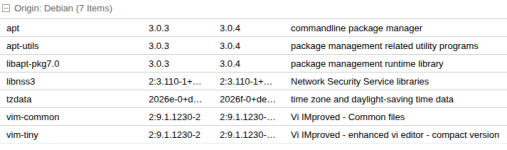
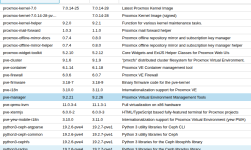
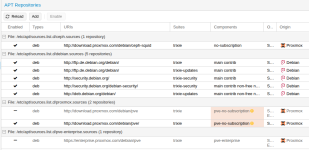
Ich habe gerade mal meinen Testserver (non-Sub), kein Ceph ohne Probleme aktualisiert.
Dto. bei meinem Produktiv-PVE. :)

An Debian Updates stand an:

Debian_Updates.png

An PVE Updates stand an (Auszug)

PVE_Updates.png

Repos:

Repos.png

Wie gesagt: Weder irgendeine Fehlermeldung noch irgendein Problem bei den Updates.

VG Jim
 
  • Like
Reactions: ThoSo
Bookworm und trixie?
Das würde ich mal genau prüfen.

edit / - Die "#" habe ich heute morgen auf dem Tablett nicht gesehen - Codeblöcke oder wenigsten Courier als Schrift wäre schon hilfreich!
Habe in den ceph.sources und proxmox.sources wieder auf bookworm zurückgestellt.
Dann konnte das Update gemacht werden.
Danke für den Tip.
 
Da ist dann aber etwas krumm. Ein 9er pve läuft unter trixie und nicht unter bookworm. In der GUI mal die enterprise-sources deaktivieren und die no-subscription quelle hinzufügen, falls es keine subscription gibt. Dann erneut apt update && apt full-upgrade probieren. Keinesfalls beide aktiviert lassen.
P.S.: Nicht vergessen zu beten, dass du dem System mit manuellem Gefummel in den Sources nicht den Hals umgedreht hast.
 
Last edited:
  • Like
Reactions: news and ThoSo