Proxmox Update Meldungen / Warning

Peter_SP

Member
May 27, 2024
15
0
6
Hallo Leute,

ich habe heute wie ca. alle 2 Wochen Updates durchführen wollen und erhielt heute folgende Meldungen. Wie kann ich das beheben, bin Anfänger :) ?

Code:
Starting system upgrade: apt-get dist-upgrade
Reading package lists... Done
Building dependency tree... Done
Reading state information... Done
Calculating upgrade... Done
The following packages were automatically installed and are no longer required:
  libclass-methodmaker-perl libdpkg-perl libfile-fcntllock-perl
  libpve-network-api-perl proxmox-enterprise-support-keyring proxmox-firewall
  pve-nvidia-vgpu-helper pve-yew-mobile-gui pve-yew-mobile-i18n python3-pefile
  python3-virt-firmware virtiofsd
Use 'apt autoremove' to remove them.
The following packages will be REMOVED:
  libpve-notify-perl proxmox-ve pve-container pve-ha-manager pve-manager qemu-server
The following packages have been kept back:
  libpve-network-api-perl libpve-network-perl libpve-rs-perl pve-cluster
  pve-firewall
The following packages will be upgraded:
  libproxmox-rs-perl libpve-cluster-api-perl libpve-cluster-perl
3 upgraded, 0 newly installed, 6 to remove and 5 not upgraded.
Need to get 0 B/87.4 kB of archives.
After this operation, 7375 kB disk space will be freed.
Do you want to continue? [Y/n] y
W: (pve-apt-hook) !! WARNING !!
W: (pve-apt-hook) You are attempting to remove the meta-package 'proxmox-ve'!
W: (pve-apt-hook)
W: (pve-apt-hook) If you really want to permanently remove 'proxmox-ve' from your system, run the following command
W: (pve-apt-hook)       touch '/please-remove-proxmox-ve'
W: (pve-apt-hook) run apt purge proxmox-ve to remove the meta-package
W: (pve-apt-hook) and repeat your apt invocation.
W: (pve-apt-hook)
W: (pve-apt-hook) If you are unsure why 'proxmox-ve' would be removed, please verify
W: (pve-apt-hook)       - your APT repository settings
W: (pve-apt-hook)       - that you are using 'apt full-upgrade' to upgrade your system
E: Sub-process /usr/share/proxmox-ve/pve-apt-hook returned an error code (1)
E: Failure running script /usr/share/proxmox-ve/pve-apt-hook

System not fully up to date (found 10 new packages)

starting shell
root@proxmox:/#

Package versions:

Code:
proxmox-ve: 9.2.0 (running kernel: 7.0.14-26-pve)
pve-manager: 9.2.24 (running version: 9.2.24/66bc407c6d90a67a)
proxmox-kernel-helper: 9.2.1
proxmox-kernel-7.0: 7.0.14-28
proxmox-kernel-7.0.14-28-pve-signed: 7.0.14-28
proxmox-kernel-7.0.14-26-pve-signed: 7.0.14-26
proxmox-kernel-6.8.12-20-pve-signed: 6.8.12-20
proxmox-kernel-6.8: 6.8.12-20
proxmox-kernel-6.5.13-6-pve-signed: 6.5.13-6
proxmox-kernel-6.5: 6.5.13-6
proxmox-kernel-6.5.13-5-pve: 6.5.13-5
proxmox-kernel-6.5.11-4-pve-signed: 6.5.11-4
ceph-fuse: 19.2.7-pve1
corosync: 3.2.0-pve1
criu: 4.1.1-1
frr-pythontools: 10.6.1-1+pve3
ifupdown2: 3.3.0-1+pmx13
intel-microcode: 3.20260227.1
ksm-control-daemon: 1.5-1
libjs-extjs: 7.0.0-9
libproxmox-acme-perl: 1.7.2
libproxmox-backup-qemu0: 2.0.4
libproxmox-rs-perl: 0.4.1
libpve-access-control: 9.2.0
libpve-apiclient-perl: 3.4.3
libpve-cluster-api-perl: 9.1.7
libpve-cluster-perl: 9.1.7
libpve-common-perl: 9.2.8
libpve-guest-common-perl: 6.0.6
libpve-http-server-perl: 6.0.7
libpve-network-perl: 1.6.7
libpve-notify-perl: 9.1.7
libpve-rs-perl: 0.15.3
libpve-storage-perl: 9.1.14
libspice-server1: 0.15.2-1+b1
lvm2: 2.03.31-2+pmx1
lxc-pve: 7.0.0-2
lxcfs: 7.0.0-pve1
novnc-pve: 1.7.0-2
proxmox-backup-client: 4.2.10-1
proxmox-backup-file-restore: 4.2.10-1
proxmox-backup-restore-image: 1.1.0
proxmox-enterprise-support-keyring: 1.1
proxmox-firewall: 1.2.4
proxmox-kernel-helper: 9.2.1
proxmox-mail-forward: 1.1.0
proxmox-mini-journalreader: 1.7
proxmox-offline-mirror-helper: 0.8.0
proxmox-widget-toolkit: 5.2.12
pve-cluster: 9.1.6
pve-container: 6.1.18
pve-docs: 9.2.13
pve-edk2-firmware: 4.2026.08-1
pve-esxi-import-tools: 1.0.1
pve-firewall: 6.0.6
pve-firmware: 3.18-9
pve-ha-manager: 5.2.5
pve-i18n: 3.11.0
pve-qemu-kvm: 11.1.3-1
pve-xtermjs: 6.0.0-3
qemu-server: 9.2.14
smartmontools: 7.5-pve2
spiceterm: 3.4.2
swtpm: 0.10.2+pve1
vncterm: 1.9.2
zfsutils-linux: 2.4.4-pve1
 
Last edited:
Führe touch '/please-remove-proxmox-ve' auf gar keinen Fall aus, auch nicht mit autoremove. Der Hook hat hier geholfen, sonst wären pve-manager, qemu-server usw. weg. Wenn apt plötzlich proxmox-ve entfernen will und pve-cluster zurückhält, liegt das fast immer an den Paketquellen. Entweder sind die Repos gemischt (enterprise und no-subscription gleichzeitig, oder Debian und PVE-Repo passen nicht) oder der Mirror war beim Sync und hatte nur einen Teil der Pakete. Zeig mal die Ausgabe von:
Code:
pveversion -v | head -n 5
grep -r . /etc/apt/sources.list /etc/apt/sources.list.d/
apt update
Wenn die Repos sauber sind, ein paar Stunden warten und apt update && apt full-upgrade nochmal probieren. Das klärt sich dann meistens von selbst.
 
Führe touch '/please-remove-proxmox-ve' auf gar keinen Fall aus, auch nicht mit autoremove. Der Hook hat hier geholfen, sonst wären pve-manager, qemu-server usw. weg. Wenn apt plötzlich proxmox-ve entfernen will und pve-cluster zurückhält, liegt das fast immer an den Paketquellen. Entweder sind die Repos gemischt (enterprise und no-subscription gleichzeitig, oder Debian und PVE-Repo passen nicht) oder der Mirror war beim Sync und hatte nur einen Teil der Pakete. Zeig mal die Ausgabe von:
Code:
pveversion -v | head -n 5
grep -r . /etc/apt/sources.list /etc/apt/sources.list.d/
apt update
Wenn die Repos sauber sind, ein paar Stunden warten und apt update && apt full-upgrade nochmal probieren. Das klärt sich dann meistens von selbst.
Habe das selbe Problem und warte jetzt mal bis am Abend:
pveversion -v | head -n 5
grep -r . /etc/apt/sources.list /etc/apt/sources.list.d/
apt update
proxmox-ve: 9.2.0 (running kernel: 7.0.14-28-pve)
pve-manager: 9.2.24 (running version: 9.2.24/66bc407c6d90a67a)
proxmox-kernel-helper: 9.2.1
proxmox-kernel-7.0: 7.0.14-28
proxmox-kernel-7.0.14-28-pve-signed: 7.0.14-28
grep: /etc/apt/sources.list: No such file or directory
/etc/apt/sources.list.d/ceph.sources:Types: deb
/etc/apt/sources.list.d/ceph.sources:URIs: http://download.proxmox.com/debian/ceph-squid
/etc/apt/sources.list.d/ceph.sources:Suites: trixie
/etc/apt/sources.list.d/ceph.sources:Components: no-subscription
/etc/apt/sources.list.d/ceph.sources:Signed-By: /usr/share/keyrings/proxmox-archive-keyring.gpg
/etc/apt/sources.list.d/pve-enterprise.list:# deb https://enterprise.proxmox.com/debian/pve bookworm pve-enterprise
/etc/apt/sources.list.d/pve-enterprise.sources:#Types: deb
/etc/apt/sources.list.d/pve-enterprise.sources:#URIs: https://enterprise.proxmox.com/debian/pve
/etc/apt/sources.list.d/pve-enterprise.sources:#Suites: trixie
/etc/apt/sources.list.d/pve-enterprise.sources:#Components: pve-enterprise
/etc/apt/sources.list.d/pve-enterprise.sources:#Signed-By: /usr/share/keyrings/proxmox-archive-keyring.gpg
/etc/apt/sources.list.d/proxmox.sources:Types: deb
/etc/apt/sources.list.d/proxmox.sources:URIs: http://download.proxmox.com/debian/pve
/etc/apt/sources.list.d/proxmox.sources:Suites: trixie
/etc/apt/sources.list.d/proxmox.sources:Components: pve-no-subscription
/etc/apt/sources.list.d/proxmox.sources:Signed-By: /usr/share/keyrings/proxmox-archive-keyring.gpg
Hit:1 http://download.proxmox.com/debian/ceph-squid trixie InRelease
Hit:2 http://download.proxmox.com/debian/pve trixie InRelease
10 packages can be upgraded. Run 'apt list --upgradable' to see them.
root@pve:/# apt full-upgrade
The following packages were automatically installed and are no longer required:
libclass-methodmaker-perl libfile-fcntllock-perl pve-nvidia-vgpu-helper pve-yew-mobile-i18n python3-virt-firmware
libdpkg-perl proxmox-enterprise-support-keyring pve-yew-mobile-gui python3-pefile virtiofsd
Use 'apt autoremove' to remove them.

Upgrading:
libproxmox-rs-perl libpve-cluster-api-perl libpve-cluster-perl

Not upgrading:
libpve-network-api-perl libpve-network-perl libpve-rs-perl pve-cluster pve-firewall

REMOVING:
libpve-notify-perl proxmox-ve pve-container pve-ha-manager pve-manager qemu-server

Summary:
Upgrading: 3, Installing: 0, Removing: 6, Not Upgrading: 5
Download size: 87.4 kB
Freed space: 7376 kB

Continue? [Y/n] n
Abort.
 
etc/apt/sources.list.d/pve-enterprise.list:# deb https://enterprise.proxmox.com/debian/pve bookworm pve-enterprise
/etc/apt/sources.list.d/pve-enterprise.sources:#Types: deb
/etc/apt/sources.list.d/pve-enterprise.sources:#URIs: https://enterprise.proxmox.com/debian/pve
/etc/apt/sources.list.d/pve-enterprise.sources:#Suites: trixie
/etc/apt/sources.list.d/pve-enterprise.sources:#Components: pve-enterprise
/etc/apt/sources.list.d/pve-enterprise.sources:#Signed-By: /usr/share/keyrings/proxmox-archive-keyring.gpg
/etc/apt/sources.list.d/proxmox.sources:Types: deb
/etc/apt/sources.list.d/proxmox.sources:URIs: http://download.proxmox.com/debian/pve
/etc/apt/sources.list.d/proxmox.sources:Suites: trixie
Bookworm und trixie?
Das würde ich mal genau prüfen.

edit / - Die "#" habe ich heute morgen auf dem Tablett nicht gesehen - Codeblöcke oder wenigsten Courier als Schrift wäre schon hilfreich!
 
Last edited:
Die bookworm-Zeile ist bei dir @masterb auskommentiert (das # vorne), apt liest die gar nicht. Die alte pve-enterprise.list kannst du löschen, das ist nur ein Überbleibsel vom Upgrade auf 9. Ansonsten sehen deine Repos sauber aus, nur trixie + no-subscription. Wenn zwei Leute mit sauberen Quellen gleichzeitig dasselbe Bild haben, liegt es am no-subscription-Repo selbst. Die neuen libpve-cluster-Pakete sind schon draußen, pve-cluster aber noch nicht. Wenn du wissen willst, wo es konkret hängt:
Code:
apt install pve-cluster
apt sagt dir dann, welche Abhängigkeit fehlt. Bei der Abfrage einfach mit n abbrechen, wenn da wieder was entfernt werden soll. Solange REMOVING: proxmox-ve noch dabei ist, einfach nicht bestätigen. Das Update läuft normal durch, sobald alle Pakete im Repo sind.
 
  • Like
Reactions: ThoSo
Habe das selbe Problem und warte jetzt mal bis am Abend:
pveversion -v | head -n 5
grep -r . /etc/apt/sources.list /etc/apt/sources.list.d/
apt update
proxmox-ve: 9.2.0 (running kernel: 7.0.14-28-pve)
pve-manager: 9.2.24 (running version: 9.2.24/66bc407c6d90a67a)
proxmox-kernel-helper: 9.2.1
proxmox-kernel-7.0: 7.0.14-28
proxmox-kernel-7.0.14-28-pve-signed: 7.0.14-28
grep: /etc/apt/sources.list: No such file or directory
/etc/apt/sources.list.d/ceph.sources:Types: deb
/etc/apt/sources.list.d/ceph.sources:URIs: http://download.proxmox.com/debian/ceph-squid
/etc/apt/sources.list.d/ceph.sources:Suites: trixie
/etc/apt/sources.list.d/ceph.sources:Components: no-subscription
/etc/apt/sources.list.d/ceph.sources:Signed-By: /usr/share/keyrings/proxmox-archive-keyring.gpg
/etc/apt/sources.list.d/pve-enterprise.list:# deb https://enterprise.proxmox.com/debian/pve bookworm pve-enterprise
/etc/apt/sources.list.d/pve-enterprise.sources:#Types: deb
/etc/apt/sources.list.d/pve-enterprise.sources:#URIs: https://enterprise.proxmox.com/debian/pve
/etc/apt/sources.list.d/pve-enterprise.sources:#Suites: trixie
/etc/apt/sources.list.d/pve-enterprise.sources:#Components: pve-enterprise
/etc/apt/sources.list.d/pve-enterprise.sources:#Signed-By: /usr/share/keyrings/proxmox-archive-keyring.gpg
/etc/apt/sources.list.d/proxmox.sources:Types: deb
/etc/apt/sources.list.d/proxmox.sources:URIs: http://download.proxmox.com/debian/pve
/etc/apt/sources.list.d/proxmox.sources:Suites: trixie
/etc/apt/sources.list.d/proxmox.sources:Components: pve-no-subscription
/etc/apt/sources.list.d/proxmox.sources:Signed-By: /usr/share/keyrings/proxmox-archive-keyring.gpg
Hit:1 http://download.proxmox.com/debian/ceph-squid trixie InRelease
Hit:2 http://download.proxmox.com/debian/pve trixie InRelease
10 packages can be upgraded. Run 'apt list --upgradable' to see them.
root@pve:/# apt full-upgrade
The following packages were automatically installed and are no longer required:
libclass-methodmaker-perl libfile-fcntllock-perl pve-nvidia-vgpu-helper pve-yew-mobile-i18n python3-virt-firmware
libdpkg-perl proxmox-enterprise-support-keyring pve-yew-mobile-gui python3-pefile virtiofsd
Use 'apt autoremove' to remove them.

Upgrading:
libproxmox-rs-perl libpve-cluster-api-perl libpve-cluster-perl

Not upgrading:
libpve-network-api-perl libpve-network-perl libpve-rs-perl pve-cluster pve-firewall

REMOVING:
libpve-notify-perl proxmox-ve pve-container pve-ha-manager pve-manager qemu-server

Summary:
Upgrading: 3, Installing: 0, Removing: 6, Not Upgrading: 5
Download size: 87.4 kB
Freed space: 7376 kB

Continue? [Y/n] n
Abort.

Debian Repositories hinzufügen:
https://pve.proxmox.com/pve-docs/chapter-sysadmin.html#_debian_base_repositories
 
  • Like
Reactions: ThoSo
Ich habe gerade mal meinen Testserver (non-Sub), kein Ceph ohne Probleme aktualisiert.
Dto. bei meinem Produktiv-PVE. :)

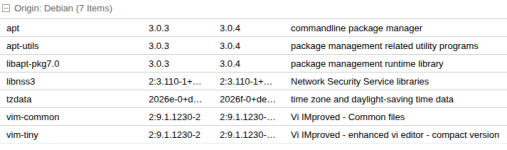
An Debian Updates stand an:

Debian_Updates.png

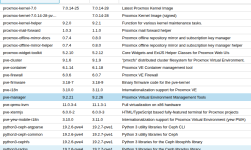
An PVE Updates stand an (Auszug)

PVE_Updates.png

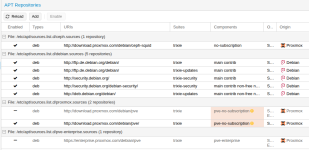
Repos:

Repos.png

Wie gesagt: Weder irgendeine Fehlermeldung noch irgendein Problem bei den Updates.

VG Jim