Proxmox Oberfläche nach Stromausfall nicht mehr erreichbar

Das Journal mit "journalctl" einfach mal durchsehen, was an Meldungen protokolliert wird.

Code:
root@proxmox:~# journalctl
-- Journal begins at Thu 2026-06-04 07:38:14 CEST, ends at Wed 2026-06-17 23:10:01 CEST. --
Jun 04 07:38:14 proxmox postfix/local[358387]: warning: hash:/etc/aliases is unavailable. open database /etc/aliases.db: No such file or directory
Jun 04 07:38:14 proxmox postfix/local[358387]: warning: hash:/etc/aliases: lookup of 'root' failed
Jun 04 07:38:14 proxmox postfix/local[358383]: 447D92161D: to=<root@proxmox.local>, relay=local, delay=97195, delays=97194/0.38/0/0, dsn=4.3.0, status=deferred (alias database unavailable)
Jun 04 07:38:14 proxmox postfix/local[358384]: warning: hash:/etc/aliases is unavailable. open database /etc/aliases.db: No such file or directory
Jun 04 07:38:14 proxmox postfix/local[358384]: warning: hash:/etc/aliases: lookup of 'root' failed
Jun 04 07:38:14 proxmox postfix/local[358387]: 45D0421B51: to=<root@proxmox.local>, orig_to=<root>, relay=local, delay=13093, delays=13092/0.38/0/0, dsn=4.3.0, status=deferred (alias database unavailable)
Jun 04 07:38:14 proxmox postfix/local[358383]: warning: hash:/etc/aliases is unavailable. open database /etc/aliases.db: No such file or directory
Jun 04 07:38:14 proxmox postfix/local[358383]: warning: hash:/etc/aliases: lookup of 'root' failed
Jun 04 07:38:14 proxmox postfix/local[358384]: 433C421777: to=<root@proxmox.local>, relay=local, delay=42597, delays=42596/0.38/0/0, dsn=4.3.0, status=deferred (alias database unavailable)
Jun 04 07:38:14 proxmox postfix/local[358387]: warning: hash:/etc/aliases is unavailable. open database /etc/aliases.db: No such file or directory
Jun 04 07:38:14 proxmox postfix/local[358387]: warning: hash:/etc/aliases: lookup of 'root' failed
Jun 04 07:38:14 proxmox postfix/local[358383]: 46930211DD: to=<root@proxmox.local>, relay=local, delay=4799, delays=4798/0.39/0/0, dsn=4.3.0, status=deferred (alias database unavailable)
Jun 04 07:38:14 proxmox postfix/local[358384]: warning: hash:/etc/aliases is unavailable. open database /etc/aliases.db: No such file or directory
Jun 04 07:38:14 proxmox postfix/local[358384]: warning: hash:/etc/aliases: lookup of 'root' failed
Jun 04 07:38:14 proxmox postfix/local[358387]: 4B17E21581: to=<root@proxmox.local>, relay=local, delay=46797, delays=46796/0.39/0/0, dsn=4.3.0, status=deferred (alias database unavailable)
Jun 04 07:38:14 proxmox postfix/local[358383]: warning: hash:/etc/aliases is unavailable. open database /etc/aliases.db: No such file or directory
Jun 04 07:38:14 proxmox postfix/local[358383]: warning: hash:/etc/aliases: lookup of 'root' failed
Jun 04 07:38:14 proxmox postfix/local[358384]: 488E62107A: to=<root@proxmox.local>, relay=local, delay=29999, delays=29998/0.39/0/0.01, dsn=4.3.0, status=deferred (alias database unavailable)
Jun 04 07:38:14 proxmox postfix/local[358387]: warning: hash:/etc/aliases is unavailable. open database /etc/aliases.db: No such file or directory
Jun 04 07:38:14 proxmox postfix/local[358387]: warning: hash:/etc/aliases: lookup of 'root' failed
Jun 04 07:38:14 proxmox postfix/local[358383]: 4CBB121787: to=<root@proxmox.local>, relay=local, delay=59397, delays=59396/0.39/0/0.01, dsn=4.3.0, status=deferred (alias database unavailable)
Jun 04 07:38:14 proxmox postfix/local[358384]: warning: hash:/etc/aliases is unavailable. open database /etc/aliases.db: No such file or directory
Jun 04 07:38:14 proxmox postfix/local[358384]: warning: hash:/etc/aliases: lookup of 'root' failed
Jun 04 07:38:14 proxmox postfix/local[358387]: 427472150B: to=<root@proxmox.local>, relay=local, delay=17398, delays=17397/0.4/0/0, dsn=4.3.0, status=deferred (alias database unavailable)
Jun 04 07:38:14 proxmox postfix/local[358383]: warning: hash:/etc/aliases is unavailable. open database /etc/aliases.db: No such file or directory
Jun 04 07:38:14 proxmox postfix/local[358383]: warning: hash:/etc/aliases: lookup of 'root' failed
Jun 04 07:38:14 proxmox postfix/local[358384]: 40ABD21A80: to=<root@proxmox.local>, relay=local, delay=17396, delays=17395/0.4/0/0.01, dsn=4.3.0, status=deferred (alias database unavailable)
Jun 04 07:38:14 proxmox postfix/local[358387]: warning: hash:/etc/aliases is unavailable. open database /etc/aliases.db: No such file or directory
Jun 04 07:38:14 proxmox postfix/local[358387]: warning: hash:/etc/aliases: lookup of 'root' failed
Jun 04 07:38:14 proxmox postfix/local[358383]: 4F92221435: to=<root@proxmox.local>, relay=local, delay=38398, delays=38397/0.4/0/0.01, dsn=4.3.0, status=deferred (alias database unavailable)
Jun 04 07:38:14 proxmox postfix/local[358384]: warning: hash:/etc/aliases is unavailable. open database /etc/aliases.db: No such file or directory
Jun 04 07:38:14 proxmox postfix/local[358384]: warning: hash:/etc/aliases: lookup of 'root' failed
Jun 04 07:38:14 proxmox postfix/local[358387]: 47E1B204D7: to=<root@proxmox.local>, relay=local, delay=17401, delays=17400/0.41/0/0.04, dsn=4.3.0, status=deferred (alias database unavailable)
Jun 04 07:38:14 proxmox postfix/local[358383]: warning: hash:/etc/aliases is unavailable. open database /etc/aliases.db: No such file or directory
Jun 04 07:38:14 proxmox postfix/local[358383]: warning: hash:/etc/aliases: lookup of 'root' failed
Jun 04 07:38:14 proxmox postfix/local[358384]: 4ECE221B86: to=<root@proxmox.local>, relay=local, delay=34195, delays=34194/0.44/0/0.02, dsn=4.3.0, status=deferred (alias database unavailable)
Jun 04 07:38:14 proxmox postfix/local[358387]: warning: hash:/etc/aliases is unavailable. open database /etc/aliases.db: No such file or directory
Jun 04 07:38:14 proxmox postfix/local[358387]: warning: hash:/etc/aliases: lookup of 'root' failed
Jun 04 07:38:14 proxmox postfix/local[358383]: 4D20421585: to=<root@proxmox.local>, relay=local, delay=46797, delays=46796/0.45/0/0.02, dsn=4.3.0, status=deferred (alias database unavailable)
Jun 04 07:38:14 proxmox postfix/local[358384]: warning: hash:/etc/aliases is unavailable. open database /etc/aliases.db: No such file or directory
Jun 04 07:38:14 proxmox postfix/local[358384]: warning: hash:/etc/aliases: lookup of 'root' failed
Jun 04 07:38:14 proxmox postfix/local[358387]: 4A46C211DC: to=<root@proxmox.local>, relay=local, delay=71999, delays=71998/0.46/0/0.02, dsn=4.3.0, status=deferred (alias database unavailable)
Jun 04 07:38:14 proxmox postfix/local[358383]: warning: hash:/etc/aliases is unavailable. open database /etc/aliases.db: No such file or directory
Jun 04 07:38:14 proxmox postfix/local[358383]: warning: hash:/etc/aliases: lookup of 'root' failed
Jun 04 07:38:14 proxmox postfix/local[358384]: 4A5D7211F6: to=<root@proxmox.local>, relay=local, delay=97197, delays=97196/0.47/0/0.02, dsn=4.3.0, status=deferred (alias database unavailable)
Jun 04 07:38:14 proxmox postfix/local[358387]: warning: hash:/etc/aliases is unavailable. open database /etc/aliases.db: No such file or directory
Jun 04 07:38:14 proxmox postfix/local[358387]: warning: hash:/etc/aliases: lookup of 'root' failed
Jun 04 07:38:14 proxmox postfix/local[358383]: 4C35221431: to=<root@proxmox.local>, relay=local, delay=38398, delays=38397/0.48/0/0.03, dsn=4.3.0, status=deferred (alias database unavailable)
Jun 04 07:38:14 proxmox postfix/local[358384]: warning: hash:/etc/aliases is unavailable. open database /etc/aliases.db: No such file or directory
Jun 04 07:38:14 proxmox postfix/local[358384]: warning: hash:/etc/aliases: lookup of 'root' failed
Jun 04 07:38:14 proxmox postfix/local[358387]: 4279321304: to=<root@proxmox.local>, relay=local, delay=21598, delays=21597/0.51/0/0.03, dsn=4.3.0, status=deferred (alias database unavailable)

einfach manuell mittels "journalctl --vacuum-size=1000M" mal reduzieren
genau das habe ich ja jetzt bereits ein paar mal hinter mir...

die Größe beschränken
auch das habe ich ja bereits getan, zumindest dachte ich das (siehe unten)

Generell ist das Journal in der Größe auf 4G oder so limitiert.
aber wieso läuft es dann voll ?

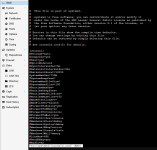
Und das wird doch hier eingestellt oder bin ich falsch ?
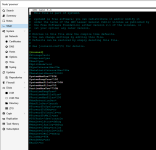
/etc/systemd/journald.conf mit SystemMaxUse = 750M

Code:
root@proxmox:~# open /etc/systemd/journald.conf
1781729744469.png


journalctl --output=cat --output-fields=UNIT | grep ".service" | sort | uniq -c | sort -n | tail -n50 | column -t
Gerade ist das journal ja wieder leer (gestern mit journalctl --vacuum-size=1000M geleert)
Code:
root@proxmox:~# journalctl --output=cat --output-fields=UNIT | grep ".service" | sort | uniq -c | sort -n | tail -n50 | column -t
2   networking.service
2   open-iscsi.service
2   postfix.service
2   postfix@-.service
2   pvebanner.service
2   pve-cluster.service
2   pvedaemon.service
2   pve-firewall.service
2   pve-guests.service
2   pve-ha-crm.service
2   pve-ha-lrm.service
2   pve-lxc-syscalld.service
2   pvenetcommit.service
2   pvescheduler.service
2   pvestatd.service
2   qmeventd.service
2   rbdmap.service
2   rpcbind.service
2   rrdcached.service
2   smartmontools.service
2   ssh.service
2   systemd-fsck@dev-disk-by\x2duuid-0A88\x2dC15E.service
2   systemd-fsckd.service
2   systemd-journal-flush.service
2   systemd-logind.service
2   systemd-sysctl.service
2   systemd-tmpfiles-setup.service
2   systemd-udev-settle.service
2   systemd-update-utmp.service
2   systemd-user-sessions.service
2   zfs-import-scan.service
2   zfs-mount.service
2   zfs-share.service
2   zfs-volume-wait.service
3   e2scrub_reap.service
3   nfs-config.service
3   systemd-rfkill.service
3   systemd-update-utmp-runlevel.service
4   pveproxy.service
4   rsyslog.service
4   spiceproxy.service
7   user@0.service
7   user-runtime-dir@0.service
9   apt-daily-upgrade.service
9   systemd-tmpfiles-clean.service
12  pve-daily-update.service
13  man-db.service
14  logrotate.service
21  apt-daily.service
25  pvefw-logger.service
root@proxmox:~# journalctl --disk-usage
Archived and active journals take up 776.2M in the file system.


apt -yU install gdu
gdu /
Code:
root@proxmox:~# apt -yU install gdu
E: Command line option 'U' [from -yU] is not understood in combination with the other options.
 
Last edited:
warning: hash:/etc/aliases is unavailable. open database /etc/aliases.db: No such file or directory
Naja, wenn die aliases.db Datei wie in der Fehlermeldung steht, nicht vorhanden ist, und das ständig im Protokoll fest gehalten wird, dann füllt sich das eben.

Google Suche : "postfix aliases.db erzeugen"

Antwort Gemini :
"Um die Datenbank aliases.db für Postfix zu erzeugen, passen Sie zunächst die Textdatei /etc/aliases an.
Führen Sie danach den Befehl newaliases aus. Dieser aktualisiert die Datenbank automatisch. "

Also mal auf der PVE Console ein "newaliases" absetzen.

Und das wird doch hier eingestellt oder bin ich falsch ?
/etc/systemd/journald.conf mit SystemMaxUse = 750M
Den Dienst neu startet?


Update:
Hier die Manpage zur journald.conf
https://man7.org/linux/man-pages/man5/journald.conf.5.html
 
Last edited:
  • Like
Reactions: Johannes S
Command line option 'U' [from -yU] is not understood in combination with the other options.
Sorry, die Optionen gehören hinter install. Ich habe meinen Post angepasst. Warum es voll läuft wird sich hoffentlich nun zeigen.
Zwar immer noch nicht perfekt aber vielleicht funktioniert dieses Snippet besser
Bash:
journalctl | awk '{print $5}' | sort | uniq -c | sort -n | tail -n 50
 
Last edited:
  • Like
Reactions: Johannes S
Den Dienst neu startet?
Jap mit: sudo systemctl restart systemd-journald


Zusätzlich habe ich jetzt nun noch folgende Parameter gesetzt:
SystemMaxUse= and RuntimeMaxUse= control how much disk space the journal may use up at most.
SystemKeepFree= and RuntimeKeepFree= control how much disk space systemd-journald shall leave free for other uses. systemd-journald will respect both limits and use the smaller of the two values.
SystemMaxFileSize= and RuntimeMaxFileSize= control how large individual journal files may grow at most. This influences the granularity in which disk space is made available through rotation, i.e. deletion of historic data

1781813003659.png


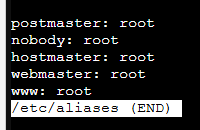
open /etc/aliases
1781813361742.png

Also mal auf der PVE Console ein "newaliases" absetzen.
gemacht
 
  • Like
Reactions: ThoSo
Sorry, die Optionen gehören hinter install. Ich habe meinen Post angepasst. Warum es voll läuft wird sich hoffentlich nun zeigen.
1781813946539.png
Funktioniert hat:
apt install -y gdu
gdu /
1781814089485.png
gerade ist journal wie gesagt recht leer, hab es seit vorgestern #58 https://forum.proxmox.com/threads/proxmox-oberfläche-nach-stromausfall-nicht-mehr-erreichbar.150913/post-857889 nicht erneut geleert.
ständig tritt das thema also nicht auf.
1781814174997.png


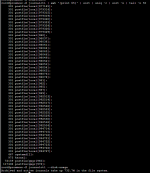
Zwar immer noch nicht perfekt aber vielleicht funktioniert dieses Snippet besser
journalctl | awk '{print $5}' | sort | uniq -c | sort -n | tail -n 50

1781813767280.png
 
Last edited:
Hmm -U sollte bei einem aktuellen apt eigentlich funktionieren. Das erspart dir apt update.
Sieht aus als ob postfix hier erhebliche Mengen loggt. Probier mal
Bash:
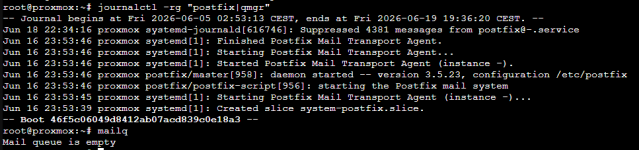
journalctl -rg "postfix|qmgr"
mailq
Vielleicht muss man die Queue auch mal leeren.
 
Last edited:
Sieht aus als ob postfix hier erhebliche Mengen loggt. Probier mal
journalctl -rg "postfix|qmgr"
mailq
1781890630542.png


Vielleicht muss man die Queue auch mal leeren.
Wie ?

Lagern dort lokale Daten oder ist dort ein externes Mount eingebunden?
Das dürfte wohl die externe platte sein auf der die Backups liegen


Leider scheinen die automatisierten Backups der Container aber gerade auch nicht zu laufen, das von der VM läuft durch...
Code:
INFO: starting new backup job: vzdump --node proxmox --compress zstd --mailnotification always --notes-template '{{guestname}}' --prune-backups 'keep-daily=14' --all 1 --mode snapshot --quiet 1 --storage Backup
INFO: Starting Backup of VM 100 (lxc)
INFO: Backup started at 2026-06-19 00:00:08
INFO: status = running
INFO: CT Name: InfluxDB2
INFO: including mount point rootfs ('/') in backup
INFO: backup mode: snapshot
INFO: ionice priority: 7
INFO: create storage snapshot 'vzdump'
snapshot create failed: starting cleanup
no lock found trying to remove 'backup'  lock
ERROR: Backup of VM 100 failed - lvcreate snapshot 'pve/snap_vm-100-disk-0_vzdump' error:   Cannot create new thin volume, free space in thin pool pve/data reached threshold.
INFO: Failed at 2026-06-19 00:00:08
INFO: Starting Backup of VM 101 (lxc)
INFO: Backup started at 2026-06-19 00:00:08
INFO: status = running
INFO: CT Name: Grafana
INFO: including mount point rootfs ('/') in backup
INFO: backup mode: snapshot
INFO: ionice priority: 7
INFO: create storage snapshot 'vzdump'
snapshot create failed: starting cleanup
no lock found trying to remove 'backup'  lock
ERROR: Backup of VM 101 failed - lvcreate snapshot 'pve/snap_vm-101-disk-0_vzdump' error:   Cannot create new thin volume, free space in thin pool pve/data reached threshold.
INFO: Failed at 2026-06-19 00:00:08
 
Last edited:
Anscheinend hilft hier postsuper -d ALL. Scheint aber schon leer zu sein.

Ich würde mal folgendes probieren. Folge dem Log mit journalctl -f, oder Service spezifisch mit journalctl -fu postfix.
Dann starte den Service in einer anderen Sitzung neu mit systemctl restart postfix und schaue was so geloggt wird. prüfe auch postfix check.

Leider scheinen die automatisierten Backups der Container aber gerade auch nicht zu laufen
Lösche alte Snapshots. Ich würde automatisch ältere als ein paar Tage löschen lassen. Die wachsen sonst nur.
Wie sieht lvs -a und lvmconfig aus? Ich würde auch gerne pct config 100 und cat /etc/pve/storage.cfg sehen.
 
Last edited:
Soweit ich hier in diesem Thread rückblickend gelesen habe, hast du auch zu viel Speicher auf die VM/CTs verteilt.
Davon ausgehend das die Plattenstruktur unverändert ist, und das Postfix Thema greift, würde ich auch nicht zu viel an den Parametern des Journald ändern - im Normalfall läuft das so schnell nicht über. Evtl. einfach mal die Journale in regelmäßigen Abständen prüfen und ggf kürzen.

Das dürfte wohl die externe platte sein auf der die Backups liegen
Prüfe das bitte einmal.
Wenn deine externe Platte für die Backups einmal nicht online war, könnte es auch sein, das im MNT Sicherungsdateien liegen, die vom externen Datenträger überdeckt werden und dir so eine Kapazität weg nehmen.

Ansonsten wäre mal ein kurzes Update der Hardware/Platten inkl. Belegung vielleicht hilfreich.
 
  • Like
Reactions: Johannes S and UdoB
Anscheinend hilft hier postsuper -d ALL. Scheint aber schon leer zu sein.
Habs trotzdem getestet
1781954300133.png

Ich würde mal folgendes probieren. Folge dem Log mit journalctl -f, oder Service spezifisch mit journalctl -fu postfix.
Dann starte den Service in einer anderen Sitzung neu mit systemctl restart postfix und schaue was so geloggt wird.
Das problem scheint ja zu sein, dass manchmal die leerung von jounal nicht klappt.

Um 13:26:27 bzw, 13:27:03 dann in einem anderen fenster systemctl restart postfix
Code:
root@proxmox:~# journalctl -fu postfix
-- Journal begins at Fri 2026-06-05 02:53:13 CEST. --
Jun 16 23:53:46 proxmox systemd[1]: Starting Postfix Mail Transport Agent...
Jun 16 23:53:46 proxmox systemd[1]: Finished Postfix Mail Transport Agent.
Jun 20 13:26:27 proxmox systemd[1]: postfix.service: Succeeded.
Jun 20 13:26:27 proxmox systemd[1]: Stopped Postfix Mail Transport Agent.
Jun 20 13:26:27 proxmox systemd[1]: Stopping Postfix Mail Transport Agent...
Jun 20 13:26:27 proxmox systemd[1]: Starting Postfix Mail Transport Agent...
Jun 20 13:26:27 proxmox systemd[1]: Finished Postfix Mail Transport Agent.
Jun 20 13:27:03 proxmox systemd[1]: postfix.service: Succeeded.
Jun 20 13:27:03 proxmox systemd[1]: Stopped Postfix Mail Transport Agent.
Jun 20 13:27:03 proxmox systemd[1]: Stopping Postfix Mail Transport Agent...
Jun 20 13:27:03 proxmox systemd[1]: Starting Postfix Mail Transport Agent...
Jun 20 13:27:03 proxmox systemd[1]: Finished Postfix Mail Transport Agent.

Um 13:33:13 bzw, 13:33:40 dann in einem anderen fenster systemctl restart postfix
Code:
-- Journal begins at Fri 2026-06-05 02:53:13 CEST. --
Jun 20 13:32:48 proxmox pvedaemon[1021]: <root@pam> end task UPID:proxmox:0011750C:01D5DE30:6A3678BC:vncshell::root@pam: OK
Jun 20 13:32:48 proxmox systemd[1]: session-1338.scope: Succeeded.
Jun 20 13:32:48 proxmox systemd-logind[665]: Removed session 1338.
Jun 20 13:32:49 proxmox pvedaemon[911193]: <root@pam> starting task UPID:proxmox:00117CA2:01D6828D:6A367A61:vncshell::root@pam:
Jun 20 13:32:49 proxmox pvedaemon[1146018]: starting termproxy UPID:proxmox:00117CA2:01D6828D:6A367A61:vncshell::root@pam:
Jun 20 13:32:49 proxmox pvedaemon[912904]: <root@pam> successful auth for user 'root@pam'
Jun 20 13:32:49 proxmox login[1146021]: pam_unix(login:session): session opened for user root(uid=0) by root(uid=0)
Jun 20 13:32:49 proxmox systemd-logind[665]: New session 1341 of user root.
Jun 20 13:32:49 proxmox systemd[1]: Started Session 1341 of user root.
Jun 20 13:32:49 proxmox login[1146026]: ROOT LOGIN  on '/dev/pts/0'
Jun 20 13:33:13 proxmox systemd[1]: postfix.service: Succeeded.
Jun 20 13:33:13 proxmox systemd[1]: Stopped Postfix Mail Transport Agent.
Jun 20 13:33:13 proxmox systemd[1]: Stopping Postfix Mail Transport Agent...
Jun 20 13:33:13 proxmox systemd[1]: Stopping Postfix Mail Transport Agent (instance -)...
Jun 20 13:33:13 proxmox postfix/postfix-script[1146113]: stopping the Postfix mail system
Jun 20 13:33:13 proxmox postfix/master[1144721]: terminating on signal 15
Jun 20 13:33:13 proxmox systemd[1]: postfix@-.service: Succeeded.
Jun 20 13:33:13 proxmox systemd[1]: Stopped Postfix Mail Transport Agent (instance -).
Jun 20 13:33:13 proxmox systemd[1]: Starting Postfix Mail Transport Agent (instance -)...
Jun 20 13:33:13 proxmox postfix/postfix-script[1146275]: starting the Postfix mail system
Jun 20 13:33:13 proxmox postfix/master[1146277]: daemon started -- version 3.5.23, configuration /etc/postfix
Jun 20 13:33:13 proxmox systemd[1]: Started Postfix Mail Transport Agent (instance -).
Jun 20 13:33:13 proxmox systemd[1]: Starting Postfix Mail Transport Agent...
Jun 20 13:33:13 proxmox systemd[1]: Finished Postfix Mail Transport Agent.
Jun 20 13:33:40 proxmox systemd[1]: postfix.service: Succeeded.
Jun 20 13:33:40 proxmox systemd[1]: Stopped Postfix Mail Transport Agent.
Jun 20 13:33:40 proxmox systemd[1]: Stopping Postfix Mail Transport Agent...
Jun 20 13:33:40 proxmox systemd[1]: Stopping Postfix Mail Transport Agent (instance -)...
Jun 20 13:33:40 proxmox postfix/postfix-script[1146400]: stopping the Postfix mail system
Jun 20 13:33:40 proxmox postfix/master[1146277]: terminating on signal 15
Jun 20 13:33:40 proxmox systemd[1]: postfix@-.service: Succeeded.
Jun 20 13:33:40 proxmox systemd[1]: Stopped Postfix Mail Transport Agent (instance -).
Jun 20 13:33:40 proxmox systemd[1]: Starting Postfix Mail Transport Agent (instance -)...
Jun 20 13:33:40 proxmox postfix/postfix-script[1146561]: starting the Postfix mail system
Jun 20 13:33:40 proxmox postfix/master[1146563]: daemon started -- version 3.5.23, configuration /etc/postfix
Jun 20 13:33:40 proxmox systemd[1]: Started Postfix Mail Transport Agent (instance -).
Jun 20 13:33:40 proxmox systemd[1]: Starting Postfix Mail Transport Agent...
Jun 20 13:33:40 proxmox systemd[1]: Finished Postfix Mail Transport Agent.


prüfe auch postfix check.
1781955331707.png


Ich würde automatisch ältere als ein paar Tage löschen lassen.
Ältere Backups als 14 Tage werden bei mir automatisch gelöscht. Auch nachdem ich jetzt 3 gelöscht habe kommt dieselbe meldung.

Wie sieht lvs -a und lvmconfig aus?
Code:
root@proxmox:~# lvs -a
  LV              VG  Attr       LSize   Pool Origin Data%  Meta%  Move Log Cpy%Sync Convert
  data            pve twi-aotz-- <80.24g             73.68  3.64                           
  [data_tdata]    pve Twi-ao---- <80.24g                                                   
  [data_tmeta]    pve ewi-ao----   1.00g                                                   
  [lvol0_pmspare] pve ewi-------   1.00g                                                   
  root            pve -wi-ao----  29.50g                                                   
  swap            pve -wi-ao----   7.00g                                                   
  vm-100-disk-0   pve Vwi-aotz--  35.00g data        45.14                                 
  vm-101-disk-0   pve Vwi-aotz--  15.00g data        13.20                                 
  vm-135-disk-0   pve Vwi-aotz--   4.00m data        14.06                                 
  vm-135-disk-1   pve Vwi-aotz-- 128.00g data        32.30                                 
root@proxmox:~# lvmconfig
config {
        checks=1
        abort_on_errors=0
        profile_dir="/etc/lvm/profile"
}
local {
}
dmeventd {
}
activation {
        checks=0
        udev_sync=1
        udev_rules=1
        retry_deactivation=1
        missing_stripe_filler="error"
        raid_region_size=2048
        raid_fault_policy="warn"
        mirror_image_fault_policy="remove"
        mirror_log_fault_policy="allocate"
        snapshot_autoextend_threshold=100
        snapshot_autoextend_percent=20
        thin_pool_autoextend_threshold=70
        thin_pool_autoextend_percent=20
        monitoring=1
        activation_mode="degraded"
}
global {
        umask=63
        test=0
        units="r"
        si_unit_consistency=1
        suffix=1
        activation=1
        proc="/proc"
        etc="/etc"
        wait_for_locks=1
        locking_dir="/run/lock/lvm"
        prioritise_write_locks=1
        abort_on_internal_errors=0
        metadata_read_only=0
        mirror_segtype_default="raid1"
        raid10_segtype_default="raid10"
        sparse_segtype_default="thin"
        use_lvmlockd=0
        system_id_source="none"
        use_lvmpolld=1
        notify_dbus=1
}
shell {
        history_size=100
}
backup {
        backup=1
        backup_dir="/etc/lvm/backup"
        archive=1
        archive_dir="/etc/lvm/archive"
        retain_min=10
        retain_days=30
}
log {
        verbose=0
        silent=0
        syslog=1
        overwrite=0
        level=0
        command_names=0
        prefix="  "
        activation=0
        debug_classes=["memory","devices","io","activation","allocation","metadata","cache","locking","lvmpolld","dbus"]
}
allocation {
        maximise_cling=1
        use_blkid_wiping=1
        wipe_signatures_when_zeroing_new_lvs=1
        mirror_logs_require_separate_pvs=0
}
devices {
        dir="/dev"
        scan="/dev"
        obtain_device_list_from_udev=1
        external_device_info_source="none"
        sysfs_scan=1
        scan_lvs=0
        multipath_component_detection=1
        md_component_detection=1
        fw_raid_component_detection=0
        md_chunk_alignment=1
        data_alignment_detection=1
        data_alignment=0
        data_alignment_offset_detection=1
        ignore_suspended_devices=0
        ignore_lvm_mirrors=1
        require_restorefile_with_uuid=1
        pv_min_size=2048
        issue_discards=0
        allow_changes_with_duplicate_pvs=0
        allow_mixed_block_sizes=0
        global_filter="r|/dev/zd.*|"
}

Ich würde auch gerne pct config 100 und cat /etc/pve/storage.cfg sehen.
Code:
root@proxmox:~# pct config 100
arch: amd64
cores: 2
features: nesting=1
hostname: InfluxDB2
memory: 512
net0: name=eth0,bridge=vmbr0,firewall=1,hwaddr=C2:DA:A0:6A:17:D4,ip=dhcp,type=veth
onboot: 1
ostype: debian
rootfs: local-lvm:vm-100-disk-0,size=35G
swap: 512
unprivileged: 1
root@proxmox:~# cat /etc/pve/storage.cfg
dir: local
        path /var/lib/vz
        content backup,vztmpl,iso

lvmthin: local-lvm
        thinpool data
        vgname pve
        content images,rootdir

dir: Backup
        path /mnt/pve/Backup
        content rootdir,backup,vztmpl,iso,snippets,images
        is_mountpoint 1
        nodes proxmox
 
Evtl. einfach mal die Journale in regelmäßigen Abständen prüfen und ggf kürzen.
Was meinst du denn mit kürzen ? Irgendwann tritt mein problem halt wieder auf das "local" vollgelaufen ist.
Das stelle ich dann fest, wenn irgendwas nicht funktioniert, keine Ahnung wieso es dazu kommt das /etc/systemd/journald.conf mit SystemMaxUse=750M anscheinend nicht immer funktioniert...
Dann nutze ich journalctl --vacuum-size 1G und es ist wieder für Wochen bis Monate Ruhe


Prüfe das bitte einmal.
Wenn deine externe Platte für die Backups einmal nicht online war, könnte es auch sein, das im MNT Sicherungsdateien liegen, die vom externen Datenträger überdeckt werden und dir so eine Kapazität weg nehmen.

Ansonsten wäre mal ein kurzes Update der Hardware/Platten inkl. Belegung vielleicht hilfreich.
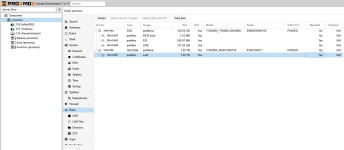
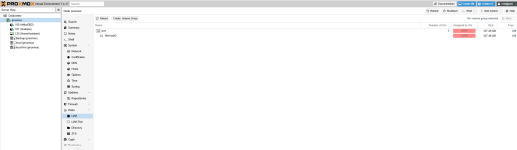
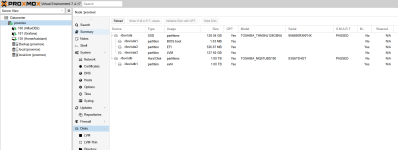
gerne doch. gibt es eine übersicht die du gerne hättest ?
Es ist eine toshiba thnsnj128g8nu verbaut, also 128GB.

100 - 35GB (knappe 15GB genutzt)
101 - 15GB (etwas mehr als 1GB genutzt)
135 - 128GB -> das ist wohl der große fehler, leider bekomme ich das nachträglich nicht kleiner, HomeAssistant selber sagt es wäre nur zu 33% belegt, das wären rund 42GB, frei sind noch 84GB, das passt also. wenn ich hier 50GB wegnehmen könnte wäre alles gut...

Alternative wäre wohl die beiden Container auf eine andere platte zu schieben, würde das gehen ?
Evtl hat mein Intel NUC6i3SYH noch einen 2,5 Zoll Slot den ich bislang nicht nutze.
Soll oder muss alles auf eine M2 SSD würde das alternativ einen kompletten plattentausch bedeuten.

1781959068489.png

1781956676101.png

1781958504439.png
1781977953634.png
Was sind das für 86GB ? Die Error Message beim Backup der Container war ja Cannot create new thin volume, free space in thin pool pve/data reached threshold. Ist es hier zu voll um ein Backup zu erstellen ?

Hier habe ich das gelesen: https://forum.proxmox.com/threads/b...-thin-pool-pve-data-reached.58271/post-268551
Thema ist das LXC Backup das vzdump zuerst lokal ablegt und es dann auf die storage kopiert. Sprich du brauchst lokal für LXC-Dumps den doppelten Speicher. KVM hingegen kopieren direkt.
Das würde zumindest erklären warum das Backup der VM ja zu funktionieren scheint...

1781958610118.png
1781958621637.png
 

Attachments

  • 1781956466026.png
    1781956466026.png
    80.8 KB · Views: 2
  • 1781958528472.png
    1781958528472.png
    74.2 KB · Views: 11
Last edited:
Wenn Du in die Maschine eine weitere SSD einbauen kannst, dann hast du auch mehr Speicher und könntest Container umziehen. Das hilft!

Mit Protokolle kürzen war das Vakuum-size gemeint.

"Prüfen des Mount", heißt externe Platte unmounten und dann auf der console dir den Inhalt des Verzeichnisses ansehen. Du kannst auch mit dem GDU Befehl dann noch mal anzeigen lassen. Ist die gemountete Platte weg, sollte deutlich weniger Speicher unter MNT belegt sein.
Ist nur ein Check - ob nicht wirklich etwas zusätzlich dort hängt.
 
Last edited:
135 - 128GB -> das ist wohl der große fehler, leider bekomme ich das nachträglich nicht kleiner, HomeAssistant selber sagt es wäre nur zu 33% belegt, das wären rund 42GB, frei sind noch 84GB, das passt also. wenn ich hier 50GB wegnehmen könnte wäre alles gut
Sichere die Konfigurationsdaten deines HomeAssistant.
Erzeuge einen neuen mit der passenden Größe, neu installieren und die Konfiguration zurücksichern.
Wenn's läuft den alten löschen.
Wenn es nicht reichen sollte einen neuen parallel hochzuziehen, dann den alten zuvor löschen!

Wenn ganz Mutig bis - alles sichern, den PVE komplett platt machen und neu installieren!
Damit wäre auch ein sauberes, frisches PVE gewährleistet! Das wäre sowieso die beste Lösung, mir kommt es auch seltsam vor, das der Postfix ständig neu startet und beendet wird. der sollte durchlaufen.

Lt. technischen Daten für den Intel NUC6i3SYH von Intel Seite kann eine 2,5" Platte eingebaut werden. Ob das das jetzt eine SSD sein muss oder HDD sein kann, musst selber für Dich beantworten. HDD ist halt entsprechend langsamer wenn viel darauf laufen würde.

Wenn eine HDD (oder SSD) rumliegt, bau diese am besten ein!
Formatieren mit ext4, und als Verzeichnis direkt einbinden. Entscheiden was alles drauf darf (VM, CT, ISO, Backup, etc) und dann die Platte deine Homeassistenten in der Webgui auf die neue Platte verschieben!

Dann auch bitte einmal ein "df -hT" von der Console posten

Aktuell sind die Preise für SSD / HDD recht happig und die sollten dann auch Reserve - mind 512GB eher 1TB Speicher aufweisen.
Das gilt eigentlich auch für deine derzeitige SSD mit 128Gb - da würde ICH keine VM oder Container drauf laufen lassen, nur das reine System. Alleine Schon wegen der Alterung der Speicherzellen.
Du hast dafür auch Ersatz für alle Fälle?
 
Last edited:
Das ist genau der Grund, warum ich LXCs generell sehr kritisch gegenüber stehe. Die Vermischung zwischen host und client ist einfach zu groß.
Ich setze seit 10J+ eine HA-VM mit 48GB HDD ein, ohne jemals so ein Problem gehabt zu haben. Dabei wird dort durchaus eine erhebliche Menge an Geräten (100+) verwaltet. Sensorwerte werden damit wohl bei 500+ liegen.
Zumal du vorgefertigte ISOs hier findet: https://www.home-assistant.io/installation/alternative

edit:
Eine gerne gebuchte Falle ist, dass irgendwas Nennenswerte nicht auf einem vorgesehenen aber nicht gemounteten Gerät landet. Das müllt dir ruckzuck dein root-Verzeichnis zu. ein beherztes df -h habe ich in diesem Thread nicht gefunden.
@ThoSo hat schon in die Richtung gezeigt, du hast irgendeine Verteilung genannt, aber ich kann nicht ergründen, wie deine 128GB aufgeteilt sind. Also poste: df -h

edit2:
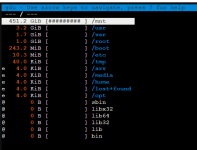
Schon @fluxX04 fragte nach df -h. Da zeigte sich dann eine 100%Belegung von 29GB. Ich habe noch keine Installation gefunden, bei der mehr als 18GB von empfohlenen 100GB belegt waren. Sonst ist ncdu dein Freund beim Finden von ungewolltem Platzverbrauch. Gerne zu finden in /mnt
 
Last edited:
Lt. technischen Daten für den Intel NUC6i3SYH von Intel Seite kann eine 2,5" Platte eingebaut werden. Ob das das jetzt eine SSD sein muss oder HDD sein kann, musst selber für Dich beantworten. HDD ist halt entsprechend langsamer wenn viel darauf laufen würde.
Hatte den Nuc jetzt gerade mal auf, in der Tat wäre platz für eine 2,5 Zoll Platte.
Wenn dann würde ich da nur die beiden Container (InfluxDB + Grafana) hin verschieben, eine SSD muss es dafür wohl nicht sein und ne kleine 128GB Platte sollte dicke reichen. Die sollte paar Euro kosten...
HomeAssistant würde ich dann weiter auf der M2 SSD laufen lassen, da wäre ja dann Platz satt.
Wenn die mal kaputt geht würde ich ne neue größere M2 SSD anschaffen, aber das kann ja noch dauern.

mir kommt es auch seltsam vor, das der Postfix ständig neu startet und beendet wird. der sollte durchlaufen.
woran siehst du das ?

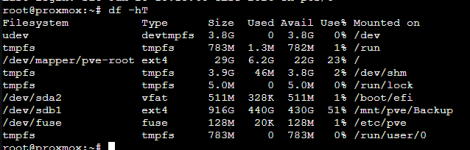
Dann auch bitte einmal ein "df -hT" von der Console posten
1781977332935.png

du hast irgendeine Verteilung genannt, aber ich kann nicht ergründen, wie deine 128GB aufgeteilt sind. Also poste: df -h
steht jetzt oben. ich hatte zusätzlich noch bilder von den verschiedenen menüs hier rein gelegt
 
Last edited:
woran siehst du das ?

Code:
Jun 20 13:32:49 proxmox login[1146026]: ROOT LOGIN  on '/dev/pts/0'
Jun 20 13:33:13 proxmox systemd[1]: postfix.service: Succeeded.
Jun 20 13:33:13 proxmox systemd[1]: Stopped Postfix Mail Transport Agent.
Jun 20 13:33:13 proxmox systemd[1]: Stopping Postfix Mail Transport Agent...
Jun 20 13:33:13 proxmox systemd[1]: Stopping Postfix Mail Transport Agent (instance -)...
Jun 20 13:33:13 proxmox postfix/postfix-script[1146113]: stopping the Postfix mail system
Jun 20 13:33:13 proxmox postfix/master[1144721]: terminating on signal 15
Jun 20 13:33:13 proxmox systemd[1]: postfix@-.service: Succeeded.
Jun 20 13:33:13 proxmox systemd[1]: Stopped Postfix Mail Transport Agent (instance -).
Jun 20 13:33:13 proxmox systemd[1]: Starting Postfix Mail Transport Agent (instance -)...
Jun 20 13:33:13 proxmox postfix/postfix-script[1146275]: starting the Postfix mail system
Jun 20 13:33:13 proxmox postfix/master[1146277]: daemon started -- version 3.5.23, configuration /etc/postfix
Jun 20 13:33:13 proxmox systemd[1]: Started Postfix Mail Transport Agent (instance -).
Jun 20 13:33:13 proxmox systemd[1]: Starting Postfix Mail Transport Agent...
Jun 20 13:33:13 proxmox systemd[1]: Finished Postfix Mail Transport Agent.
Jun 20 13:33:40 proxmox systemd[1]: postfix.service: Succeeded.
Jun 20 13:33:40 proxmox systemd[1]: Stopped Postfix Mail Transport Agent.
Jun 20 13:33:40 proxmox systemd[1]: Stopping Postfix Mail Transport Agent...
Jun 20 13:33:40 proxmox systemd[1]: Stopping Postfix Mail Transport Agent (instance -)...
Jun 20 13:33:40 proxmox postfix/postfix-script[1146400]: stopping the Postfix mail system
Jun 20 13:33:40 proxmox postfix/master[1146277]: terminating on signal 15
Jun 20 13:33:40 proxmox systemd[1]: postfix@-.service: Succeeded.
Jun 20 13:33:40 proxmox systemd[1]: Stopped Postfix Mail Transport Agent (instance -).
Jun 20 13:33:40 proxmox systemd[1]: Starting Postfix Mail Transport Agent (instance -)...
Jun 20 13:33:40 proxmox postfix/postfix-script[1146561]: starting the Postfix mail system
Jun 20 13:33:40 proxmox postfix/master[1146563]: daemon started -- version 3.5.23, configuration /etc/postfix
Starting .... Stopping
 
Last edited:
Das Root belegt lt deinem DF etwas über 6Gb und 22G sind frei.
Die 440GB kommen von der externen Platte (/mnt/pve/Backup)- das passt soweit.
Hast du mal die externe Platte abgehängt und den Ordner /mnt angeschaut?
 
Hatte den Nuc jetzt gerade mal auf, in der Tat wäre platz für eine 2,5 Zoll Platte.
Wenn dann würde ich da nur die beiden Container (InfluxDB + Grafana) hin verschieben, eine SSD muss es dafür wohl nicht sein und ne kleine 128GB Platte sollte dicke reichen. Die sollte paar Euro kosten...
HomeAssistant würde ich dann weiter auf der M2 SSD laufen lassen, da wäre ja dann Platz satt.
Wenn die mal kaputt geht würde ich ne neue größere M2 SSD anschaffen, aber das kann ja noch dauern.


woran siehst du das ?


View attachment 98493


steht jetzt oben. ich hatte zusätzlich noch bilder von den verschiedenen menüs hier rein gelegt
Also dein Platz auf / sieht nun völlig unproblematisch aus. Ich würde nun die virtuellen Kisten sichern und die Rücksicherung auf Funktionsfähigkeit kontrollieren. Dann würde ich auf der 128er das System mit Installationsvoraben (nur bei CPU würde ich host wählen) installieren. Danach die VMs zurückspielen und HA in einer VM neu installieren. Sonst verplemperst du bei der Fehlersuche nur Zeit. Ohne HA bist du in 30min durch. Wieviel Krempel, mit welchem Zeitaufwand, du in einer neuen HA-VM integrieren musst, kann ich nicht beurteilen.

Achso, wo ich gerade den Beitrag von @ThoSo sehe. Hänge /mnt/pve/Backup mal aus und sende danach ein weiteres df -h.
 
Last edited: