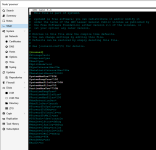
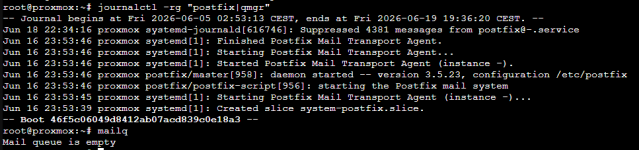
Das Journal mit "journalctl" einfach mal durchsehen, was an Meldungen protokolliert wird.
Code:
root@proxmox:~# journalctl
-- Journal begins at Thu 2026-06-04 07:38:14 CEST, ends at Wed 2026-06-17 23:10:01 CEST. --
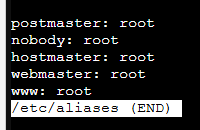
Jun 04 07:38:14 proxmox postfix/local[358387]: warning: hash:/etc/aliases is unavailable. open database /etc/aliases.db: No such file or directory
Jun 04 07:38:14 proxmox postfix/local[358387]: warning: hash:/etc/aliases: lookup of 'root' failed
Jun 04 07:38:14 proxmox postfix/local[358383]: 447D92161D: to=<root@proxmox.local>, relay=local, delay=97195, delays=97194/0.38/0/0, dsn=4.3.0, status=deferred (alias database unavailable)
Jun 04 07:38:14 proxmox postfix/local[358384]: warning: hash:/etc/aliases is unavailable. open database /etc/aliases.db: No such file or directory
Jun 04 07:38:14 proxmox postfix/local[358384]: warning: hash:/etc/aliases: lookup of 'root' failed
Jun 04 07:38:14 proxmox postfix/local[358387]: 45D0421B51: to=<root@proxmox.local>, orig_to=<root>, relay=local, delay=13093, delays=13092/0.38/0/0, dsn=4.3.0, status=deferred (alias database unavailable)
Jun 04 07:38:14 proxmox postfix/local[358383]: warning: hash:/etc/aliases is unavailable. open database /etc/aliases.db: No such file or directory
Jun 04 07:38:14 proxmox postfix/local[358383]: warning: hash:/etc/aliases: lookup of 'root' failed
Jun 04 07:38:14 proxmox postfix/local[358384]: 433C421777: to=<root@proxmox.local>, relay=local, delay=42597, delays=42596/0.38/0/0, dsn=4.3.0, status=deferred (alias database unavailable)
Jun 04 07:38:14 proxmox postfix/local[358387]: warning: hash:/etc/aliases is unavailable. open database /etc/aliases.db: No such file or directory
Jun 04 07:38:14 proxmox postfix/local[358387]: warning: hash:/etc/aliases: lookup of 'root' failed
Jun 04 07:38:14 proxmox postfix/local[358383]: 46930211DD: to=<root@proxmox.local>, relay=local, delay=4799, delays=4798/0.39/0/0, dsn=4.3.0, status=deferred (alias database unavailable)
Jun 04 07:38:14 proxmox postfix/local[358384]: warning: hash:/etc/aliases is unavailable. open database /etc/aliases.db: No such file or directory
Jun 04 07:38:14 proxmox postfix/local[358384]: warning: hash:/etc/aliases: lookup of 'root' failed
Jun 04 07:38:14 proxmox postfix/local[358387]: 4B17E21581: to=<root@proxmox.local>, relay=local, delay=46797, delays=46796/0.39/0/0, dsn=4.3.0, status=deferred (alias database unavailable)
Jun 04 07:38:14 proxmox postfix/local[358383]: warning: hash:/etc/aliases is unavailable. open database /etc/aliases.db: No such file or directory
Jun 04 07:38:14 proxmox postfix/local[358383]: warning: hash:/etc/aliases: lookup of 'root' failed
Jun 04 07:38:14 proxmox postfix/local[358384]: 488E62107A: to=<root@proxmox.local>, relay=local, delay=29999, delays=29998/0.39/0/0.01, dsn=4.3.0, status=deferred (alias database unavailable)
Jun 04 07:38:14 proxmox postfix/local[358387]: warning: hash:/etc/aliases is unavailable. open database /etc/aliases.db: No such file or directory
Jun 04 07:38:14 proxmox postfix/local[358387]: warning: hash:/etc/aliases: lookup of 'root' failed
Jun 04 07:38:14 proxmox postfix/local[358383]: 4CBB121787: to=<root@proxmox.local>, relay=local, delay=59397, delays=59396/0.39/0/0.01, dsn=4.3.0, status=deferred (alias database unavailable)
Jun 04 07:38:14 proxmox postfix/local[358384]: warning: hash:/etc/aliases is unavailable. open database /etc/aliases.db: No such file or directory
Jun 04 07:38:14 proxmox postfix/local[358384]: warning: hash:/etc/aliases: lookup of 'root' failed
Jun 04 07:38:14 proxmox postfix/local[358387]: 427472150B: to=<root@proxmox.local>, relay=local, delay=17398, delays=17397/0.4/0/0, dsn=4.3.0, status=deferred (alias database unavailable)
Jun 04 07:38:14 proxmox postfix/local[358383]: warning: hash:/etc/aliases is unavailable. open database /etc/aliases.db: No such file or directory
Jun 04 07:38:14 proxmox postfix/local[358383]: warning: hash:/etc/aliases: lookup of 'root' failed
Jun 04 07:38:14 proxmox postfix/local[358384]: 40ABD21A80: to=<root@proxmox.local>, relay=local, delay=17396, delays=17395/0.4/0/0.01, dsn=4.3.0, status=deferred (alias database unavailable)
Jun 04 07:38:14 proxmox postfix/local[358387]: warning: hash:/etc/aliases is unavailable. open database /etc/aliases.db: No such file or directory
Jun 04 07:38:14 proxmox postfix/local[358387]: warning: hash:/etc/aliases: lookup of 'root' failed
Jun 04 07:38:14 proxmox postfix/local[358383]: 4F92221435: to=<root@proxmox.local>, relay=local, delay=38398, delays=38397/0.4/0/0.01, dsn=4.3.0, status=deferred (alias database unavailable)
Jun 04 07:38:14 proxmox postfix/local[358384]: warning: hash:/etc/aliases is unavailable. open database /etc/aliases.db: No such file or directory
Jun 04 07:38:14 proxmox postfix/local[358384]: warning: hash:/etc/aliases: lookup of 'root' failed
Jun 04 07:38:14 proxmox postfix/local[358387]: 47E1B204D7: to=<root@proxmox.local>, relay=local, delay=17401, delays=17400/0.41/0/0.04, dsn=4.3.0, status=deferred (alias database unavailable)
Jun 04 07:38:14 proxmox postfix/local[358383]: warning: hash:/etc/aliases is unavailable. open database /etc/aliases.db: No such file or directory
Jun 04 07:38:14 proxmox postfix/local[358383]: warning: hash:/etc/aliases: lookup of 'root' failed
Jun 04 07:38:14 proxmox postfix/local[358384]: 4ECE221B86: to=<root@proxmox.local>, relay=local, delay=34195, delays=34194/0.44/0/0.02, dsn=4.3.0, status=deferred (alias database unavailable)
Jun 04 07:38:14 proxmox postfix/local[358387]: warning: hash:/etc/aliases is unavailable. open database /etc/aliases.db: No such file or directory
Jun 04 07:38:14 proxmox postfix/local[358387]: warning: hash:/etc/aliases: lookup of 'root' failed
Jun 04 07:38:14 proxmox postfix/local[358383]: 4D20421585: to=<root@proxmox.local>, relay=local, delay=46797, delays=46796/0.45/0/0.02, dsn=4.3.0, status=deferred (alias database unavailable)
Jun 04 07:38:14 proxmox postfix/local[358384]: warning: hash:/etc/aliases is unavailable. open database /etc/aliases.db: No such file or directory
Jun 04 07:38:14 proxmox postfix/local[358384]: warning: hash:/etc/aliases: lookup of 'root' failed
Jun 04 07:38:14 proxmox postfix/local[358387]: 4A46C211DC: to=<root@proxmox.local>, relay=local, delay=71999, delays=71998/0.46/0/0.02, dsn=4.3.0, status=deferred (alias database unavailable)
Jun 04 07:38:14 proxmox postfix/local[358383]: warning: hash:/etc/aliases is unavailable. open database /etc/aliases.db: No such file or directory
Jun 04 07:38:14 proxmox postfix/local[358383]: warning: hash:/etc/aliases: lookup of 'root' failed
Jun 04 07:38:14 proxmox postfix/local[358384]: 4A5D7211F6: to=<root@proxmox.local>, relay=local, delay=97197, delays=97196/0.47/0/0.02, dsn=4.3.0, status=deferred (alias database unavailable)
Jun 04 07:38:14 proxmox postfix/local[358387]: warning: hash:/etc/aliases is unavailable. open database /etc/aliases.db: No such file or directory
Jun 04 07:38:14 proxmox postfix/local[358387]: warning: hash:/etc/aliases: lookup of 'root' failed
Jun 04 07:38:14 proxmox postfix/local[358383]: 4C35221431: to=<root@proxmox.local>, relay=local, delay=38398, delays=38397/0.48/0/0.03, dsn=4.3.0, status=deferred (alias database unavailable)
Jun 04 07:38:14 proxmox postfix/local[358384]: warning: hash:/etc/aliases is unavailable. open database /etc/aliases.db: No such file or directory
Jun 04 07:38:14 proxmox postfix/local[358384]: warning: hash:/etc/aliases: lookup of 'root' failed
Jun 04 07:38:14 proxmox postfix/local[358387]: 4279321304: to=<root@proxmox.local>, relay=local, delay=21598, delays=21597/0.51/0/0.03, dsn=4.3.0, status=deferred (alias database unavailable)genau das habe ich ja jetzt bereits ein paar mal hinter mir...einfach manuell mittels "journalctl --vacuum-size=1000M" mal reduzieren
auch das habe ich ja bereits getan, zumindest dachte ich das (siehe unten)die Größe beschränken
aber wieso läuft es dann voll ?Generell ist das Journal in der Größe auf 4G oder so limitiert.
Und das wird doch hier eingestellt oder bin ich falsch ?
/etc/systemd/journald.confmitSystemMaxUse = 750M
Code:
root@proxmox:~# open /etc/systemd/journald.conf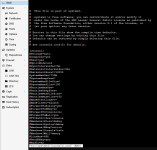
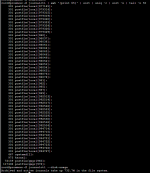
Gerade ist das journal ja wieder leer (gestern mitjournalctl --output=cat --output-fields=UNIT | grep ".service" | sort | uniq -c | sort -n | tail -n50 | column -t
journalctl --vacuum-size=1000M geleert)
Code:
root@proxmox:~# journalctl --output=cat --output-fields=UNIT | grep ".service" | sort | uniq -c | sort -n | tail -n50 | column -t
2   networking.service
2   open-iscsi.service
2   postfix.service
2   postfix@-.service
2   pvebanner.service
2   pve-cluster.service
2   pvedaemon.service
2   pve-firewall.service
2   pve-guests.service
2   pve-ha-crm.service
2   pve-ha-lrm.service
2   pve-lxc-syscalld.service
2   pvenetcommit.service
2   pvescheduler.service
2   pvestatd.service
2   qmeventd.service
2   rbdmap.service
2   rpcbind.service
2   rrdcached.service
2   smartmontools.service
2   ssh.service
2   systemd-fsck@dev-disk-by\x2duuid-0A88\x2dC15E.service
2   systemd-fsckd.service
2   systemd-journal-flush.service
2   systemd-logind.service
2   systemd-sysctl.service
2   systemd-tmpfiles-setup.service
2   systemd-udev-settle.service
2   systemd-update-utmp.service
2   systemd-user-sessions.service
2   zfs-import-scan.service
2   zfs-mount.service
2   zfs-share.service
2   zfs-volume-wait.service
3   e2scrub_reap.service
3   nfs-config.service
3   systemd-rfkill.service
3   systemd-update-utmp-runlevel.service
4   pveproxy.service
4   rsyslog.service
4   spiceproxy.service
7   user@0.service
7   user-runtime-dir@0.service
9   apt-daily-upgrade.service
9   systemd-tmpfiles-clean.service
12  pve-daily-update.service
13  man-db.service
14  logrotate.service
21  apt-daily.service
25  pvefw-logger.service
root@proxmox:~# journalctl --disk-usage
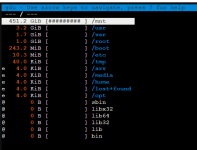
Archived and active journals take up 776.2M in the file system.apt -yU install gdu
gdu /
Code:
root@proxmox:~# apt -yU install gdu
E: Command line option 'U' [from -yU] is not understood in combination with the other options.
Last edited: