Proxmox management GUI not reachable when using OPNsense and VLANs

Dec 28, 2025
1
0
1
I have the following network configuration: an ISP router connected via cable to the server’s network port eno1, where Proxmox is installed, and a second port eno2 coming out of Proxmox that will be connected to a switch for network management (VLANs, etc.). Nothing is connected on the outgoing side yet because I am still doing some tests.

On the Proxmox node there are vmbr0 and vmbr1; only vmbr1 has an IP address automatically assigned by my ISP router.

I created a virtual machine with OPNsense.
OPNsense is configured with vnet0 as WAN, associated with vmbr0, and vnet1 as the interface for VLANs, associated with vmbr1.

I started by creating a VLAN for device management with ID 99. I can reach it remotely and I can see other Proxmox VMs tagged with VLAN 99, but I cannot access the Proxmox management GUI in any way.

I can’t figure out where I’m making a mistake or which step I might have missed.
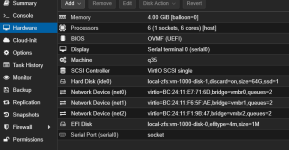
 
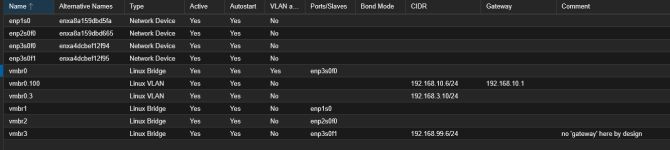
Here's my setup, doing almost exactly the same thing with pfSense instead of OPNsense. I have a total of four NICs: two Realtek NICs on the motherboard and two ports on my X520 SFP+ NIC. I use the two motherboard NICs for my redundant WAN connections (Xfinity cable modem and T-Mobile 5G). The first port on my X520 NIC is the LAN port on pfsense and is also the connection to the Proxmox interface. The second port on my X520 NIC is used only to connect directly to Proxmox if pfSense is down. For your purposes you can ignore that and you can ignore the WAN2 interface. Inside of Proxmox, I have 3 VMBRs set up, one for each WAN NIC and one for the LAN. In my pfSense VM I have three virtual NICs, one on VMBR0, one on VMBR1, and one on VMBR2


1766953550793.png


1766953595246.png

This is my /etc/network/interfaces file:

Code:
auto lo
iface lo inet loopback

# ===== LAN Trunk (X520 Port 0) =====
auto enp3s0f0
iface enp3s0f0 inet manual

auto vmbr0
iface vmbr0 inet manual
        bridge-ports enp3s0f0
        bridge-stp off
        bridge-fd 0
        bridge-vlan-aware yes
        bridge-vids 2-4092

# Primary Proxmox management on VLAN 100 (tagged on vmbr0)
auto vmbr0.100
iface vmbr0.100 inet static
        address 192.168.10.6/24
        gateway 192.168.10.1

# Proxmox host on VLAN 3 (Storage VLAN, non-routed)
auto vmbr0.3
iface vmbr0.3 inet static
        address 192.168.3.10/24

# ===== Emergency / Rescue Management (X520 Port 1) =====
# Dedicated bridge on the second port with a private subnet and NO gateway.
# Plug your laptop or an isolated switch into enp3s0f1 and set your laptop to 192.168.99.10/24, for example.
auto enp3s0f1
iface enp3s0f1 inet manual

auto vmbr3
iface vmbr3 inet static
        address 192.168.99.6/24
        bridge-ports enp3s0f1
        bridge-stp off
        bridge-fd 0
        # no 'gateway' here by design


# ===== WAN1 (Realtek 2.5g) =====
auto enp1s0
iface enp1s0 inet manual

auto vmbr1
iface vmbr1 inet manual
        bridge-ports enp1s0
        bridge-stp off
        bridge-fd 0

# ===== WAN2 (Realtek 1g) =====
auto enp2s0f0
iface enp2s0f0 inet manual

auto vmbr2
iface vmbr2 inet manual
        bridge-ports enp2s0f0
        bridge-stp off
        bridge-fd 0


source /etc/network/interfaces.d/*