I have trixie 13, I looked for libapt-pkg6, d/l and installed it, pdm works. My apologies for posting here.You very likely have a broken apt sources configuration! Please check that out, ensure they all use same distro (bookworm for pdm0/alpha, trixie for pdm1/beta), and if you cannot figure that out, or if something else is off too, then please open a new thread, the generic alpha release thread is not the right place to debug this.


Proxmox Datacenter Manager - First Alpha Release
- Thread starter t.lamprecht
- Start date
You are using an out of date browser. It may not display this or other websites correctly.
You should upgrade or use an alternative browser.
You should upgrade or use an alternative browser.

Ok, butI have trixie 13
is from Debian bookworm 12, as in Debian Trixie 13 it'slibapt-pkg6
libapt-pkg7.0. Are you sure you switch the PDM repo over to the trixie one?I realized my mistake and changed pdm-test.list to deb http://download.proxmox.com/debian/pdm trixie pdm-test
apt update, pdm is 0.9.4
apt update, pdm is 0.9.4
Honestly I doubt it.did you maybe mix up some certificates/nodes/fingerprints? the error message says that the remote has a different one than you configured.. note that if you use Let's Encrypt or another trusted-by-default CA, you don't need to provide a fingerprint at all, you can just use the FQDN as endpoint and it should work.
pm-dcm proxmox-datacenter-api[662]: bad fingerprint: 47:69:ef:da:f8:1d:9d:e9:ca:34:29:85:90:26:54:39:8e:6e:ad:7a:bc:b3:55:fe:a3:98:5a:6d:70:47:04:98
pm-dcm proxmox-datacenter-api[662]: expected fingerprint: 9b:5e:eb:18:50:2f:e1:c6:5b:19:5f:de:9b:60:c9:f7:ba:9e:78:3f:4a:cf:6a:9e:aa:63:56:5f:9c:f4:a7:9b
pm-dcm proxmox-datacenter-api[662]: failed to query info for remote 'cluster' node 'host418.domain.local:8006' - client error (Connect)
openssl s_client -connect host418.domain.local:8006 </dev/null 2>/dev/null | openssl x509 -noout -fingerprint -sha256
sha256 Fingerprint=9B:5E:EB:18:50:2F:E1:C6:5B:19:5F
 E:9B:60:C9:F7:BA:9E:78:3F:4A:CF:6A:9E:AA:63:56:5F:9C:F4:A7:9B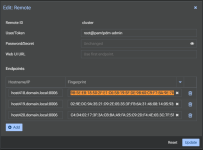
In that case, all certificates should have the same fingerprint, and that's not my case, right?does the "bad" fingerprint match the issuer of your certificate?
root@pm-dcm:/usr/local/share/ca-certificates# openssl s_client -connect host420.domain.local:8006 </dev/null 2>/dev/null | openssl x509 -noout -fingerprint -sha256
sha256 Fingerprint=C4
4:02:17:3F:3A:CB:BA:A9:FA:25:C9:2D:F4:4E:65:3C:7F:5F:FD:507:9A:AD:C2:20:92:78:F8:A9:29:12root@pm-dcm:/usr/local/share/ca-certificates# openssl s_client -connect host419.domain.local:8006 </dev/null 2>/dev/null | openssl x509 -noout -fingerprint -sha256
sha256 Fingerprint=02:9E
C:9A:35:219:2E:05:35:3F:FB:6A:31:46:08:14:05:930:5D:E64:7C:4D:46:14:51:8B:0A:51:1Eroot@pm-dcm:/usr/local/share/ca-certificates# openssl s_client -connect host418.domain.local:8006 </dev/null 2>/dev/null | openssl x509 -noout -fingerprint -sha256
sha256 Fingerprint=9B:5E:EB:18:50:2F:E1:C6:5B:19:5F
E:9B:60:C9:F7:BA:9E:78:3F:4A:CF:6A:9E:AA:63:56:5F:9C:F4:A7:9BHello Fabian. The bad fingerprint is a sha256 fingerprint of the Root CA.could you answer the question? the "bad" fingerprint must come from somewhere..

then I think I know the issue - the "fingerprint" option (currently) expects the server to return a single certificate and the fingerprint to match that. your server returns more than one certificate - did you maybe put the full chain instead of just the certificate into the file?

Got it, I'll check on this issue. Thanks!then I think I know the issue - the "fingerprint" option (currently) expects the server to return a single certificate and the fingerprint to match that. your server returns more than one certificate - did you maybe put the full chain instead of just the certificate into the file?
The DCM has been released now.
It now requires a subscription to get updates from the Enterprise repository. I didn't find a price for the subscription. It appears that you need an active PVE subscription for DCM to be active. And any experimental nodes without the subscription are forbidden, right? So we need to have two DC Manager nodes for paid PVE nodes and for the Community nodes, right?
> No valid subscription
> At least one remote does not have a valid subscription.
UPD:
You must have at least a Basic subscription for your products. And >= 80% of remotes should have it.
It now requires a subscription to get updates from the Enterprise repository. I didn't find a price for the subscription. It appears that you need an active PVE subscription for DCM to be active. And any experimental nodes without the subscription are forbidden, right? So we need to have two DC Manager nodes for paid PVE nodes and for the Community nodes, right?
> No valid subscription
> At least one remote does not have a valid subscription.
UPD:
You must have at least a Basic subscription for your products. And >= 80% of remotes should have it.
Last edited:
Hi,
Thanks for this nice project.
Is it possible and a good idea to install PDM on a PVE node (with package) or better to create a VM.
Thanks.
Thanks for this nice project.
Is it possible and a good idea to install PDM on a PVE node (with package) or better to create a VM.
Thanks.
Yes since PVE and PDM are both based on Debian: https://pdm.proxmox.com/docs/installation.html#install-proxmox-datacenter-manager-on-debianIs it possible and a good idea to install PDM on a PVE node (with package) or better to create a VM.
This doesn't make it a good idea to install it on a PVE node though: If it' installed with a VM (with the iso image) or to a Debian lxc you can migrate the PDM from one PVE host to another. But if you install it directly on an PVE host you won't have a working PDM in case of a host failure.
So I would create a vm or (if you need to save RAM) a Debian LXC and install PDM to it.
Hi Fabian, having the same issue as i have uploaded a custom cert chain. i need to provide the full chain (which starts with the root-cert) and this is not valid for PDM. @RocketSam how did you solve it then?then I think I know the issue - the "fingerprint" option (currently) expects the server to return a single certificate and the fingerprint to match that. your server returns more than one certificate - did you maybe put the full chain instead of just the certificate into the file?
we will fix it. but if you provide the full chain, then you don't need a fingerprint. if you use a fingerprint, you don't need the full chain.
Hi everyone,
I’m trying to perform a live migration of a small VM from one Proxmox cluster to another using Proxmox Data Center Manager (PDM). Both clusters are added in PDM and visible — I can see CPU/RAM usage, VM lists, PVE version etc. However, when I try to migrate a VM using the PDM migration wizard, I get the following error after ~30 seconds:
api error (status = 400: api error (status = 596: ))
Both PVE nodes are running the latest version:
root@int-106:~# pveversion
pve-manager/9.1.2/9d436f37a0ac4172 (running kernel: 6.17.2-2-pve)
root@int-107:~# pveversion
pve-manager/9.1.2/9d436f37a0ac4172 (running kernel: 6.17.2-2-pve)
PDM version is also the newest available:
root@pdm:~# proxmox-datacenter-manager-admin versions
proxmox-datacenter-manager 1.0.1 running version: 1.0.1
When I check the browser developer tools, I don’t see any obvious errors. The only clue is that the remote-migrate API call takes around 30 seconds before returning the error.
Payload it tries to send:
API response:
What should I check next, or what could I be doing wrong? Any hints would be greatly appreciated.
I’m trying to perform a live migration of a small VM from one Proxmox cluster to another using Proxmox Data Center Manager (PDM). Both clusters are added in PDM and visible — I can see CPU/RAM usage, VM lists, PVE version etc. However, when I try to migrate a VM using the PDM migration wizard, I get the following error after ~30 seconds:
api error (status = 400: api error (status = 596: ))
Both PVE nodes are running the latest version:
root@int-106:~# pveversion
pve-manager/9.1.2/9d436f37a0ac4172 (running kernel: 6.17.2-2-pve)
root@int-107:~# pveversion
pve-manager/9.1.2/9d436f37a0ac4172 (running kernel: 6.17.2-2-pve)
PDM version is also the newest available:
root@pdm:~# proxmox-datacenter-manager-admin versions
proxmox-datacenter-manager 1.0.1 running version: 1.0.1
When I check the browser developer tools, I don’t see any obvious errors. The only clue is that the remote-migrate API call takes around 30 seconds before returning the error.
Payload it tries to send:
Code:
{"delete": true, "online": true, "target": "int-106.REMOVED", "target-bridge": ["vmbr0"], "target-storage": ["local-zfs"]}API response:
Code:
{
    "errors": {},
    "message": "api error (status = 596: )",
    "status": 400,
    "success": false
}
What should I check next, or what could I be doing wrong? Any hints would be greatly appreciated.
can the two
can the two PVE systems talk to eachother? anything visible on the source PVE system (task log, journal)?Hi everyone,
I’m trying to perform a live migration of a small VM from one Proxmox cluster to another using Proxmox Data Center Manager (PDM). Both clusters are added in PDM and visible — I can see CPU/RAM usage, VM lists, PVE version etc. However, when I try to migrate a VM using the PDM migration wizard, I get the following error after ~30 seconds:
api error (status = 400: api error (status = 596: ))
Both PVE nodes are running the latest version:
root@int-106:~# pveversion
pve-manager/9.1.2/9d436f37a0ac4172 (running kernel: 6.17.2-2-pve)
root@int-107:~# pveversion
pve-manager/9.1.2/9d436f37a0ac4172 (running kernel: 6.17.2-2-pve)
PDM version is also the newest available:
root@pdm:~# proxmox-datacenter-manager-admin versions
proxmox-datacenter-manager 1.0.1 running version: 1.0.1
When I check the browser developer tools, I don’t see any obvious errors. The only clue is that the remote-migrate API call takes around 30 seconds before returning the error.
Payload it tries to send:
Code:{"delete": true, "online": true, "target": "int-106.REMOVED", "target-bridge": ["vmbr0"], "target-storage": ["local-zfs"]}
API response:
Code:{ "errors": {}, "message": "api error (status = 596: )", "status": 400, "success": false }
What should I check next, or what could I be doing wrong? Any hints would be greatly appreciated.
That was exactly the issue - the firewall between them. Migration works great now. Thank you very much for your help and for the great Proxmox stuff.can the two PVE systems talk to eachother? anything visible on the source PVE system (task log, journal)?
Just one more question: I’ve seen in some tutorials that the API token is created on the root PVE account. From a security and best-practice point of view, should I create a dedicated PVE account for PDM on each node instead?