I posted this in the wrong section before so i am posting this here hoping is the right place.
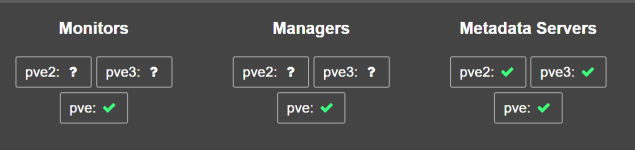
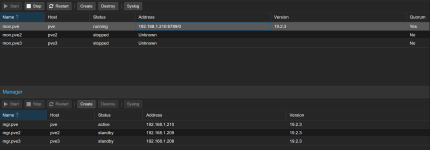
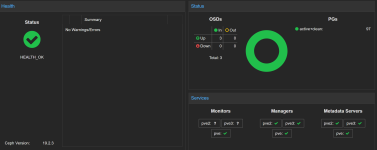
Hi all, i am facing a strange issue, after using having a proxmox pc for my self hosted app I decided to play around and create a cluter to dive deeper into the HA topics, i dowloaded the latest ISO and build up a cluster from scratch. My Cluster works, i can see every node, my ceph storage says everythng is ok. Managers works on all 3 node, metadata is ok on all 3 nodes but Monitor started only on the first node. When i try to make it start on the others node, nothing happen.
This is the syslog of the second node
Oct 28 00:13:47 pve2 ceph-mon[1041]: 2025-10-28T00:13:47.531+0100 7265f2d4c6c0 -1 received signal: Hangup from killall -q -1 ceph-mon ceph-mgr ceph-mds ceph-osd ceph-fuse radosgw rbd-mirror cephfs-mirror (PID: 2949170) UID: 0
Oct 28 00:13:47 pve2 ceph-mon[1041]: 2025-10-28T00:13:47.531+0100 7265f2d4c6c0 -1 mon.pve2@0(leader) e1 *** Got Signal Hangup ***
Oct 28 00:13:47 pve2 ceph-mon[1041]: 2025-10-28T00:13:47.554+0100 7265f2d4c6c0 -1 received signal: Hangup from (PID: 2949171) UID: 0
Oct 28 00:13:47 pve2 ceph-mon[1041]: 2025-10-28T00:13:47.554+0100 7265f2d4c6c0 -1 mon.pve2@0(leader) e1 *** Got Signal Hangup ***
this is from the third node
ct 28 00:48:10 pve3 ceph-mon[1030]: 2025-10-28T00:48:10.850+0100 7f59362b76c0 -1 received signal: Hangup from killall -q -1 ceph-mon ceph-mgr ceph-mds ceph-osd ceph-fuse radosgw rbd-mirror cephfs-mirror (PID: 740342) UID: 0
Oct 28 00:48:10 pve3 ceph-mon[1030]: 2025-10-28T00:48:10.852+0100 7f59362b76c0 -1 mon.pve3@0(leader) e1 *** Got Signal Hangup ***
Oct 28 00:48:10 pve3 ceph-mon[1030]: 2025-10-28T00:48:10.871+0100 7f59362b76c0 -1 received signal: Hangup from (PID: 740343) UID: 0
Oct 28 00:48:10 pve3 ceph-mon[1030]: 2025-10-28T00:48:10.871+0100 7f59362b76c0 -1 mon.pve3@0(leader) e1 *** Got Signal Hangup ***
I am kinda stuck
Hi all, i am facing a strange issue, after using having a proxmox pc for my self hosted app I decided to play around and create a cluter to dive deeper into the HA topics, i dowloaded the latest ISO and build up a cluster from scratch. My Cluster works, i can see every node, my ceph storage says everythng is ok. Managers works on all 3 node, metadata is ok on all 3 nodes but Monitor started only on the first node. When i try to make it start on the others node, nothing happen.
This is the syslog of the second node
Oct 28 00:13:47 pve2 ceph-mon[1041]: 2025-10-28T00:13:47.531+0100 7265f2d4c6c0 -1 received signal: Hangup from killall -q -1 ceph-mon ceph-mgr ceph-mds ceph-osd ceph-fuse radosgw rbd-mirror cephfs-mirror (PID: 2949170) UID: 0
Oct 28 00:13:47 pve2 ceph-mon[1041]: 2025-10-28T00:13:47.531+0100 7265f2d4c6c0 -1 mon.pve2@0(leader) e1 *** Got Signal Hangup ***
Oct 28 00:13:47 pve2 ceph-mon[1041]: 2025-10-28T00:13:47.554+0100 7265f2d4c6c0 -1 received signal: Hangup from (PID: 2949171) UID: 0
Oct 28 00:13:47 pve2 ceph-mon[1041]: 2025-10-28T00:13:47.554+0100 7265f2d4c6c0 -1 mon.pve2@0(leader) e1 *** Got Signal Hangup ***
this is from the third node
ct 28 00:48:10 pve3 ceph-mon[1030]: 2025-10-28T00:48:10.850+0100 7f59362b76c0 -1 received signal: Hangup from killall -q -1 ceph-mon ceph-mgr ceph-mds ceph-osd ceph-fuse radosgw rbd-mirror cephfs-mirror (PID: 740342) UID: 0
Oct 28 00:48:10 pve3 ceph-mon[1030]: 2025-10-28T00:48:10.852+0100 7f59362b76c0 -1 mon.pve3@0(leader) e1 *** Got Signal Hangup ***
Oct 28 00:48:10 pve3 ceph-mon[1030]: 2025-10-28T00:48:10.871+0100 7f59362b76c0 -1 received signal: Hangup from (PID: 740343) UID: 0
Oct 28 00:48:10 pve3 ceph-mon[1030]: 2025-10-28T00:48:10.871+0100 7f59362b76c0 -1 mon.pve3@0(leader) e1 *** Got Signal Hangup ***
I am kinda stuck