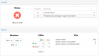
I have the very latest of Proxmox installed and I went to look at my Ceph Health and realized I have some serious inconsistencies which I seem to be having issues resolving. I haven't had any strange issues like this before with Ceph, so wondering if someone can help me. I found an article where I have been sort of following the commands to troubleshoot my issue, but when I try to do a 'rados list-inconsistent-obj' it returns no scrub information available.'
Site I am kind of following some of the commands.
http://tracker.ceph.com/issues/21040
root@elk1:~/bluestore# ceph pg ls inconsistent
PG_STAT OBJECTS MISSING_ON_PRIMARY DEGRADED MISPLACED UNFOUND BYTES LOG DISK_LOG STATE STATE_STAMP VERSION REPORTED UP UP_PRIMARY ACTING ACTING_PRIMARY LAST_SCRUB SCRUB_STAMP LAST_DEEP_SCRUB DEEP_SCRUB_STAMP
1.96 3716 0 0 0 0 15575967526 1572 1572 active+clean+inconsistent 2018-02-02 19:23:30.209358 893'213238 893:430943 [2,8,5] 2 [2,8,5] 2 74'209093 2018-02-02 13:40:03.366655 74'209093 2018-02-02 13:40:03.366655
1.de 3698 0 0 0 0 15506341888 1568 1568 active+clean+inconsistent 2018-02-03 03:55:23.891742 893'266334 893:960160 [1,4,9] 1 [1,4,9] 1 74'265028 2018-02-02 12:30:14.191941 74'265028 2018-02-02 12:30:14.191941
1.168 1865 0 0 0 0 7818207232 1570 1570 active+clean+scrubbing+deep+inconsistent 2018-02-03 18:36:06.603339 893'242556 893:355711 [2,8,5] 2 [2,8,5] 2 74'241802 2018-02-02 13:46:43.961135 74'241802 2018-02-02 13:46:43.961135
root@elk1:~/bluestore# rados list-inconsistent-obj 1.96
No scrub information available for pg 1.96
error 2: (2) No such file or directory
Possible data damage: 3 pgs inconsistent
pg 1.96 is active+clean+inconsistent, acting [2,8,5]
pg 1.de is active+clean+inconsistent, acting [1,4,9]
pg 1.168 is active+clean+inconsistent, acting [2,8,5]
Site I am kind of following some of the commands.
http://tracker.ceph.com/issues/21040
root@elk1:~/bluestore# ceph pg ls inconsistent
PG_STAT OBJECTS MISSING_ON_PRIMARY DEGRADED MISPLACED UNFOUND BYTES LOG DISK_LOG STATE STATE_STAMP VERSION REPORTED UP UP_PRIMARY ACTING ACTING_PRIMARY LAST_SCRUB SCRUB_STAMP LAST_DEEP_SCRUB DEEP_SCRUB_STAMP
1.96 3716 0 0 0 0 15575967526 1572 1572 active+clean+inconsistent 2018-02-02 19:23:30.209358 893'213238 893:430943 [2,8,5] 2 [2,8,5] 2 74'209093 2018-02-02 13:40:03.366655 74'209093 2018-02-02 13:40:03.366655
1.de 3698 0 0 0 0 15506341888 1568 1568 active+clean+inconsistent 2018-02-03 03:55:23.891742 893'266334 893:960160 [1,4,9] 1 [1,4,9] 1 74'265028 2018-02-02 12:30:14.191941 74'265028 2018-02-02 12:30:14.191941
1.168 1865 0 0 0 0 7818207232 1570 1570 active+clean+scrubbing+deep+inconsistent 2018-02-03 18:36:06.603339 893'242556 893:355711 [2,8,5] 2 [2,8,5] 2 74'241802 2018-02-02 13:46:43.961135 74'241802 2018-02-02 13:46:43.961135
root@elk1:~/bluestore# rados list-inconsistent-obj 1.96
No scrub information available for pg 1.96
error 2: (2) No such file or directory
Possible data damage: 3 pgs inconsistent
pg 1.96 is active+clean+inconsistent, acting [2,8,5]
pg 1.de is active+clean+inconsistent, acting [1,4,9]
pg 1.168 is active+clean+inconsistent, acting [2,8,5]