

Proxmox Backup/Migration mit Veeam
- Thread starter Grisu76
- Start date
You are using an out of date browser. It may not display this or other websites correctly.
You should upgrade or use an alternative browser.
You should upgrade or use an alternative browser.
Im ersten tread kannst das machen.Jetzt muss mir als altem Sack nur noch jemand sagen, wie ich den Post als gelöst schließen kann. Hier scheine ich Tomaten auf den Augen zu haben.
Thank's for replay 6equj5!
From my experience, I can tell you that the Veeam 12.3.2.x + ProxMox 8.4.x combination works great, while Veeam 12.3.2.x with ProxMox 9.1.x, on the other hand, sucks.
Basically, it's the worker that doesn't perform well because during migration, it sets the machine version to the highest value ProxMox can accept by default, and this is a problem.
So, with both Linux and Windows VMs, I found many issues resolved by using a ProxMox 8.4.x target (where the maximum VM is 9.2 + PVE1).
Unfortunately, Veeam has discontinued support for the ProxMox plug-in on version 12 because the downloadable plugin is only compatible with version 13. A real shame. It would be enough to be able to modify the final configuration file before performing the restore to solve everything...
I also had a setback: I took a snapshot to make changes to the WinServer VM with Veeam, but when I went to consolidate a few days later, it was no longer possible. I had to delete the VM and restore with a backup made fortunately with PBS (which works very well).
I like Veeam B&R; it's robust even if it's gigantic and requires a lot of resources, but it allows you to selectively recover files. But it's too much of a hassle.
To be honest, over Christmas, I ran a DR test with PBS on the same infrastructure by shutting down the server and using a spare server, and from the last backup, I restored EVERYTHING within a day (it always depends on the size of the VMs).
I'm doing the same thing for a customer with ESXI 7 and Veeam 12.3.2. Only with a proxy configured on the new server did it work fast enough; otherwise, it would take forever.
From my experience, I can tell you that the Veeam 12.3.2.x + ProxMox 8.4.x combination works great, while Veeam 12.3.2.x with ProxMox 9.1.x, on the other hand, sucks.
Basically, it's the worker that doesn't perform well because during migration, it sets the machine version to the highest value ProxMox can accept by default, and this is a problem.
So, with both Linux and Windows VMs, I found many issues resolved by using a ProxMox 8.4.x target (where the maximum VM is 9.2 + PVE1).
Unfortunately, Veeam has discontinued support for the ProxMox plug-in on version 12 because the downloadable plugin is only compatible with version 13. A real shame. It would be enough to be able to modify the final configuration file before performing the restore to solve everything...
I also had a setback: I took a snapshot to make changes to the WinServer VM with Veeam, but when I went to consolidate a few days later, it was no longer possible. I had to delete the VM and restore with a backup made fortunately with PBS (which works very well).
I like Veeam B&R; it's robust even if it's gigantic and requires a lot of resources, but it allows you to selectively recover files. But it's too much of a hassle.
To be honest, over Christmas, I ran a DR test with PBS on the same infrastructure by shutting down the server and using a spare server, and from the last backup, I restored EVERYTHING within a day (it always depends on the size of the VMs).
I'm doing the same thing for a customer with ESXI 7 and Veeam 12.3.2. Only with a proxy configured on the new server did it work fast enough; otherwise, it would take forever.
Last edited:
i am using 8.4.16Good morning,
Before closing the thread, can you tell me which version of ProxMox you're using?
Die Kirsche auf der Sahnetorte ist, dass das Veeam Plugin beim Full VM Restore statt der Anzahl Cores, die Anzahl Sockel nimmt. Ist bei Veeam v13.0.1 und Proxmox 9.1.1 passiert. Schludrigkeit hoch 3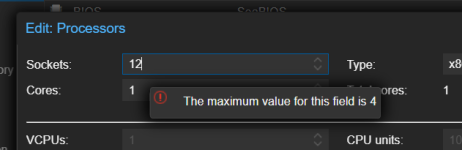


Oben den Titel des Thread bearbeiten und solved auswählen.Jetzt muss mir als altem Sack nur noch jemand sagen, wie ich den Post als gelöst schließen kann. Hier scheine ich Tomaten auf den Augen zu haben.
Nein, er nimmt in der Regel das, was eingestellt war. Bei vSphere ist das oft Standard, weil die schon 13x die Art wie man es einstellt geändert haben.Die Kirsche auf der Sahnetorte ist, dass das Veeam Plugin beim Full VM Restore statt der Anzahl Cores, die Anzahl Sockel nimmt. Ist bei Veeam v13.0.1 und Proxmox 9.1.1 passiert. Schludrigkeit hoch 3View attachment 95623
P.S. bei 12 vCPUs muss das schon eine Dicke DB VM sein. Gern mal beim migrieren überprüfen ob tatsächlich so viele Cores benötigt werden.
12 cores are necessary if there are many processes and flows in a job or multiple running simultaneously, for example, 3 VMs to be backed up in a job with multiple disks. Each core/vCPU is assigned a worker thread. If you have few, the VMs are queued and processed as soon as one becomes available.
I prefer having multiple single VM jobs, also for more streamlined space management on the destination. Otherwise, very large files are created, and in the case of a restore, more resources are needed, as is the repository space, especially on rotating media (RDX cassettes, external USB drives).
It's probably difficult to create a worker VM at the configuration level that can meet the needs of every customer. However, when creating the worker from the Veeam management console, it asks you how many cores, RAM, and flows it must manage.
I prefer having multiple single VM jobs, also for more streamlined space management on the destination. Otherwise, very large files are created, and in the case of a restore, more resources are needed, as is the repository space, especially on rotating media (RDX cassettes, external USB drives).
It's probably difficult to create a worker VM at the configuration level that can meet the needs of every customer. However, when creating the worker from the Veeam management console, it asks you how many cores, RAM, and flows it must manage.
Ja, war eine dicke DB VM, gut geratenNein, er nimmt in der Regel das, was eingestellt war. Bei vSphere ist das oft Standard, weil die schon 13x die Art wie man es einstellt geändert haben.
P.S. bei 12 vCPUs muss das schon eine Dicke DB VM sein. Gern mal beim migrieren überprüfen ob tatsächlich so viele Cores benötigt werden.

Das finde ich trotzdem sehr komisch. Warum 12 virtuelle Sockel? Ein KVM Hypervisor mit 2 Hardware Sockeln, hat 4 logische Sockel. Auf so einem Hardware Sockel von gängigen Servern sind heutzutage 16, 32, 48, bis zu 256 logische Kerne... Wenn er 12 von 4 logischen Sockeln gleichzeitig belegt, dann macht es das doch komplett ineffizient von der Aufteilung? Die vielen virtuellen Cores auf 1-2 Sockeln könnten den Speicherbereich doch viel besser nutzen als 12 virtuelle Sockel.
Was verstehe ich hier falsch? Veeam macht das mit der Sockel-vCPU-Teilung genauso
Sorry für die späte Antwort. VMFS auf iSCSI Block Storage wurde bislang genutzt. Deshalb der komplizierte Weg. Man könnte in diesem auch einige Schritte weglassen.Warum so extrem umständlich?
Was hättest du empfohlen?
Er liest die VMware .vmx Datei aus und schlägt vor was da drin steht. Schau dir deine Konfigurationen der VMs unter vSphere an. Das ist vSphere Default.Ja, war eine dicke DB VM, gut geraten
Das finde ich trotzdem sehr komisch. Warum 12 virtuelle Sockel?
Hier wirfst du ganz viele Sachen durcheinander.Ein KVM Hypervisor mit 2 Hardware Sockeln, hat 4 logische Sockel. Auf so einem Hardware Sockel von gängigen Servern sind heutzutage 16, 32, 48, bis zu 256 logische Kerne... Wenn er 12 von 4 logischen Sockeln gleichzeitig belegt, dann macht es das doch komplett ineffizient von der Aufteilung? Die vielen virtuellen Cores auf 1-2 Sockeln könnten den Speicherbereich doch viel besser nutzen als 12 virtuelle Sockel.
Was verstehe ich hier falsch? Veeam macht das mit der Sockel-vCPU-Teilung genauso
Bei einem 2 Sockel Server, hast du 2 Sockel. Wenn du große VMs mit sehr vielen Kernen betreiben willst, macht es Sinn über vNUMA nachzudenken und dann ist die Einstellung auf der VM wichtig. Da musst du dann korrekt 2 Sockel angeben und die Software in der VM muss dann auch NUMA Aware sein.
Ob du einer VM 4 Sockel oder 4 Kerne gibst, ändert erst einmal gar nichts, der Scheduler wird das immer auf einer CPU laufen lassen, solange auf der CPU genügend Kerne frei sind.
VMware stellt da gern nur Sockel ein, da dann der CPU Scheduler des ESXi frei entscheiden kannwelche Kerne er benutzt, z.B. sind auf der ersten CPU nur 3 Kerne frei, dannkann es passieren dass ein Kern der zweiten CPU dazu genommen wird.
Stellst du bei vSphere 1 Sockel ein, zwingst du den Scheduler immer nur Cores einer CPU zu nehmen.
Ob der Scheduler im KVM genau so strikt ist, weiß ich nicht.
Vorsich mit so vielen Sockeln, viele Software, wie MS SQL haben eine Limitierung eingebaut wie viele Sockel in der jeweiligen Lizenz erlaubt sind.
Im Schlimmsten Fall hast du 12 vCPUs und SQl nutzt aber nur 4 Cores, da die 4 Sockel Begrenzung greift.
Top, danke fürs erklären. Mit dem NUMA habe ich es mir noch Mal angeschaut.Er liest die VMware .vmx Datei aus und schlägt vor was da drin steht. Schau dir deine Konfigurationen der VMs unter vSphere an. Das ist vSphere Default.
Hier wirfst du ganz viele Sachen durcheinander.
Bei einem 2 Sockel Server, hast du 2 Sockel. Wenn du große VMs mit sehr vielen Kernen betreiben willst, macht es Sinn über vNUMA nachzudenken und dann ist die Einstellung auf der VM wichtig. Da musst du dann korrekt 2 Sockel angeben und die Software in der VM muss dann auch NUMA Aware sein.
Ob du einer VM 4 Sockel oder 4 Kerne gibst, ändert erst einmal gar nichts, der Scheduler wird das immer auf einer CPU laufen lassen, solange auf der CPU genügend Kerne frei sind.
VMware stellt da gern nur Sockel ein, da dann der CPU Scheduler des ESXi frei entscheiden kannwelche Kerne er benutzt, z.B. sind auf der ersten CPU nur 3 Kerne frei, dannkann es passieren dass ein Kern der zweiten CPU dazu genommen wird.
Stellst du bei vSphere 1 Sockel ein, zwingst du den Scheduler immer nur Cores einer CPU zu nehmen.
Ob der Scheduler im KVM genau so strikt ist, weiß ich nicht.
Vorsich mit so vielen Sockeln, viele Software, wie MS SQL haben eine Limitierung eingebaut wie viele Sockel in der jeweiligen Lizenz erlaubt sind.
Im Schlimmsten Fall hast du 12 vCPUs und SQl nutzt aber nur 4 Cores, da die 4 Sockel Begrenzung greift.
Ich meine, dass virtuelle Sockel als Grundlage für die Ressourcenzuteilung sich komisch anfühlt. Denn der Server hat doch auch nur wenige Sockel und mehr Kerne.
Wird der Zugriff auf RAM dann nicht mehr gestückelt, wenn die einzelnen Prozesse derselben VM Mal von hier, Mal von da auf den RAM zugreifen, also mal der eine Core und Mal der andere gewählt wird?
Um zu dem eigentlichen Thema zurückzukommen: Man hat ein VMFS auf einem externen iSCSI od. Fibre Channel Storage. Später will man den selben iSCSI Storage wieder für PVE nutzen.
Welchen einfacheren Weg gibt es, als über Veeam zu migrieren mit?:
-Backup von VMware
-Wiederherstellung auf Proxmox
-Treiberinstallation
Der Scheduler versucht das schon optimal zu machen.Top, danke fürs erklären. Mit dem NUMA habe ich es mir noch Mal angeschaut.
Ich meine, dass virtuelle Sockel als Grundlage für die Ressourcenzuteilung sich komisch anfühlt. Denn der Server hat doch auch nur wenige Sockel und mehr Kerne.
Wird der Zugriff auf RAM dann nicht mehr gestückelt, wenn die einzelnen Prozesse derselben VM Mal von hier, Mal von da auf den RAM zugreifen, also mal der eine Core und Mal der andere gewählt wird?
Also neue LUNs für PVE erzeugen und per LVM nutzen.Um zu dem eigentlichen Thema zurückzukommen: Man hat ein VMFS auf einem externen iSCSI od. Fibre Channel Storage. Später will man den selben iSCSI Storage wieder für PVE nutzen.
Also am besten zuerst Treiber installieren mit meinem iso: https://forum.proxmox.com/threads/kleiner-gamechanger-bei-der-windows-migration-zu-proxmox.167837/Welchen einfacheren Weg gibt es, als über Veeam zu migrieren mit?:
-Backup von VMware
-Wiederherstellung auf Proxmox
-Treiberinstallation
Ob mit Veeam oder meine präferierte Methode: https://pve.proxmox.com/wiki/Migrate_to_Proxmox_VE#Attach_Disk_&_Move_Disk_(minimal_downtime)
ist egal, geht beides gut.