

Hi All,
I've written a web based manager for Proxmox using the API of Proxmox to access a LXC console.
However, I'm missing something:
When using the newly created web based manager (in php) all info is correct but an error is thrown when connecting to the console:
Connection failed (Error 401: No ticket)
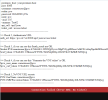
But, When logging on to the Proxmox PVE manager and then to the web based manager (php) a connection is made.
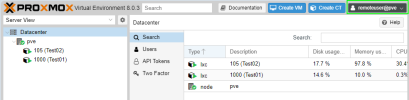
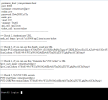
In short:
NO Login on Proxmox PVE GUI >> Login on LXC Console = No Console
Logged in on Proxmox PVE GUI >> login on LXC Console = Console OK
The complete code below (and as an attachement), maybe it will help you guys for your own designs.
I have stripped the code to prevent issues (security e.g.) and use the credentials in the code for testing, it all works.
Keep in mind, if you are using for your own project, no security is implemented!!
Any help is appreciated.
I've written a web based manager for Proxmox using the API of Proxmox to access a LXC console.
However, I'm missing something:
When using the newly created web based manager (in php) all info is correct but an error is thrown when connecting to the console:
Connection failed (Error 401: No ticket)
But, When logging on to the Proxmox PVE manager and then to the web based manager (php) a connection is made.
In short:
NO Login on Proxmox PVE GUI >> Login on LXC Console = No Console
Logged in on Proxmox PVE GUI >> login on LXC Console = Console OK
The complete code below (and as an attachement), maybe it will help you guys for your own designs.
I have stripped the code to prevent issues (security e.g.) and use the credentials in the code for testing, it all works.
Keep in mind, if you are using for your own project, no security is implemented!!
Any help is appreciated.
PHP:
<?php
# Proxmox credentials and details

    $proxmox_host    = 'your.proxmox.host';
    $port            = '8006';
    $realm            = 'pve';
    $username        = 'remoteuser';
    $password        = 'Dt#rDNlUyJTa';
    $username        = $username .'@'. $realm; // No, this is not conflicting with the earlier defined "username"
    $node            = 'pve';
    $vmid            = '105';
    $name           = 'Test02';

    $api_call         = '/api2/json';
    $ticket_call     = '/access/ticket';

#  Normally these input fields are send from an input form:
/*
    $proxmox_host    = $_POST['proxmox_host'];
    $port            = $_POST['port'];
    $realm            = $_POST['realm'];
    $username        = $_POST['username'] .'@'. $_POST['realm'];
    $password        = $_POST['password'];
    $node            = $_POST['node_name'];
    $vmid            = $_POST['vmid'];
    $name           = $_POST['name'];
*/

###################################################
# Check 1, are the values correct?
#
    echo 'proxmox_host:    '. $proxmox_host .'<br/>';
    echo 'port:            '. $port .'<br/>';
    echo 'username:        '. $username .'<br/>';
    echo 'realm:        '. $realm .'<br/>';
    echo 'password:        '. $password .'<br/>';
    echo 'node:            '. $node .'<br/>';
    echo 'vmid:            '. $vmid .'<br/>';
    echo 'vmname:        '. $name .'<br/>';

    echo 'api_call:        '. $api_call .'<br/>';
    echo 'ticket_call:    '. $ticket_call .'<br/>';

    echo '--------------------------------------------------------';
    echo '<br/>';
###################################################


# Function to make a POST request and return the response
#
function make_post_request($url, $data, $headers = []) {
    $ch = curl_init($url);
    curl_setopt($ch, CURLOPT_RETURNTRANSFER, true);
    curl_setopt($ch, CURLOPT_POST, true);
    curl_setopt($ch, CURLOPT_POSTFIELDS, http_build_query($data));

    // Set custom headers if provided
    if (!empty($headers)) {
        curl_setopt($ch, CURLOPT_HTTPHEADER, $headers);
    }

    // Ignore SSL certificate verification (not recommended for production)
    # DEACTIVATED for testing purposes
    // No, this is not causing problems
    curl_setopt($ch, CURLOPT_SSL_VERIFYPEER, false);
    curl_setopt($ch, CURLOPT_SSL_VERIFYHOST, false);

    $response = curl_exec($ch);
    if ($response === false) {
        throw new Exception('Curl error: ' . curl_error($ch));
    }

    $http_code = curl_getinfo($ch, CURLINFO_HTTP_CODE);
    curl_close($ch);

    return ['response' => json_decode($response, true), 'http_code' => $http_code];
}

# Authenticate to get the ticket and CSRF token
#
$auth_url = "https://". $proxmox_host .":". $port . $api_call . $ticket_call;
$auth_data = [
    'username' => $username,
    'password' => $password
];
$auth_result = make_post_request($auth_url, $auth_data);

############################################################
# Check 2, are the Authenticate values correct?
#
echo '<br/>';
echo '>> Check 2, Authenticate URL. <br/>';
echo 'auth_url: '. $auth_url .'<br/>';
    echo '--------------------------------------------------------';
    echo '<br/>';
############################################################

if ($auth_result['http_code'] != 200 || !isset($auth_result['response']['data'])) {
    die('Authentication failed: ' . json_encode($auth_result));
}

$ticket = $auth_result['response']['data']['ticket'];
$csrf_token = $auth_result['response']['data']['CSRFPreventionToken'];

#############################################################################
# Check 3, are the $auth_result values correct?
#
echo '<br/>';
echo '>> Check 3, if you can see this $auth_result are OK. <br/>';

    echo '$ticket:'. $ticket .'<br/>';
    echo '$csrf_token: '. $csrf_token .'<br/>';
    echo '--------------------------------------------------------';
    echo '<br/>';
#############################################################################

# Generate the VNC ticket
#
$vnc_url = "https://". $proxmox_host .":". $port ."/api2/json/nodes/$node/lxc/$vmid/vncproxy";
$headers = [
    "CSRFPreventionToken: $csrf_token",
    "Cookie: PVEAuthCookie=$ticket"
];
$vnc_data = [];
$vnc_result = make_post_request($vnc_url, $vnc_data, $headers);

if ($vnc_result['http_code'] != 200 || !isset($vnc_result['response']['data'])) {

################################################################################
    echo '<br/>';
    echo '--------------------------------------------------------';
    echo 'ERROR!';
    echo '<br/>';
################################################################################

    die('<p style="font-size: 1em; font-family: Quicksand, sans-serif;">Failed to generate VNC ticket: ' . json_encode($vnc_result) . '<br/>Is your Virtual Machine running?</p>');
}

$vnc_ticket = $vnc_result['response']['data']['ticket'];
$vnc_port = $vnc_result['response']['data']['port'];

# PHP logic to retrieve Proxmox credentials
# Assuming you've already authenticated and obtained the CSRFPreventionToken and username
#
$pve_user_name = $username;
$pve_csrf_token = $csrf_token;

#############################################################################
# Check 4, are the "Generate the VNC ticket" values correct?
#
echo '<br/>';
echo '>> Check 4, if you can see this "Generate the VNC ticket" is OK. <br/>';

    echo '$pve_user_name :'. $pve_user_name .'<br/>';
    echo '$pve_csrf_token :'. $pve_csrf_token .'<br/>';
    echo '----------------------------------------------------------------';
    echo '<br/>';

#################################################################################

?>

<script type="text/javascript">
    if (typeof(PVE) === 'undefined') PVE = {};
    PVE.UserName = '<?php echo $pve_user_name; ?>'; // Set the user name dynamically
    PVE.CSRFPreventionToken = '<?php echo $pve_csrf_token; ?>'; // Set the CSRF token dynamically
</script>

<?php

#################################################################################
# Check 4, are the "Generate the VNC ticket" values correct?
#
echo '<br/>';
echo '>> Check 5, NoVNC URL secrets';
echo '<br/>';

    echo 'PVE.UserName :'. $pve_user_name .'<br/>';
    echo 'PVE.CSRFPreventionToken :'. $pve_csrf_token .'<br/>';
    echo '----------------------------------------------------------------<br/>';
    echo '<br/>';
#################################################################################

# Open the noVNC session
#
# Generate Link to get access to the Console from external
$novnc_url = "https://$proxmox_host:$port/?console=lxc&xtermjs=1&vmid=$vmid&node=$node&resize=off&port=$vnc_port&PVE.UserName=$username&PVE.CSRFPreventionToken=" . urlencode($csrf_token);

?>

<!DOCTYPE html>
<html lang="en">
<head>
    <meta charset="UTF-8">
    <meta name="viewport" content="width=device-width, initial-scale=1.0">
    <title><?php echo 'VM'.$vmid.' '.$name ; ?></title>
<style>
html, body {
    margin: 0;
    padding: 0;
    height: 100%;
    width: 100%;
    overflow: hidden; /* Prevent scrollbars */
    }

iframe {
    border: none; /* Remove border */
    width: 100vw; /* Full viewport width */
    height: 100vh; /* Full viewport height */
    display: block; /* Ensure it’s a block element */
    }
    </style>
</head>

<body>
<iframe target='_blank' src="<?php echo $novnc_url; ?>" allowfullscreen></iframe>
</body>
</html>
Last edited:
