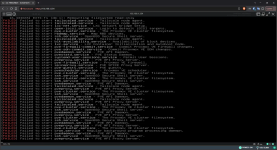
Proxmox 9 boot issues

sagiziv3

Member
Sep 14, 2024
13
0
6
I have an HPE microserver gen 8 that I just upgrade to version 9 and I get those terrible failures on boot.
I initially tried to do a clean install but it showed an error related to GRUB files, so I installed version 8 and then upgraded to 9 (`pve8to9 --full` showed no errors).
I followed the official guide and everything seemed to go well, but when I rebooted the machine I got those errors.

I can boot to the previous version of the kernel and to the recovery mode of the new kernel, but I am not sure what I need to do from here to fix this.
I can continue with the old kernel, but I still prefer to be on the latest version if possible.


1791623949192.png
 
Could you please share the output using the forum’s code formatting?

This may be related to filesystem errors, an underlying disk or I/O issue, or a storage-driver regression in the newer kernel.
 
Last edited:
  • Like
Reactions: leesteken
@kawano-y I got it from the ILO interface so I don't really have it as text, but I'll convert it
Markdown (GitHub flavored):
[   16.434665] EXT4-fs (dm-1): Remounting filesystem read-only
[FAILED] Failed to start tailscaled.service - Tailscale node agent.
[FAILED] Failed to start tailscaled.service - Tailscale node agent.
[FAILED] Failed to start lxc-net.service - LXC network bridge setup.
[FAILED] Failed to start open-iscsi.service - Login to default iSCSI targets.
[FAILED] Failed to start pve-cluster.service - The Proxmox VE cluster filesystem.
[FAILED] Failed to start rbdmap.service - Map RBD devices.
[FAILED] Failed to start ssh.service - OpenBSD Secure Shell server.
[FAILED] Failed to start tailscaled.service - Tailscale node agent.
[FAILED] Failed to start blk-availability.service - Availability of block devices.
[FAILED] Failed to start lxc.service - LXC Container Initialization and Autoboot Code.
[FAILED] Failed to start pve-firewall-commit.service - Commit Proxmox VE Firewall changes.
[FAILED] Failed to start pve-sdn-commit.service - Commit Proxmox VE SDN changes.
[FAILED] Failed to start pvedaemon.service - PVE API Daemon.
[FAILED] Failed to start pvestatd.service - PVE Status Daemon.
[FAILED] Failed to start systemd-user-sessions.service - Permit User Sessions.
[FAILED] Failed to start pveproxy.service - PVE API Proxy Server.
[FAILED] Failed to start pve-firewall.service - Proxmox VE firewall.
[FAILED] Failed to start spiceproxy.service - PVE SPICE Proxy Server.
[FAILED] Failed to start pve-guests.service - PVE guests.
[FAILED] Failed to start pvescheduler.service - Proxmox VE scheduler.
[FAILED] Failed to start pve-cluster.service - The Proxmox VE cluster filesystem.
[FAILED] Failed to start ssh.service - OpenBSD Secure Shell server.
[FAILED] Failed to start pve-cluster.service - The Proxmox VE cluster filesystem.
[FAILED] Failed to start ssh.service - OpenBSD Secure Shell server.
[FAILED] Failed to start pvedaemon.service - PVE API Daemon.
[FAILED] Failed to start tailscaled.service - Tailscale node agent.
[FAILED] Failed to start pveproxy.service - PVE API Proxy Server.
[FAILED] Failed to start pve-cluster.service - The Proxmox VE cluster filesystem.
[FAILED] Failed to start ssh.service - OpenBSD Secure Shell server.
[FAILED] Failed to start pvedaemon.service - PVE API Daemon.
[FAILED] Failed to start tailscaled.service - Tailscale node agent.
[FAILED] Failed to start pveproxy.service - PVE API Proxy Server.
[FAILED] Failed to start tailscaled.service - Tailscale node agent.
[FAILED] Failed to start pve-cluster.service - The Proxmox VE cluster filesystem.
[FAILED] Failed to start ssh.service - OpenBSD Secure Shell server.
[FAILED] Failed to start pvedaemon.service - PVE API Daemon.
[FAILED] Failed to start pveproxy.service - PVE API Proxy Server.
[FAILED] Failed to start pve-cluster.service - The Proxmox VE cluster filesystem.
[FAILED] Failed to start ssh.service - OpenBSD Secure Shell server.
[FAILED] Failed to start pvedaemon.service - PVE API Daemon.
[FAILED] Failed to start pveproxy.service - PVE API Proxy Server.
[FAILED] Failed to start pve-cluster.service - The Proxmox VE cluster filesystem.
[FAILED] Failed to start cron.service - Regular background program processing daemon.
[FAILED] Failed to start pvedaemon.service - PVE API Daemon.
[FAILED] Failed to start ssh.service - OpenBSD Secure Shell server.
[FAILED] Failed to start pveproxy.service - PVE API Proxy Server.
 
[ 16.434665] EXT4-fs (dm-1): Remounting filesystem read-only
Well..., now the seconds before this one would be interesting. Everything here is too late.

Is it possible to catch them the same way? There must be a reason for "remount read-only" - possibly/hopefully logged in the seconds before.

ILO has a local device management and an error log, right? Did you check that?

What is the state (on the console) at the end? Do you get a login prompt? (Just press "Enter" to (possibly) trigger it to get redrawn).
 
Last edited:
  • Like
Reactions: leesteken
Well..., now the seconds before this one would be interesting. Everything here is too late.

Is it possible to catch them the same way? There must be a reason for "remount read-only" - possibly/hopefully logged in the seconds before.

ILO has a local device management and an error log, right? Did you check that?

What is the state (on the console) at the end? Do you get a login prompt? (Just press "Enter" to (possibly) trigger it to get redrawn).
I don't see it in the ILO logs, will try to reboot again to capture those logs before.

Anyway, after those errors I get a blank console and no option to login and it doesn't respond to any input
 
Well..., now the seconds before this one would be interesting. Everything here is too late.

Is it possible to catch them the same way? There must be a reason for "remount read-only" - possibly/hopefully logged in the seconds before.

ILO has a local device management and an error log, right? Did you check that?

What is the state (on the console) at the end? Do you get a login prompt? (Just press "Enter" to (possibly) trigger it to get redrawn).
This is all the output I get after the selecting the new kernel, and again, after that is a blank screen (the zfs-error is fine, I have TrueNAS VM):


Markdown (GitHub flavored):
 Found volume group "pve" using metadata type lvm2
 13 logical volume(s) in volume group "pve" now active
/dev/mapper/pve-root: clean, 90574/4308992 files, 4868709/17207296 blocks
[FAILED] Failed to start zfs-import-scan.service - Import ZFS pools by device scanning.
[   15.921391] EXT4-fs error (device dm-1): ext4_wait_block_bitmap:582: comm ext4lazyinit: Cannot read block bitmap - block_group = 125, block_bitmap = 3670029
[   15.921436] EXT4-fs error (device dm-1): ext4_journal_check_start:86: comm systemd-journal: Detected aborted journal
[   15.921483] EXT4-fs error (device dm-1): in ext4_reserve_inode_write:6305: IO failure
[   15.921578] EXT4-fs (dm-1): Remounting filesystem read-only
[FAILED] Failed to start pvebanner.service - Proxmox VE Login Banner.
[FAILED] Failed to start e2scrub_reap.service - Remove Stale Online ext4 Metadata Check Snapshots.
[FAILED] Failed to start tailscaled.service - Tailscale node agent.
[FAILED] Failed to start tailscaled.service - Tailscale node agent.
[FAILED] Failed to start lxc-net.service - LXC network bridge setup.
[FAILED] Failed to start open-iscsi.service - Login to default iSCSI targets.
[FAILED] Failed to start pve-cluster.service - The Proxmox VE cluster filesystem.
[FAILED] Failed to start rbdmap.service - Map RBD devices.
[FAILED] Failed to start ssh.service - OpenBSD Secure Shell server.
[FAILED] Failed to start blk-availability.service - Availability of block devices.
[FAILED] Failed to start lxc.service - LXC Container Initialization and Autoboot Code.
[FAILED] Failed to start pve-firewall-commit.service - Commit Proxmox VE Firewall changes.
[FAILED] Failed to start pve-sdn-commit.service - Commit Proxmox VE SDN changes.
[FAILED] Failed to start pvedaemon.service - PVE API Daemon.
[FAILED] Failed to start pvestatd.service - PVE Status Daemon.
[FAILED] Failed to start systemd-user-sessions.service - Permit User Sessions.
[FAILED] Failed to start pve-firewall.service - Proxmox VE firewall.
[FAILED] Failed to start pveproxy.service - PVE API Proxy Server.
[FAILED] Failed to start tailscaled.service - Tailscale node agent.
[FAILED] Failed to start spiceproxy.service - PVE SPICE Proxy Server.
[FAILED] Failed to start pve-guests.service - PVE guests.
[FAILED] Failed to start pve-cluster.service - The Proxmox VE cluster filesystem.
[FAILED] Failed to start ssh.service - OpenBSD Secure Shell server.
[FAILED] Failed to start pvescheduler.service - Proxmox VE scheduler.

 
Please boot with the older kernel, log in, and run:

Code:
journalctl --list-boots

Please share the output. We can then identify the failed boot and determine the command needed to retrieve its kernel log.
 
Last edited:
  • Like
Reactions: UdoB
Please boot with the older kernel, log in, and run:

Code:
journalctl --list-boots

Please share the output. We can then identify the failed boot and determine the command needed to retrieve its kernel log.
This is what I get:
Code:
journalctl --list-boots
IDX BOOT ID                          FIRST ENTRY                 LAST ENTRY
-24 cc65a312b5b7441bbbca1eb3cd6f75ac Sat 2026-08-08 12:23:15 IDT Sat 2026-08-08 12:45:53 IDT
-23 d88a3ebfe3be4b6bb733aaf0ffca6ada Sat 2026-08-08 12:48:53 IDT Sat 2026-08-08 12:57:54 IDT
-22 af1c38634f5840878cc1170c5e1bce8c Sat 2026-08-08 13:00:00 IDT Mon 2026-08-17 23:30:16 IDT
-21 9f195d136d304c5bbaf66f7cb444bc0f Mon 2026-08-17 23:41:22 IDT Fri 2026-08-21 18:22:57 IDT
-20 9a59d21d175d4958abcf7309dee495b0 Sat 2026-08-22 15:16:37 IDT Sun 2026-08-30 11:07:23 IDT
-19 efe0ed09e28b439781e80e5eb2e5bbf6 Sun 2026-08-30 18:48:02 IDT Sat 2026-09-05 15:15:50 IDT
-18 10a5adbd36174f788e234c5eddd3114a Sat 2026-09-05 15:17:57 IDT Sat 2026-09-05 15:36:50 IDT
-17 ba2b9e505cc34232ad3cb9ddedab21a4 Sat 2026-09-05 15:38:57 IDT Sat 2026-09-05 15:41:03 IDT
-16 ccd75a80008a4910bd76fc554dbaa0a6 Sat 2026-09-05 15:43:54 IDT Sat 2026-09-05 15:54:19 IDT
-15 b2200c75e16142e18ccd2c6f25b90cb3 Sat 2026-09-05 15:56:27 IDT Fri 2026-09-11 17:03:37 IDT
-14 384a15cedaf84e37b04c3f83be2d92d3 Fri 2026-09-11 17:52:12 IDT Fri 2026-09-11 17:57:54 IDT
-13 f401165efb604557b85e62c26b9cdab9 Fri 2026-09-11 18:00:44 IDT Sat 2026-09-26 18:07:50 IDT
-12 1868baa53ab347509ddf99d2094c5914 Sat 2026-09-26 18:27:22 IDT Sat 2026-10-10 02:27:00 IDT
-11 3a40871fdd2348e68a4eebc59c9fc877 Sat 2026-10-10 02:29:11 IDT Sat 2026-10-10 02:29:12 IDT
-10 a6dd8c3760d14dd4830d05abb6431e25 Sat 2026-10-10 02:33:11 IDT Sat 2026-10-10 02:33:12 IDT
 -9 ead54b46360845d686531e67f2fdc4ce Sat 2026-10-10 02:41:16 IDT Sat 2026-10-10 02:48:44 IDT
 -8 d9ae36e861f9494faa333fe95cf93dea Sat 2026-10-10 02:55:08 IDT Sat 2026-10-10 03:03:13 IDT
 -7 deea1f58fcec461bac641841bc04d011 Sat 2026-10-10 03:05:25 IDT Sat 2026-10-10 03:05:25 IDT
 -6 aee9d365779547fb84c6001871832f2a Sat 2026-10-10 03:09:04 IDT Sat 2026-10-10 03:09:04 IDT
 -5 9e1caa9ba73a499791607d666774bb29 Sat 2026-10-10 03:14:13 IDT Sat 2026-10-10 03:14:13 IDT
 -4 6e37b4eac2a74c8f892c58ed0c0118de Sat 2026-10-10 10:49:35 IDT Sat 2026-10-10 11:10:08 IDT
 -3 db8dd6542cb44767af184f29e5027fc0 Sat 2026-10-10 11:16:19 IDT Sat 2026-10-10 11:16:19 IDT
 -2 d840c961d9944709a73ece78c050bc22 Sat 2026-10-10 11:22:51 IDT Sat 2026-10-10 15:31:35 IDT
 -1 c4963a68433342b79d289b4decf29410 Sat 2026-10-10 15:34:26 IDT Sat 2026-10-10 15:34:27 IDT
  0 ff26645cba8a49f09fe8cf0f6475ebf7 Sat 2026-10-10 15:53:26 IDT Sat 2026-10-10 15:54:38 IDT
 
your root partition is on a disk that is experiencing problems- either hardware, cabling, or software.

smartctl --test=long /dev/[path to your root device)
dmesg | grep [your root device]
I will admit that my drive is on the older side, but if its hardware issue why does it work with the old kernel?
 
I will admit that my drive is on the older side, but if its hardware issue why does it work with the old kernel?
Because (most likely) the HP Storage controller is not really standard, but something strange?
I don't know this for sure, but remember that the hardware of your box is already really old. Plus at some point, people stop validating new kernels with stuff that is not standard-HW.

Edit:
This might be helpful: https://forums.rockylinux.org/t/how-to-deal-with-b120i-raid-controller/7482
 
Last edited: