The Issue:
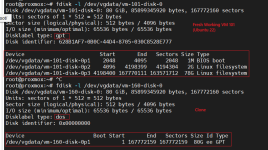
When cloning typical Ubuntu guests, that have GPT / Logical Volume installations (The default installer setup), the cloned VM has a missing GPT partition table and is unusable. This issue is repeatable after reinstalling 9.1, I do not recall this being an issue in 8.4 on the same hardware. It seems like basic Windows 11 Guests have no issues being cloned.
There are no errors, the thin-lvm is ~50% full, the system is under very little load during this process. I have similar issues with backups as well, if I import backups into the system they have broken GPT partitions that are not recoverable. So this almost seems to involve the same mechanism?
I see this with the VirtIO and SCSI based storage configurations on VM guests. I'm currently running this in a production environment and very concerned about the restorability of backups etc. as a result.
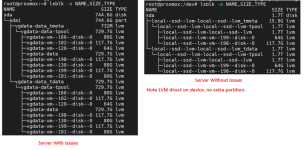
See attached image for the fdisk info on both "disks" on the host.
Hardware:
Running Proxmox 9.1 on multiple Dell R740 Servers with PERC Raid controllers running SSD drives in RAID 1 array. So Proxmox see's just 1 unified local storage drive on each server. I do not recall this issue existing in Proxmox 8.4 with the same setup.
When cloning typical Ubuntu guests, that have GPT / Logical Volume installations (The default installer setup), the cloned VM has a missing GPT partition table and is unusable. This issue is repeatable after reinstalling 9.1, I do not recall this being an issue in 8.4 on the same hardware. It seems like basic Windows 11 Guests have no issues being cloned.
There are no errors, the thin-lvm is ~50% full, the system is under very little load during this process. I have similar issues with backups as well, if I import backups into the system they have broken GPT partitions that are not recoverable. So this almost seems to involve the same mechanism?
I see this with the VirtIO and SCSI based storage configurations on VM guests. I'm currently running this in a production environment and very concerned about the restorability of backups etc. as a result.
See attached image for the fdisk info on both "disks" on the host.
Hardware:
Running Proxmox 9.1 on multiple Dell R740 Servers with PERC Raid controllers running SSD drives in RAID 1 array. So Proxmox see's just 1 unified local storage drive on each server. I do not recall this issue existing in Proxmox 8.4 with the same setup.