

Proxmox 8.1 ESXi import storage error 500

After reading this thread I changed both values and restarted my 7.0U3n host. I can now add the ESX-Storage but when I select the Esx-Storage I am getting this error:

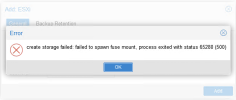
failed to spawn fuse mount, process exited with status 65280 (500)

I have upgraded every package to lateset, but I wonder if there is some library missing?
We had to run /etc/init.d/hostd restart in the ESXi host to get this error to stop. Also, I am seeing responses from people saying they had to reboot the ESXi host instead of running the hostd command.
 
  • Like
Reactions: julien10
I already restarted the service and rebooted the whole host but no progress - for testing purposes I also disabled and unloaded the esx firewall, also no progress.

After reboot the proxmox server I can the storage but I still can't use the storage item itself...

Code:
failed to spawn fuse mount, process exited with status 65280 (500)
 
I already restarted the service and rebooted the whole host but no progress - for testing purposes I also disabled and unloaded the esx firewall, also no progress.

After reboot the proxmox server I can the storage but I still can't use the storage item itself...

Code:
failed to spawn fuse mount, process exited with status 65280 (500)
Did you change the soap settings in the ESXi GUI, or did you edit the config.xml file?
 
Actually I don't have such config.xml only config-defs.xml and there are no such settings, so I changed it using the GUI
 
I am failing on this as well (ESXi 6.5U3, Proxmox 8.2).

I edited Config.HostAgent.vmacore.soap.sessionTimeout in ESXi (Host, Manage, Advanced settings) to set it to 0 (it was the default of 30), which added the <soap> section to /etc/vmware/hostd/config.xml. Inserting <maxSessionCount>0</maxSessionCount> below the <sessionTimeout>0</sessionTimeout> and running /etc/init.d/hostd restart had no impact for me. I still see the error in Datacenter -> Storage -> Add -> ESXi:

1714592782145.png
 
Hi, I had also a lot of problems importing VM's from ESXi 8. I had a simple solution to Timeout's and Transport Endpoint Errors. The solution was to SSH into the ESXi Host (start dcui or you can also use a monitor if you have one installed) and restart the management network. That was it. After that, every import worked.
 
I ran into a similar Error 500 when trying the new import wizard. For me, it turned out to be a permissions issue on the target storage—make sure the storage ID you're importing to actually has 'VM Image' content enabled in the Proxmox storage settings. Also, double-check that your ESXi host isn't blocking the API request on port 443.
On a side note, while I was cleaning up some of the older configuration data from my ESXi environment to prep for the move, I found this tool for converting SOAP responses to JSON- https://thetoolapp.com/code-tools/soap-to-json/. It was actually super handy for parsing some of the legacy API outputs I was getting during the migration.