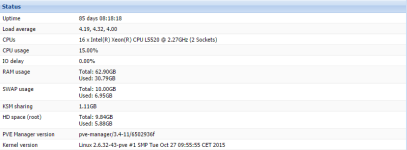
Hello to all, from few days ago i have encountered a problem with one of mine kvm machine, i cant start the machine beacause the disk-1.qcow2 is corrupt.
If i run qemu-img check -r, all the free ram of the node (40 GB) will be consumed in just 3 seconds and affect all the virtual machine from the node.
The output of qm start 108:
The output of pveversion -v :
Thanks for help !
If i run qemu-img check -r, all the free ram of the node (40 GB) will be consumed in just 3 seconds and affect all the virtual machine from the node.
The output of qm start 108:
Code:
kvm: -drive file=/var/lib/vz/images/108/vm-108-disk-1.qcow2,if=none,id=drive-sata0,format=qcow2,aio=native,cache=none,detect-zeroes=on: could not open disk image /var/lib/vz/images/108/vm-108-disk-1.qcow2: qcow2: Image is corrupt; cannot be opened read/write
start failed: command '/usr/bin/kvm -id 108 -chardev 'socket,id=qmp,path=/var/run/qemu-server/108.qmp,server,nowait' -mon 'chardev=qmp,mode=control' -vnc unix:/var/run/qemu-server/108.vnc,x509,password -pidfile /var/run/qemu-server/108.pid -daemonize -smbios 'type=1,uuid=b1d32910-018d-4fea-86db-dbbd2dbb9a80' -name jump.cloudhostlab.com -smp '3,sockets=1,cores=3,maxcpus=3' -nodefaults -boot 'menu=on,strict=on,reboot-timeout=1000' -vga cirrus -cpu kvm64,+lahf_lm,+x2apic,+sep -m 1000 -k en-us -cpuunits 1000 -device 'piix3-usb-uhci,id=uhci,bus=pci.0,addr=0x1.0x2' -device 'usb-tablet,id=tablet,bus=uhci.0,port=1' -device 'virtio-balloon-pci,id=balloon0,bus=pci.0,addr=0x3' -iscsi 'initiator-name=iqn.1993-08.org.debian:01:c3824f7f69c' -device 'ahci,id=ahci0,multifunction=on,bus=pci.0,addr=0x7' -drive 'file=/var/lib/vz/images/108/vm-108-disk-1.qcow2,if=none,id=drive-sata0,format=qcow2,aio=native,cache=none,detect-zeroes=on' -device 'ide-drive,bus=ahci0.0,drive=drive-sata0,id=sata0,bootindex=100' -drive 'if=none,id=drive-ide2,media=cdrom,aio=native' -device 'ide-cd,bus=ide.1,unit=0,drive=drive-ide2,id=ide2' -netdev 'type=tap,id=net0,ifname=tap108i0,script=/var/lib/qemu-server/pve-bridge,downscript=/var/lib/qemu-server/pve-bridgedown' -device 'e1000,mac=1E:F5:37:F5:B0:2D,netdev=net0,bus=pci.0,addr=0x12,id=net0' -netdev 'type=tap,id=net1,ifname=tap108i1,script=/var/lib/qemu-server/pve-bridge,downscript=/var/lib/qemu-server/pve-bridgedown' -device 'e1000,mac=B6:10:7D:36:B5:86,netdev=net1,bus=pci.0,addr=0x13,id=net1'' failed: exit code 1
The output of pveversion -v :
Code:
proxmox-ve-2.6.32: 3.4-166 (running kernel: 2.6.32-43-pve)
pve-manager: 3.4-11 (running version: 3.4-11/6502936f)
pve-kernel-2.6.32-32-pve: 2.6.32-136
pve-kernel-2.6.32-43-pve: 2.6.32-166
lvm2: 2.02.98-pve4
clvm: 2.02.98-pve4
corosync-pve: 1.4.7-1
openais-pve: 1.1.4-3
libqb0: 0.11.1-2
redhat-cluster-pve: 3.2.0-2
resource-agents-pve: 3.9.2-4
fence-agents-pve: 4.0.10-3
pve-cluster: 3.0-19
qemu-server: 3.4-6
pve-firmware: 1.1-4
libpve-common-perl: 3.0-24
libpve-access-control: 3.0-16
libpve-storage-perl: 3.0-33
pve-libspice-server1: 0.12.4-3
vncterm: 1.1-8
vzctl: 4.0-1pve6
vzprocps: 2.0.11-2
vzquota: 3.1-2
pve-qemu-kvm: 2.2-13
ksm-control-daemon: 1.1-1
glusterfs-client: 3.5.2-1
Thanks for help !